

Daangn ads are pay-per-click ads that promote your shop to local neighbors inside the Daangn app (also known as Danggeun Market, Korea's largest hyperlocal community marketplace). You can start with a daily budget of 5,000 KRW. As of October 3, 2026, the official guide says Simple Mode for small businesses offers display ads and search ads, and you pay only when a neighbor taps your ad. For search ads, you set a maximum cost per click between 90 KRW and 100,000 KRW.
Daangn ad types: Simple Mode and Expert Mode
The ad creation screens are split into Simple Mode for small business owners and Expert Mode for marketers. In Simple Mode, you build the creative from photos and text, then set the area, period, and budget. The official guide says you can start "in 3 minutes." In Expert Mode, the official guide lets you pick a campaign goal from awareness, product sales, store visits, conversions, and lead collection (gathering contact details from potential customers).
| Mode | Ad type | Where it appears |
|---|---|---|
| Simple Mode | Display ads | Various screens in Daangn |
| Simple Mode | Search ads | Results for keywords neighbors search |
| Expert Mode | Native ads | Between posts in the home feed |
| Expert Mode | Catalog ads | Placements that match your registered product info |
| Expert Mode | Keyword ads | Top of the 'All' tab in search results |
If you are a small business running ads for the first time, start with search ads or display ads in Simple Mode. You can start with a small budget and there are fewer settings. When you need goal-based measurement, such as conversions or lead collection, it is not too late to move to Expert Mode.
How to create a Daangn ad in 5 steps

The guide to creating display ads and the guide to creating search ads both walk through the same five steps.
- Choose what to advertise. For display ads, pick a landing page type (Biz Profile or website). For search ads, pick the Biz Profile home or a news post. A Biz Profile is the shop introduction page you create on Daangn.
- Write the ad photo and title. For search ads, you also write an intro text.
- Add more photos and text. You can add up to 10 to create several versions.
- Set up the ad group. Choose the area, budget, and period. For search ads, also set the maximum cost per click.
- When creation is done, the required budget is shown. You must recharge Ad Cash for that amount before the ad runs.
For the area, search and pick a city, district, or neighborhood, or draw it on the map by walking or driving distance. The display ad guide recommends choosing an area with a target audience of 30,000 or more people for the ad to be shown. You can also choose gender and age group.
Where to check results and edit a Daangn ad
After you create an ad, open [My Daangn] → [Ads] in the app and tap an ad group or ad to see its results. According to the results guide, the ad list shows impressions, clicks, reactions, and total spend. The group detail page also shows click-through rate and spend per reaction. Reactions count the actions that neighbors took on your Biz Profile after seeing the ad. If clicks pile up but there are no reactions, fix the intro and photos on your Biz Profile first.
The management guide has two rules. You can change the budget, schedule, and area in the ad group at any time, and most changes need no extra review. If you edit the photo, title, or intro text, review finishes within 1 business day at most. Ads run only when both the ad group and the individual ad are ON. If an ad stops, check in order: ad account sanctions, low Ad Cash, Biz Profile problems, and an ended period.
Daangn ad cost: daily budget and cost per click
Daangn ads are billed per click. The budget and schedule guide says "You are charged only when a neighbor taps your ad." The daily budget starts at a minimum of 5,000 KRW, and a period of 2 days or more is recommended. If you spend the minimum daily budget for a full 30 days, that is 5,000 KRW × 30 days, or 150,000 KRW (this is a multiplication by MCPY, not an official rate).

| Item | Display ads | Search ads |
|---|---|---|
| Billing | Only on click | Only on click |
| Daily budget | Minimum 5,000 KRW, 10,000 KRW or more recommended | 5,000 KRW or more recommended |
| Max cost per click | No input step | 90 KRW to 100,000 KRW |
| Period | 2 days or more recommended | 2 days or more recommended |
For search ads, only up to 2 ads are shown per keyword. When you rank first, the actual charge is the amount set by the second-place ad plus 10 KRW. Even if you enter a high maximum cost, that full amount is not charged.
Ad Cash recharge bonus
According to the official guide, if you recharge 50,000 KRW or more of Ad Cash in a month, a bonus is added automatically when you recharge the next month. Recharging 50,000 KRW earns 2%, recharging 1,000,000 KRW earns 5%, and the bonus is capped at 200,000 KRW. Check it in the "Ad Cash - Recharge Bonus" tab of the Advertiser Center. The guide does not state the announcement date or the start date, so the conditions above are what we confirmed on October 3, 2026.
Daangn ad cost compared with Naver and Kakao
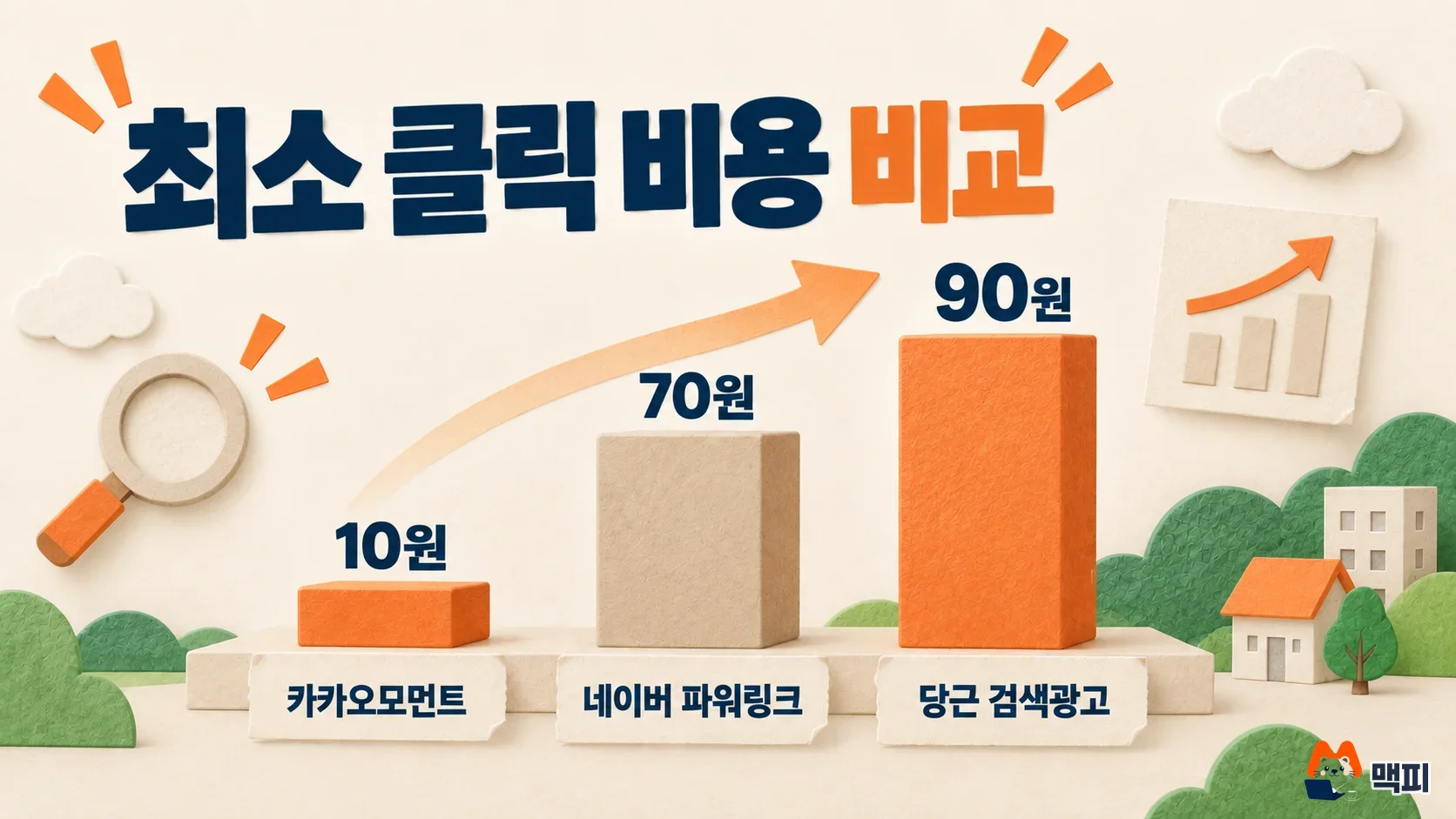
| Platform | Ad | Cost per click floor | Source |
|---|---|---|---|
| Daangn | Search ads | 90 KRW (range 90 KRW to 100,000 KRW) | Daangn guide |
| Naver | Power Link | 70 KRW (minimum bid) | Advertiser Center help |
| Kakao | Kakao Moment manual bid CPC | 10 KRW (excluding VAT) | Kakao Business guide |
All three values are as of October 3, 2026. The Kakao 10 KRW is an input value excluding VAT, and VAT is added at actual billing. Bidding methods and units differ by platform, so the floor numbers alone cannot tell you which one is cheaper. Naver is Korea's largest search engine, and Kakao is the operator of KakaoTalk, Korea's dominant messenger. Businesses that need to draw customers from their own neighborhood are better suited to Daangn, which can narrow the area down to city, district, and neighborhood level. Businesses that target nationwide search demand should look at Naver first.
Daangn ad review and banned categories
The ad operation policy takes effect on September 7, 2026. It says review runs only during the company's set business hours, and Daangn is not responsible for delays caused by registering outside business hours. Submit event ads during business hours one day before the start date, so a review delay does not make you miss the first day. Even after approval, exposure can be limited if there is a legal violation or user reports.
The operation policy says it can reject or restrict ads in these cases.
- Illegal businesses such as illegal gambling, arranging prostitution, and fraud, and tattoo or semi-permanent makeup procedures by businesses that are not medical institutions
- Ads that require pre-review under the Medical Act and have no verifiable pre-review number
- Loan and loan shark ads, entertainment venues such as danran bars (low-cost hostess bars) and talking bars, escort-style companion services, and private detective agencies
- Campaigns for political or religious purposes
- Images with poor resolution or focus, and ads whose thumbnail is a Before&After comparison image
- Ads with an extremely low click-through rate, and ads that users report repeatedly
Common mistakes first-time advertisers make
- Setting the period to one day. The official guide recommends at least 2 days to optimize exposure, so set 2 days or more.
- Narrowing the target area too much. Display ads recommend an area of 30,000 people or more, so widen the range if you picked only one or two neighborhoods.
- Setting the search ad maximum cost per click at the minimum of 90 KRW. Only 2 ads are shown per keyword, so you can be pushed out if you bid lower than other advertisers. If you get no impressions, raise the amount.
- Finishing without recharging Ad Cash. You must recharge the required budget shown in the last creation step for the ad to run.
- Using a Before&After comparison photo as the thumbnail. It is a reason for rejection, so switch to a single result photo.
Daangn ads FAQ
How do I get a refund on Daangn ads?
In the app, go to [My Daangn] → [Ads] and apply through Ad Cash refund in the top right menu. According to the refund guide, only the full balance of paid cash recharged by card, bank transfer, or Daangn Money is refunded. Partial refunds and refunds of free cash are not available.
Can I run Daangn ads without a Biz Profile?
For display ads, you can choose website as the landing page type. Search ads require a Biz Profile because you choose the Biz Profile home or a news post.
Can I run job postings or alcohol ads as search ads?
The search ad guide says Simple Mode search ads cannot be used for products with age or gender restrictions, such as job postings and alcohol.
What to do before you start
First, create a Biz Profile on Daangn Business, then create one 2-day search ad with 5,000 KRW a day. After two days, check impressions, clicks, and total spend in [My Daangn] → [Ads], and adjust the budget and maximum cost per click.
Found this useful? Share it
Latest posts
Kakao Share Thumbnail Not Showing? Here's the Fix (JavaScript SDK 2025)
Learn why Kakao Share thumbnails don't appear even with a valid imageUrl, and fix it using scrapImage to convert your URL into a KAGE CDN URL. Step-by-step guide.
How to Generate CRM User Manuals in 20 Minutes with Claude Code Sub-Agents
Learn how Claude Code sub-agents can analyze your CRM codebase and auto-generate user manuals and visual guidebooks in just 20 minutes. See the real-world results.
GEO Generative Engine Optimization: The Complete 2025 AI Marketing Strategy Guide
Learn what GEO (Generative Engine Optimization) is, how it differs from traditional SEO, and discover 5 proven AI marketing strategies to get cited by AI search engines in 2025.
Related projects
Get new posts by email
Insights on marketing, analytics, and dev, delivered to your inbox.