

Even with folders organized, the system couldn't properly answer the simple question "show me everything related to this topic." The solution wasn't a grand ontology. It was automatically scraping the tags already written on every file, building a small lookup index, and letting AI read just that one line.
No new connections are created. A small script scrapes the tags (topics, keywords, etc.) already on every file and bundles "everything related to this topic" into one line.
AI cost dropped by a measured 2.9–13.3×. Building the index is done by a plain script, so AI cost is zero; at read time only that short index is consumed.
New ideas don't get crushed into old categories. Auto-merging is limited to spelling variants of the same word; a new concept must recur multiple times before it earns a formal slot.
1When I asked to gather everything for one client, the system got lost
Start with my situation. I do marketing, data analysis, code, and planning. Years of notes piled up in one place. A collection like this is often called a "vault." My vault held 210 organized reference notes, 160 project records, and 56 working memos. I thought the organization was decent. Topics in folders, each file tagged with metadata at the top (title, tags, date, called "frontmatter"), and an index on top of that.
But when I actually started assigning work to AI, the gaps showed. Take one client I work with, call it Client A. "Show me everything we've ever done for Client A" meant AI had to search the entire vault by keyword, open one matching file, then another, and another, grinding through dozens of them. The volume drove up cost (AI charges in proportion to how much it reads and writes, measured in units called tokens) and it was bleeding. Worse: even after all that, it still missed things. Some files didn't contain the words "Client A" anywhere in the body. Others had landed in the wrong folder.
The scale in numbers: a single "summarize where we are on Client A" meant AI had to read 12 related files in full. About 100,000 characters. And it repeated that every time it was asked. Folders provided classification, but what was missing was the connection between scattered pieces.

Classified but not connected. AI rummages through files every time.
Trying to solve that "no connection" problem, I landed on a plausible-sounding word: ontology.
2"Ontology", a word that was far heavier than what I wanted
Ontology is roughly "defining in advance how things relate to each other in a formal structure." If folder organization asks "which drawer does this file go in?", ontology asks "what does this concept connect to?" It builds a web of relationships rather than a set of drawers, exactly the picture I had in mind.
My requirements were clear: easy to expand, easy to use, lightweight, and well-connected. So I found some public projects that had done something similar and put them side by side. They turned out not to be competing tools but a "weight ladder" running from light to heavy. They all claimed to do "connections," but the effort and weight varied enormously.
| Approach | How it connects | Separate engine | Why use it | Weight |
|---|---|---|---|---|
| Document links | Documents link to each other | None | Light linking and discovery | Light |
| Typed edges | Named relationships ("who fixed what") + smart search | None | Connections + fast search | Medium |
| Formal ontology | Facts registered as logical rules | Yes (inference engine) | AI proves answers with logic; blocks hallucinations | Heavy |
The first lesson from this: my direction was right, but the word I chose to name it was too heavy. The "light connections" I wanted was at the left end of the ladder, but the word "ontology" usually points to the right end, elaborate systems that verify every fact with logic. One person maintaining something like that by hand quickly turns the maintenance itself into a second job, and eventually it gets abandoned. The right end was ruled out early.
3But I was scared, pre-fixing structure crushes new ideas
Once the heavy end was ruled out, something more fundamental started snagging. I tend to continuously collect new things. I write down what I learned today; tomorrow I write something else. There's plenty still in my head that hasn't been turned into text, and that volume keeps growing. So "defining the structure in advance", the core premise of ontology, felt genuinely unstable.
Pre-fixing structure means later incoming new concepts get forced into old categories. That kills the newness. Things that look similar but are actually different get conflated. "Apple" is a company; "Apple Watch" is a product that company makes, but if you say "they're both Apple" and merge them, the company-product distinction disappears. The same word spelled differently is one thing; two concepts with genuinely different meanings are another. The topic tags I'd written on my files carried that same risk.
If you force new ideas into old buckets and crush them, what's the point of organizing at all?

Putting a new idea into old buckets too quickly causes damage before it causes order.
This concern shaped the entire design. The answer turned out to be simple, but it took a long time to arrive. The core was this: most new concepts simply don't go into the structure at all. Leave them as free notes and find them by search when needed. The connection network doesn't try to hold everything that keeps flowing in. Only the core handful that have settled are lightly bundled; the rest is left to search. Not chasing everything. That was the secret.
4I didn't need to build new connections, just flip what was already there
That realization unlocked everything. What I'd been missing wasn't a grand ontology but a lightweight "connection map" laid lightly on top of ordinary notes. And the material for those connections, remarkably, was already written in every file.
What I mean is this. My project records already had metadata like this at the top of every file. Don't be put off by the code-like appearance. It's just a memo saying "this belongs to which client, what topic."
--- frontmatter at the top of 'Client-A-ad-tracking.md' ---
project: "Client A Ad Tracking"   # which project
client:  Client A               # which client
role:    [planning, engineering]  # my roles
tags:    [ads, data, tracking]    # topic tags
The "client," "project," and "tags" fields here are exactly the thread of connections. Files that both say "Client A" are already linked, they just have that marker scattered across 200 separate files. So there was no need to draw a new connection map. Flipping the existing frontmatter in reverse, bundling "all files that say Client A" into one line, was all it took. And the bundling is done not by AI but by a plain script.
# Scrape frontmatter and build the index (no AI, just a plain script)
$ python3 build_all.py
→ Index built: 145 groups by client · project · tag
The result: "everything for Client A" is now neatly summarized in one line below. AI no longer has to rummage through files one by one. Reading that one line is enough.
{ client: "Client A",  linked_files: 28,
  domains: [planning, marketing, engineering],
  files: [... all 28 file paths, including those scattered across 3 folders ...] }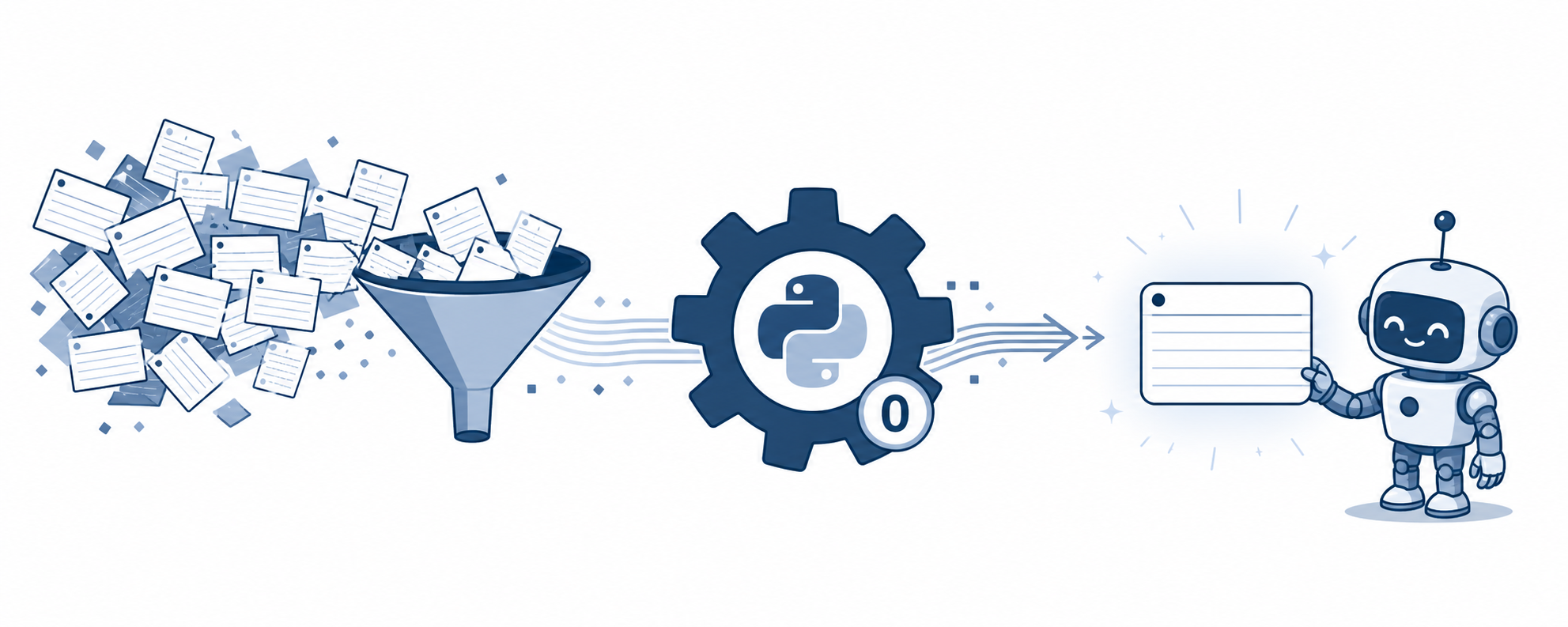
Python bakes at build time; AI picks up just one line at read time.
That's the big picture. Now let's peel back why this was so cheap and whether it actually worked.
Why cheap: different workers do different jobs
The key is "who does the work." If AI built this index directly, tokens would be consumed. But if a plain script builds it, AI cost is zero. Same output, different cost type. The cost I wanted to save was AI cost, and what actually runs to rebuild the index is just my computer spinning for two seconds. That's essentially free. "Rebuild the whole index every time something changes" sounds inefficient, but it was actually the cheapest approach.
Did it actually shrink? I measured it directly
For tasks like "summarize where we are on Client A," I directly compared how many characters the old method (opening all files) versus the new method (reading just the short index) would consume.
| Client | Files | Old method (read all) | New method (index only) | Reduction |
|---|---|---|---|---|
| Client A | 12 | ~104,000 chars | ~7,900 chars | 13.3× |
| Client B | 14 | ~26,000 chars | ~9,000 chars | 2.9× |
| Client C | 5 | ~12,000 chars | ~3,100 chars | 3.9× |
Client A's 13.3× reduction happened because that project's records were exceptionally long. The longer the documents, the larger the savings. These are directly measured character counts. One honest note: this savings applies only to "find and summarize" tasks. If the work requires reading the full body of a document, the files still have to be opened, no gain there.
But I was tricked twice
This far, it looks like a clean success story. But two traps were hidden in this picture that fooled me before the work was done. Leaving them out wouldn't be honest.
5Tricked twice: the compressed format was bigger, and the index only saw half
First: "compressed means smaller" collapsed under measurement
I was convinced early on. Instead of a human-readable table format, using a machine-friendly compressed format would reduce size and therefore AI cost. Compressed, obviously smaller. So I built it and measured the size.
| Index format | Size (characters) | Verdict |
|---|---|---|
| Human-readable table | 22,630 | Smallest |
| Machine-readable compressed (simple version) | 29,029 | Larger |
| Machine-readable compressed (mine) | 77,086 | 3× larger |
The reason was simple. Machine-readable compressed format repeats labels like "title:", "desc:" on every single row. The human-readable table writes them once at the top. So compressed ended up larger. No matter how much cruft was stripped, it was still bigger than a table. My intuition that "compressed obviously means smaller" was just wrong once I measured it. So that whole approach was discarded. Hurt my pride, but doing less was the right answer. Fewer things built also means fewer things to fall out of sync later, ultimately a gain.
Second: the index was lying to me
The second trap was worse. This came after the index was complete and I'd already concluded it was working. Then during a different task, a check script flagged something strange. An enormous pile of items still showing as unprocessed, even though I'd clearly finished the work.
The cause was embarrassingly simple. The script that built the index was scanning only the outermost folder and not looking inside any subfolders. My knowledge was mostly in those subfolders. The result was that 210 files, the largest chunk of my knowledge, were never seen yet the script reported "done." In reality it had only looked at 156 out of 432 total files.

An index that doesn't look empty is the most dangerous kind.
Two lessons came out of this. One: an index that "doesn't look empty" is the most dangerous kind. A completely blank index at least draws suspicion. A half-filled index gets trusted: "something's there, must be right." That's the more dangerous state. Two: what caught this wasn't my eye, it was an automated check script. Manual inspection would never have caught it. The system was lying to me, and I needed a device that would question whether that was happening. The device had to be automated.
6Safeguard: keeping automation from crushing new ideas
Now return to the fear from section 3: "if organization is automated, won't new ideas get crushed into old categories?" The answer first: what the machine merges automatically is exactly one thing, spelling variants of the same word. And even that is done by preserving the original spelling separately, so nothing is lost.
Safe to auto-merge
- Only different spellings of the same word (e.g. capitalization or spacing differences)
- Original spelling is recorded separately and preserved; file body is untouched
- Always reversible
Never merge
- Related but distinct concepts (e.g. "Apple" vs. "Apple Watch")
- Pulling in a slightly different new word and bundling it in
- Merging when ambiguous (default is always "keep separate")
And there's one more important mechanism. A new topic tag only gets promoted to a formal slot after appearing at least four times. Until then it stays in free-note state and is only findable by search. New ideas don't get absorbed into old ones, they recur enough times that it's clear "this is a concept I actually keep using," and only then earn their own place. A safeguard designed for someone like me who endlessly collects new things.
7Remaining scars
Claiming everything was resolved cleanly would be a lie. A few things were never fully solved or were patched awkwardly, and they remain.
First, the undo safeguard was completely missing. A version-control tool that saves state at each point so changes can always be reversed wasn't working due to a compatibility issue in my environment. So there was no proper backup throughout the work, and the only way to undo was keeping manual copies one by one. What made it worse was finding out only much later. What I'd checked and thought "nothing changed" was actually the tool failing silently. Another bug hidden in plain sight.
Next, in one client's file collection, three files nearly dropped out. Their filenames were inconsistent and some had the project field left empty, so the automated rule couldn't catch those three. The automated check caught them, otherwise "everything for Client A" would have quietly omitted three files. In the end, they were patched in manually to the exception list. Not clean, but an honest fix.
Finally, five files with broken frontmatter syntax were silently missing from every index. Not a bug I introduced, they were already like that. A missing quote mark in the frontmatter caused the script to skip those files entirely. Fixed immediately on discovery, but this confirmed once more that "silently dropped" is the common enemy of this kind of system.
8What to take away: checklist for a lightweight, connected knowledge system
If you were drawn to the word "ontology," ask yourself first: do I want "a system that proves answers with logic," or do I just want "something connected and fast to search"? If it's the latter, a heavy ontology isn't needed. Build something light in this order.
- Don't create new connections. Use a script to flip the tags already on every file in reverse and bundle "everything related to this topic" into one line. Delegate the bundling to a plain script, not AI.
- Rebuild this index from scratch every time anything changes. "Surgically update only the changed part" is the incubator for "partially-updated and out-of-sync" accidents. Even hundreds of files take a few seconds.
- Auto-merge only spelling variants of the same word. Distinct new concepts always stay separate. Humans decide whether to merge.
- Give new concepts a probationary period. Before they've appeared a set number of times (e.g. four), leave them as free notes; once they've repeated enough, then promote them to a formal slot.
- Build a self-questioning check device that asks whether the system is lying. "An index that doesn't look empty but is actually only half-filled" is the most dangerous state. Only automated checking catches this.
- Record the cleanup process itself inside the system. Writing down why things were built the way they were (including the options that were discarded) is what lets you revisit and revise later.
In the end, what I built was not a grand ontology. A small script scrapes what was already written and bundles it for free into a small index. That's all. New ideas float freely until they've recurred enough to earn their spot. The system gets a little more honest every time it's maintained. Fast work was the side effect of that honesty. So rather than "gradually improving me," it's closer to a system that lies less and less, and that's what made me faster.
Sources: Cost reduction (2.9–13.3×), actual file count (156→432), and index size comparison are all measured values from direct testing. The three reference implementations on the weight ladder are godstale/LLM-WiKi (link-based connections), hang-in/seCall (typed edges + hybrid search), and an ontology-based course with an inference engine attached. The case is a personal knowledge vault reorganized for AI (June 2026); client names such as "Client A" are generalized pseudonyms.
Found this useful? Share it
Latest posts
Kakao Share Thumbnail Not Showing? Here's the Fix (JavaScript SDK 2025)
Learn why Kakao Share thumbnails don't appear even with a valid imageUrl, and fix it using scrapImage to convert your URL into a KAGE CDN URL. Step-by-step guide.
How to Generate CRM User Manuals in 20 Minutes with Claude Code Sub-Agents
Learn how Claude Code sub-agents can analyze your CRM codebase and auto-generate user manuals and visual guidebooks in just 20 minutes. See the real-world results.
GEO Generative Engine Optimization: The Complete 2025 AI Marketing Strategy Guide
Learn what GEO (Generative Engine Optimization) is, how it differs from traditional SEO, and discover 5 proven AI marketing strategies to get cited by AI search engines in 2025.
Related projects
Get new posts by email
Insights on marketing, analytics, and dev, delivered to your inbox.