
An A/B test randomly splits visitors between two versions (A and B) that differ in only one thing, runs them over the same period, and compares which one has the higher conversion rate. To tell whether a conversion rate really rises from 2% to 3%, you need about 3,800 people per group. For ads, you can run a Google Ads custom experiment with a 50/50 split between the control and the trial. The process has 5 steps: hypothesis, change one thing, random split, sample and duration, and verdict. For web pages, you connect an external testing tool to GA4.
What is an A/B test? Stop picking the winner by gut feeling
You change your ad copy and purchases go up this week. But was it the copy, or a sale that happened to start at the same time? Often you cannot tell. It is like a bakery selling new item A on Monday and new item B on Tuesday. The customers differ by weekday, so the comparison is meaningless. You have to offer one item at a time, alternating between customers, on the same day at the same counter. Only then can you say which sold better. That is how an A/B test works, and ad tools like Google also show each version to visitors split at random into two groups. But if sales are few, one side can lead by pure chance. So first work out how many people must pass through before the result is trustworthy.
Google calls this structure a control and trial. The control is the version you use now. The trial is the version with your change applied. You compare the performance metrics of the two groups to judge the effect of the change.
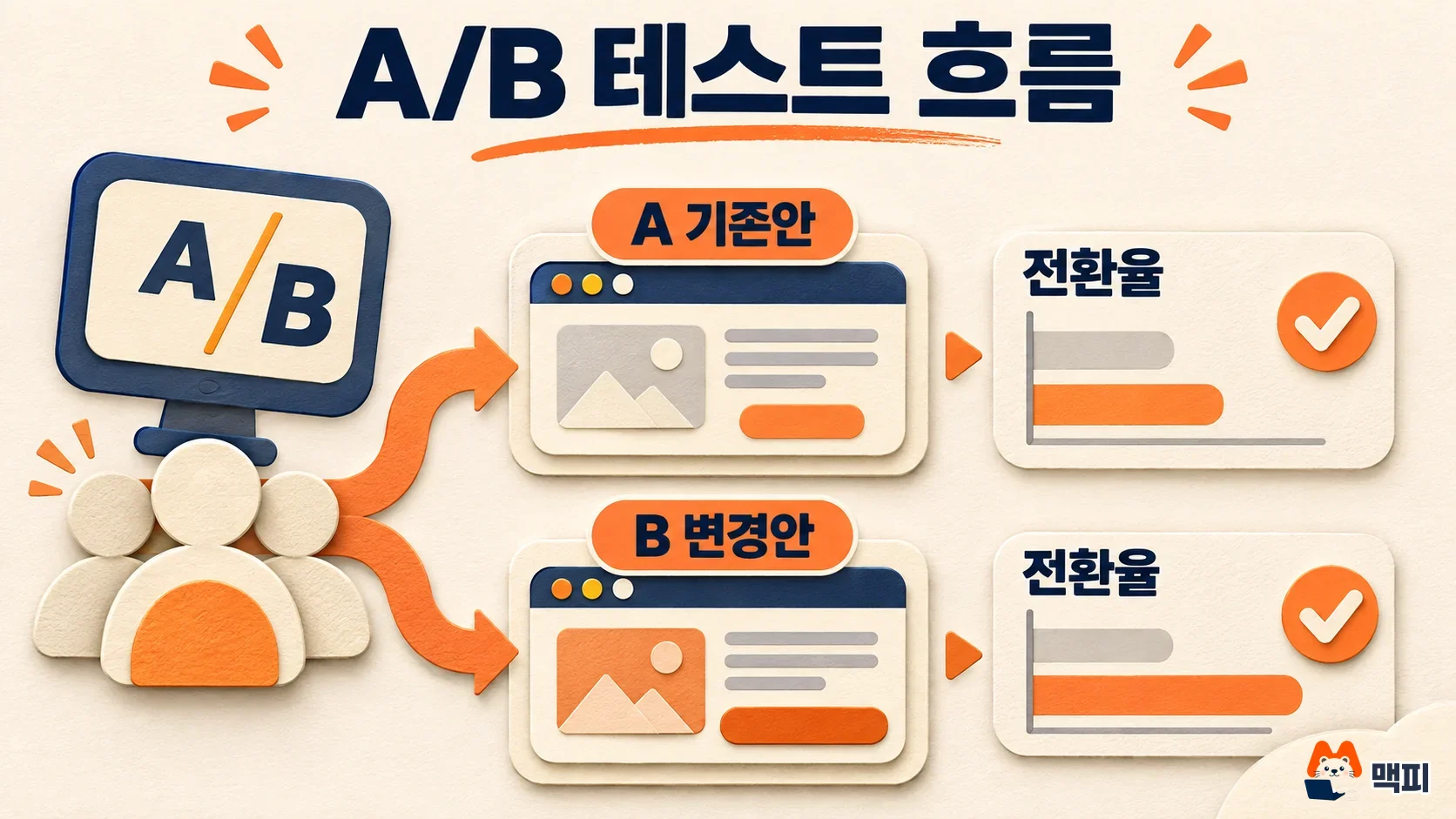
How to run an A/B test in 5 steps
If you follow the steps in order, you can interpret the result. If you skip even one, it becomes hard to say which side really won.
- Write a hypothesis: State what you will change and the result you expect in one sentence. For example: "If we change the button text from 'Apply now' to 'Start for free', the sign-up rate will rise."
- Change only one thing: If you change the copy and the image together, you cannot tell which change made the difference. If you want to change several things, split them into separate tests and run them in order.
- Split at random: Divide visitors into two halves at random. If you split by weekday or channel, that difference gets mixed into the result.
- Set the sample and duration: Calculate the number of visitors you need first, as in the table below. Then pick a period that includes both weekdays and weekends so that day-of-week differences even out.
- Judge the result: Wait until you reach the planned sample, then compare using a single success metric. Even if one side looks ahead midway, decide whether to stop based on the rule you set at the start.

A/B test sample size: how many visitors make the result reliable
The smaller the difference in conversion rate, the more visitors you need. A power of 80% means there is an 80% chance of detecting a difference when one really exists. The numbers below are the visitors needed per group. They come from the standard two-proportion formula with a 5% significance level (two-sided) and 80% power. They are a calculation example, not figures from official documentation, and results can differ slightly because each tool makes different assumptions.
To detect a small gain, such as raising a 2% page to 2.4%, you need more than 20,000 visitors each for A and B. At 500 visitors a day, that takes about 85 days for both groups combined. If your site has few visitors, test a big change such as 2% to 3% rather than a small improvement. Then you get an answer in a realistic time. A small online store with 10,000 monthly visitors gets about 333 a day. To tell 2% from 3%, it needs about 7,650 visitors across both groups, which takes about 23 days. To finish within a month, pick a change that large.
How to run an A/B test (experiment) in Google Ads
In Google Ads, campaign experiments are the A/B testing feature. You run your existing campaign (the control) side by side with an experiment that has your change applied. Google's help page recommends a 50% split when you compare an existing campaign with an experiment.
You choose one of two split types. The table below is based on the custom experiment notes.
| Split type | How it works | When to choose it |
|---|---|---|
| Cookie-based (recommended) | Users are randomly assigned to the experiment or the original campaign, so each user sees only one side | When the same person must not see both versions |
| Search-based | Each search is randomly assigned, so the same user can see both versions | When you want meaningful results faster |
Display campaigns are always split by cookie. If you combine a cookie-based split with an audience list, the experiment needs at least 10,000 people. With fewer, the results may be inaccurate. You cannot create custom experiments for App campaigns and Shopping campaigns.
While the experiment runs, do not make changes to the original campaign or the experiment. Google's help page says this makes results harder to interpret. You set the start date and the duration, and the system sets the end date. You can schedule up to 5 per campaign, but only one runs at a time.
When the experiment ends, you pick one of three options. You can stop the experiment, apply its changes to the original campaign, or convert the experiment campaign into a standalone campaign.
For results, you can set up to 2 success metrics and see them highlighted in the campaign report. Before you start, choose one conversion as the success metric. After the experiment ends, compare that value for the experiment and the original campaign side by side in the report. If the experiment's cost per conversion is lower than the original and the sample you first calculated has been reached, apply the change. If the sample is short, extend the duration.

A/B testing tools for web pages and landing pages
Google Optimize, Google's free tool, has been unavailable since September 30, 2023. Google said it would invest in integrations between GA4 and external A/B testing tools such as AB Tasty, Optimizely, and VWO. So to test a landing page, use one of these tools. Meta ads also have an A/B test feature in Ads Manager.
Whichever tool you use, it is best to check success with a GA4 conversion (key event). You should compare outcomes such as sign-ups and purchases, not clicks. If you have not set up key events yet, create them first. For the meaning of metrics such as conversion rate and CPA, see this performance marketing metrics guide.
Common mistakes in A/B testing
- Stopping midway: If B looks ahead on day three and you end the test, you can easily mistake chance for a win. Fill the sample and duration you set before you started.
- Changing several things at once: If you change the headline, image, and price together, you cannot tell why it won. Test one thing at a time.
- Making other changes during the test: If you change the budget or bids during the experiment, the results get mixed. Google also says changes make results hard to interpret.
- Choosing the metric later: If you pick a favorable metric after seeing the results, any test can look like a win. Decide on one conversion first.
Your next step is to write down one thing you want to change and one success metric. Then use the table above to calculate the visitors you need, and check whether you can reach that number within a month. If you cannot, pick a bigger change and run the same calculation again.
A/B testing FAQ
How long should an A/B test run?
Run it until you reach the required number of visitors. It is safest to allow at least 1 to 2 weeks, including both weekdays and weekends, so that day-of-week behavior differences average out. If you have few daily visitors, the table suggests it can take several weeks.
Can I still use Google Optimize?
No. It ended on September 30, 2023, and experiments still running stopped at that time. The alternative is to connect an external tool such as AB Tasty, Optimizely, or VWO to GA4.
Can a site with few visitors run an A/B test?
Small improvements are hard to detect. It is more realistic to test changes that could shift the conversion rate a lot, such as the offer, the price, or the key copy. You can also use user interviews or screen recordings to find problems.
Found this useful? Share it
Latest posts
Kakao Share Thumbnail Not Showing? Here's the Fix (JavaScript SDK 2025)
Learn why Kakao Share thumbnails don't appear even with a valid imageUrl, and fix it using scrapImage to convert your URL into a KAGE CDN URL. Step-by-step guide.
How to Generate CRM User Manuals in 20 Minutes with Claude Code Sub-Agents
Learn how Claude Code sub-agents can analyze your CRM codebase and auto-generate user manuals and visual guidebooks in just 20 minutes. See the real-world results.
GEO Generative Engine Optimization: The Complete 2025 AI Marketing Strategy Guide
Learn what GEO (Generative Engine Optimization) is, how it differs from traditional SEO, and discover 5 proven AI marketing strategies to get cited by AI search engines in 2025.
Related projects
Get new posts by email
Insights on marketing, analytics, and dev, delivered to your inbox.