

Kakao Moment is the ad platform from Kakao, the company behind KakaoTalk, Korea's dominant messaging app. It places ads on KakaoTalk and other Kakao service surfaces. As of October 3, 2026, the official guide lists these steps: create an ad account, connect the pixel or SDK, link a BizWallet, create a campaign and ad group, then register creatives and pass review. Ad prices are set by bidding. For manual bidding with cost per click (CPC), the minimum bid is 10 KRW (excluding VAT).
You enter bids without value-added tax (VAT), and the actual charge adds VAT (Getting started with Moment). The daily budget is the opposite: you set it with VAT included. The basis differs on the same screen, which is the point that first-time advertisers mix up most often, so the budget section below covers it separately.
Ad types you can run on Kakao Moment
According to the official Kakao Moment guide, ads run on KakaoTalk, core Kakao services and major partner services. The guide explains that nearly everyone in Korea uses KakaoTalk while logged in, so you can reach core customers quickly. There are six ad products.
| Ad product | Placement and format | Billing method |
|---|---|---|
| Kakao Bizboard | Banner ads based on KakaoTalk traffic (object, thumbnail, masking and text types) | CPC, CPM |
| Display ads | Native image and video ads on core Kakao service surfaces | CPC, CPM |
| Video ads | Video ads in Kakao's premium content areas | CPV (per view) |
| KakaoTalk Channel message | Message-style ads sent from your KakaoTalk Channel to users' chat rooms | Fixed price (CPMS) |
| Product catalog, engagement ads | Ads based on your registered product list, and ads users interact with | See each product guide |
The official guide says Kakao Moment is optimized for the Chrome browser. You can use Safari or Edge, but optimization is not supported, and Internet Explorer cannot be used.
How to start Kakao Moment ads in 5 steps
You need an ad account before you can run ads on Kakao Moment. The ad account is the basic unit of ad operations. Follow the order below, based on the Getting started with Moment guide.

Step 1. Create an ad account
In the Moment Manager Center, click [+ Create ad account], then enter the advertiser's business registration number and an ad account name. The name must be 1 to 20 characters and can use only Korean letters, English letters, numbers, periods and spaces. Special characters other than periods are not allowed, and neither are standalone Korean consonants or vowels.
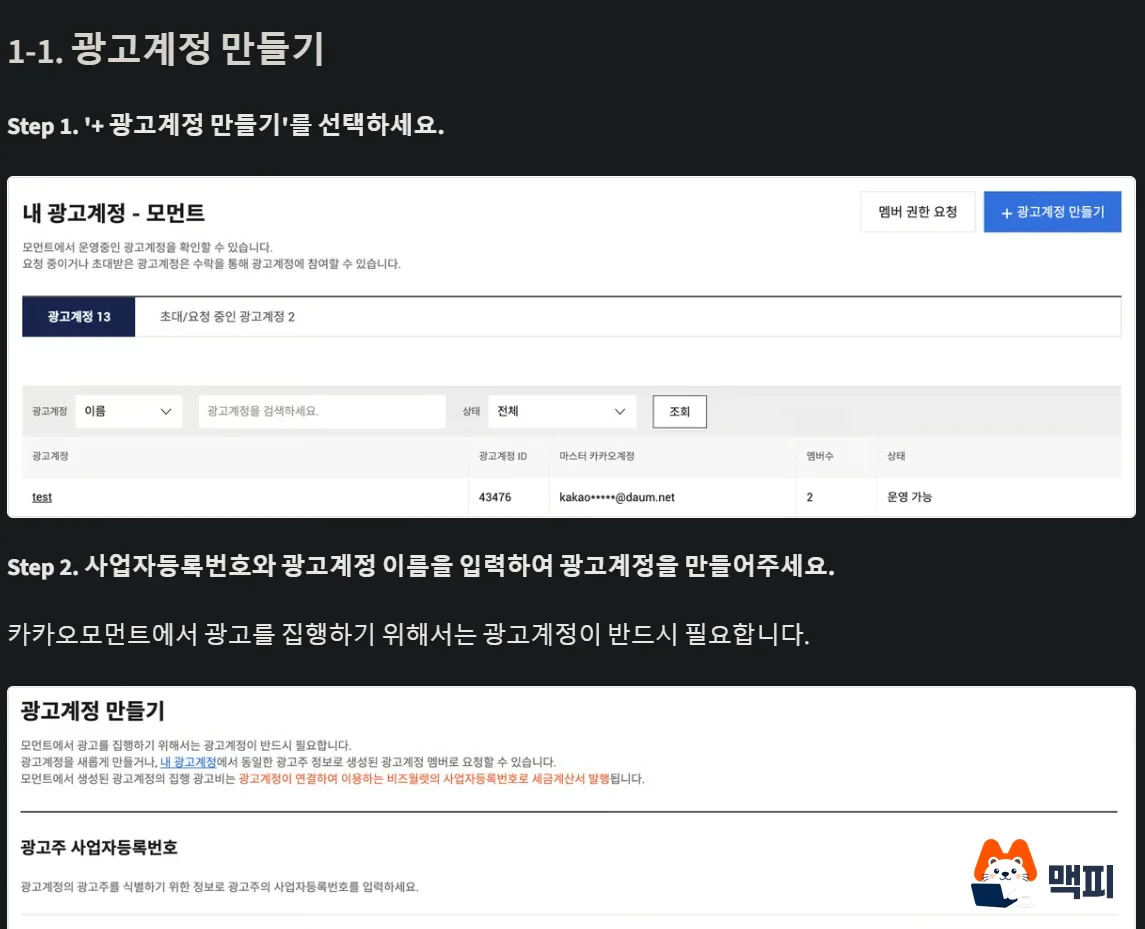
You can create an account without a business registration number, but you cannot add the number later, and you cannot transfer the account to someone else. If an account already exists for the same advertiser, search in [My ad accounts] by business registration number, account name, account ID or master Kakao account, then request member access. Once the account is created, it appears in the [My ad accounts] list.
Step 2. Connect the pixel or SDK
The Kakao pixel is a tracking code you install on your website, and the SDK is the equivalent tool for apps. Once connected, you can use customer actions such as visits, views and purchases as targets, and you can see how many people signed up or bought after seeing an ad. The official guide calls this connection an essential step for improving conversion efficiency.
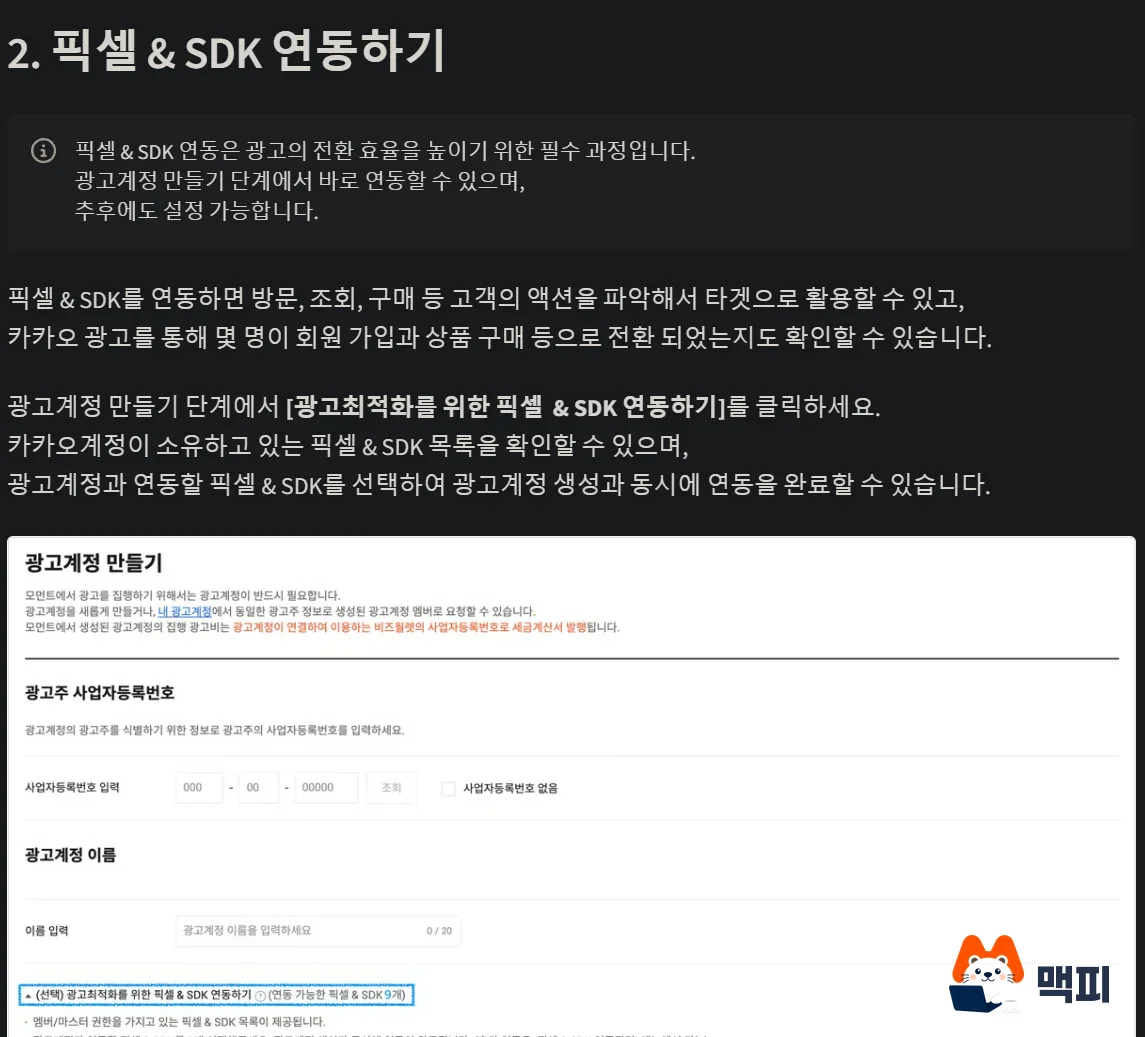
On the create ad account screen, pick a pixel you own under [Connect pixel & SDK for ad optimization], and the connection finishes as the account is created. You can do it later, but then you must first install the pixel or SDK on your website or app. The detailed procedure is in Pixel & SDK connection management.
Step 3. Link a BizWallet
BizWallet is an integrated wallet for topping up and paying for Kakao Business services in one place, and only Kakao Business integrated members can use it. If you have no wallet, click [+ Create BizWallet] under [My BizWallet] in the MY menu. If you already have one, go to BizWallet management in the ad account settings and choose [Link BizWallet].
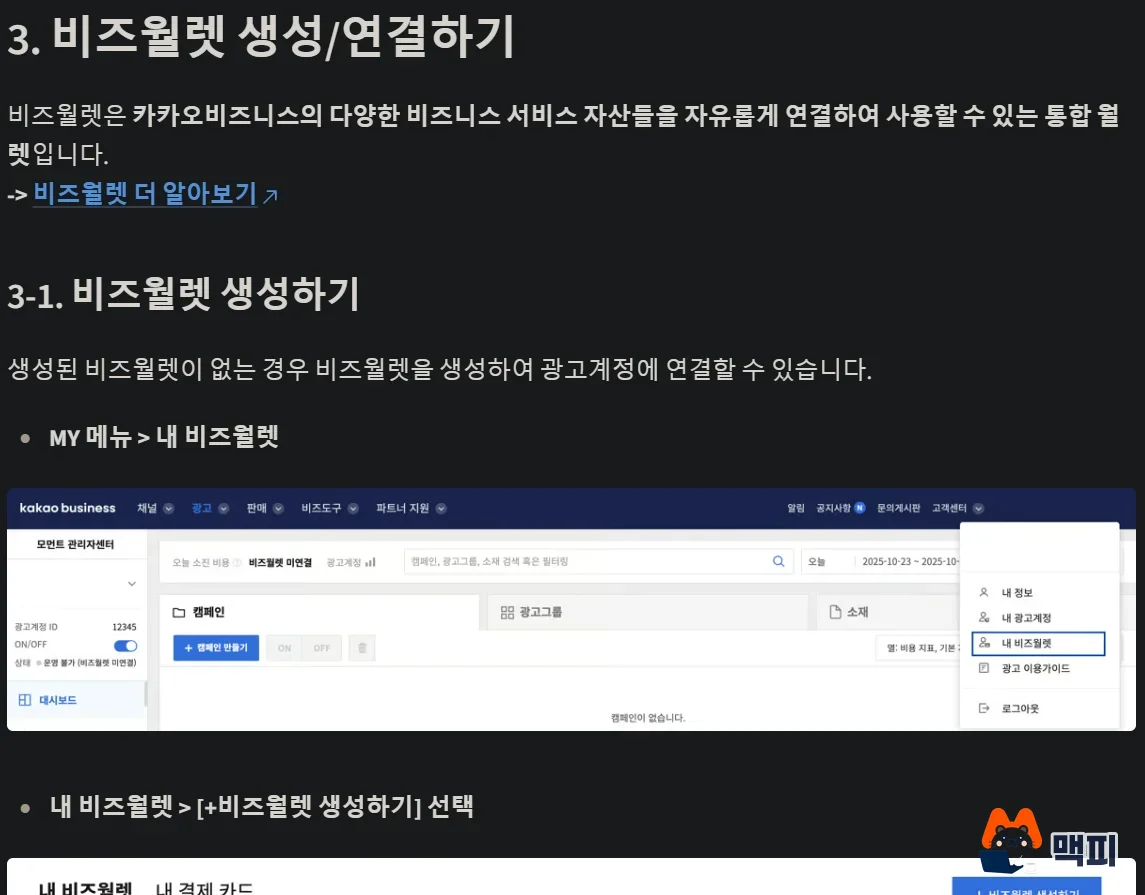
If you register a card with [+ Register card] under [My payment cards] in [My BizWallet], payment happens automatically and you do not need to top up each time. The official guide explains that auto payment keeps ads from stopping due to a low balance.
Step 4. Create a campaign and ad group
Click [+ Create ad] and set, in order, the ad objective, the campaign goal and type, conversion tracking and the daily budget. A campaign can have only one ad goal and type. An ad group sets who sees the ad (audience), where (device and placement) and for how much (bidding method, daily budget, run period, delivery method). You can create up to 5 at a time.
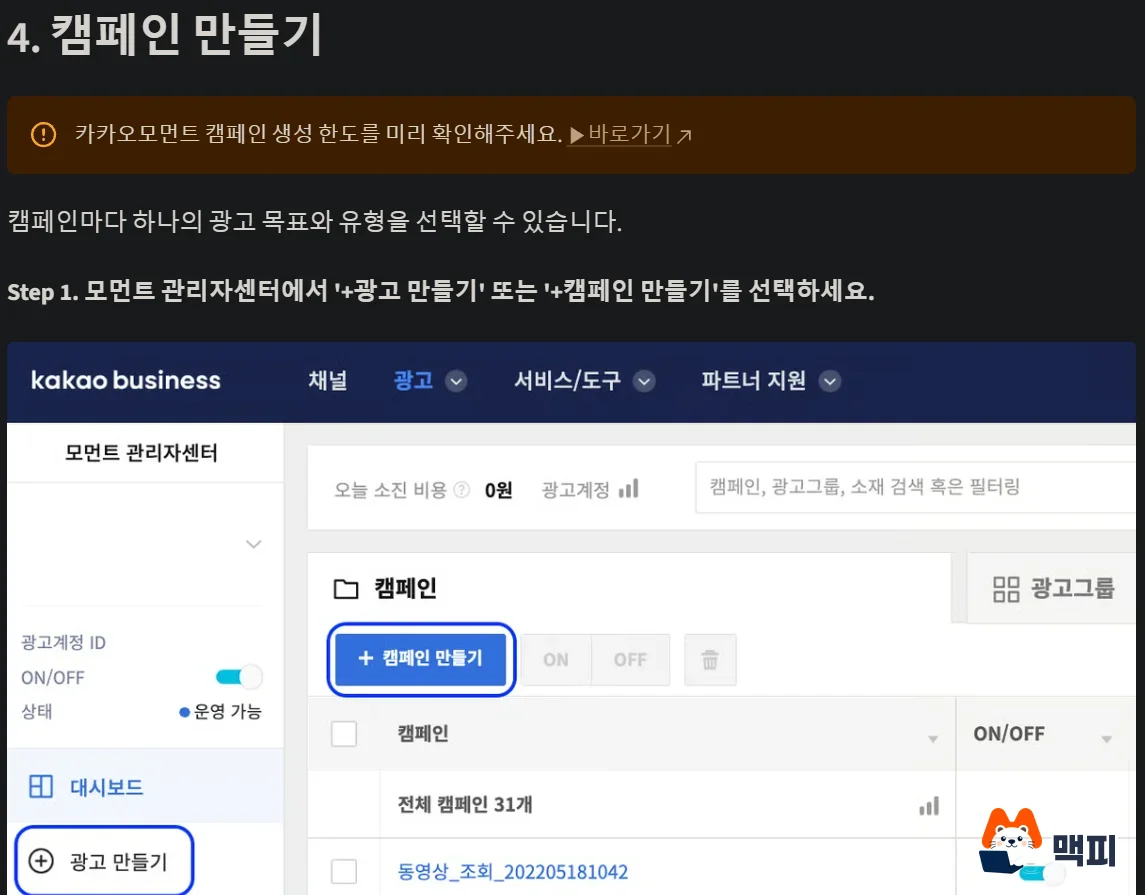
You cannot edit the start date of the run period after creation. You can change only the end date. For an ad group whose start date is in the future, the start date can also be edited.
Step 5. Register creatives and check review
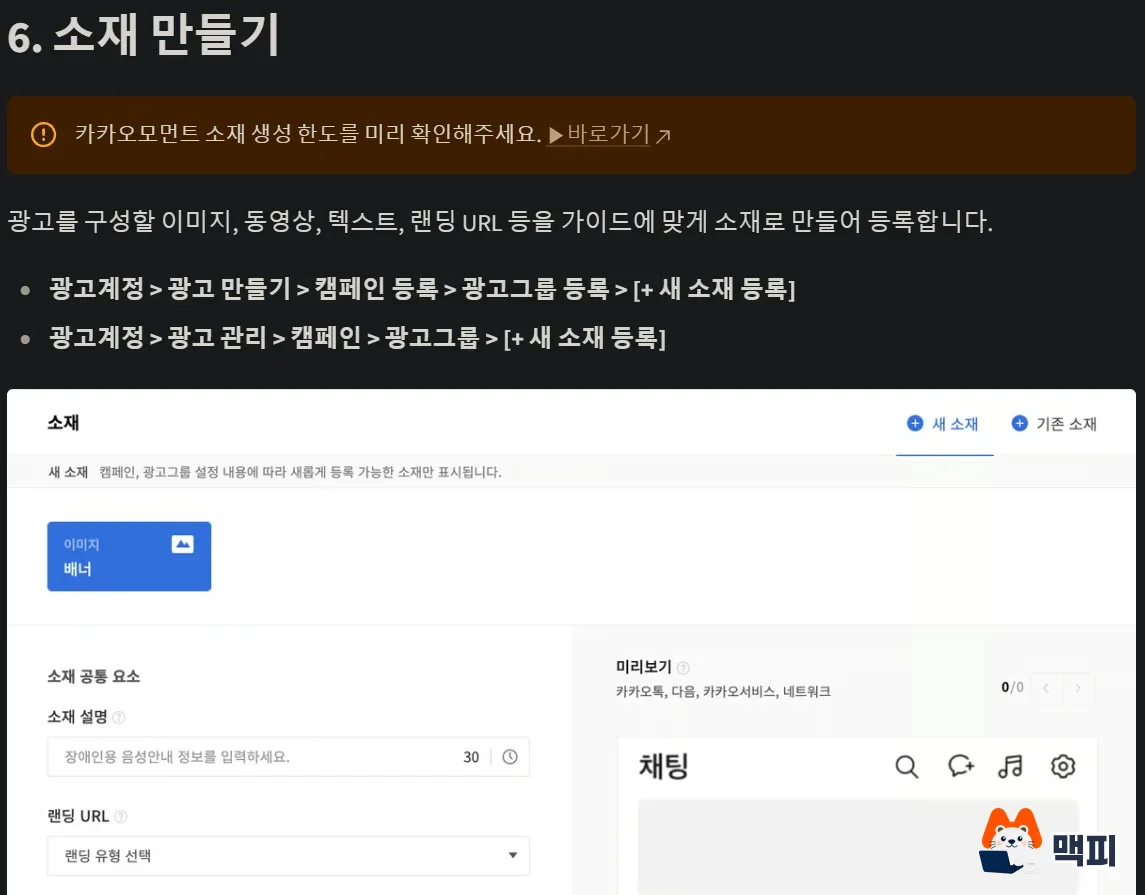
A creative is the actual ad made from an image, video, copy and a landing URL. Click [+ Register new creative] in the ad group to upload one. Review finishes within 2 business days at most, and once approved, the ad is shown to the audience you set. Some industries have restrictions, so read the review guide before you make creatives.
On the campaign and ad group screens in ad management, check whether the creative passed review and is running. Changes to the daily budget or maximum bid apply in real time, but depending on the device environment they can take 10 minutes or more.
How to set bids on Kakao Moment
Kakao Moment ad prices are not fixed. The official guide describes a real-time bidding system where the billing method, bid price and ad response rate are calculated in real time. Bidding is split into manual and automatic, depending on the ad goal.

Manual bidding: minimum bid by billing method
Manual bidding is used for reach, visit and view goals, and you enter the bid amount yourself. All amounts below exclude VAT and come from the bidding method section of the official guide.
| Billing method | Billing basis | Minimum bid | Default |
|---|---|---|---|
| CPC | Per click (Bizboard, Display) | 10 KRW | 200 KRW |
| CPM | Per 1,000 impressions (Bizboard, Display) | Bizboard 1,000 KRW, Display 100 KRW | Bizboard 3,000 KRW, Display 1,000 KRW |
| CPA | Per conversion such as a channel add. Only conversions within 24 hours of a click are billed | 100 KRW | 1,500 KRW |
| CPV | Per video view. Billing starts at 3 seconds of playback | 10 KRW | 20 KRW |
You can choose CPA when optimizing ads toward a KakaoTalk Channel under the conversion goal for Bizboard and Display. Enter every maximum bid in 1 KRW units. The official guide states the cap as 50% or less of the ad group daily budget, or 100,000 KRW or less.
Automatic bidding: set a goal and the system adjusts the bid
Automatic bidding is used for conversion and visit goals. For the conversion goal, you choose from maximize conversions, CPA cost target, maximize conversion value and ROAS target. For the visit goal, you choose maximize clicks or CPC cost target. ROAS is the ratio of revenue to ad spend. In goal-based bidding, both the CPA cost target and the ROAS target are billed per click, and the system sets the bid amount within the ad group daily budget.
When you set a cost target, the conditions in the bidding method section of the official guide are as follows.
- The minimum bid for CPC and CPA cost targets is 100 KRW, and the maximum bid is the smaller of 50% of the daily budget or 10,000 KRW.
- Reaching the target takes 2 to 4 weeks after the ad starts, so daily actual values may differ from the target.
- With pixel or SDK conversion optimization, if there are not enough conversions, the ad runs as maximize conversions even if you set a CPA or ROAS target. The CPA cost target for KakaoTalk Channel optimization campaigns works right away.
- For a CPA cost target, the recommended daily budget is at least 15 times the average CPA of the last week.
The official guide says that if you do not know your target CPA, first run maximize conversions to see the average CPA, then set the cost target. It also explains that setting a cost target far below your existing average CPA can slow budget spending and delivery a lot, and that editing the cost target or daily budget too often can affect learning and delay reaching the target.
Daily budget, VAT and overspending warnings
You enter the bid without VAT and the actual charge adds VAT, while the ad group daily budget is set with VAT included. A bid of 200 KRW plus 10% value-added tax means up to 220 KRW is charged per click. Do not read the daily budget in the same unit as the bid.

Ads stop automatically when the daily budget is exceeded, but it takes time to stop, so you can be charged more than the daily budget. The overcharge policy in the official guide states that both exceeding the daily budget and a negative top-up balance count as normal billing. The overage grows when the daily budget is too small, the bid is high, the ad runs without targeting, or the run period is short.
To reduce the overage, choose standard delivery as the official guide recommends. Accelerated delivery (the default) spends the budget as fast as possible, and standard delivery splits the daily budget across time slots. For auto-bidding ad groups, the system also decides the delivery method. An impression counts when at least 50% of the ad is visible on screen for 1 second or more, and clicks count only when valid, excluding invalid clicks such as double clicks or repeated clicks.
Kakao Moment vs Naver Power Link: starting conditions
Both ads set prices by bidding, but they show up at different moments. Kakao Moment shows ads to the audience you set, while Power Link, the search ad product of Naver (Korea's largest search engine), shows ads when a person types a search term. Power Link fits when you target people who are already searching, and target-based Kakao Moment fits when you want to reach people who are not looking yet. This is an interpretation drawn from the difference in how ads are shown, not an official recommendation. The Power Link figures follow the Naver Ads advertiser center bid help and the review notice.
| Item | Kakao Moment | Naver Power Link |
|---|---|---|
| When the ad appears | Shown to the audience you set (audience-based) | When a search term is entered (keyword-based) |
| Minimum bid per click | 10 KRW (excluding VAT, manual CPC) | 70 KRW |
| Maximum bid | 50% or less of the daily budget, or 100,000 KRW or less (excluding VAT) | 100,000 KRW |
| Review time | Up to 2 business days | Usually 1 to 2 business days |
Account limits and what Korean advertisers should check first
According to the ad account operations guide, each ad account can hold up to 200 campaigns, up to 500 ad groups per campaign (5,000 per account in total), and up to 200 creatives per ad group (10,000 per account in total). Even within the limits, creating campaigns or ad groups in bulk from accounts suspected to belong to similar businesses, or with similar creatives, can lead to sanctions.
You must decide whether to enter a business registration number when you create the account, and you cannot change it later. The budget includes VAT and the bid excludes VAT, so when you calculate a monthly budget, add VAT to the bid-based amount.
Common mistakes first-time advertisers make
- Reading the VAT basis of the bid and the daily budget as the same. The daily budget includes VAT and the bid excludes VAT, so estimate cost per click using the bid plus VAT.
- Keeping the top-up balance too thin. Even when the balance runs out, ads take time to stop and a negative balance can occur, so register an auto-payment card in BizWallet.
- Setting a CPA target before conversion data builds up. With too few conversions the ad falls back to maximize conversions, so check over 2 to 4 weeks whether the target works by looking at the average CPA.
- Judging results right after changing a bid. Changes take up to 10 minutes or more to apply, and auto-bidding targets are reached after 2 to 4 weeks, so do not judge by daily values before then.
Frequently asked questions
How much does a KakaoTalk Channel message ad cost per message?
It is not bidding. It is a fixed price (CPMS). It is 15 KRW per message sent if you used no targeting or set only whole regions or devices, and 20 KRW if you set one or more audiences or used smart messages. All prices exclude VAT.
Can I advertise directly without an agency?
With Kakao Moment, advertisers can run everything themselves, from ad registration to checking reports. If running it yourself is hard, find an agency in the Kakao Ads official agency list.
How do I delete an ad account?
According to the ad account operations guide, use master permission and click the delete button under ad account management in settings. The account must be turned OFF, all members removed, the paid cash balance at 0 KRW, the auto-payment card released, there must be no spending this month, and last month's tax invoice must be issued. Once deleted you cannot view ad data, so download your reports first.
Before you create an ad, first check that a BizWallet is linked to the ad account and a payment card is registered.
Official documents checked on: October 3, 2026. Kakao may change bid amounts and limits, so check the notices in the Moment Manager Center again before you create ads. The flowchart and diagrams are generated illustrations that explain concepts and are not actual screens. The step screenshots are captures from the official Kakao Business guide, and the screens at the time of capture may differ from the current Manager Center.
Found this useful? Share it
Latest posts
Kakao Share Thumbnail Not Showing? Here's the Fix (JavaScript SDK 2025)
Learn why Kakao Share thumbnails don't appear even with a valid imageUrl, and fix it using scrapImage to convert your URL into a KAGE CDN URL. Step-by-step guide.
How to Generate CRM User Manuals in 20 Minutes with Claude Code Sub-Agents
Learn how Claude Code sub-agents can analyze your CRM codebase and auto-generate user manuals and visual guidebooks in just 20 minutes. See the real-world results.
GEO Generative Engine Optimization: The Complete 2025 AI Marketing Strategy Guide
Learn what GEO (Generative Engine Optimization) is, how it differs from traditional SEO, and discover 5 proven AI marketing strategies to get cited by AI search engines in 2025.
Related projects
Get new posts by email
Insights on marketing, analytics, and dev, delivered to your inbox.