
Meta Ad Library is an ad transparency tool that lets anyone search the ads currently running on Meta services such as Facebook and Instagram. As of October 4, 2026, the Korean-language screen opened without logging in. If you search a brand or advertiser name, you can see the ad creatives that advertiser is running and their start dates. Standard ad detail screens have no ad spend or impressions fields, so the tool is best for scanning which messages and creatives competitors use.
The Meta Business Help Center's Ad Library guide says the tool contains all active ads running across Meta technologies, and that anyone can view and search it. The screen layout in this article was checked by opening the Korean-language screen on October 4, 2026. This article covers how to search, how to set filters, what you can and cannot read in the details, and the order for recording competitor ads.
Which ads you can see in Meta Ad Library
Ad Library shows different information and keeps ads for different periods depending on the ad type. Based on the Meta Transparency Center and Business Help Center explanations, the types break down as follows.
| Ad type | What is visible |
|---|---|
| Standard ads (products and services) | Active ads running across Meta services |
| Branded content | Public content running on Facebook and Instagram with a paid partnership label |
| Social issue, election and political ads | Active and inactive ads kept for 7 years, with extra information such as spend, reach and sponsor |
| Ads shown in the EU and related regions | Shown while active, kept for 1 year after last shown (Transparency Center) |
Most Korean marketers use the first two rows for competitor research. The activity status filter on the search screen also offers "Active and inactive" and "Inactive ads" options. But the range that the Meta Help Center describes for standard ads is ads that are currently running. Do not expect to find a competitor's ended ads later. Record the creatives you need at the time you see them.
According to the Meta Help Center, when an ad has age-restricted content such as alcohol or gambling, its creative is not shown to people who are not logged in to Facebook or to minors. If such an ad looks empty in the list, check again while logged in.
How to search Meta Ad Library
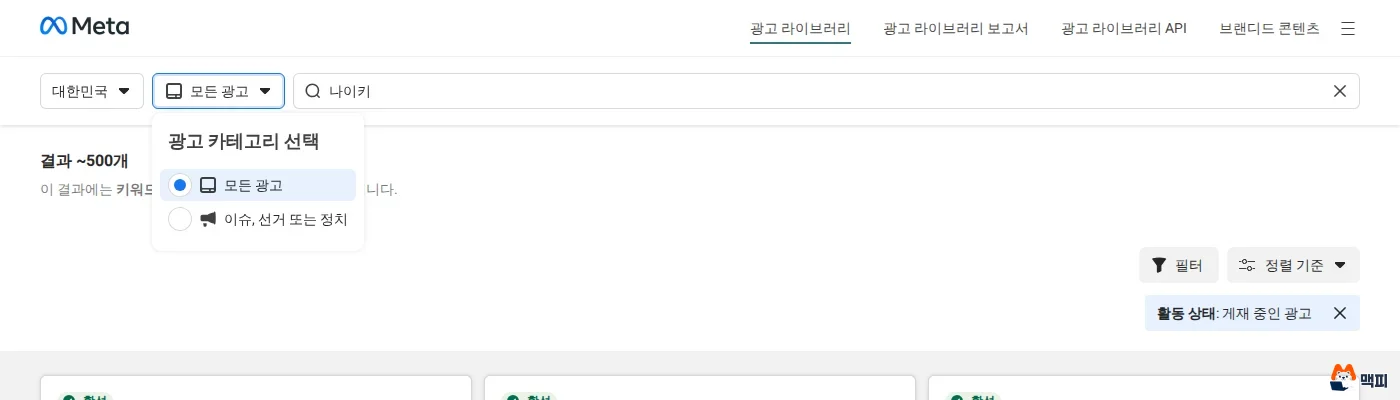
Start the search at facebook.com/ads/library . Set the country, ad category and search term in that order. If you follow the steps below, you get your first results in under a minute.

- Open Ad Library. On the Korean-language screen on October 4, 2026, it opened without logging in, and the help page also says anyone can view it.
- Check that the country selector at the top left says "South Korea". If you want to see Korean ads and another country is selected, change it.
- Leave the ad category as "All ads". "Issues, elections or politics" is the option for political ads.
- Enter a brand name, an advertiser name or a keyword in the search box. According to the help page, a search term returns ads that contain that word, or ads running from pages that contain that word.
- The search worked if you see a result count such as "About 500 results" above the results, and each ad card shows an "Active" label, a Library ID, a start date and platform icons.
Your search conditions are stored in the URL in the address bar as country, search term and activity status. For competitors you check often, bookmark the address of the results page so you can reopen the same conditions right away.
How to narrow competitor ads with filters
Click "Filters" at the top right of the results to see the items below. The options reflect what was opened and checked one by one on the Korean-language screen on October 4, 2026. In "Sort by" on the same screen, you choose between "Impressions: high to low" and "Newest".
| Filter | Options | Use it when |
|---|---|---|
| Language | All languages or a chosen language | You only want to see Korean-language creatives |
| Advertiser | All advertisers or a specific advertiser | You want to keep only one brand out of mixed keyword results |
| Platform | Facebook, Instagram, Audience Network, Messenger, WhatsApp, Threads | You want to view Instagram ads separately |
| Media type | Images, memes, images and memes, videos, no image or video | You want to view video and image creatives separately |
| Activity status | Active and inactive, active ads, inactive ads | The default is active ads |
| Impressions by date | Start date and end date | You only want ads from a specific period |
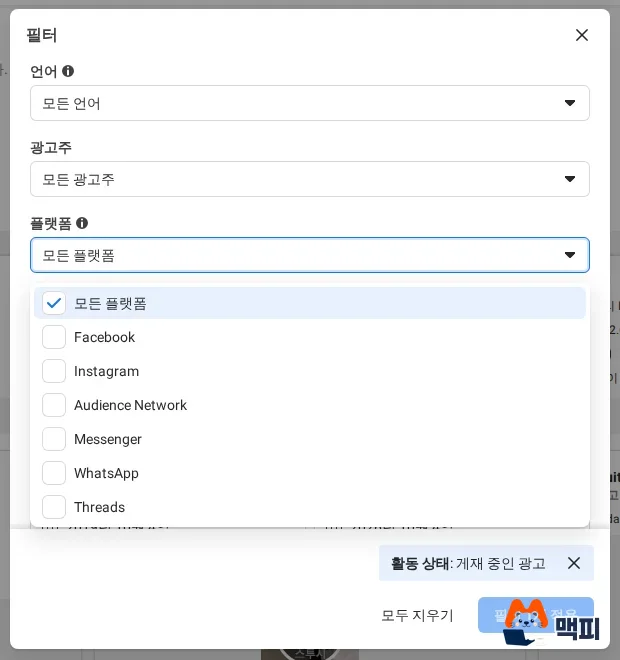
"High impressions order" is only a sort name. The cards show no impression numbers, so do not read this order as a ranking of ad performance. After choosing filters, you must click the "Apply filters" button for them to take effect in the results.
What you can and cannot read in ad details
Click "See ad details" on an ad card to open the creative and advertiser information. The advertiser information showed the page name, page ID, follower count, page category and linked Instagram account. An ad marked "This ad has multiple versions" contains several creatives in one ad, and you page through them in the detail screen, for example 1/6.

| Category | Items |
|---|---|
| Visible for standard ads | Ad copy, image or video, start date, platforms, Library ID, advertiser page information |
| Not visible for standard ads | Ad spend, impressions, targeting settings |
The Meta Transparency Center says it provides extra information such as spend, reach and sponsor only for social issue, election and political ads. Ad spend, impressions and targeting items were also not found on the standard ad detail screen. So you can only estimate ad performance from the creative and how long it has been running.
The order for researching competitor ads
Ad Library is more useful when you check it repeatedly with the same conditions than when you scan it once and stop. The steps below are for collecting creative references.
- Pick 3 to 5 competitors to research and search for each one by advertiser name.
- Set activity status to "Active ads" and use the platform filter to view Facebook and Instagram separately.
- Create a table and write one row each for advertiser, Library ID, start date, platform, media type and key copy.
- For ads with the "multiple versions" label, page through the versions and note how the copy and images differ.
- About a month later, reopen the same search from the saved address and compare the ads that newly started with the ones that disappeared.
The research is done when the table has the number of running creatives and start dates filled in for each advertiser. An ad with an old start date only tells you that the creative keeps running. Because ad spend and conversions are not visible, do not use it as evidence that an ad performs well. The copy and images of a creative are the advertiser's work, so use them only as a reference for structure and message direction, and do not copy them as they are.
Common mistakes with Meta Ad Library
The first case below is the result of a direct search on October 4, 2026. The others are cautions that follow from the screen layout checked above.
Reading keyword search results as one brand's ads. As of October 4, 2026, a keyword search for "Nike" (written in Korean) returned ads from online stores and apps that sell Nike products along with Nike's own. To see only a specific brand's ads, set the page in the advertiser filter.
Interpreting sort order as performance. Even though the sort options include an impressions order, impression counts are not shown. Use the order only as a convenience for browsing the list.
Not checking the country selection. If you browse with another country selected, you may collect creatives that do not run in Korea as references. Check the selected country before you search.
Trying to find ended ads later. The range the official guidance guarantees for standard ads is active ads. Record any creative you want to keep that day, using the Library ID and a screenshot.
Frequently asked questions
Do I need to log in to use Meta Ad Library?
According to the Meta Help Center, anyone can view and search it. However, to download search results you need to log in to Facebook and agree to the terms of service.
Can I see how much a competitor spends on ads?
Not for standard ads. The Meta Transparency Center says it provides spend and reach information only for social issue, election and political ads.
Can I see ads that have ended?
The filter has an inactive ads option, but the range the official help page describes for standard ads is ads that are currently running. Political ads, both active and inactive, are kept for 7 years.
Your task for today is to pick 3 competitors, search each by advertiser name, write the Library ID and start date in a table, and bookmark the results address. Meta can change the screen layout and options, so open the tool once more to check.
Found this useful? Share it
Latest posts
Kakao Share Thumbnail Not Showing? Here's the Fix (JavaScript SDK 2025)
Learn why Kakao Share thumbnails don't appear even with a valid imageUrl, and fix it using scrapImage to convert your URL into a KAGE CDN URL. Step-by-step guide.
How to Generate CRM User Manuals in 20 Minutes with Claude Code Sub-Agents
Learn how Claude Code sub-agents can analyze your CRM codebase and auto-generate user manuals and visual guidebooks in just 20 minutes. See the real-world results.
GEO Generative Engine Optimization: The Complete 2025 AI Marketing Strategy Guide
Learn what GEO (Generative Engine Optimization) is, how it differs from traditional SEO, and discover 5 proven AI marketing strategies to get cited by AI search engines in 2025.
Related projects
Get new posts by email
Insights on marketing, analytics, and dev, delivered to your inbox.