
Coupang Partners is the affiliate marketing program (you introduce products and earn a commission when sales happen) of Coupang, a major Korean e-commerce company. You earn 3% of the payment amount when a purchase is made through a Coupang link on your blog or social media. Any Coupang member can apply, there is no sign-up fee, and you can place ads right after joining. To get your first payout, however, your cumulative sales must pass 150,000 KRW and you must receive final approval. Earnings are paid out only when they reach 10,000 KRW or more in a month. The official Coupang Partners FAQ and operating policy do not state an effective date, so this article uses October 4, 2026, the day the content was checked, as its reference date.
Coupang Partners is an affiliate program that pays 3% by default
The Coupang Partners FAQ says that unless the company sets a different rate or agrees otherwise with the member, 3% of the payment amount is paid as earnings. The rate can vary by product category and product characteristics, but the public FAQ and operating policy contain no table of rates by category. Read 3% as the default, and check the actual rate on the Partners site.
The conditions for earning, and the cases that are excluded, are as follows.
| Item | Official guidance |
|---|---|
| Purchases that count as earnings | All purchases made within 24 hours of the visit through a link or banner you created |
| Your own purchases through your own link | Not counted toward your results |
| Products excluded from payment | Gift cards and paid product warranty services, plus products and categories Coupang announces in advance |
| Cancellations and returns | Earnings are paid after subtracting cancellations and returns from monthly sales |
| Monthly earnings cap | 30 million KRW per month (applied from August 1, 2024) |
The tracking window is 24 hours from the time of the visit through your link.
Coupang Partners sign-up requires a Coupang account and identity checks
Coupang members can sign up. According to operating policy 1.1, individual members must pass identity verification (real-name check), and sole proprietors and corporations must submit documents such as a business registration certificate. To prevent identity theft, individuals can apply only if they are the named holder of the Coupang account. Sole proprietors can apply only if the account name matches the representative's name. The FAQ states that applications from minors, non-profit corporations, tax-exempt businesses and foreigners may be rejected.

- Log in to the Coupang Partners site with your Coupang ID, then enter the sign-up information, such as the site where you will advertise Coupang, to create your account.
- Start advertising on the site you registered. You can use every feature except the Partners API even before final approval.
- Once cumulative sales reach 150,000 KRW or more, Coupang reviews your channel and decides whether to grant final approval.
Because you can advertise before final approval, it is safer to publish a post with your Partners link and the disclosure phrase on your active channel right after signing up. The top reason final approval is rejected is that no activity posts can be found.
Coupang Partners links differ by channel
After logging in, you can use the link generation menu to create a short URL for the product you want, or create HTML code for a banner ad, and paste it into your blog or website. You can also advertise with Coupang's main category banners instead of individual products. Whenever you place an ad, you must also include the disclosure phrase described in the next section.
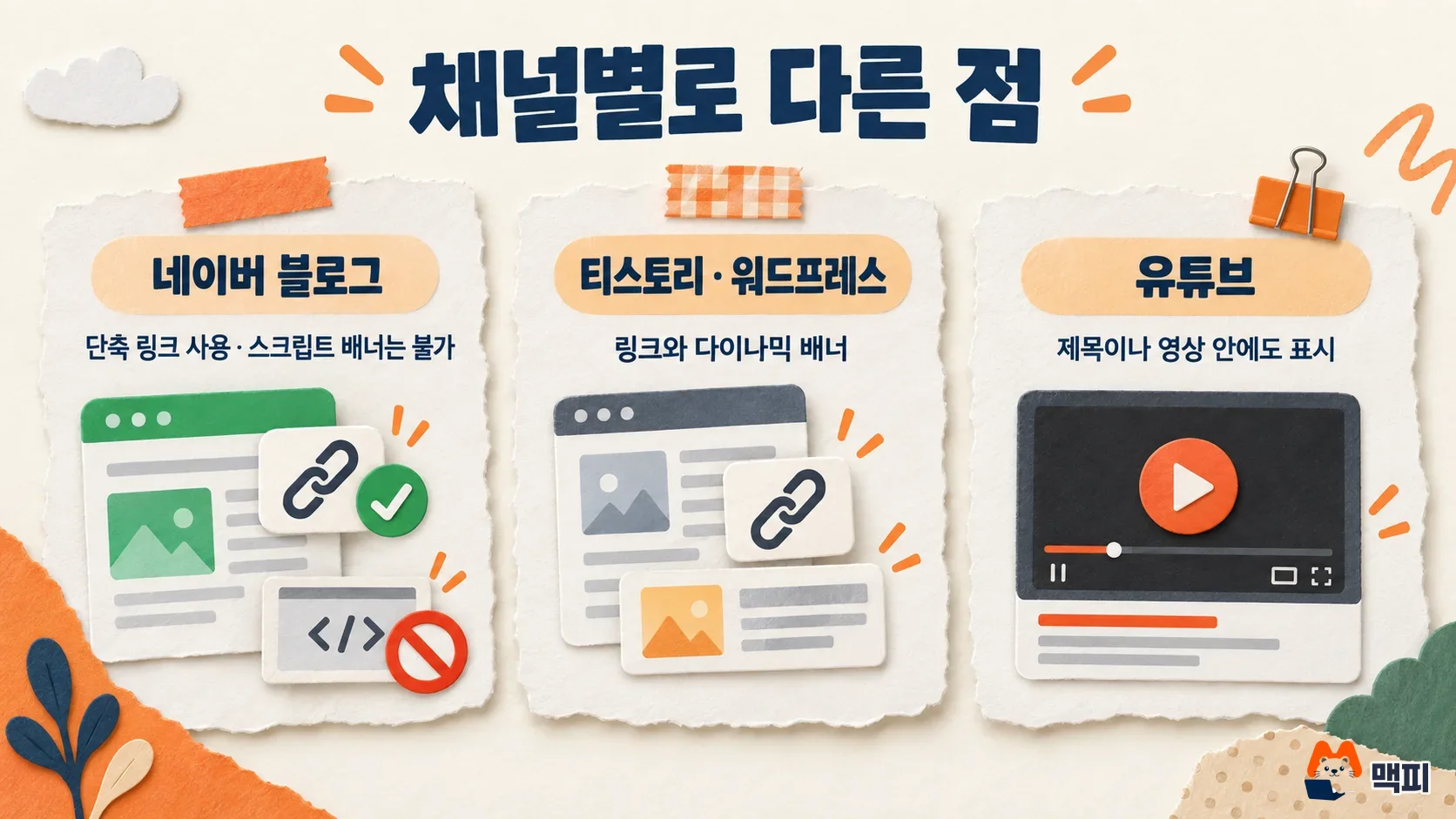
Which format you can use depends on your channel. A dynamic banner is a banner inserted with a script tag. It can be used with web technologies, but Naver Blog (the blogging service of Naver, Korea's largest search engine) does not support script tags. So on Naver Blog, paste the short URL (a shortened link) created in the link generation menu. On your own site, Tistory (a Korean blogging platform) or WordPress, where script tags can be inserted, you can use banners too.
| Channel | Link format | What to check first |
|---|---|---|
| Naver Blog | Short URL link | Script tags are not supported, so you cannot add a dynamic banner |
| Tistory, WordPress, own site | Link, banner (where scripts and HTML can be inserted) | First check where you can insert scripts and HTML |
| YouTube | Link in the pinned comment or video description | Apart from the link, you must also state the relationship in the title or inside the video |
The Coupang Partners disclosure phrase must appear in every post
The disclosure phrase states that you wrote the post in exchange for compensation from the advertiser. Every post you publish as part of Partners activity must carry this phrase, which reveals your financial relationship with Coupang. Following the Korea Fair Trade Commission's guidelines on reviewing endorsement and guarantee advertising, the FAQ says that Coupang cannot decide on its own which posts are subject to the rule, so you should label every post you publish for Partners activity. The phrase Coupang recommends is "This post is part of Coupang Partners activity, and I receive a certain amount of commission for it."

There are standards for position and appearance too. If you put it in the title, adjust the title length so the phrase is not cut off. If you put it at the start, make the text larger than the body or use a different text color from the body so it stands out. On YouTube, even if you add a link in the pinned comment or video description, you must state the relationship in the video title or inside the video. The FAQ lists the following methods as inappropriate.
- The phrase is visible only after clicking "Show more"
- The phrase is mixed into the middle of the post and not distinguished from other content
- The Partners link and the phrase are displayed apart from each other
- Readers must go to a separate page to see it
When you work through YouTube community posts, also make sure the phrase is not hidden behind "Read more".
Coupang Partners final approval depends on sales and channel checks
Final approval is the last sign-up step, where Coupang verifies that the channel and activity of a member who has generated sales are legitimate. The FAQ says that you can use the Partners API and receive your first payout only after final approval is complete. Approval comes after cumulative sales reach 150,000 KRW or more, and the basis is sales amount, not earnings. At the default 3% rate, 150,000 KRW in sales equals 4,500 KRW in earnings, which is below the 10,000 KRW payout threshold. Operating policy 1.3, on the other hand, says media is reviewed once earnings reach the minimum payout amount, so its figure differs from the FAQ. This article uses the FAQ's 150,000 KRW.
The FAQ lists three typical reasons for rejection.
| Rejection reason | What to check beforehand |
|---|---|
| No Partners activity posts on the registered activity page | Check that the channel you entered at sign-up really has a post containing a Partners link |
| Violation of the terms of use and operating policy | If the member information you entered has errors or conflicts with the terms, you receive an email asking you to correct your information |
| Financial-relationship disclosure not shown | Check that every post has the disclosure phrase at the start or in the title |
Coupang Partners payouts arrive on the 15th, two months after the earnings month
Earnings are confirmed on the 25th of the month after they occur, and paid to your bank account on the 15th of the month after that. The FAQ explains that the results are confirmed on the 25th of the following month to total the cancellation and return amounts of customers who bought through your link. It gives an example: the earnings in the June settlement report are May earnings, and they are paid on July 15 if the conditions are met.
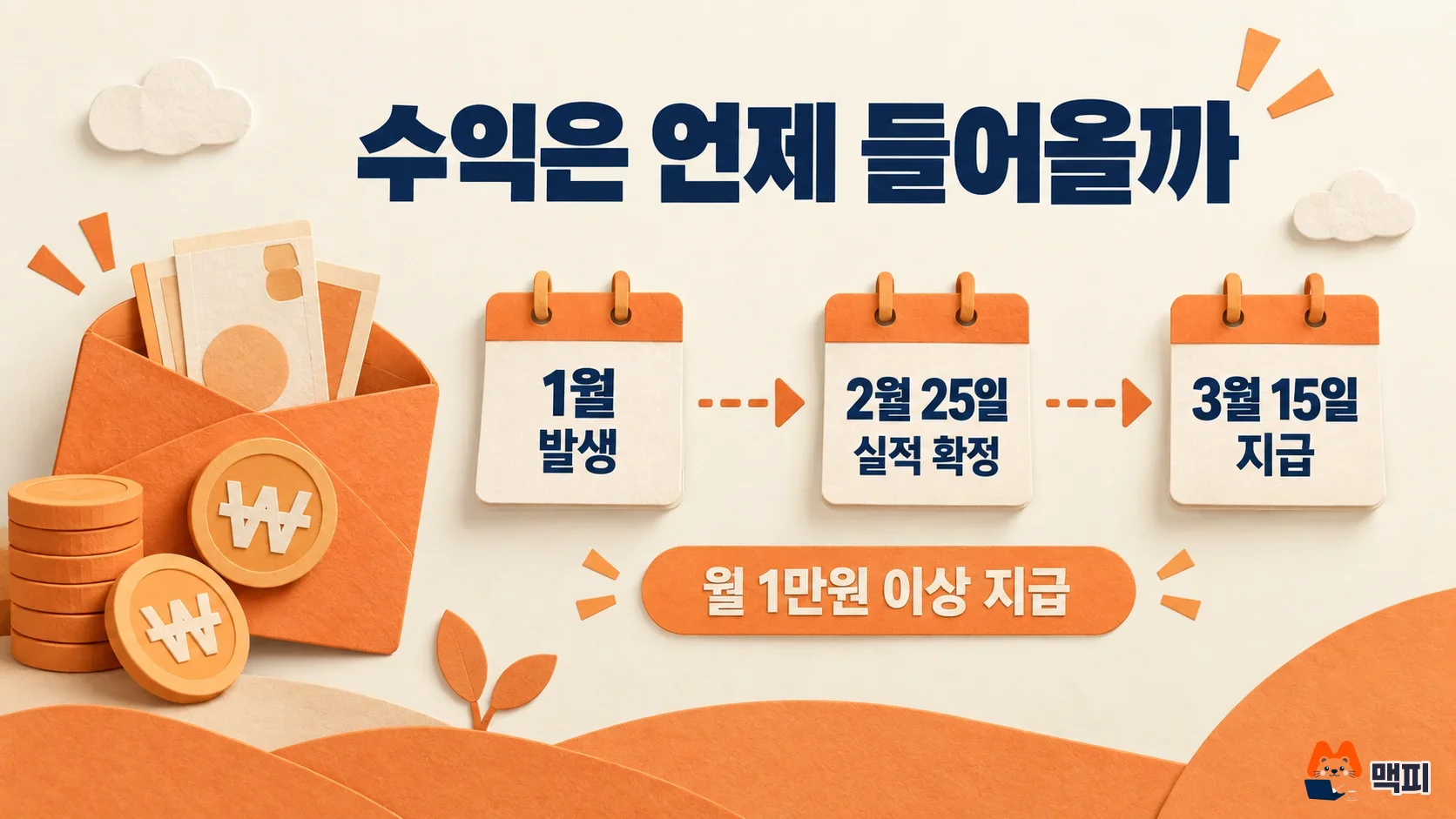
There are two payment conditions. Your account must have completed final approval, and monthly earnings must exceed the minimum of 10,000 KRW. According to the terms of use, if monthly earnings do not exceed 10,000 KRW, the settlement amount is carried over to the next month. Carryover lasts up to 6 months, after which the amount accumulated over those 6 months is paid at once.
You can see the confirmed earnings on the 25th of the following month on the Coupang Partners site under Report > Payment Report. According to the operating policy, if anything looks wrong, you can ask Coupang to check within 14 days, so review the numbers before payment. The steps before payment also differ depending on how you handle taxes.
| Type | Steps before payment |
|---|---|
| Corporation or sole proprietor (issues tax invoices) | The day after the previous month's results are confirmed, Coupang issues the tax invoice on your behalf (reverse invoicing). You must approve it by the approval deadline (the 10th in the example) to be paid on the 15th |
| Individual or sole proprietor (no tax invoice) | First-time settlement members receive an email asking for payment information. Enter it by the deadline (the 24th in the example) to be paid on the 15th |
The dates in the table above come from the FAQ's January results example. If the 15th is a holiday, payment is processed on the next business day. When you meet the payment conditions, Coupang sends an email and a notice, so enter your payment information within the deadline as instructed. Businesses must upload a copy of the business registration certificate and a copy of the bank passbook before the first payout.
Common mistakes when starting Coupang Partners
- Buying through your own link to earn commission: purchases through your own link are treated as activity that does not fit the program's purpose and are not counted toward your results. Buy what you need as usual and let visitors use the link.
- Putting the disclosure in the middle of the post or behind "Show more": a position consumers cannot notice at first glance counts as improper labeling. Put it in the title or at the start, distinct from the body.
- Pasting a dynamic banner code into Naver Blog: script tags are not supported, so it does not work. On Naver Blog, use the short URL from the link generation menu.
- Expecting money as soon as you hit 150,000 KRW: 150,000 KRW is the cumulative sales figure for the final approval review. Payment comes after approval, when monthly earnings are 10,000 KRW or more, on the 15th two months after the earnings month.
- Ignoring cancellations and returns: if a customer who bought through your link cancels or returns, that amount is deducted when results are confirmed on the 25th of the following month, so the payout can be lower than the earnings you calculated from sales.
Coupang Partners frequently asked questions
Is there a sign-up or usage fee for Coupang Partners?
No. Applying costs nothing, and the earnings from your activity are paid according to the settlement rules.
Do I have to apply separately to receive Coupang Partners earnings?
When you meet the payment conditions, Coupang sends an email and a notice asking you to enter payment information. If you do not enter it within the deadline, the earnings are carried over.
What happens to my earnings if Coupang Partners final approval keeps being rejected?
Earnings keep being tallied normally during rejection, and they are paid once you get approved. However, if rejections continue and you never receive final approval, earnings are not paid under the terms of use and operating policy.
Before you apply, write one post on your channel with a Partners link and the disclosure phrase, then start your sign-up on the Coupang Partners site with your Coupang account.
Found this useful? Share it
Latest posts
Kakao Share Thumbnail Not Showing? Here's the Fix (JavaScript SDK 2025)
Learn why Kakao Share thumbnails don't appear even with a valid imageUrl, and fix it using scrapImage to convert your URL into a KAGE CDN URL. Step-by-step guide.
How to Generate CRM User Manuals in 20 Minutes with Claude Code Sub-Agents
Learn how Claude Code sub-agents can analyze your CRM codebase and auto-generate user manuals and visual guidebooks in just 20 minutes. See the real-world results.
GEO Generative Engine Optimization: The Complete 2025 AI Marketing Strategy Guide
Learn what GEO (Generative Engine Optimization) is, how it differs from traditional SEO, and discover 5 proven AI marketing strategies to get cited by AI search engines in 2025.
Related projects
Get new posts by email
Insights on marketing, analytics, and dev, delivered to your inbox.