

Meta Ads Manager is Meta's official tool for creating ads on Facebook, Instagram, Messenger, and Audience Network, and for tracking their results. You build ads in three levels: campaign, ad set, and ad. You set the objective at the campaign level, the audience, budget, and schedule at the ad set level, and the image and text at the ad level. Your ad account ID is the number after act= in the Ads Manager address bar.
Meta Ads Manager is the tool for creating and managing Meta ads
On the Ads Manager overview page, Meta describes this tool as the place to run ads on Facebook, Instagram, Messenger, and Audience Network. Audience Network is a Meta service that shows ads in other companies' apps. The Meta developer documentation says ads also run on WhatsApp.
You create and edit ads, manage run dates and placements, and check results against your objective, all in one view. It works on desktop web and in the iOS and Android apps.
Meta Ads Manager structure: campaign, ad set, and ad differences
Each campaign holds one or more ad sets, and each ad set holds one or more ads. Each level controls different settings, so knowing where a setting lives keeps you from getting lost on screen. The campaign structure in the Meta developer documentation and the ad levels help page in the Meta Business Help Center use the same framework.

| Level | What you set here | Example |
|---|---|---|
| Campaign | Ad objective, buying type | Increase website traffic, get leads |
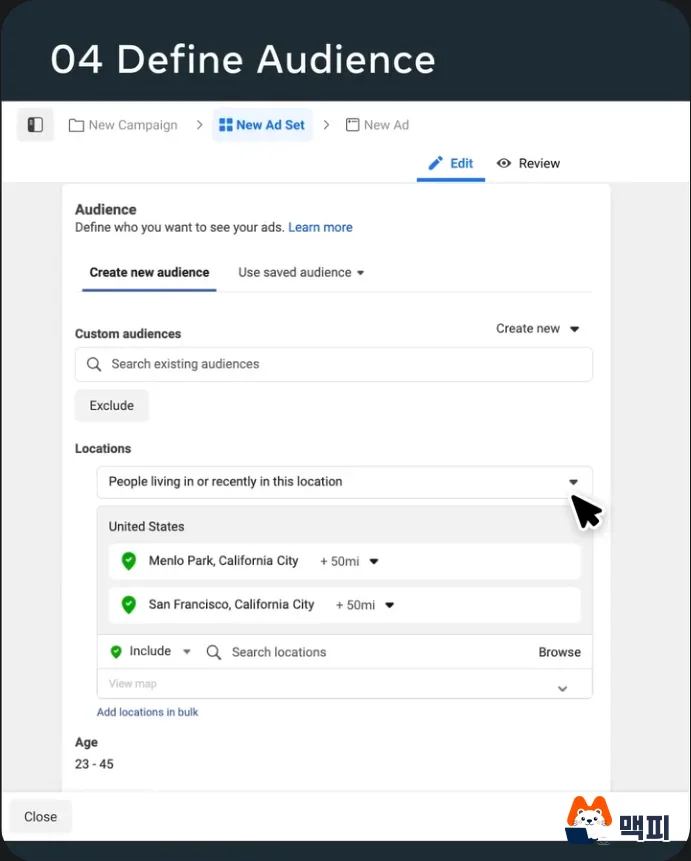
| Ad set | Audience, placements, budget, schedule | Ages 18 to 30, Instagram Stories, daily budget |
| Ad | Format and creative | Image, video, carousel, collection |
Each campaign is built around one objective. As for buying type, Meta's help page says most advertisers use auctions, where Meta's system automatically optimizes delivery. The developer documentation explains that this objective is the standard used to validate the ads inside the campaign. The ad set is the unit that holds budget, billing, and schedule, and the ads in the same set share these values. The ad is what people actually see, so you add the image or video, text, and link here.
The three levels exist so you can test audiences and creatives separately within the same objective. Create one website traffic campaign with an ad set for ages 18 to 30 and another for ages 31 to 50, put different ads in each set, and you can compare which combination performs best. To compare audiences, split ad sets, not ads. To compare only creatives, put several ads in one ad set.
How to find your Meta ad account ID
Every ad account has a unique ID number. According to the Meta Business Help Center guide, you can find it in two places in Ads Manager.

- Top dropdown: Open Ads Manager and look at the business asset dropdown at the top of the page. It shows the ad account name and ID number.
- Address bar: Look for the number in the browser address bar while Ads Manager is open. If it is hard to spot, find act= in the address and read the number after it as the account ID.
If the numbers from both methods match, you found the right one. Campaign IDs and ad IDs are different from the account ID, so check which number you are sharing before you send it to an agency.
What you can do in the Meta Ads Manager app
On the Ads Manager overview page, Meta also lists apps for iOS and Android. You can manage campaigns from your phone while on the move.
The order for building your first ad

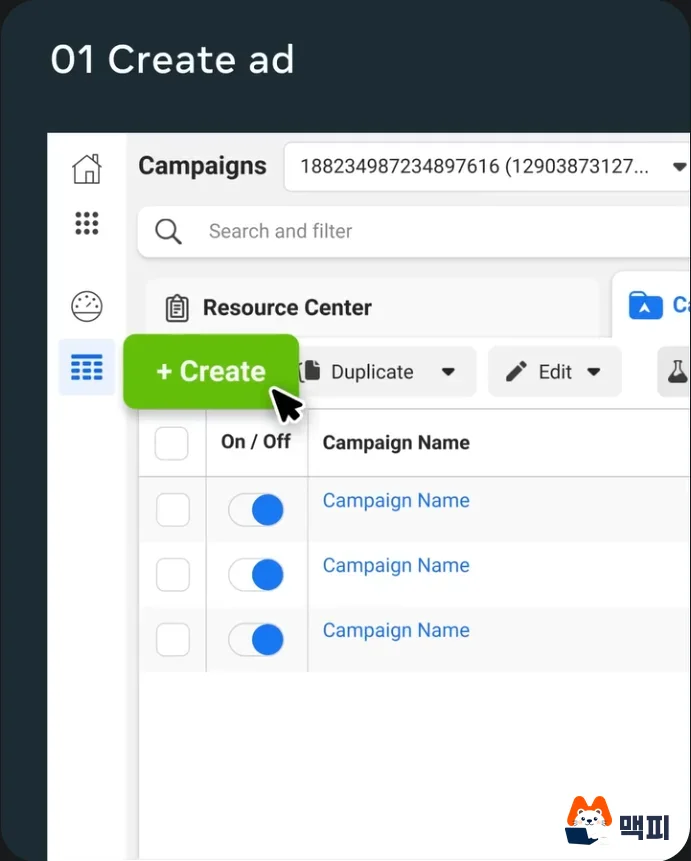
First, confirm at the top that you are looking at the right ad account. Next, pick one campaign objective. In the ad set, enter the audience, placements, budget, and schedule. Then add the creative in the ad and publish. After publishing, check that the campaign appears in the campaign list and that numbers start to build up in the results columns, such as reach and clicks. Empty numbers right after publishing can be normal, so give it some time and open it again.
Common mistakes
- Picking the objective carelessly: The campaign objective is the standard used to validate the ads inside the campaign. Decide first whether you need clicks, purchases, or inquiries, then choose.
- Adding more ads to compare audiences: Ads in the same ad set share the same audience. Compare audiences by splitting ad sets.
- Looking for the budget in the ad: Budget and schedule live in the ad set. At the ad level, you change the creative.
- Confusing the account ID with other numbers: The ad account ID is the number after act= in the address bar. It differs from the campaign ID and the ad ID.
Frequently asked questions
Is Facebook Ads Manager a different tool from Meta Ads Manager?
Meta says Facebook ads also run in Meta Ads Manager, and it points you to this tool to find your Facebook ad account ID. The search terms differ, but you enter through the same Ads Manager.
Can one campaign have several objectives?
A campaign is built around one objective. If the objectives differ, split them into separate campaigns.
How many ad sets should I split into?
The Meta developer documentation recommends that each ad set target one distinct audience. Create as many ad sets as the number of audiences you want to compare.
Found this useful? Share it
Latest posts
Kakao Share Thumbnail Not Showing? Here's the Fix (JavaScript SDK 2025)
Learn why Kakao Share thumbnails don't appear even with a valid imageUrl, and fix it using scrapImage to convert your URL into a KAGE CDN URL. Step-by-step guide.
How to Generate CRM User Manuals in 20 Minutes with Claude Code Sub-Agents
Learn how Claude Code sub-agents can analyze your CRM codebase and auto-generate user manuals and visual guidebooks in just 20 minutes. See the real-world results.
GEO Generative Engine Optimization: The Complete 2025 AI Marketing Strategy Guide
Learn what GEO (Generative Engine Optimization) is, how it differs from traditional SEO, and discover 5 proven AI marketing strategies to get cited by AI search engines in 2025.
Related projects
Get new posts by email
Insights on marketing, analytics, and dev, delivered to your inbox.