
Miri Canvas (Miricanvas), a popular Korean online design tool, is free for anyone who signs up. To use premium templates and assets without limits, you need to pay for the Pro plan (KRW 14,900 per member per month, or KRW 160,800 per year, VAT included). Prices are based on the Miri Canvas pricing page as of October 11, 2026. First-time Pro buyers get a 1-month free trial. The registered payment method is charged automatically on the day the trial ends, so you must cancel before then to avoid being billed.
Miri Canvas Free vs Pro: what is different
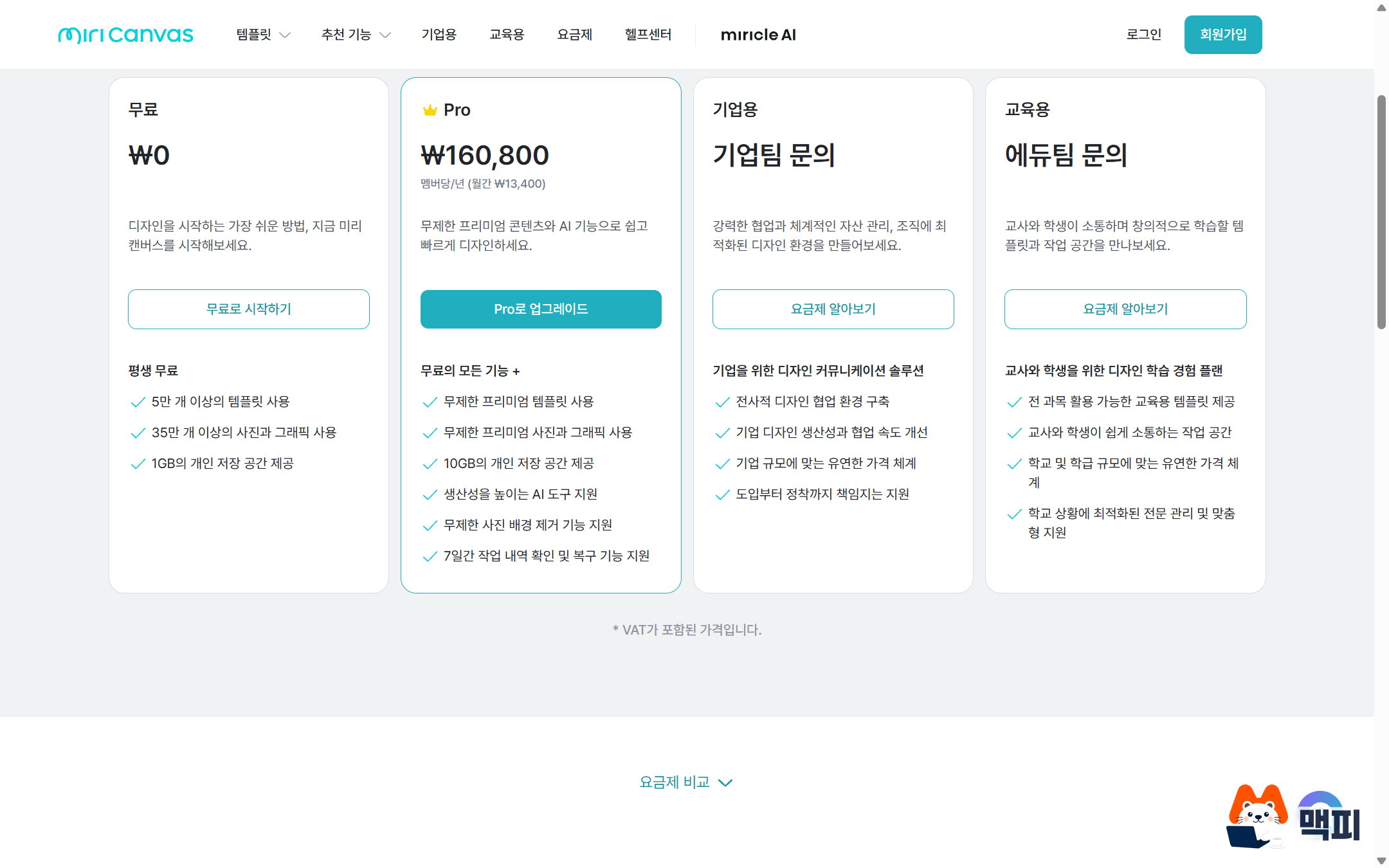
Miri Canvas lists Free, Pro and Enterprise on its pricing page. Free gives you more than 50,000 templates and more than 350,000 photos and graphics, with 1GB of personal storage. Pro includes everything in Free. It also adds unlimited premium templates and premium photos and graphics, and raises storage to 10GB.

| Item | Free | Pro |
|---|---|---|
| Price | KRW 0 | KRW 14,900 per month or KRW 160,800 per year (per member) |
| Templates | 50,000+ | Unlimited premium templates |
| Photos and graphics | 350,000+ | Unlimited premium photos and graphics |
| Personal storage | 1GB | 10GB |
| Photo background removal | Not listed on the pricing page | Unlimited |
| AI tools | Not listed on the pricing page | Included |
| Work history recovery | Not listed on the pricing page | View and restore for 7 days |
According to the Miri Canvas pricing FAQ, premium templates and content carry a crown mark on their thumbnails. Free users must upgrade to Pro to use crown-marked templates, though premium content can also be bought individually. Pro and Enterprise users can use all templates and content without separate purchases.
Miri Canvas Pro pricing: monthly, annual and member count
You choose between monthly and annual billing for Pro, and the price is multiplied by the number of workspace members. According to the Miri Canvas Pro plan guide, monthly billing is KRW 14,900 times the member count. Annual billing is KRW 160,800 times the member count, with a 10% discount built in. Divided by 12, the annual plan comes to KRW 13,400 per month, which is KRW 1,500 less per member per month than monthly billing.
| Billing method | Monthly cost |
|---|---|
| Monthly billing | 14,900 |
| Annual billing (per month) | 13,400 |
Per the official guide, you can pay with Naver Pay, Kakao Pay (both popular Korean mobile payment services) or a standard card. Annual billing charges KRW 160,800 in one payment. This is not official advice, but if you are unsure you will keep using it, start with monthly billing after the trial and switch to annual once your usage settles. That avoids a large upfront payment. For teams, the same amount is added for each member you add.
Miri Canvas Pro free trial and how to cancel
According to the Miri Canvas pricing FAQ, the Pro trial is available once and lasts 1 month. You are not charged during the trial. On the trial end date, the plan fee is charged automatically to your registered payment method. The official guide says a canceled trial cannot be used again later, so treat it as a one-time chance.
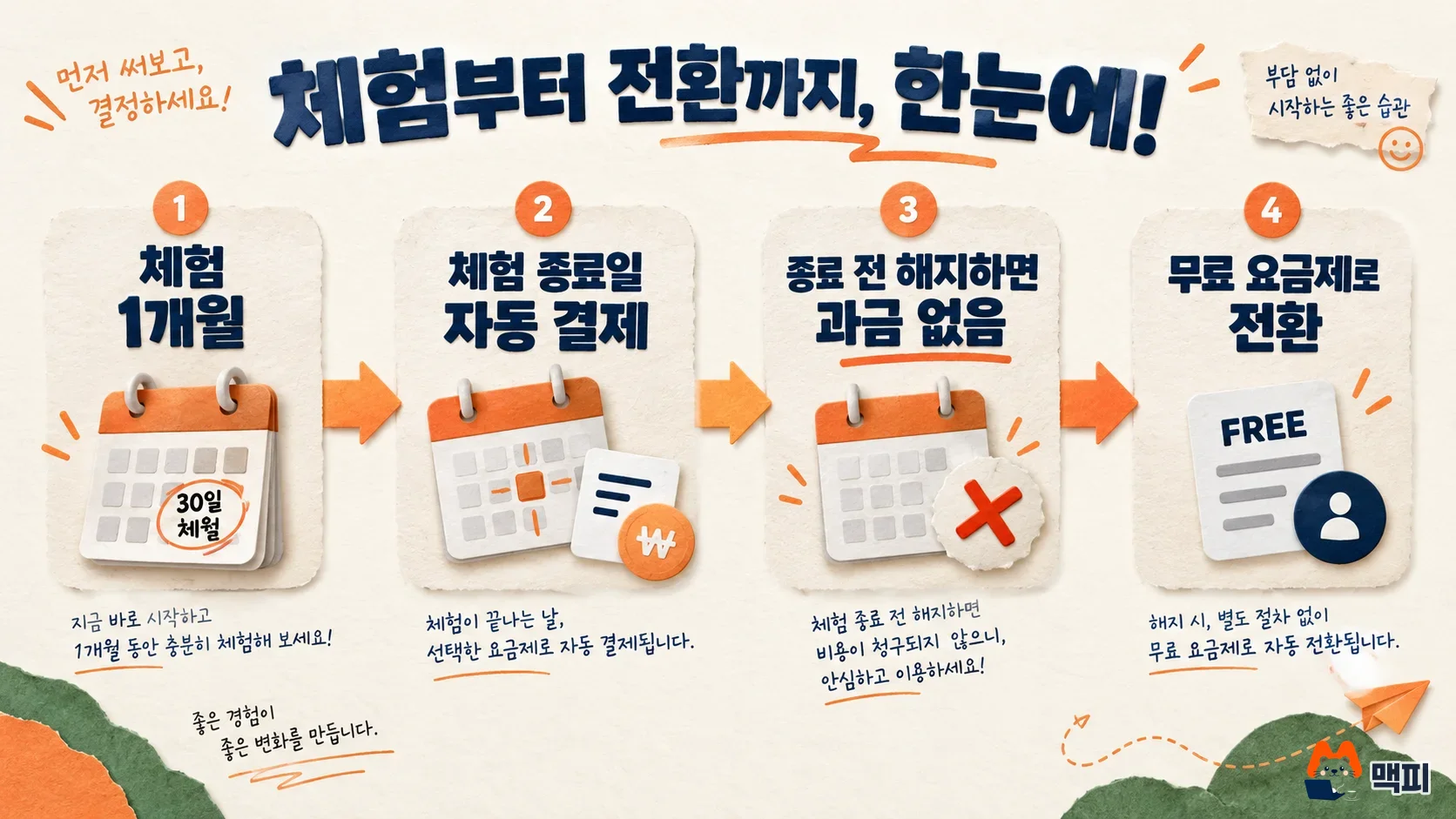
The pricing FAQ explains that if you cancel before the trial ends, you can keep using the rest of the trial period, and then you drop to the Free plan. The cancellation steps follow the official Pro plan guide.
- In Miri Canvas settings, go to Payment information settings.
- Click the link that says "Click here to cancel your paid plan."
- Choose a reason for canceling, check the final confirmation box, then click Cancel Pro plan.
During cancellation, a one-time first-use discount may be offered (33% for 3 months on monthly plans, or 20% off the next payment on annual plans). To confirm the cancellation worked, check that the plan has changed to Free in the payment information settings, and that no payment record appeared on the trial end date.
Miri Canvas commercial use and licensing
The pricing FAQ states that Miri Canvas applies the same license agreement to every plan. Under the Miri Canvas license agreement (effective September 11, 2023), paid provider content can be used permanently in one user design. It can be used for personal, non-commercial and commercial purposes within the scope the agreement allows. Free provider content must follow the license policy that each provider specifies.
The copyright guide restricts use for unsavory industries such as gambling and adult entertainment, industries that may encourage luxury or speculation, offensive ads, and content that defames others. If you plan to use designs for anything tied to revenue, such as online store detail images or ad banners, read the usage permissions and restrictions in the license agreement before you pay.
Which Miri Canvas plan should you choose
The Miri Canvas pricing FAQ says Free is enough if you work alone and do not make many designs each month. It recommends Pro if your team collaborates and shares often, or if you produce a lot each month and need more content. If you cannot decide, try the 1-month Pro trial and then choose.

According to the pricing FAQ, Enterprise offers more capacity than Pro, team drives and brand kits, and supports SSO (single sign-on, which lets you access multiple services with one login) and API integration. Pricing is not public. Large franchises, nationwide organizations and large agencies should contact the B2B sales team (b2b@miricanvas.com).
The most common trial mistake is missing the end date. If you do not cancel, payment is processed automatically on the end date, and per the official guidance, refunds for a simple change of mind are not available. On the day you start the trial, set a phone reminder for one day before it ends. If you do not plan to keep Pro, you can cancel in the payment information settings right away on day one and still use the rest of the trial period.
Miri Canvas pricing FAQ
Can I get a refund if I cancel a Miri Canvas Pro payment?
According to the official Pro plan guide, a refund is possible only if 7 days have not passed since the automatic payment date and you have no usage history, such as creating, downloading or uploading a document. In Settings, open the payment history, click the more button (···) and choose cancel payment and refund. Depending on the payment method, the refund takes about 1 to 7 days.
Can I use the Miri Canvas Pro trial again?
You can apply for the trial only once, and a canceled trial cannot be used again later. The official guide says that if you want to pay right away without a trial, you need to contact customer support.
Do I pay the Miri Canvas Pro fee for each team member?
Yes. According to the official guide, the fee is billed by the number of workspace members: KRW 14,900 times the member count for monthly billing, or KRW 160,800 times the member count for annual billing.
Found this useful? Share it
Latest posts
Kakao Share Thumbnail Not Showing? Here's the Fix (JavaScript SDK 2025)
Learn why Kakao Share thumbnails don't appear even with a valid imageUrl, and fix it using scrapImage to convert your URL into a KAGE CDN URL. Step-by-step guide.
How to Generate CRM User Manuals in 20 Minutes with Claude Code Sub-Agents
Learn how Claude Code sub-agents can analyze your CRM codebase and auto-generate user manuals and visual guidebooks in just 20 minutes. See the real-world results.
GEO Generative Engine Optimization: The Complete 2025 AI Marketing Strategy Guide
Learn what GEO (Generative Engine Optimization) is, how it differs from traditional SEO, and discover 5 proven AI marketing strategies to get cited by AI search engines in 2025.
Related projects
Get new posts by email
Insights on marketing, analytics, and dev, delivered to your inbox.