
Naver Digital OOH ads can now run for food and beverage, lodging, and hospital-related businesses such as hospitals, clinics and pharmacies. In its notice on expanded eligible industries dated October 13, 2026, Naver (Korea's largest search engine) added hospital-related businesses. These advertisers do not need a medical ad pre-review number or review certificate. In exchange, their ads run only on indoor ad media, and some indoor media may limit exposure. This article reflects the situation as of October 14, 2026.
Industries eligible for Naver Digital OOH ads
Digital OOH is a Naver ad product that shows ads on screens in everyday places, such as apartment elevators, convenience stores, restaurants and cafes, in locations you choose. The official help page calls it ADVoost Screen Place type. With this expansion, the notice groups eligible industries into three sets.
| Industry | Eligible | Good to know |
|---|---|---|
| Food and beverage related | Yes | Creatives that promote alcohol or encourage drinking cannot run, per the guide to ineligible industries. |
| Lodging related | Yes | Detailed eligibility follows the ad registration criteria and each industry's operating policy. |
| Hospital-related industries such as hospitals, clinics and pharmacies | Yes, per the October 13, 2026 notice | Ads run only on indoor ad media, and delivery may be limited depending on the review result. |
The help pages list industries that still cannot advertise. Examples include businesses barred under the search ad site registration criteria, such as gambling, entertainment bars and adult products, plus gas stations, funeral and mutual-aid services, and tobacco. Some wording in the product launch notice and the refund event notice still lists hospitals and clinics as restricted. Treat the October 13 notice, the most recent one, as the standard for hospital-related industries.
What hospitals and pharmacies should know before running Digital OOH
Hospital-related businesses do not have to submit ad review documents, but their reach is narrower. The notice lists three points.
- A medical ad pre-review number or review certificate is not required.
- Under medical advertising laws and media operating policies, ads run only on indoor ad media, and some indoor media may limit exposure.
- Creatives must comply with relevant laws and the ad registration criteria, and delivery may be limited depending on the review result.
The notice says creatives must follow relevant laws and the ad registration criteria, and delivery may be limited by the review result. The help page also states that advertisers must hold the legal right to use the creative's text, images, video and model portrait rights.
Where Digital OOH ads appear and how billing works
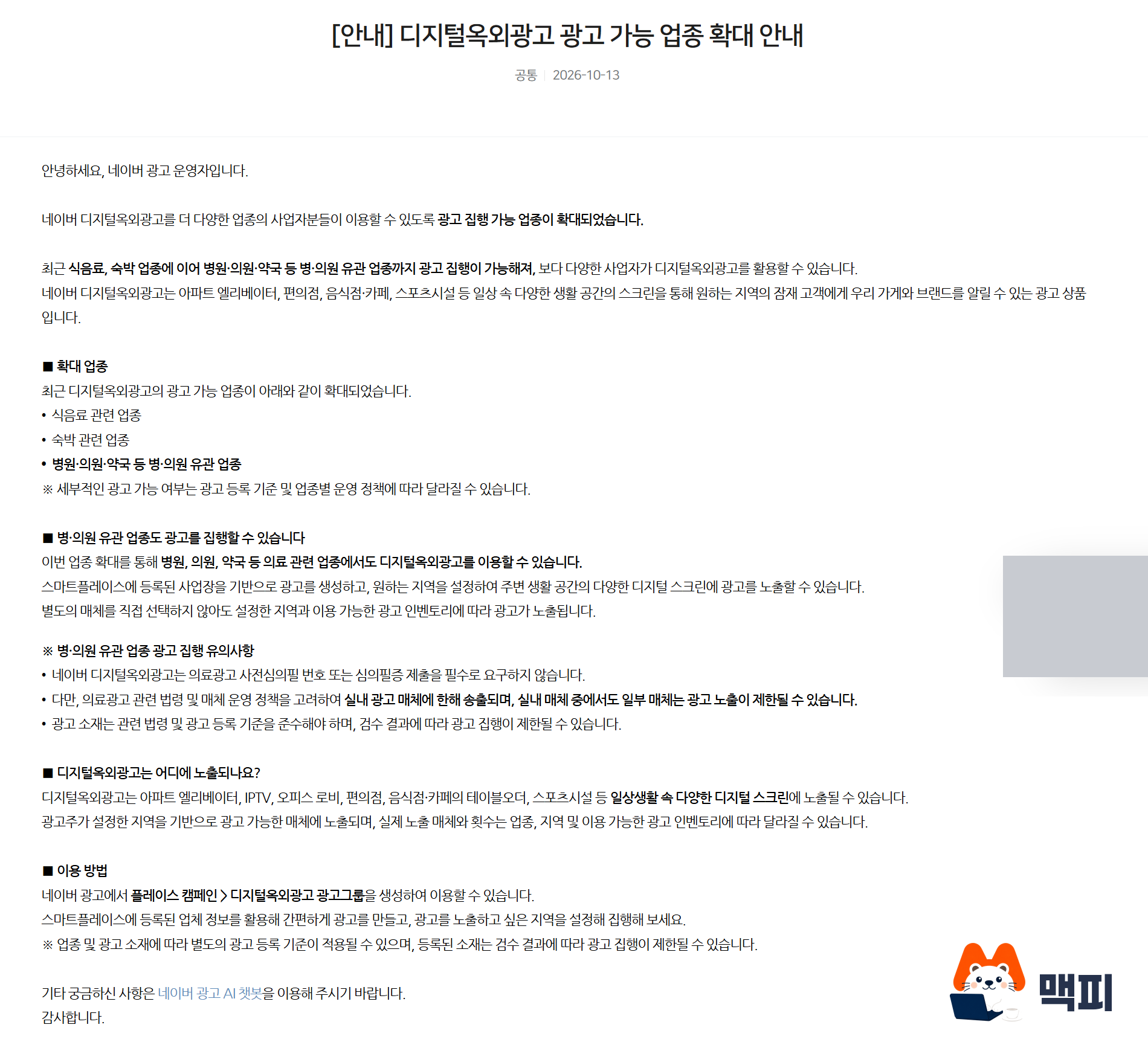
According to the help pages, ads appear on elevators, convenience stores, table-order screens, office and apartment lobbies, hospital waiting-room screens, screen golf kiosks, IPTV and more. Advertisers cannot choose the media. Ads run based on the ad inventory of media in the region you select. If another advertiser picks the same region, exposure is decided by factors such as each campaign's target budget and spending status. For hospital-related industries, the notice says ads run only on the indoor media among these.
Billing is based on plays, not clicks. According to the billing method help page, this is a non-guaranteed product where cost accrues as ads play within the daily budget. It uses a fixed price per play (CPV), so you do not enter a bid. Registering an ad is free, you are charged only when it plays, and clicks do not occur given the nature of Digital OOH.
Naver also announced an event that refunds October ad spend. Advertisers who spend KRW 1,000 or more get a refund of up to KRW 300,000.
How to set up Digital OOH ads for hospitals and clinics
You create the ad in Naver Ads as a Digital OOH ad group under a Place campaign. Creatives use the business information and clips registered in Smart Place (Naver's business listing service), so your business must be registered in Smart Place before you create the ad.
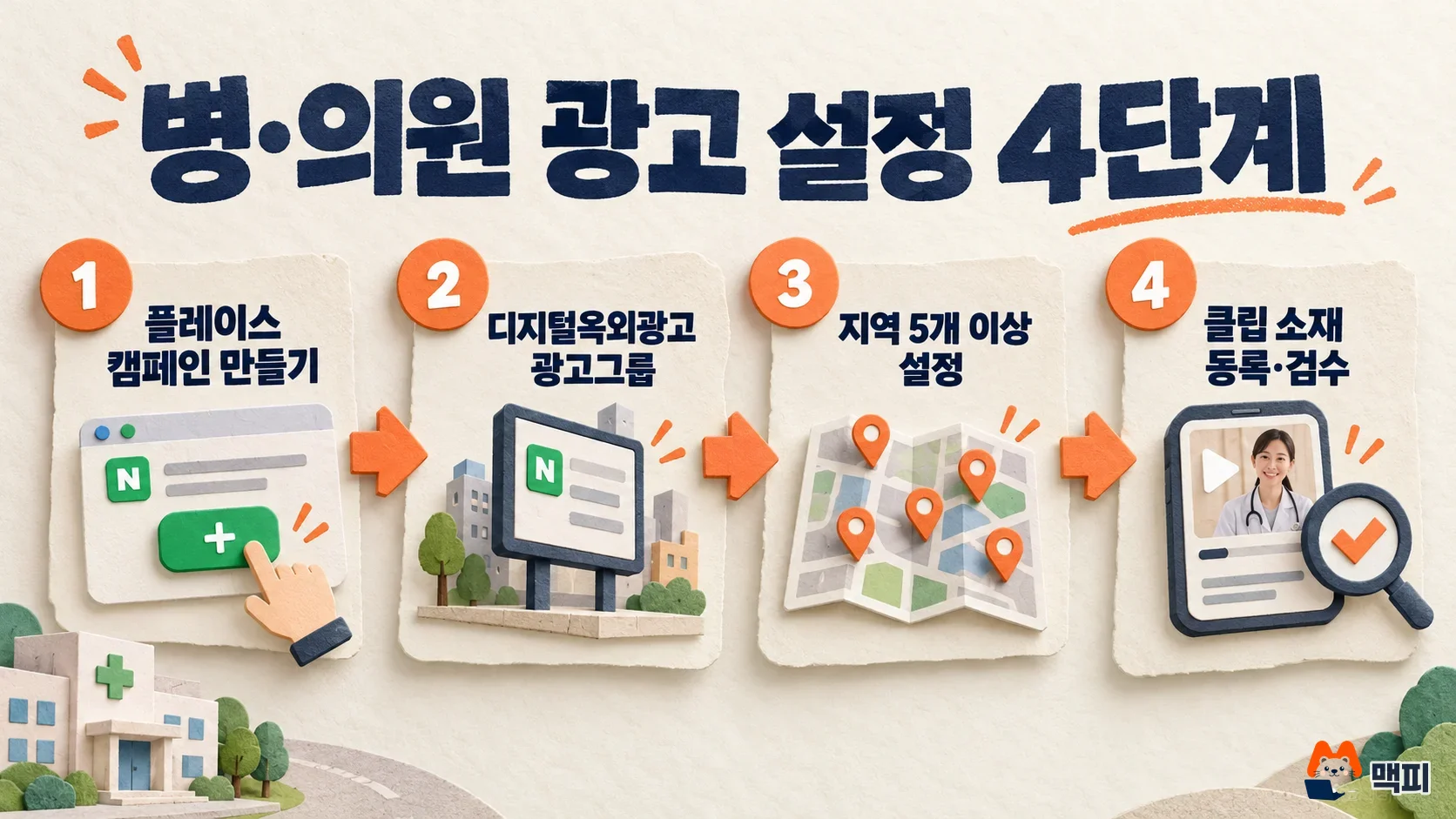
- In the advertiser center dashboard, click [Create ad > Choose a goal and start > Promote offline store > Digital OOH > Next] to create a Place campaign.
- On the campaign's ad group tab, click [New ad group], enter the ad group name, business information and daily budget, then click Save and close. You cannot change the ad group type after creating it.
- On the ad group's region tab, set the exposure regions to between 5 and 100 neighborhoods (dong units). When you create the ad group, 5 nearby regions based on your business's legal dong are added automatically (exposure region settings).
- On the creative tab, click [New creative] and choose a clip made in Smart Place. Each ad group allows up to 2 creatives. You cannot edit a creative once made, so delete it and create it again (creating a creative).
A clip is made in Smart Place under Marketing > Outdoor ads, by adding 5 photos to AI-generated ad copy. The clip creation guide warns that text placed directly inside images may appear cut off. Creatives are produced as landscape (16:9) and portrait (9:16) videos.
Review starts once registration is complete. Review can take 2 to 5 business days, and ads appear on outdoor media only after review ends. From the day after delivery starts, you can check exposure and performance in the Digital OOH report (beta) under Reports > Product-specific reports. You can view play counts by place type, at the ad group or creative level, and by province, city/county/district and legal dong. Only place types with actual exposure are shown.
Naver Digital OOH FAQ
What is the minimum daily budget?
For Place ad groups, you set a daily budget from KRW 50 to KRW 300,000 in KRW 10 units. The price per play is fixed, so you do not enter a bid.
Does a region change apply immediately?
No. According to the help page, edits to region targeting take up to 30 minutes to apply.
Can I target specific elevators or convenience stores?
You cannot choose media. According to the help page, ads appear on media with ad inventory inside the regions you set, and on the region tab you can check whether each region has devices available for exposure.
If you run a hospital or pharmacy, first check that your Smart Place listing has your business information and a clip. Then create a Digital OOH ad group under a Place campaign in the advertiser center, and set 5 regions and a creative.
Sources: Naver Ads advertiser center Notice on expanded Digital OOH eligible industries (October 13, 2026), What is Digital OOH?, How to use, Billing method, Exposure areas and methods.
Found this useful? Share it
Latest posts
Kakao Share Thumbnail Not Showing? Here's the Fix (JavaScript SDK 2025)
Learn why Kakao Share thumbnails don't appear even with a valid imageUrl, and fix it using scrapImage to convert your URL into a KAGE CDN URL. Step-by-step guide.
How to Generate CRM User Manuals in 20 Minutes with Claude Code Sub-Agents
Learn how Claude Code sub-agents can analyze your CRM codebase and auto-generate user manuals and visual guidebooks in just 20 minutes. See the real-world results.
GEO Generative Engine Optimization: The Complete 2025 AI Marketing Strategy Guide
Learn what GEO (Generative Engine Optimization) is, how it differs from traditional SEO, and discover 5 proven AI marketing strategies to get cited by AI search engines in 2025.
Related projects
Get new posts by email
Insights on marketing, analytics, and dev, delivered to your inbox.