
On September 2, 2026, Google sent another reminder that Google Ads API v22 is being retired. The Google Ads API is the connection channel that lets programs read and change ad accounts. From October 7, 2026, API requests sent to v22 will fail. This is not an announcement that all Google Ads ad delivery will stop. First check whether your systems actually call v22. If they do, move to a supported newer version before the sunset date.
Who is affected
v22 is the 22nd major version of this API (a big version that includes changes that break compatibility). It is a separate path from running campaigns by hand in the ad manager interface.
The scope is applications that send v22 API requests. Check anything that depends on the Google Ads API, such as campaign creation and change scripts, report collectors, dashboards, and conversion data integrations. Do not widen the scope to delivery stoppages in ad accounts that do not use the API.
Google's official notice says all v22 API requests will start failing after October 7. It advises you to upgrade to the latest version before the sunset date. You can see what differs in newer versions in the release notes and the sunset schedule.
The order to check now
The check runs in four steps, from finding calls to verifying after the switch.
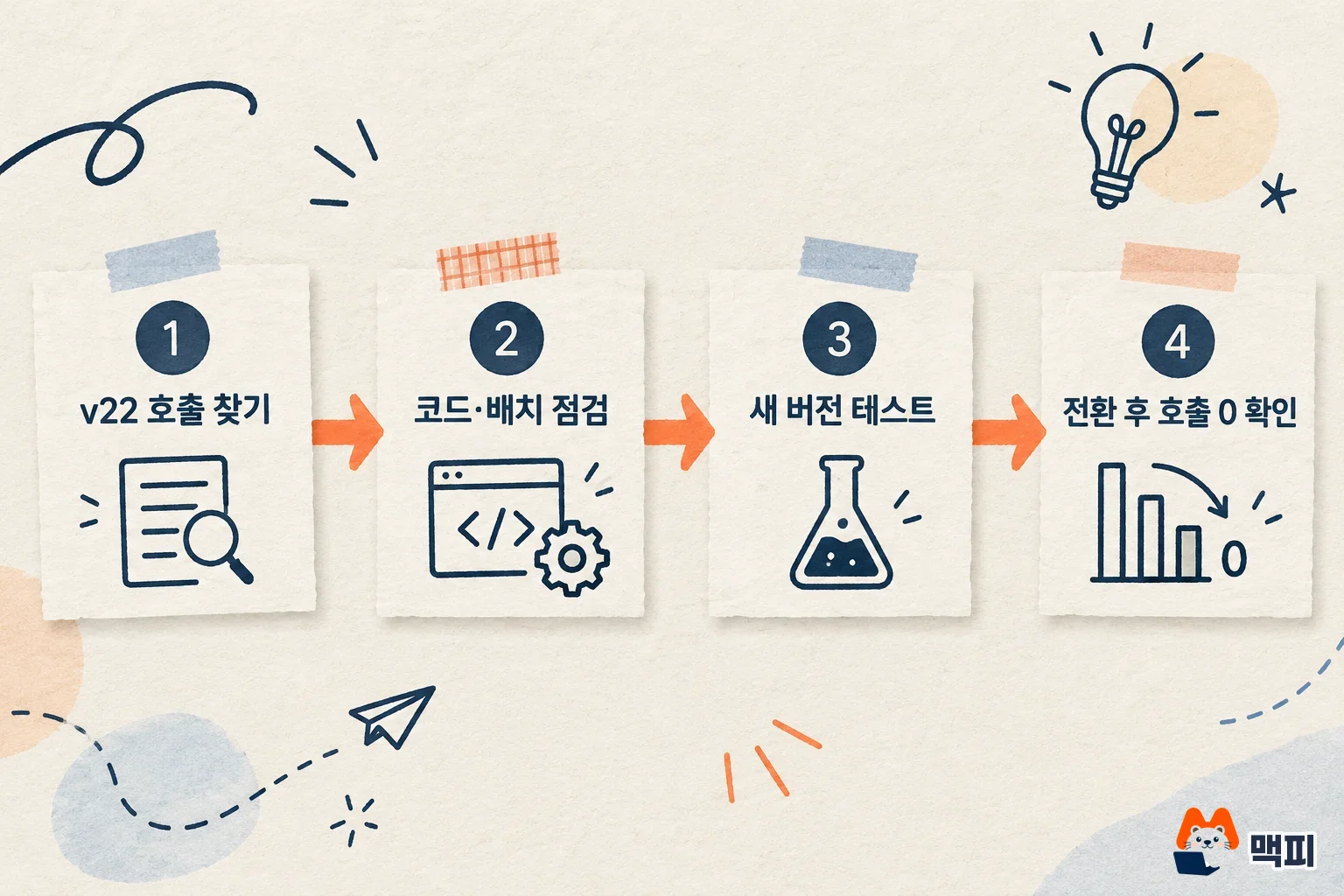
- In Google Cloud Console, open APIs & Services → Google Ads API → Metrics. The recent calls in the Methods table show the version, service, and method together. If you find a name such as
google.ads.googleads.v22.services.GoogleAdsService.Mutate, trace the owner and the deployment path of that system. - Look for settings that pin v22 in server code, official client libraries, batch jobs, Cloud Run scheduled jobs, and third-party integrations. Monthly jobs that fall outside the console's recent call window need a separate check through code and execution logs.
- Read the changes in the latest supported version, and test authentication, queries, fields, and error handling in a test environment. Compare report values and mutate request results against the existing version.
- After switching to the new version, confirm that no more v22 calls show up in Metrics, and check the failure rate, batch completion, and downstream data freshness. Finish the switch before the sunset date.
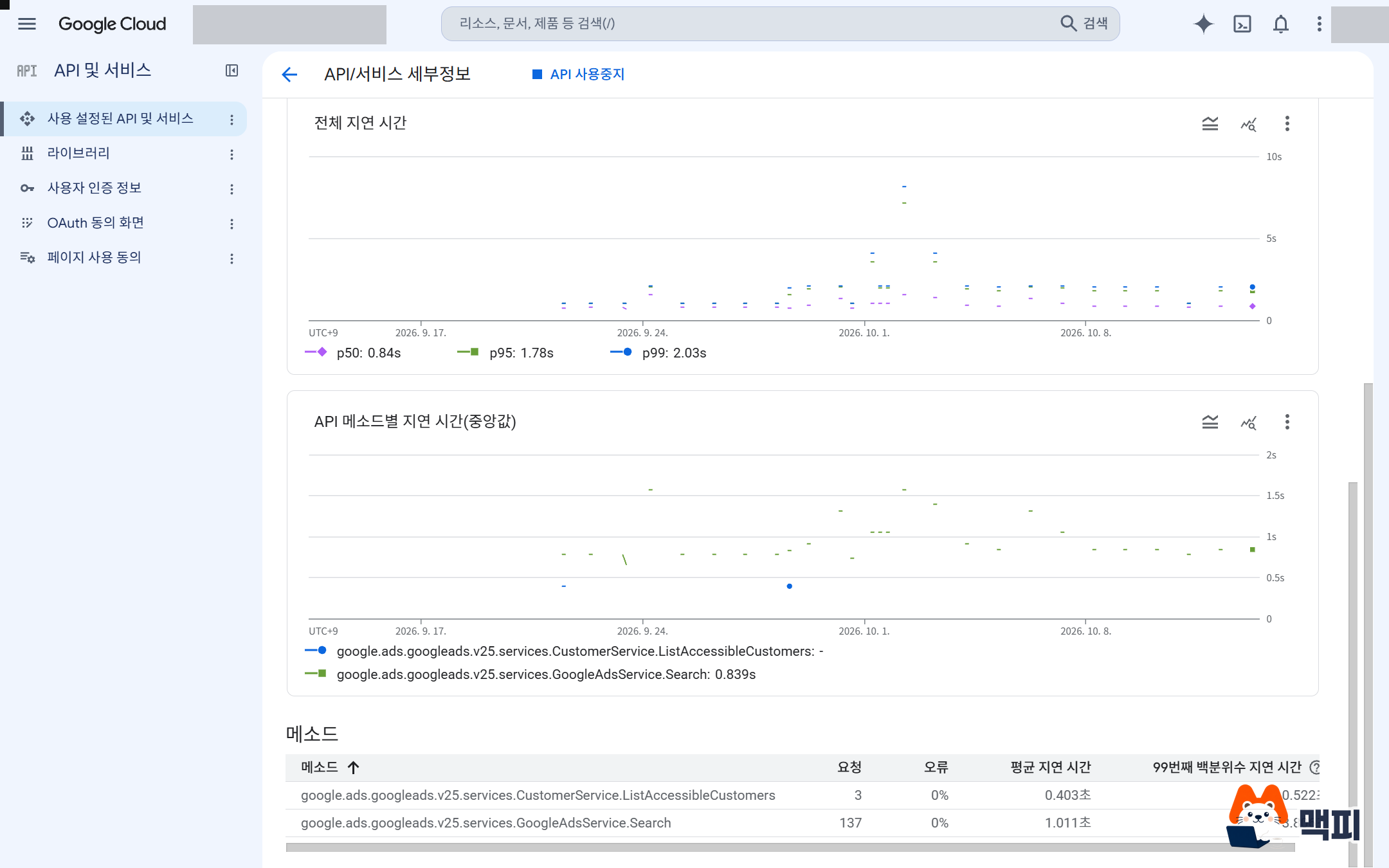
In the Google Cloud Console methods table, the API version is part of the call name, so you can tell at a glance whether v22 is still there. The screen below is an example of a healthy state where only v25 calls appear.
Confirmed facts and practical inference
Confirmed facts: The notice date is September 2, 2026, and the v22 sunset date is October 7, 2026. After that, v22 API requests fail. The official post points to the path in Google Cloud Console for checking recent call methods and versions.
Practical inference: Automated reporting and change jobs that depend on v22 can fail. The real impact depends on whether each organization makes these calls and how it handles failures. Do not read this as a blanket stop of ad delivery. If conversion measurement and server integration are unfamiliar to you, MCPY's guide on how conversion tracking works may also help.
Update (October 13, 2026): From v26, API releases come twice a month, and the 2026 to 2027 sunset schedule is out
On October 12, 2026, Google published the Google Ads API 2026 to 2027 release and sunset schedule. From v26, releases increase to twice a month, so new features reach the API sooner. Major versions that break compatibility stay at four per year, as they are now, and the rest are minor releases that only add new features.
A major version is supported for one year, and minor releases end together with the major version they belong to. There are more releases, but the migration cycle stays the same, so you do not have to change versions more often. Google also said it will move the release blog and the YouTube briefing to twice per quarter.
| Major version | Planned release | Planned sunset |
|---|---|---|
| v23 | Released | February 2027 |
| v24 | Released | May 2027 |
| v25 | Released | August 2027 |
| v26 | October 2026 | November 2027 |
| v27 | January 2027 | February 2028 |
| v28 | April 2027 | May 2028 |
| v29 | July 2027 | August 2028 |
| v30 | October 2027 | November 2028 |
The dates in the table are values Google gave as an expected schedule, so they can change. v26.3, which falls in the year-end holiday season, may be skipped, and v27, which arrives in January, has few minor releases.
What you need to do is put the sunset month of the version you use on your calendar. If you use v23, the nearest date is February 2027, and for v24 it is May. A new minor release only adds features inside the same major version, so you can move when you need a specific feature, after reading the release notes. Check the updated dates on the sunset schedule.
Frequently asked questions
Does the v22 sunset mean ads stop serving? No. The notice is about v22 API requests failing. The delivery status of an ad account is a separate matter.
How can we tell whether our organization is affected? Check the version of recent call methods in Google Ads API Metrics in Google Cloud Console, and also investigate batch jobs and code settings that fall outside the call window.
Can we upgrade after October 7? Until then, v22 requests may fail. It is safer to switch before the sunset date, allowing time for testing, deployment, and observation.
A reusable check card
- Insight: In a service sunset notice, separate the impact scope of the whole product from that of a specific API version.
- Practice: After confirming the effective date in the notice, cross-check actual call methods, code settings, and batch execution history.
- Task template: Fill in one row each for
System name / Owner / Recent v22 calls (yes/no) / Replacement version / Test result / Deploy date / Confirmed zero v22 calls after switch.
Found this useful? Share it
Latest posts
Kakao Share Thumbnail Not Showing? Here's the Fix (JavaScript SDK 2025)
Learn why Kakao Share thumbnails don't appear even with a valid imageUrl, and fix it using scrapImage to convert your URL into a KAGE CDN URL. Step-by-step guide.
How to Generate CRM User Manuals in 20 Minutes with Claude Code Sub-Agents
Learn how Claude Code sub-agents can analyze your CRM codebase and auto-generate user manuals and visual guidebooks in just 20 minutes. See the real-world results.
GEO Generative Engine Optimization: The Complete 2025 AI Marketing Strategy Guide
Learn what GEO (Generative Engine Optimization) is, how it differs from traditional SEO, and discover 5 proven AI marketing strategies to get cited by AI search engines in 2025.
Related projects
Get new posts by email
Insights on marketing, analytics, and dev, delivered to your inbox.