
Instagram said on September 30, 2026 that it added an AI assistant to Edits, its video editing app, in an official blog post. For now it is open only to US users. It is free to use, but daily usage has a limit, and you need a Meta One subscription to use more. No launch date for Korea has been announced.
The short version in three lines
- What it is: a chat-style helper that reads your account's views and watch retention, then suggests video ideas, hooks, captions and trending audio.
- Who can use it: per the official announcement, all Edits users in the US, on both iOS and Android.
- Cost: free within a daily usage limit. You raise the limit by subscribing to Meta One.
What the assistant does for you
Edits is a video editing app made by Instagram. Think of it as the editor you use to make Reels (Instagram's short videos). The assistant is a chat window inside this app.
The assistant reads your account's follows, views, watch retention, likes and shares. It combines this with comments and what is trending on Instagram to answer. Instagram says the goal is answers tailored to your account, not generic advice.

The official post lists three features.
- Find patterns: it points out what works on your account and why.
- Generate ideas: it suggests video topics, opening lines (hooks) and captions for your niche.
- Find audio: it recommends popular audio and lets you save it right from the chat.
Brett Westervelt, head of Edits, wrote in the official post, in essence, that the assistant does the analysis while the creative judgment is still yours. MCPY takes this at face value and reads the assistant as not a feature that makes videos for you.
How to get started
Using it is simple. Open the Edits app, tap the chat icon, and type a question. The example question in the official post is "What is working on my account right now?"

- Open the Edits app.
- Tap the chat icon.
- Ask something specific, such as "What do my most-viewed Reels from the past month have in common?"
- Take the answer, pick a topic and wording, and do the editing yourself.
Below is the actual screen Instagram posted in its official post. The speech bubble icon at the far right of the bottom menu is the entry point to the chat. The questions and answers on screen are in English.
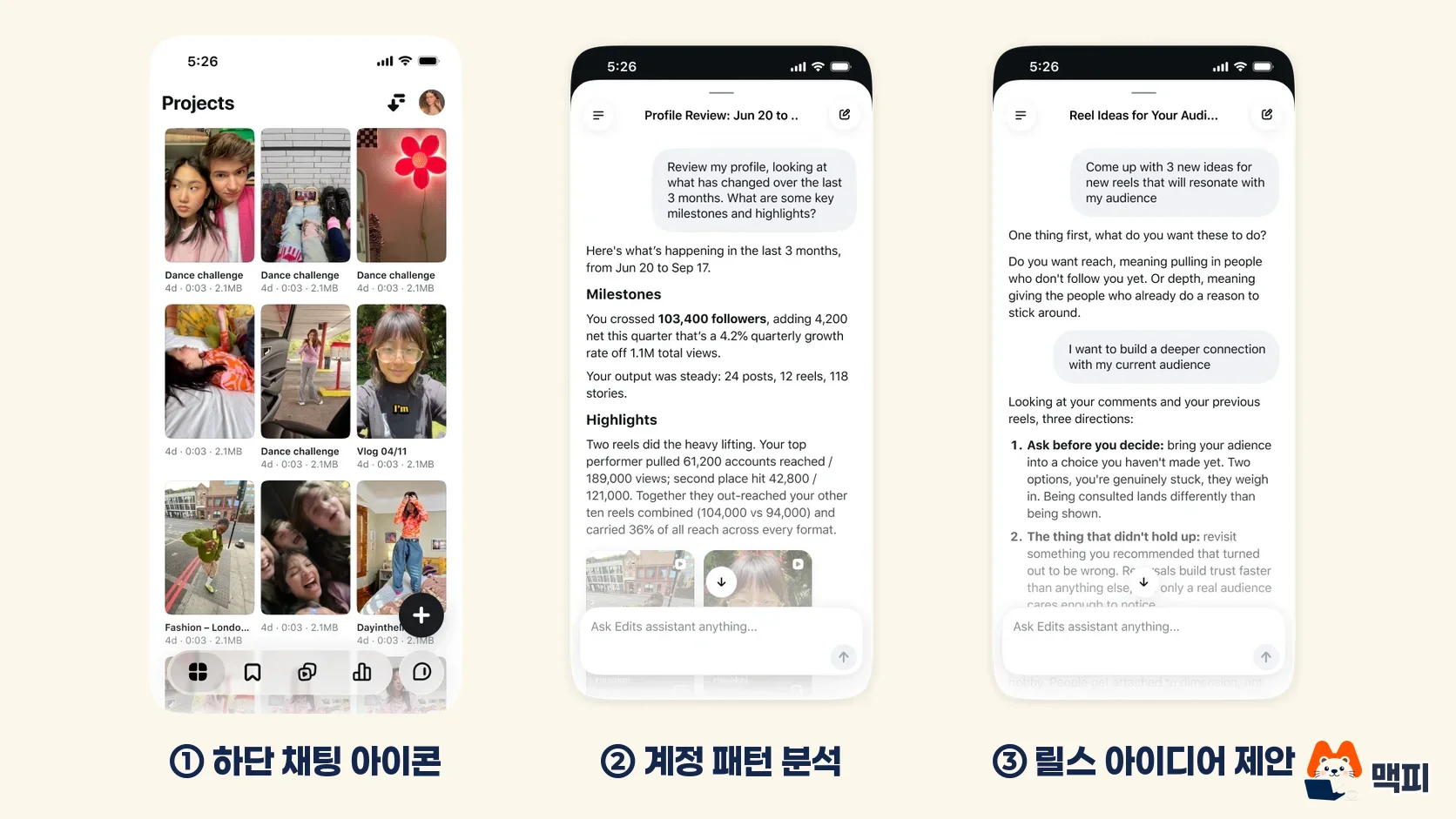
The more specific your question, the closer the answer gets to your account. The example questions above were written by MCPY. Few people have tried the assistant yet, so its real answer quality is unknown.
The basic flow for editing Reels in Edits
You can use Edits itself even if the assistant does not open for you. The basic editing flow is as follows.
- Tap the + button to choose and add the video clips you want to edit.
- Refine them with tools such as trim, captions, audio, sound effects and overlays.
- Tap export to save to your phone. Buffer's usage guide explains that it saves in up to 4K with no watermark.
- Upload it to Instagram as a Reel.
According to the Korean App Store description, one video can be up to 10 minutes long. That is plenty for making Reels.
Free limit and Meta One pricing
According to the official post, the assistant has a daily limit on questions. The limit number has not been disclosed. Once you pass it, you need the higher usage that opens up for Meta One subscribers.
Meta One is a subscription bundling Instagram, Facebook, WhatsApp and Meta AI. Per the official Meta announcement, it launched in September 2026. Plans for creators and businesses start at $14.99 per month.

| Plan | Monthly price (USD, starting) |
|---|---|
| Essential | 14.99 |
| Advanced | 49.99 |
| Expert | 149 |
| Max | 499 |
The reference date is October 1, 2026. Meta has not said how much extra assistant usage each plan gives. Instead, it previewed Edits Plus in the official Meta announcement, to come later, which will add cloud storage and more assistant usage.
What to check in Korea
You can download the Edits app for free from the Korean App Store, and it supports a Korean-language interface. The assistant is separate from that and has opened only to US users. When it will be available in Korea, and whether it will answer in Korean, has not been announced.
What follows is MCPY's recommendation, not an official announcement. Korean users can do two things right now. One is to install Edits first and watch whether a chat icon appears in an app update. The other is to read the same metrics yourself in the insights of the Instagram professional dashboard. The data the assistant looks at is ultimately these metrics.
Meta One pricing is in US dollars. Check before signing up whether a price shows on the Korean payment screen and how much it is in Korean won.
Common mistakes
- Reading "launched" as "available in Korea too." For now it is for US users.
- Posting the assistant's recommendations as they are. Ideas are references, and the judgment is yours.
- Reading the Meta One starting price as the assistant's fee. Usage by plan has not been disclosed.
When to check next
This article is based on the official announcement of September 30, 2026. We will update it when Korean availability and the limit numbers are released. For now, keep the Edits app on the latest version and check once whether the chat icon appears.
References
Found this useful? Share it
Latest posts
Kakao Share Thumbnail Not Showing? Here's the Fix (JavaScript SDK 2025)
Learn why Kakao Share thumbnails don't appear even with a valid imageUrl, and fix it using scrapImage to convert your URL into a KAGE CDN URL. Step-by-step guide.
How to Generate CRM User Manuals in 20 Minutes with Claude Code Sub-Agents
Learn how Claude Code sub-agents can analyze your CRM codebase and auto-generate user manuals and visual guidebooks in just 20 minutes. See the real-world results.
GEO Generative Engine Optimization: The Complete 2025 AI Marketing Strategy Guide
Learn what GEO (Generative Engine Optimization) is, how it differs from traditional SEO, and discover 5 proven AI marketing strategies to get cited by AI search engines in 2025.
Related projects
Get new posts by email
Insights on marketing, analytics, and dev, delivered to your inbox.