
Instagram Live video ads become generally available on September 29, 2026 per Meta's official announcement, and brands can run a creator's live stream as a partnership ad (as of September 30). Korea's launch is confirmed only by a September 30 report from Madtimes, a Korean advertising trade outlet. That report says the ads require a professional or creator account with 1,000+ followers, carry no separate fee, and appear in Stories, Reels and Feed. None of these three points appear in Meta's official announcement. We could not confirm a minimum budget or KRW pricing for Korea.
This guide is for marketers evaluating Instagram Live ads for the first time. It covers the start date, conditions, placements, setup path and pre-launch checks. The start date and scope follow Meta's official announcement of September 15, 2026 (Meta for Business news). Korean conditions come from the Madtimes report and are marked separately. Every claim that is not in the official announcement names its source.
The short version in three lines
- Start: Meta's official announcement says general availability begins September 29. Korea's launch is confirmed only by a September 30 report, so check your own account to see whether the menu is open.
- Conditions: The official announcement says only that it is open to all advertisers and agencies. The 1,000-follower condition appears only in the Korean report.
- Cost: The Korean report says there is no separate fee and standard ad rates apply. The official announcement does not mention pricing, and the minimum budget is unconfirmed.
When you can start using it
At IAB Global Creator Week on September 15, Meta officially announced that Instagram Live video ads enter general availability on September 29. The official wording is this: Instagram Live video ads let brands turn a creator's live stream into a partnership ad, and they become available globally to all advertisers and agencies. The format already existed on Facebook. Meta first announced the expansion plan on June 18 around Cannes Lions (Social Media Today, Mediaweek), and Marketing Dive and Social Media Today reported the September 15 announcement on the same date. A partnership ad is a format where a brand pays to promote content from a creator's account.
In Korea, Madtimes reported a September 30 launch. AMPM, a Korean marketing practitioner publication, wrote in its August 31 article that the feature was introduced in March, so the timing differs between reports. MCPY also could not confirm the date it actually opened on Korean accounts.
Who can use it and what it costs
According to Madtimes, eligible accounts are professional or creator accounts with 1,000 or more followers. Meta's official announcement says only that it is available to all advertisers and agencies, with no follower condition. The report also does not say whether the follower condition applies to the brand running the ad or the creator who is streaming. We could not confirm whether the two descriptions describe the same condition. So MCPY treats 1,000 only as the figure from the Korean report.
According to Madtimes, live stream ads carry no separate fee, and the standard ad rates for impressions and reach apply. Performance figures were reported alongside, but the original gives no comparison baseline or campaign period, so this article does not repeat them. There is no basis to assume your account will see the same results. The converted KRW amount has to be checked on the billing screen.
Where live ads appear
They appear in three places: Stories, Reels and Feed. In Stories, the live stream is shown like a teaser of up to 15 seconds. In Reels and Feed, the real-time video keeps playing until the user scrolls past it. Madtimes, AMPM and the global explainer articles describe it the same way.

AMPM explains that you can set a CTA button (a button that prompts an action, such as Watch Now or Learn More) before and during the live stream. When the button is tapped, the detail page opens in the in-app browser while the live stream keeps playing behind it. Check your landing page speed before the broadcast so that people coming from the stream can view it smoothly on mobile.
How to set up an Instagram Live ad
According to Madtimes, there are three setup entry points: Ads Manager, Meta Business Suite and the Instagram app. A global explainer article says you create the ad in Ads Manager before or during the broadcast, and that the ad runs only after the creator first grants ad permission in their business management tools. The Meta Business Help Center has an official help article titled "Create an Instagram Live Video Ad from Meta Ads Manager", described as explaining how to create an ad in Ads Manager that promotes an Instagram Live broadcast to more people (Meta Business Help Center). However, that page is rendered by script, so MCPY could not read the step-by-step body, and we did not verify button names or order. Below is the sequence from checking conditions to going live.
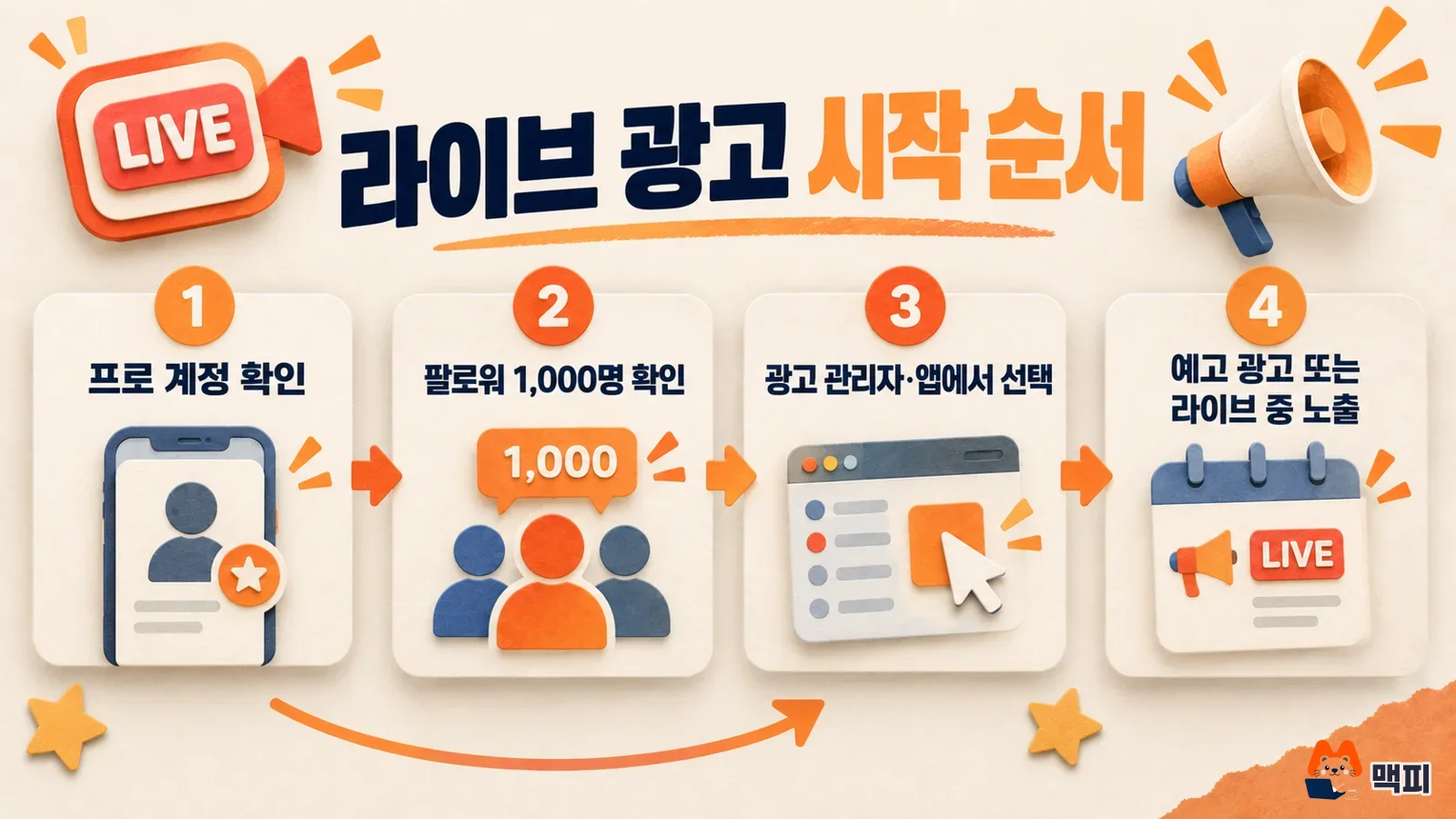
- Check that your Instagram account is a professional or creator account.
- Check that you have 1,000 or more followers.
- Confirm that the live ad menu is open in one of Ads Manager, Business Suite or the app.
- To promote another creator's broadcast, ask them for ad permission.
- Decide whether to start with a teaser ad before the live stream or show the ad during the broadcast.
Per AMPM, you choose the objective from maximizing conversions, link clicks, watch time and reach. For a first run, AMPM suggests building audience size with reach, then narrowing to the segments that respond well.
What to check in Korea
- Account type: If you have a personal account, switching to a professional account comes first.
- Follower condition: 1,000 is the figure from the Korean report. If the menu does not appear, check the Meta help pages.
- Budget: We could not confirm the minimum budget or the KRW unit price. Look at the currency and VAT display in Ads Manager.
- Privacy: Broadcasts show the faces of people on camera and the comments. Decide on consent from participants and the scope of comment display before the broadcast.
Common mistakes
The most common misunderstanding is treating a live ad as another name for a regular video ad. A video ad keeps running a pre-made creative, but a live ad has nothing to show once the broadcast ends. MCPY's estimate is that budget can be wasted if the broadcast time and the ad schedule do not line up. Second, expecting the reported performance figures as they are. The reported Meta figures do not disclose the comparison baseline or conditions. Third, designing a campaign before meeting the follower condition. Fourth, opening the broadcast link for the first time right before going live.
Four things to check before you run it

Reports say reach, impressions and video views are provided as performance metrics. Purchase conversions need separate tracking. Add UTM parameters to the link that sends people from the live stream to your landing page, and test once before the broadcast that purchase events reach GA4. MCPY recommends starting the first run with a small reach-focused budget and judging performance only by your own account's results. Start today by checking whether the live menu is open in your ad account.
Sources
- Meta for Business, IAB Global Creator Week: Making it Easier for Businesses to Partner with Creators (official Meta announcement, September 15, 2026)
- Madtimes, Meta launches Instagram Live broadcast ads in Korea (September 30, 2026)
- Meta Business Help Center, Create an Instagram Live Video Ad from Meta Ads Manager (official Meta help article, description only verified)
- Marketing Dive, Meta streamlines creator-brand tie-ups with new Creator Marketing Hub (September 2026)
- Social Media Today, Meta adds more creator partnership tools (September 15, 2026)
- MediaPost, Meta Launches Creator Marketing Hub, Live Video Ads (September 16, 2026)
- Shopifreaks, live video partnership ads to Instagram starting September 29 (September 16, 2026)
- Social Media Today, Meta updates its livestream shopping tools (June 17, 2026)
- Mediaweek, Meta expands live video ads and affiliate commerce tools (June 18, 2026)
- AMPM, Instagram Live ads: a practical operating strategy (August 31, 2026)
- Common Thread Co., Meta Instagram Live Video Ads Launch September 29 (third-party commentary)
Found this useful? Share it
Latest posts
Kakao Share Thumbnail Not Showing? Here's the Fix (JavaScript SDK 2025)
Learn why Kakao Share thumbnails don't appear even with a valid imageUrl, and fix it using scrapImage to convert your URL into a KAGE CDN URL. Step-by-step guide.
How to Generate CRM User Manuals in 20 Minutes with Claude Code Sub-Agents
Learn how Claude Code sub-agents can analyze your CRM codebase and auto-generate user manuals and visual guidebooks in just 20 minutes. See the real-world results.
GEO Generative Engine Optimization: The Complete 2025 AI Marketing Strategy Guide
Learn what GEO (Generative Engine Optimization) is, how it differs from traditional SEO, and discover 5 proven AI marketing strategies to get cited by AI search engines in 2025.
Related projects
Get new posts by email
Insights on marketing, analytics, and dev, delivered to your inbox.