
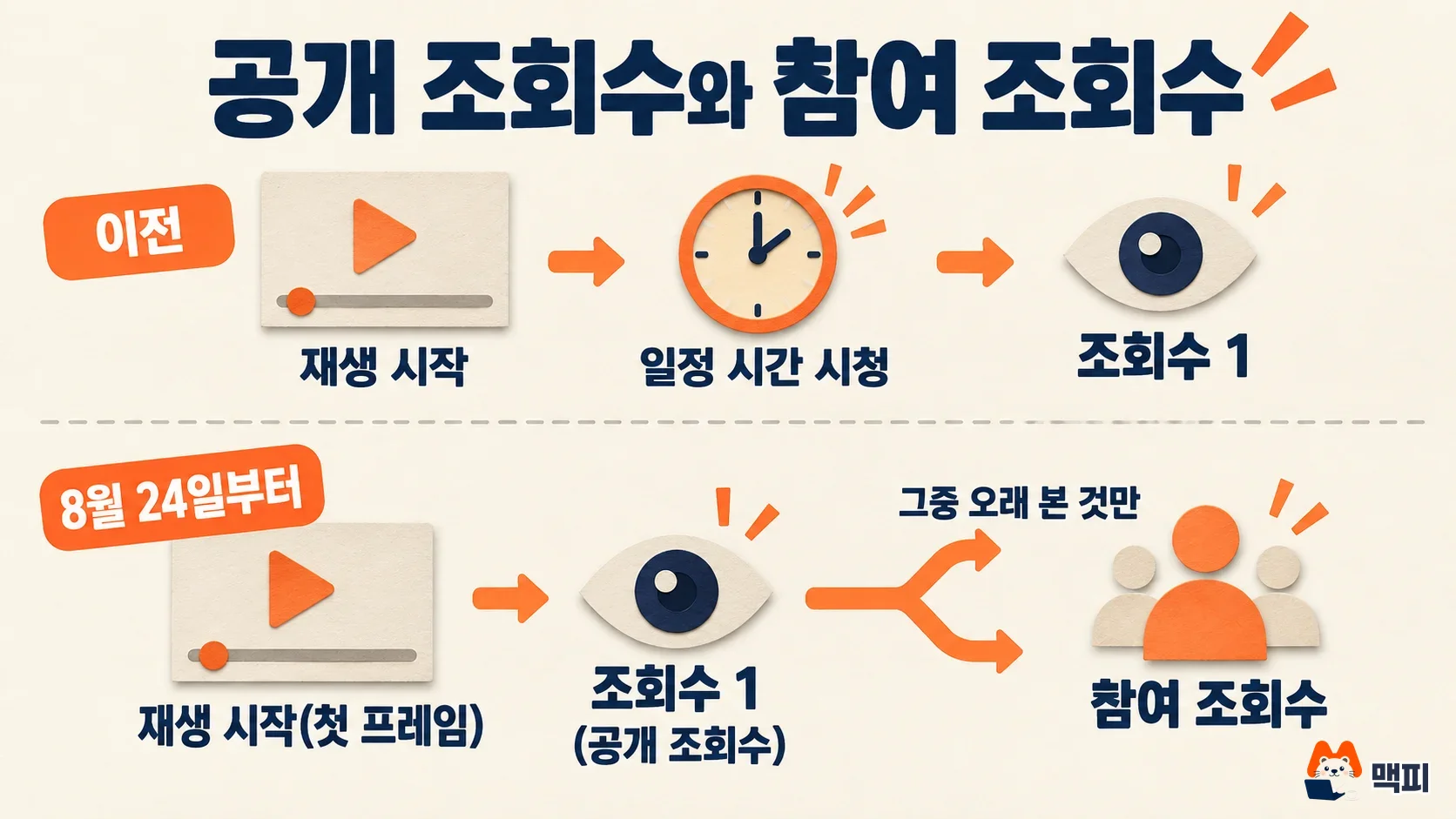
Starting August 24, 2026, YouTube counts a public view from the first frame of playback. The old-style number remains in YouTube Studio analytics under the name "Engaged views." Monetization eligibility and the CTR and average view duration calculations stay the same. When you review ad performance, use public views only as a rough reference for reach. Check engaged views and Google Ads ad views separately (as of Sept 30).
This article explains what changed, how the three view numbers differ, and where to be careful when reading ad reports. It draws on the YouTube official blog's Engaged views explainer, the YouTube Help page on how views are counted, and the Google Ads Help definition of ad views. MCPY read all three pages directly on September 30. The August 17 announcement timeline was confirmed through TechCrunch's report. The original notice is a YouTube Community post, but MCPY could not open and read the body of that post.
The short version in three lines
- Change: From August 24, public views on Shorts, long-form videos, and live streams all go up by 1 the moment playback starts.
- Unchanged: The old-style view was renamed engaged views, and monetization and most analytics metrics are based on engaged views.
- Caution: Public view counts may now run higher than before (per TechCrunch). One outside analysis reported that only 6 out of 10 public views are counted as engaged views.
What changed in the YouTube view count
The public view count is the number anyone can see. From August 24, a view is counted once playback starts. The YouTube official blog describes this as counting from "the very first frame."
The old definition did not disappear. It stays under the name engaged views. Engaged views are views where the viewer "clicked to watch or watched past the first few seconds." The official post does not state the exact number of seconds. MCPY does not guess a number either.
| Item | Public views | Engaged views |
|---|---|---|
| When it is counted | First frame of playback | Watching after a click, or past the first few seconds |
| Where you see it | The public view count anyone can see | YouTube Studio analytics |
| Monetization and YPP eligibility | Not the basis | Remains the basis (for public videos) |
| CTR, average view duration, retention | Not mentioned in the official post | Same calculation as before |
The official blog says most analytics are tied to engaged views, so the calculations for CTR, average view duration, and retention have not changed. The YouTube Help page also states that this change does not affect YPP (YouTube Partner Program) earnings or eligibility.
Which view count to use for ad performance
If you run ads, three numbers can cause confusion. They are public views, engaged views, and ad views, which Google Ads defines separately. Google Ads Help defines ad views differently by ad format.
| Ad format | What Google Ads counts as a view |
|---|---|
| Skippable in-stream | Watching 30 seconds or to the end, or clicking a CTA, card, or banner |
| In-feed video | Clicking the thumbnail to go to the watch page, or 10 or more seconds of muted autoplay |
| Shorts ads | Watching 10 seconds or clicking a CTA |
The YouTube Help page separates billable views on paid ads (TrueView views) from public views (YouTube public views). Ads also have public views, and the page says they are counted the moment playback starts. The definition of a billable view is the per-format rule in the table above. So MCPY treats the views and view rate (views ÷ impressions) in ad reports as separate from this public view change. This is MCPY's interpretation from reading the documents side by side. MCPY could not confirm whether the Google Ads reporting screen has changed.

Here is a hypothetical example. A production company pitches a sponsored influencer video and says, "This video has 500,000 views." If the video was published after August 24, that 500,000 may be counted from the first frame. If your team sets sponsorship rates by view count, it is safer to also ask for a screenshot of the same channel's engaged views.
How to read the 60% figure from outside analysis
Agentio, a creator advertising platform, analyzed 75,000 videos in its network. It reported that only 6 out of 10 public views also count as engaged views. According to Tubefilter's report, public views are 85% higher than engaged views on channels with fewer than 50,000 subscribers, and 49% higher on channels with 300,000 or more. Autoplay on the home screen and recommendation areas makes up 38% of all views and 20% of engaged views, and 77% of the gap between the two numbers reportedly comes from there.

With these numbers, the cost per view looks different. Agentio's example is a campaign that bought 1 million views at a CPM (cost per 1,000 impressions) of $30. If 600,000 engaged views are the real viewing, the cost on an engaged basis is $50.
MCPY does not apply these numbers directly to Korean channels or to your own campaign. The sample is videos in the Agentio network, so it is not a YouTube-wide average, and the share of Korean videos has not been confirmed. In this article, 60% is only a reference for judging direction. You can calculate the real ratio for your own channel by viewing public views and engaged views side by side in YouTube Studio.
What to check in Korea
- YouTube Studio: Check for yourself what name engaged views appear under in the Analytics tab. MCPY could not confirm the label on the Korean-language screen.
- Revenue payouts: Payouts in Korean won and tax handling are not affected by this change. The official explanation stays that YPP eligibility is based on engaged views and watch time.
- Agency reports: Reports from before and after August 24 define views differently. When you read month-over-month growth, first ask whether the basis has changed.
- Naver: This article covers YouTube metrics only. MCPY has not checked how Naver, Korea's largest search engine, counts views on Naver videos or Clips.
Common mistakes
First, reading the rise in views after August 24 as better content performance. Part of it comes from counting starting earlier. Second, comparing influencer quotes using public views alone. In the Agentio analysis, the gap was larger on channels with a bigger share of autoplay. Third, assuming that Google Ads views and view rate changed too. The Help page separates billable views from public views, and billable views follow separate per-format rules. Fourth, treating engaged views as a new metric. It is the old standard under a new name, and monetization still uses this number.
What to check today, in order
- In YouTube Studio analytics, open public views and engaged views for the last 28 days side by side and calculate the ratio.
- Split the period around August 24 and see whether the ratio changed.
- For running campaigns, check that the views and view rate in the Google Ads report match the per-format definitions (30 seconds, 10 seconds).
- For view reports you receive from influencers or agencies, ask them to state whether the basis is public or engaged.
Official Help pages change often, so check the YouTube Help view definitions once more before signing a sponsorship contract.
Sources
- YouTube official blog, What are 'Engaged' Views on YouTube?
- YouTube Help, How engagement metrics are counted
- Google Ads Help, About YouTube ads and view metrics
- YouTube Community, view count change notice (body not directly confirmed)
- TechCrunch, YouTube will now count a view as soon as a video starts playing (August 17, 2026)
- Tubefilter, YouTube's new public viewcounts over-report actual engagement by 40% (September 4, 2026)
Found this useful? Share it
Latest posts
Kakao Share Thumbnail Not Showing? Here's the Fix (JavaScript SDK 2025)
Learn why Kakao Share thumbnails don't appear even with a valid imageUrl, and fix it using scrapImage to convert your URL into a KAGE CDN URL. Step-by-step guide.
How to Generate CRM User Manuals in 20 Minutes with Claude Code Sub-Agents
Learn how Claude Code sub-agents can analyze your CRM codebase and auto-generate user manuals and visual guidebooks in just 20 minutes. See the real-world results.
GEO Generative Engine Optimization: The Complete 2025 AI Marketing Strategy Guide
Learn what GEO (Generative Engine Optimization) is, how it differs from traditional SEO, and discover 5 proven AI marketing strategies to get cited by AI search engines in 2025.
Related projects
Get new posts by email
Insights on marketing, analytics, and dev, delivered to your inbox.