
Marketing automation software is a tool that sends emails automatically in response to customer actions such as a newsletter signup. A small team can start by choosing one of three types based on what it wants to send automatically: email sending, app-connecting workflow, or CRM all-in-one. Prices are based on the official pages as of October 21, 2026.
What marketing automation software handles for you
Many teams send welcome emails by hand every time a subscriber joins. One day a message gets missed, and only then do they look for software. It is like a restaurant owner who keeps a regulars list in a notebook and texts each guest on their birthday, then looks for an automatic text service once the list passes a hundred people. Automation software lets you write down in advance the rule people used to follow by hand, 'if this condition is met, send this', and runs it for you when the condition is met. That condition is called a trigger (the event that starts the action). One warning: if a rule is written wrong, the wrong email goes out to every subscriber automatically, so test it with two or three of your own email addresses before turning it on.
The Stibee help center (Stibee is a Korean newsletter and email marketing service) describes marketing automation as an environment that automatically sends messages to the right customer, at the right time, through the right channel and with the right content. In this definition, whether the 'channel' is just email or extends to messengers and ads is what separates the tool types.
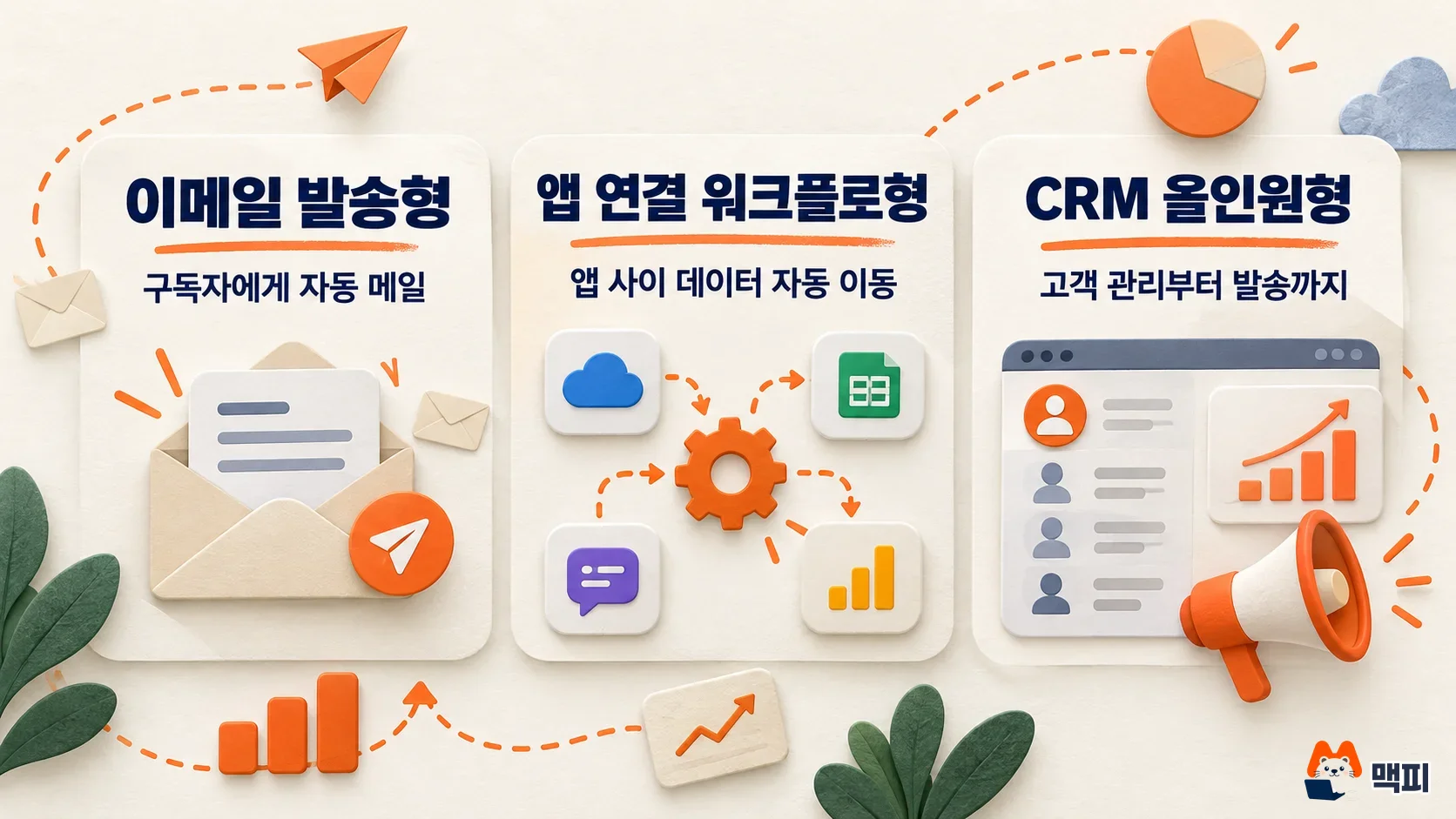
Three types of marketing automation tools and examples
| Type | What it does | Example tools | Best for |
|---|---|---|---|
| Email sending | Automatically sends emails to subscribers based on conditions | Stibee | Teams whose main work is newsletters or signup emails |
| App-connecting workflow | Automatically moves data between apps such as forms, spreadsheets and messengers | Zapier, Make | Teams that already use several tools and only want to connect them |
| CRM all-in-one | Handles customer records, email and automation in one place | HubSpot | Teams where sales and marketing share the same customer list |
The three types can overlap. If your subscriber data is already in Stibee, email automation ends with Stibee, and Zapier or Make only handles the link that puts form responses into the Stibee address book. Start with one type, and add another when you hit a limit.
Email sending type: automatic welcome emails with Stibee
According to the Stibee pricing guide, the free Starter plan allows 500 subscribers and 2 sends per month, and automatic emails are available from the Standard plan. If your goal is to send one welcome email automatically, Standard is the right place to start.
App-connecting and CRM all-in-one types
According to its official pricing page, Zapier's free plan gives up to 100 tasks per month (a task is one action that ran automatically) and only allows two-step connections (one trigger, one action). That is enough if you only add a row to a spreadsheet when a form response arrives, but you need a paid plan to add a conditional branch in the middle. On its official pricing page, Make gives 1,000 credits per month on the free plan and says most actions use 1 credit. In HubSpot, the number of automation actions differs by Marketing Hub plan, and the center of the product is the CRM (customer relationship management software) that stores customer data. It suits teams that also manage sales records. Starter allows up to 10 automation actions, and Professional adds a separate $3,000 onboarding fee, so a team that only wants to automate a few emails gets little value for the cost.
How to compare marketing automation software pricing
Each tool charges by a different unit, so lining up the prices and ranking them from cheapest is misleading. Stibee charges by subscriber count, HubSpot by contacts and seats, Zapier by number of tasks, and Make by credits. The table below shows the starting plans from each official page, on monthly billing.
| Tool | Free range | Paid starting price | Billing basis |
|---|---|---|---|
| Stibee | Starter: 500 subscribers, 2 sends per month, no automatic email | Standard from KRW 8,900 per month (0 to 500 subscribers, VAT included), Pro from KRW 29,000 per month | Subscriber count tier |
| HubSpot | Free: 1 automation action | Starter from $7 per month (per seat, 1,000 contacts, up to 10 automation actions), Professional $890 per month ($800 with an annual contract, plus $3,000 onboarding fee) | Seats and marketing contacts |
| Zapier | Free: 100 tasks per month, 2-step connections only | Professional $29.99 per month (750 tasks, multi-step connections), Team $103.50 per month (2,000 tasks) | Tasks per month |
| Make | Free: 1,000 credits per month | Core, Pro and Teams vary by credit tier, so pick a tier on the official pricing page | Credits per month |
Stibee's paid price rises by tier as your subscribers grow. On Standard, 501 to 1,000 subscribers cost KRW 16,000 per month, and 1,001 to 2,500 subscribers cost KRW 27,000 per month. There is no extra charge for the number of sends, but you cannot send from Starter once you pass 500 subscribers, so work that out before you sign up. Exchange rates and VAT can change when you pay for overseas tools, so check dollar prices again against the final amount on the checkout screen.
How a small team should choose marketing automation tools
- If the only message you want to send automatically is email and you already have a subscriber list, choose the email sending type.
- If you already use several tools (forms, spreadsheets, messengers) and copying and pasting between them is the problem, choose the app-connecting type.
- If sales and marketing staff need to work from the same customer list, choose the CRM all-in-one type.
These three rules are the author's own selection criteria, not rules from any official documentation. The reason is simple. The three types charge by different units, so if you do not know how many tasks you need to automate each month, you have no basis for choosing a paid tier. So first measure your task volume within the free limits (Zapier 100 tasks, Make 1,000 credits, HubSpot Free 1 automation action), and then decide on a paid tier. Stibee's free Starter has no automatic email, so this approach does not fit, and it is faster to test directly with Standard at KRW 8,900 per month.
Steps to test your first marketing automation
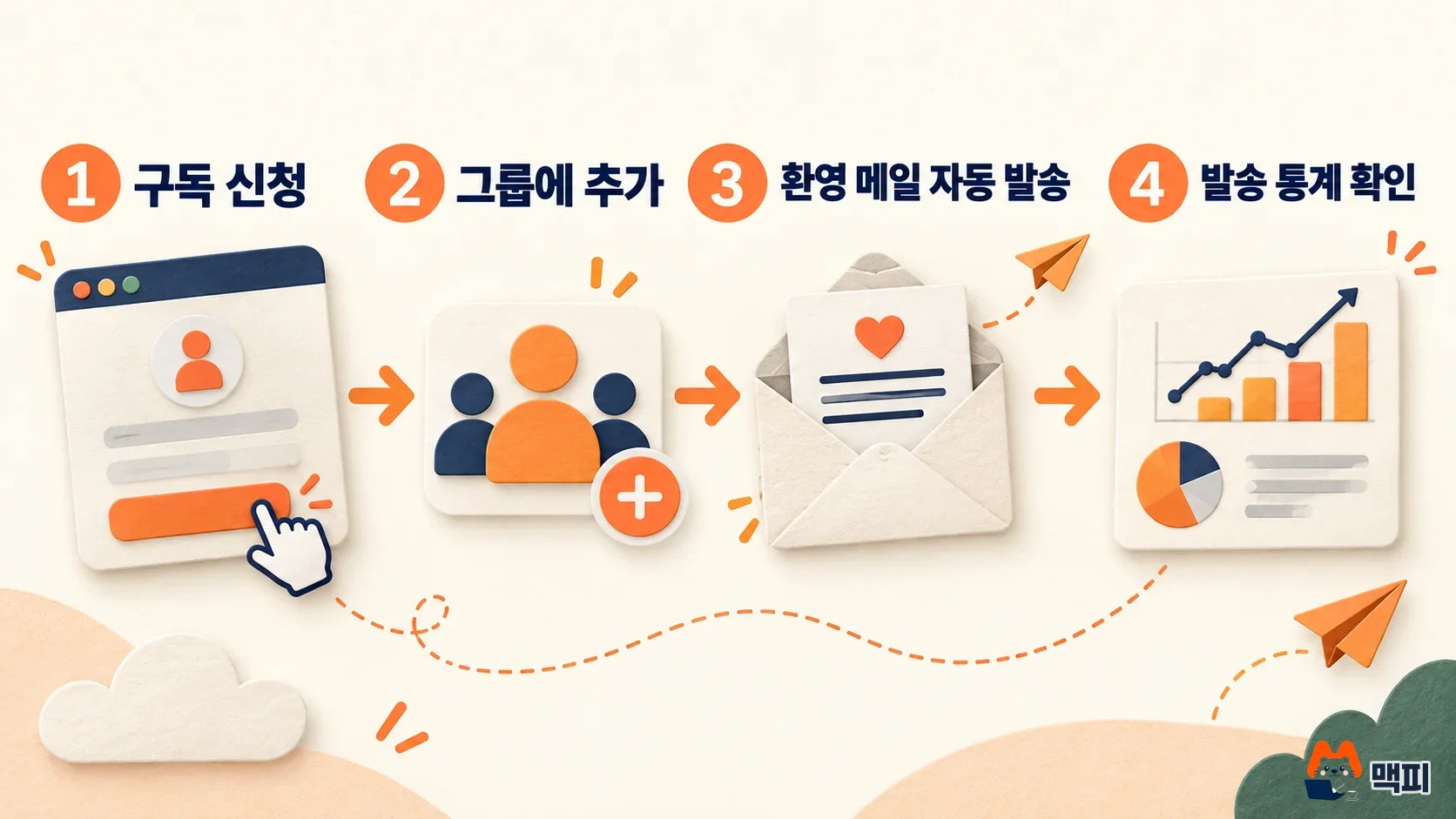
- Sign up for Stibee Standard and add two of your own email addresses to the subscriber address book.
- Follow the Stibee help page Using automatic email to create a welcome email with 'subscription signup' as the condition.
- Subscribe a third email address through the subscription page.
- Check that address's inbox for the welcome email, and confirm that the send is recorded in Stibee's email statistics dashboard.
If the welcome email does not arrive, check the condition and the recipient settings first. If the email arrived and shows up in the statistics, the automation works, so review the legal items below before turning it on for real subscribers.
What to check before sending automated marketing email in Korea
Whatever country the software comes from, anyone sending promotional email to recipients in Korea must follow the advertising information rules in Article 50 of the Information and Communications Network Act. Based on guides compiled by businesses, there are five items to check before sending.
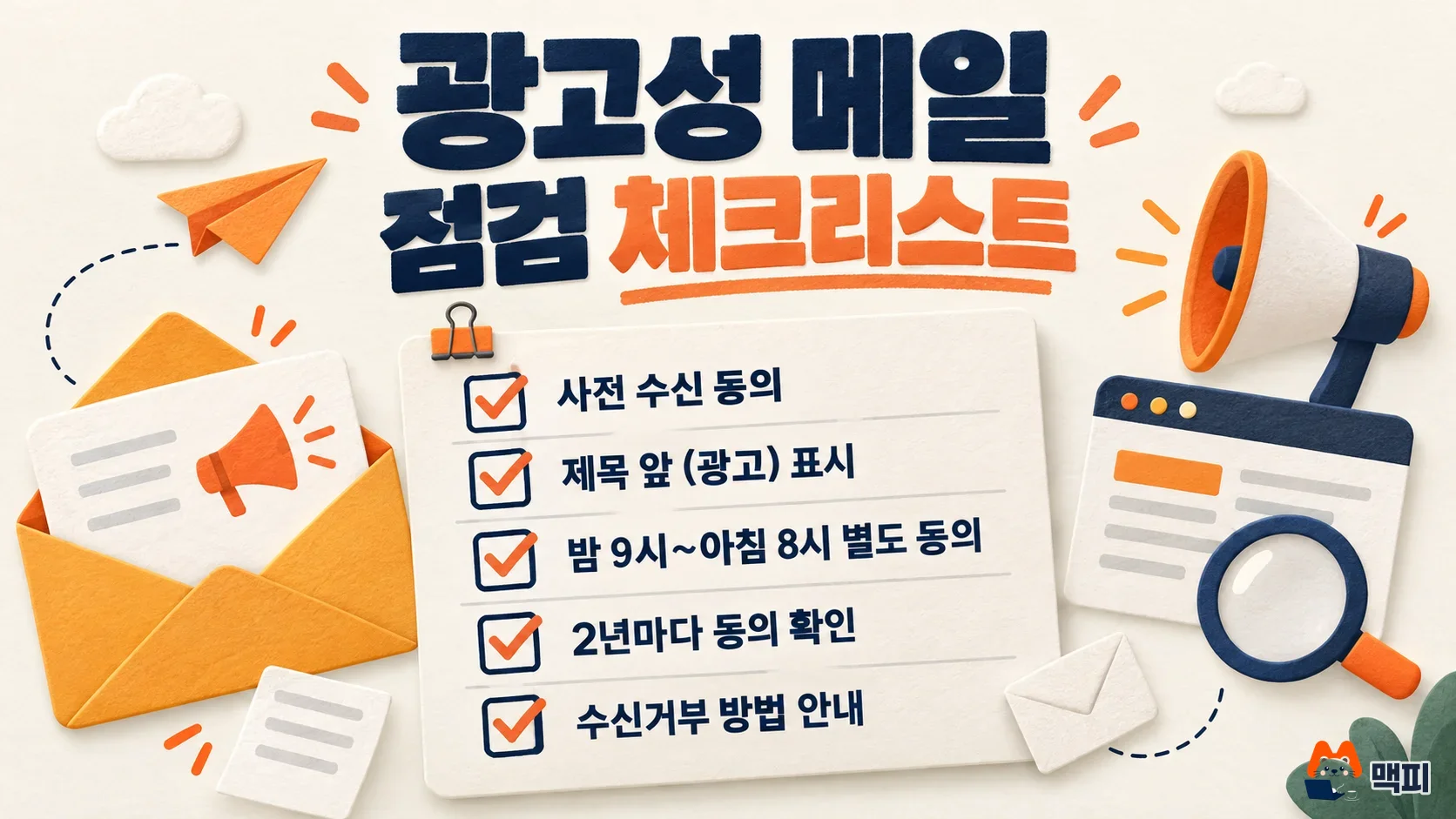
| Item | Details |
|---|---|
| Prior consent | You may send promotional messages only if you have the recipient's explicit prior consent |
| Ad label | Put the Korean ad label, '(gwanggo)' in romanized form (the Korean word for 'ad'), at the start of the subject line |
| Night sending | To send between 9 PM and 8 AM, you need separate night-time consent in addition to general promotional consent |
| Consent check | Reconfirm the recipient's consent every 2 years after the first consent |
| Opt-out | Explain how to opt out in the body, and do not send any more to people who opted out |
Automatic emails go out even when no one is watching, so the night-time rule matters most. If you have not collected separate night-time consent, you cannot send in that window, so set the send time after 8 AM and before 9 PM. For the exact wording of the law, see Article 50 at the National Law Information Center.
Frequently asked questions
Can I start with marketing automation software for free?
The free range differs by tool. Stibee Starter has no automatic email, HubSpot Free has 1 automation action, Zapier Free gives 100 tasks per month, and Make Free gives 1,000 credits per month.
What happens to Stibee pricing when I pass 500 subscribers?
Starter covers up to 500 subscribers, so you need to move to a paid plan. On Standard, the 501 to 1,000 subscriber tier costs KRW 16,000 per month (VAT included).
Is marketing automation the same as work automation?
The tools overlap, but the goals differ. Marketing automation focuses on the messages sent to customers and on sorting customers into groups. Work automation focuses on moving data between apps. Zapier and Make are closer to the latter.
Found this useful? Share it
Latest posts
Kakao Share Thumbnail Not Showing? Here's the Fix (JavaScript SDK 2025)
Learn why Kakao Share thumbnails don't appear even with a valid imageUrl, and fix it using scrapImage to convert your URL into a KAGE CDN URL. Step-by-step guide.
How to Generate CRM User Manuals in 20 Minutes with Claude Code Sub-Agents
Learn how Claude Code sub-agents can analyze your CRM codebase and auto-generate user manuals and visual guidebooks in just 20 minutes. See the real-world results.
GEO Generative Engine Optimization: The Complete 2025 AI Marketing Strategy Guide
Learn what GEO (Generative Engine Optimization) is, how it differs from traditional SEO, and discover 5 proven AI marketing strategies to get cited by AI search engines in 2025.
Related projects
Get new posts by email
Insights on marketing, analytics, and dev, delivered to your inbox.