
Muse for Small Business is an AI agent that works in the background once an owner enters a goal such as "find new customers." Meta launched it in the US and Canada on September 29, 2026. Korea is not mentioned in the official post, so nothing confirms that Korean owners can officially use it as of September 30, 2026. Meta says nothing is published, sent, or spent until the user approves it.
This article is based on three official newsroom posts: the small business announcement (Sept 29), the core Muse announcement (Sept 8), and the enterprise platform announcement (Sept 28). The images in this article are illustrations made to aid understanding, not real screen captures. Many details on Korean availability and pricing are missing from the official posts. Where something is missing, we say so.
Three lines to start
- What it is: Muse for Small Business takes a goal, analyzes data from connected tools, then suggests and carries out tasks as an AI agent.
- Region: It launched in the US and Canada. The official posts give no Korea launch date and no Korean language support.
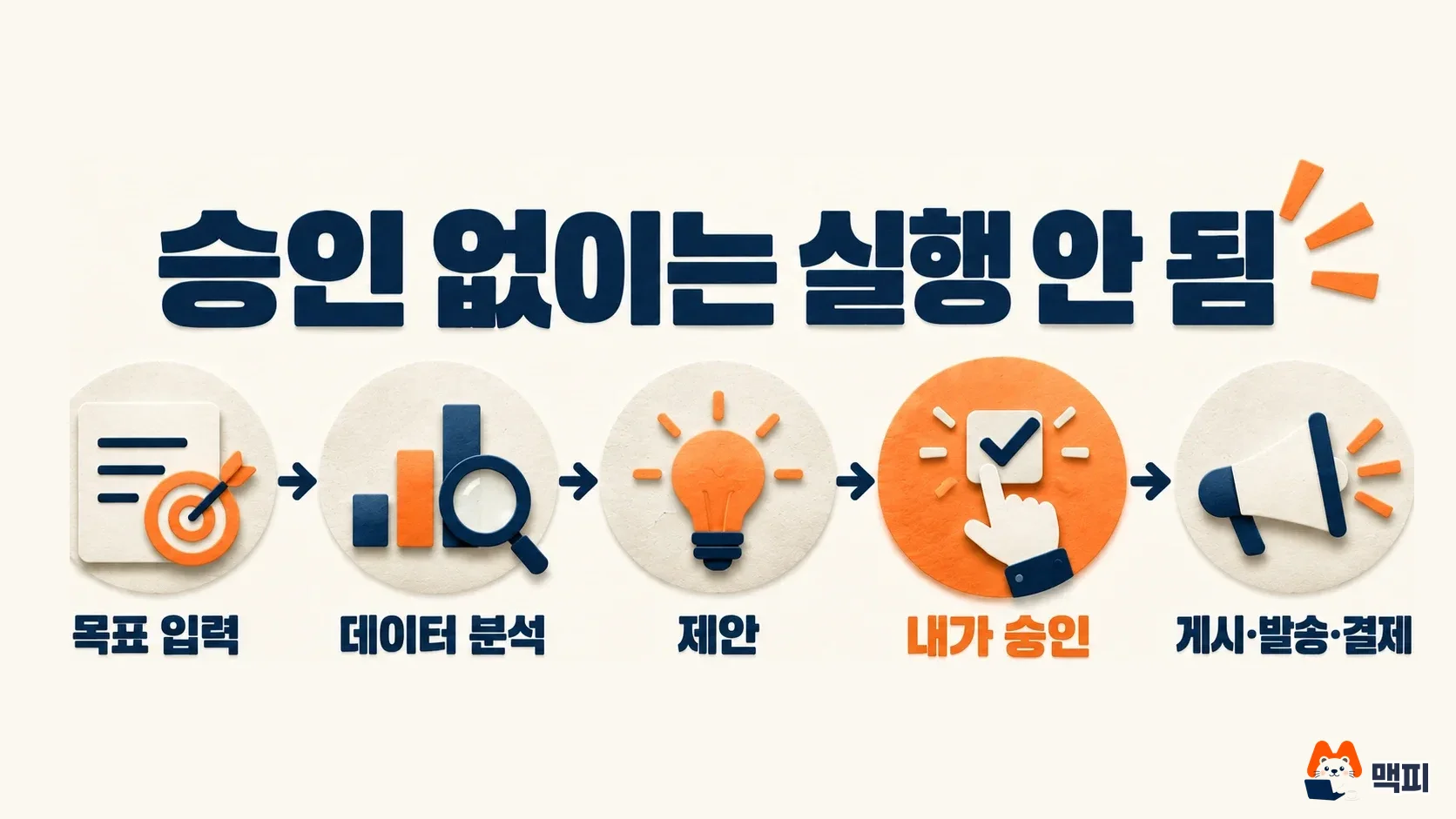
- Safeguard: The official wording is "nothing publishes, sends, or spends without your approval." Without approval, nothing is posted, sent, or paid.
What Meta announced for Muse for Small Business
On September 8, 2026, Meta first released Muse, a personal AI agent, in the US. Muse is not a chatbot that only answers questions. It is an agent that handles tasks such as email, bookings, form filling, and purchases. An agent is an AI that works through multiple steps on its own toward a goal the user sets.
On September 29, "Muse for Small Business" arrived, tailored to small businesses. Meta describes it as "a personal AI agent that works in the background to help your small business reach its goals." For example, if you enter a goal like "run my business" or "find new customers," it analyzes business data from connected tools and suggests what to do.
One day earlier, on September 28, Meta announced the Meta Enterprise Platform separately. It is a bigger plan to offer Muse agents, Meta Business Agent, the Muse API, and Muse Code to companies and developers. Meta did not state regions or prices. It is a different announcement from Muse for Small Business.
Where you can use it now
Muse for Small Business is available in the US and Canada. The core Muse app launched in the US on September 8 on iOS, Android, and muse.ai. According to the explainer site The Neuron, Canada was added on September 18. Korea and the EU are not mentioned in the small business announcement.

The Korean marketing blog Digital Marketer also wrote, as of September 25, that there is no Muse launch schedule for Korea. As far as MCPY has checked, Meta has published no official Korea launch date. We did not treat rumors like "it opens soon" as evidence.
Which tools it connects to
For Muse for Small Business to be useful, it has to plug into wherever your business data lives. The official post lists these connections.
- Meta products: Facebook Pages, Instagram business accounts, Meta ad accounts
- Work tools: Asana, Notion, Slack, Zoom
- Design: Canva, Figma, Lovable
- Commerce and payments: Shopify, Stripe, Intuit QuickBooks
- Marketing: Klaviyo, HighLevel
- Storage and records: Box, Dropbox, Granola
Custom-built connectors are also said to be supported. Services that Korean owners commonly use, such as Naver Smart Store (a major Korean e-commerce platform), Kakao (Korea's dominant messaging and services company), and Cafe24 (a Korean online store builder), are not on the official list. Whether they are planned or simply undecided has not been stated.

What "nothing runs without approval" means
In the small business announcement, Meta wrote "nothing publishes, sends, or spends without your approval." This means a person must approve before a post goes live, a message is sent, or money is spent. The core Muse announcement also describes checking with the user before sensitive actions such as sending an email or making a purchase, and it provides a full record (audit trail).
The principle is simple. The agent reads data and builds a plan on its own, then hands off to a person at the last step that affects the outside world. So for money-related work such as ad budgets, think of it this way: the proposal stage is automatic, and a person presses the button to execute. However, the official posts do not show what the approval screen looks like or whether you can approve several items at once. MCPY will not judge this part until we have tried it ourselves.
What Korean owners should check now
This is not an official launch in Korea, so the task now is to prepare, not to install. MCPY looks at four things.
- Korea launch notice: Watch the Meta newsroom (about.fb.com/news) and the app stores for any change in Korean availability. We do not recommend unofficial workarounds to sign up, because they can lead to account penalties or payment problems.
- Payment method: Core Muse is mostly free, and you buy a subscription to use more. The small business subscription price is not in the official post. The Neuron reports that core plans cost 20 dollars a month (Power) and 100 dollars (Max), but it is not confirmed that the same applies to the small business version. KRW pricing and VAT handling will only be known after launch.
- Ad account connection: Sort out who owns your current Meta ad account and Page permissions. The agent will likely need admin access to connect. The official post does not state the required permission level.
- Customer data scope: If you connect a tool that holds customer lists or order data, the agent reads that data. Decide in advance how much personal information you will connect.

Common mistakes
- Thinking of Muse as a chatbot: Muse is an agent Meta built on its own model, Muse Spark. It does not stop at giving answers. It acts, including bookings, purchases, and form filling.
- Mixing up small business Muse and the enterprise platform: The September 29 small business launch and the September 28 Enterprise Platform are different announcements. The enterprise side also includes the Muse API and Muse Code.
- Reading "US and Canada launch" as "Korea soon": The official posts do not mention Korea. Until a schedule appears, it is undecided.
- Trusting the approval step and clicking without checking: When an approval request arrives, read the post text, the recipients, and the amount yourself before you press approve. Automated help does not mean skipping review.
MCPY's take
MCPY does not see Muse for Small Business as a tool for Korean owners right now. We see it as a signal that Meta wants to tie ad accounts and payment tools together through agents. So the task for today is to sort out your Meta ad account permissions and the scope of your customer data connections. When a Korea launch notice appears, we will update the region and pricing sections of this article first.
Official sources used
- Meta Newsroom: Muse for Small Business (2026-09-29)
- Meta Newsroom: Introducing Muse (2026-09-08)
- Meta Newsroom: Launching Meta Enterprise Platform (2026-09-28)
Because the official posts lack them, we used the explainers at the two sites below only as supporting evidence. The Canada launch date and the core plan pricing come from these explainers, not from official confirmation.
Found this useful? Share it
Latest posts
Kakao Share Thumbnail Not Showing? Here's the Fix (JavaScript SDK 2025)
Learn why Kakao Share thumbnails don't appear even with a valid imageUrl, and fix it using scrapImage to convert your URL into a KAGE CDN URL. Step-by-step guide.
How to Generate CRM User Manuals in 20 Minutes with Claude Code Sub-Agents
Learn how Claude Code sub-agents can analyze your CRM codebase and auto-generate user manuals and visual guidebooks in just 20 minutes. See the real-world results.
GEO Generative Engine Optimization: The Complete 2025 AI Marketing Strategy Guide
Learn what GEO (Generative Engine Optimization) is, how it differs from traditional SEO, and discover 5 proven AI marketing strategies to get cited by AI search engines in 2025.
Related projects
Get new posts by email
Insights on marketing, analytics, and dev, delivered to your inbox.