
You run TikTok ads by creating an account in TikTok Ads Manager and publishing a campaign. At the start you decide the objective, the daily budget, and the billing method. As of October 4, 2026, the TikTok budget help page says the daily budget must be more than $50 at the campaign level and more than $20 at the ad group level. Below, we cover the setup steps, minimum budgets and charging, how to choose a billing method, and the differences between ad formats.
Start TikTok ads: from creating an account to publishing
You build TikTok ads in Ads Manager. Ads Manager is the tool for creating campaigns, managing ad assets, checking data, and optimizing ads, and you sign up from the TikTok ads page. Open the account in this order.
- Enter your email or phone number and a password, then enter the verification code you receive, agree to the terms, and sign up.
- Enter your country/region, time zone, billing currency, and company name. You cannot change this basic information later.
- Enter your state/province, detailed address, postal code, and website address. Enter the website as a full URL, such as http://www.tiktok.com/.
- Choose a payment method: manual payment or automatic payment. The billing section below explains the difference between the two.
- Submit your account information. The official guide says it will tell you within 24 hours whether you are approved.

Once approved, click Create ad on the dashboard, then choose an objective and pick a campaign type: manual, Search, or Smart+ campaign. Next, enter the campaign name and optimization goal, the TikTok account or approved post to link, and the budget. A campaign you are building is saved automatically as a draft.
After publishing, open the campaign in the Campaigns tab of Ads Manager to see its status and data. Delivery stops when the budget you set is reached, so if delivery stops, first check whether the budget is used up.
TikTok ad campaign structure and choosing an objective
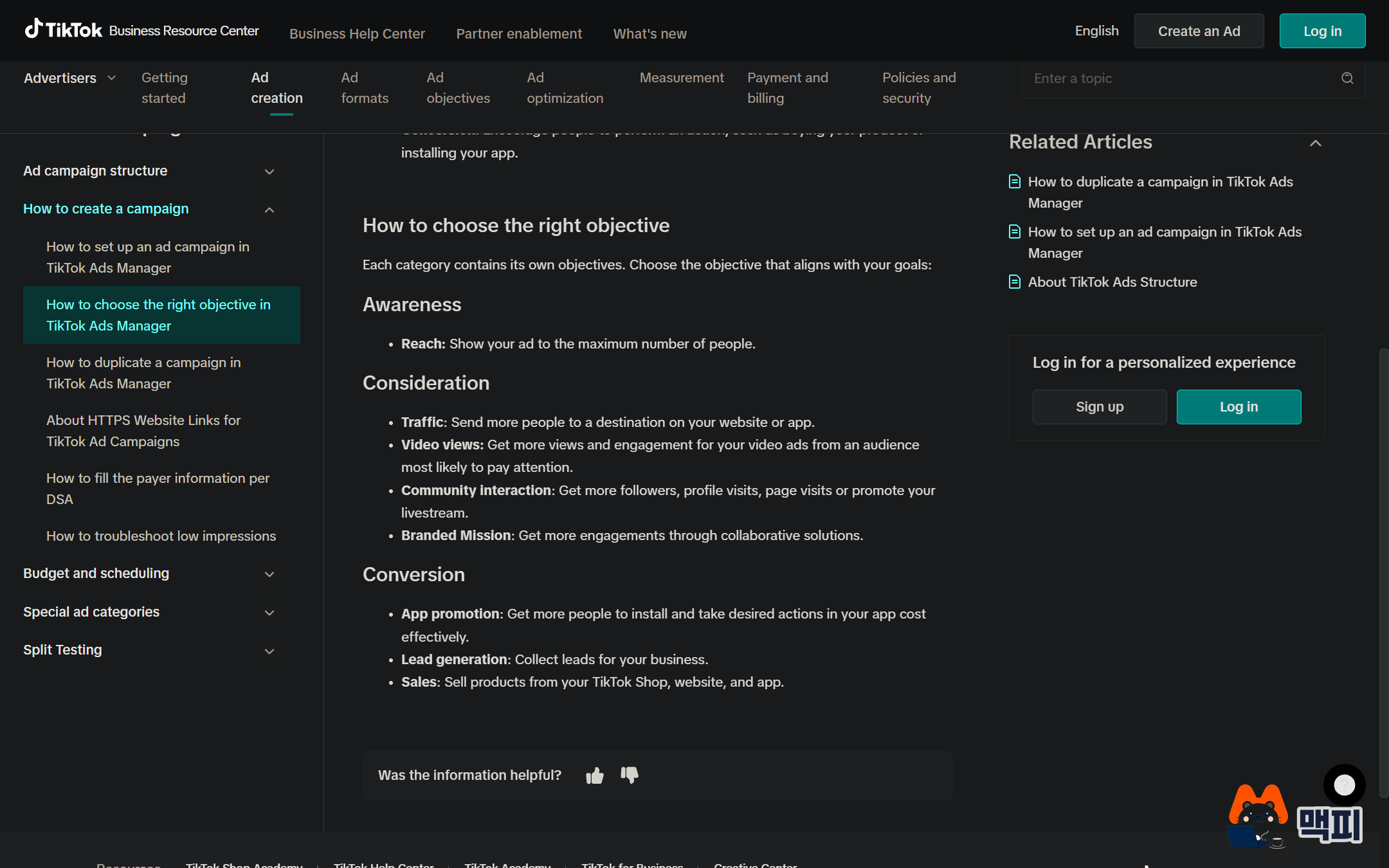
Ads Manager organizes ads into three levels, campaign, ad group, and ad, managed in the Campaigns tab. You choose the objective when you create the campaign, and you set the budget separately at the campaign and ad group levels.

The first thing you set is the objective. Objectives fall into three categories: awareness, consideration, and conversion, and the objective changes the bidding method and what you optimize for.
| Category | Objective | Choose it when |
|---|---|---|
| Awareness | Reach | You want to show your ad to as many people as possible |
| Consideration | Traffic | You want to send visitors to a website or app |
| Video views | You want more video views and engagement | |
| Community interaction | You want to promote followers, profile visits, or LIVE streams | |
| Branded Mission | You want to increase engagement through collaboration | |
| Conversion | App promotion | You want more app installs and in-app actions |
| Lead generation | You want to collect potential customer information | |
| Sales | You want to sell products from TikTok Shop, a website, or an app |
The table is adapted from the official objective guide. If the result you want to measure is purchases or inquiries, choose a conversion objective. If visitor count comes first, choose Traffic.
TikTok ads minimum budget and cost structure
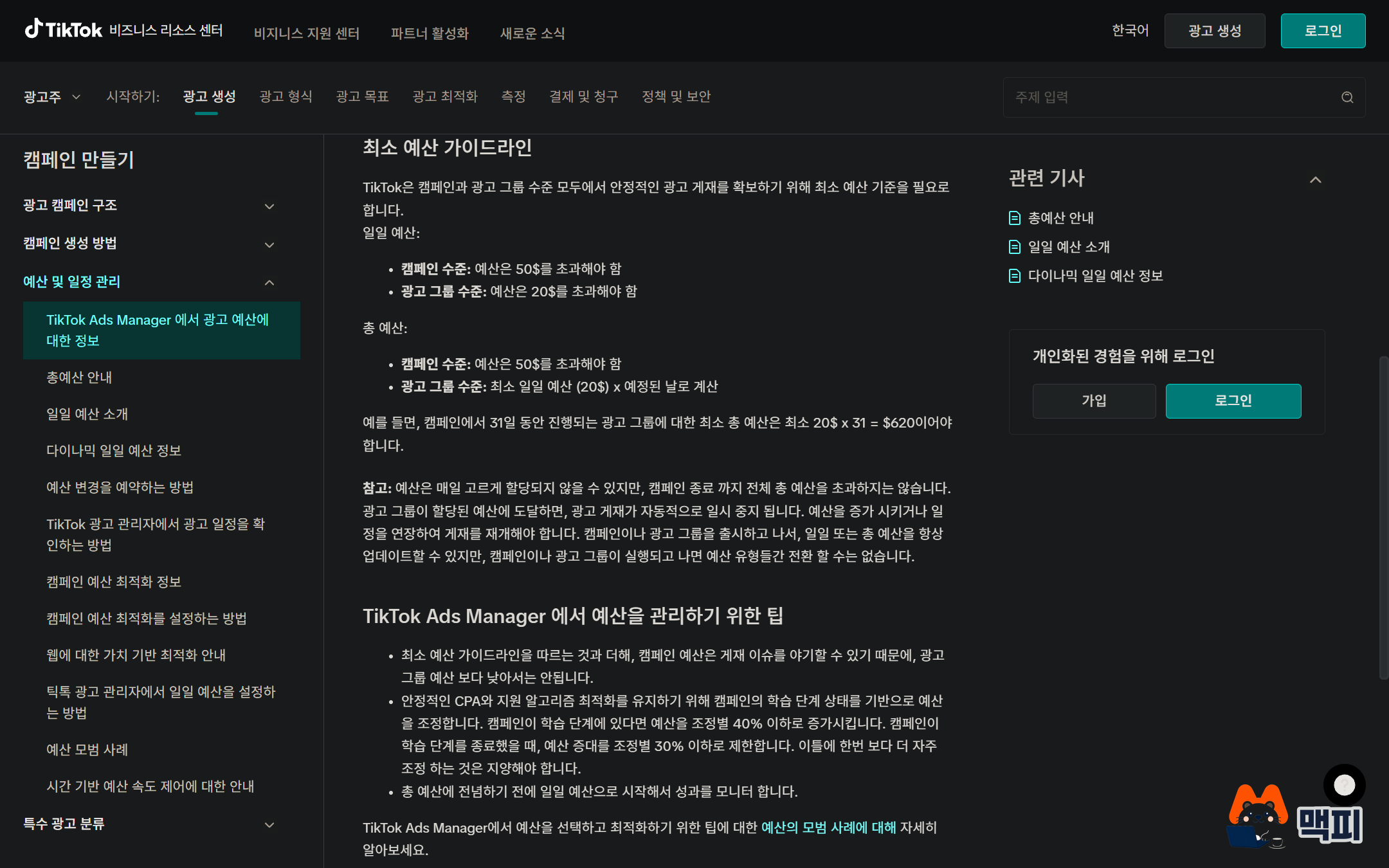
You set the budget in one of two ways. A daily budget is the average amount you spend each day, and a total budget is the amount you spend over the whole run of a campaign or ad group. The minimum differs by method and by level.
| Budget type | Campaign level | Ad group level |
|---|---|---|
| Daily budget | More than $50 | More than $20 |
| Total budget | More than $50 | $20 × planned days ($620 for 31 days) |

The amounts in the table are the standards the Ads Manager budget help page lists in dollars. Because the help page gives minimums only in dollars, check the minimum for a KRW (Korean won) account on the budget entry screen. Separately, the recommended daily ad group budget for web conversion campaigns is listed as $20 for Asia-Pacific and $30 for North America and EMEA (Europe, Middle East, and Africa). That is a recommendation, and the table above holds the minimum requirements. Also, setting the campaign budget lower than the ad group budget can cause delivery problems.
Within the budget, the bidding strategy sets your cost. There are two bidding strategies.
| Bidding strategy | How it works | Choose it when |
|---|---|---|
| Maximum Results | Delivers to get the most results within the budget you set. | You have no cost-per-result target yet and only set a budget |
| Target Cost Per Result | Optimizes delivery around the cost per result you set. Daily cost varies, but the average stays near your bid. | You already know the cost per result you can accept |
The two strategies in the table come from the bidding strategy help page. The Korean-language guide sometimes lists methods with the same intent under the names lowest cost and cost cap. The Korean help page says the lowest cost method makes it easier to specify a budget, so a first campaign with no cost-per-result data should start with the method where you only set a budget.
What you are actually charged for depends on the objective. The billing events the help page lists are oCPM, CPC, CPM, and CPV. CPC is the cost per click, and CPM is the cost per 1,000 impressions. Which event you are charged for is set by the objective and bidding strategy you choose.
Choose a TikTok ads billing method: manual, automatic, or monthly invoicing
There are three billing methods, and the directions you can switch between are fixed.
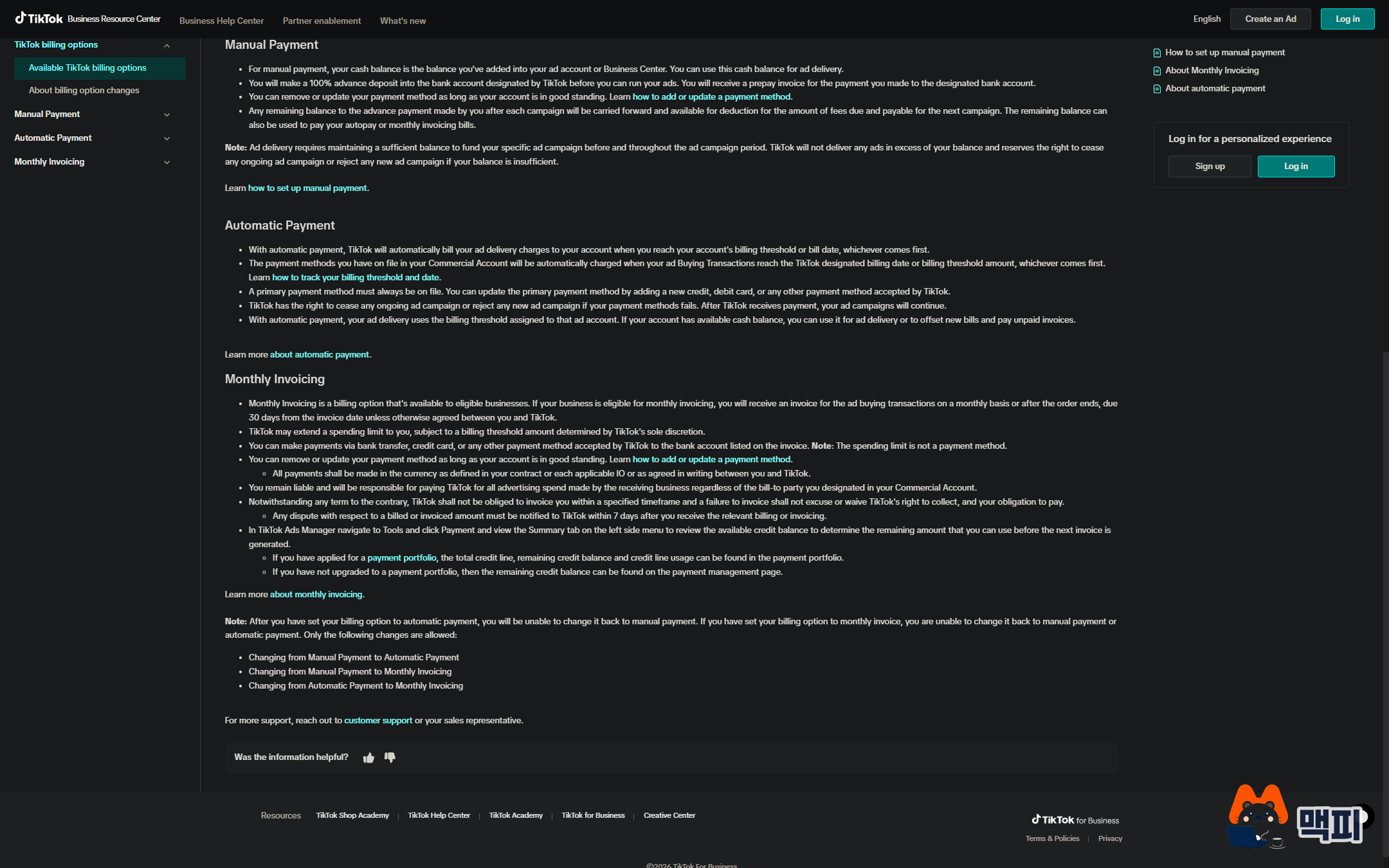
| Method | How it works | Watch out for |
|---|---|---|
| Manual payment | You add a balance to the ad account in advance, and ad spend is drawn from that balance. | Ads stop when the balance runs out. Any remaining balance is offset against later ad spend or automatic payment invoices. |
| Automatic payment | TikTok charges your registered payment method when spend reaches the billing threshold or the billing date arrives, whichever comes first. | If the payment method is not valid, campaigns stay paused until a payment succeeds. |
| Monthly invoicing | You receive an invoice each month and pay it within 30 days of the invoice date. | Open only to approved businesses, and TikTok sets the limit. |
You can switch from manual payment to automatic payment or monthly invoicing, and from automatic payment to monthly invoicing. In the other direction, you cannot go back to manual payment. With manual payment, ads stop when the balance is used up, so it is the easiest way for a first-time account to cap total spend. When ad spend grows and topping up the balance becomes a chore, move to automatic payment, but do it knowing you cannot return to manual.
TikTok ad format comparison: standard in-feed, Spark Ads, and TopView

| Format | Features | Choose it when |
|---|---|---|
| Standard In-Feed ad | A standard non-Spark ad that uses creative made for advertising. | You have creative made only for ads |
| Spark Ads | Uses an organic post as an ad, and the views, comments, shares, likes, and follows gained during the ad accrue to that post. You use a post from your own account or a post a creator has authorized. | You want to promote a post that already gets engagement |
| TopView | Appears first when the app opens, before other videos, full screen with sound on. It holds the screen for 3 seconds, then turns into a standard In-Feed ad. It is bought on a CPM basis and guarantees impressions. | You need big reach in a short window, such as a launch or event |
TopView's minimum spend differs by market. Fixed rates go through a sales representative, and variable CPM is bought in Ads Manager.
Common mistakes when you first start TikTok ads
- Entering the company name and billing currency carelessly. You cannot change the country, time zone, billing currency, or company name after signup. Check the business name on your business registration certificate and the currency you will actually pay in before you enter them.
- Switching to automatic payment and then trying to go back to manual. You cannot switch back to manual payment. If you want to cap total spend with a balance, keep manual payment.
- Setting the campaign budget lower than the ad group budget. It can cause delivery problems. Set the campaign budget equal to or higher than the ad group budget.
TikTok ads FAQ
Can I change the budget after publishing?
You can change the amount. The help page says you can edit the daily budget or total budget even after publishing a campaign or ad group, but you cannot switch between a daily budget and a total budget.
How far ahead do I need to book TopView?
The help page says to book at least 60 days ahead to guarantee delivery.
What do I need to run Spark Ads with a creator's post?
It takes three steps: the creator allows the post to be authorized in their account, authorizes that post for ads, and you enter the authorization code they give you in Ads Manager. You can set how long the authorization code is valid to fit your campaign.
Sign up for Ads Manager, check the step 2 basic information against your business details before you enter it, and publish a first campaign with one objective and an ad group daily budget above $20.
Found this useful? Share it
Latest posts
Kakao Share Thumbnail Not Showing? Here's the Fix (JavaScript SDK 2025)
Learn why Kakao Share thumbnails don't appear even with a valid imageUrl, and fix it using scrapImage to convert your URL into a KAGE CDN URL. Step-by-step guide.
How to Generate CRM User Manuals in 20 Minutes with Claude Code Sub-Agents
Learn how Claude Code sub-agents can analyze your CRM codebase and auto-generate user manuals and visual guidebooks in just 20 minutes. See the real-world results.
GEO Generative Engine Optimization: The Complete 2025 AI Marketing Strategy Guide
Learn what GEO (Generative Engine Optimization) is, how it differs from traditional SEO, and discover 5 proven AI marketing strategies to get cited by AI search engines in 2025.
Related projects
Get new posts by email
Insights on marketing, analytics, and dev, delivered to your inbox.