
ChatGPT Work is a ChatGPT agent that OpenAI released on July 9, 2026. It works across multiple apps and produces finished deliverables such as documents, spreadsheets and slides. As of September 30, 2026, every plan including Free can open Work in the Windows and Mac desktop apps, while web and mobile are open to paid plans except Free and Go. Usage is deducted from the same pool as Codex, and Plus starts at $20 per month.
The short version in three lines
- Unlike chat, Work moves between tools such as email, files and documents and hands back a finished result. On web and mobile you choose Work. In the desktop app you switch to Work with the toggle at the top.
- Usage is drawn from a pool shared with Codex and others. One long task can use far more than a short request.
- Actions that affect the outside world, such as sending email, may need your approval, and the task pauses until you give it.
How Work differs from chat
Chat gives you one answer for one question. OpenAI describes Work as an agent for longer, multi-step jobs that end in a deliverable. As a hypothetical example, building a weekly ad report fits here: pull metrics from email, organize them in a spreadsheet, then carry on to a slide deck.
Work includes Codex. Codex is OpenAI's coding agent that reads and writes code. That is why jobs like spreadsheet calculations and building web pages (Sites) also continue inside the Work screen. How to start Codex cloud tasks and the plan requirements are covered in How to use Codex: starting cloud tasks and plan requirements.

Which plans and which screens can use it
The OpenAI announcement (July 9, 2026) explains availability by screen. On web and mobile, it opened first to Pro, Enterprise and Edu that day, and OpenAI said Plus and Business would follow within days. The current OpenAI product page lists Plus, Pro, Business, Enterprise and Edu for web and mobile, and the release notes say paid plans except Free and Go. In the desktop app, Chat, Work and Codex are available on all plans including Free, and the Windows and Mac apps can be downloaded worldwide. The release notes only say "all supported regions" for regional limits. However, Sites is not yet available in the European Economic Area, Switzerland and the United Kingdom.
On Enterprise and Edu workspaces, Work is off by default during a 2-week preview period, and it turns on automatically when the period ends unless an admin turns it off. If Work does not show up in a company account, check the admin settings first.
| Plan | Monthly price (USD) | What MCPY confirmed |
|---|---|---|
| Free | 0 | Work in the desktop app, no Work on web or mobile |
| Go | 8 | Work in the desktop app, no Work on web or mobile |
| Plus | 20 | Web, mobile and desktop; extra usage by buying credits |
| Pro | 100~500 | Web, mobile and desktop; usage shared with Codex |
| Business | 20 per user (billed annually) | Web, mobile and desktop; extra usage by buying credits |
| Enterprise·Edu | Contact sales | Usage spending limits set in the admin console |
Prices follow the pricing document at learn.chatgpt.com, and availability by screen follows the OpenAI announcement and help articles. We could not find Korean won amounts in these documents, so none are included. The difference between the $200 and $500 Pro plans is covered in ChatGPT plan prices and limits: Pro 200 vs Pro 500 cautions (in Korean).
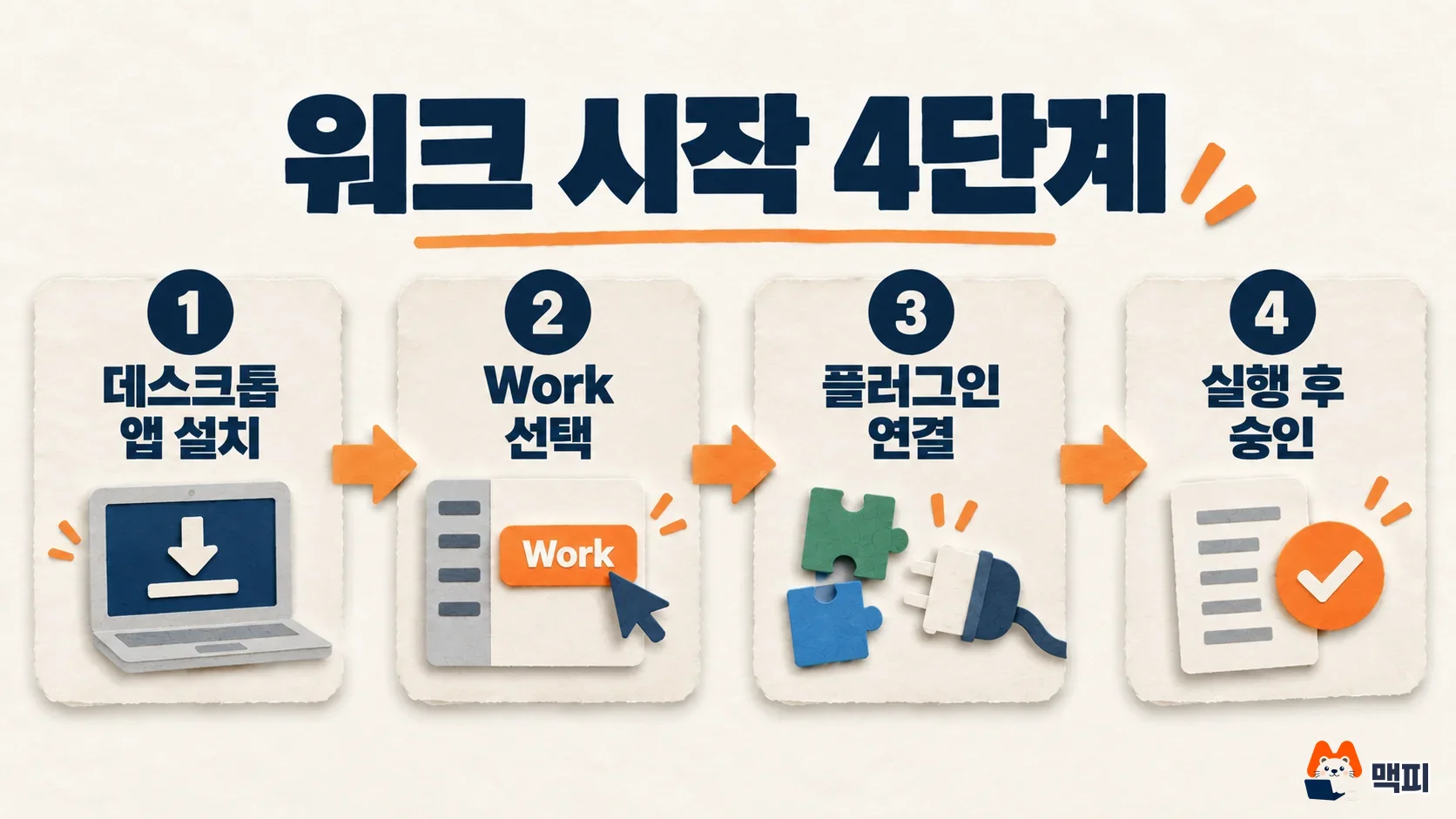
Getting started takes 4 steps
The OpenAI help article (ChatGPT Work and Codex) gives two ways in. On the web or mobile app, open ChatGPT and select Work. In the desktop app, choose ChatGPT from the menu at the top left, then select Work with the toggle at the top of the page.
- Open the ChatGPT app and go into Work.
- Connect the apps you need for the task from the plugin directory. Plugins expand what ChatGPT can do, and skills store how it should do it.
- Write out the task and run it.
- When an action needs approval, approve or deny it with the on-screen button.
How to build and publish your own plugin is covered in What is a ChatGPT plugin? How to build one, plus publishing and review cautions.
Set approvals together with app permissions
An agent carries out hard-to-undo actions itself, such as sending email or editing external data, so you can insert a human check before it runs. On web and mobile, when an action needs approval, you approve or deny it with an on-screen control. Approval by voice is not supported. The app permissions help article lists four levels: Always ask, Allow read actions, Allow low-risk actions and Allow all actions. Approval cards show buttons such as Deny, Allow once and Always allow. MCPY recommends starting with Always ask and loosening it only after read-focused tasks run reliably.
Scheduled tasks differ in count and frequency by plan
Scheduled Tasks can run a task once, repeat it on a schedule, run it when an event occurs, or watch for changes. The OpenAI learning guide walks you through running the task in a normal chat first, refining the result, then saying in the same conversation when to run it again. You check results in the Scheduled tab.
- Number of tasks you can keep active at once: 3 for Free and Go, 5 for Plus, 10 for Business and Edu, 15 for Pro and Enterprise
- Repeat frequency: Free up to once a day, paid plans up to once an hour
- Event-triggered (webhook) tasks: available on Plus and above, up to 30 per hour and 720 per day. Not available on Free and Go
- Actions that send messages or change external data may need approval, and the task pauses in the meantime
Tasks that use only connected tools such as Gmail or Google Calendar run on the web or in the cloud. Tasks that need files on your own computer or locally saved skills require your computer to be on with the desktop app running.

Usage is drawn from the same pool as Codex
The OpenAI help article says Codex, ChatGPT Work, ChatGPT for Excel and Workspace Agents share one allowance and credit pool. This is separate from the usage rules for chat. One long task can use far more than a short request, and Astra models can use up the allowance faster than GPT-5.6 Sol. Plus and Business Standard seats include a limited amount of Astra usage, and beyond that you need to buy credits. The documents MCPY reviewed have no table showing exactly how much one task uses. The help article also says that once you use up your limit, OpenAI support will not restore it.
What to check in Korea
The announcement and release notes contain no wording that restricts Korea specifically. Menus can still look different depending on your account, plan and app version, so check three things before paying.
- The won amount on the in-app pricing screen and whether VAT is included
- Any price difference between web billing and app store billing
- For a company account, whether the admin has allowed Work and plugins (Permissions & roles in Workspace settings)
Common mistakes
- Using Work for short questions like chat. For simple questions, chat is faster and uses less of your allowance.
- Looking for Work on web or mobile with a Free or Go account. These two plans use Work only in the desktop app.
- Setting up a scheduled task and then closing the laptop. Tasks that need local files may not run at that time.
- Setting permissions to Allow all actions and then handing off tasks like sending email.
What to try today
Open Work in the desktop app, connect just one plugin, and run a read-focused task (for example, summarizing last week's email) with Always ask on. Move it to a scheduled task once you are happy with the result.
Official sources
- ChatGPT is now a partner for your most ambitious work (OpenAI, 2026-07-09)
- ChatGPT Work product page (OpenAI)
- ChatGPT Work and Codex (OpenAI Help)
- Using Codex with your ChatGPT plan (shared usage pool)
- Scheduled tasks in ChatGPT (OpenAI Help)
- Set Up Scheduled Tasks (OpenAI learning guide)
- Managing app permissions in ChatGPT (OpenAI Help)
- ChatGPT release notes (2026-07-09 entry)
- ChatGPT Work and Codex pricing document (learn.chatgpt.com)
Found this useful? Share it
Latest posts
Kakao Share Thumbnail Not Showing? Here's the Fix (JavaScript SDK 2025)
Learn why Kakao Share thumbnails don't appear even with a valid imageUrl, and fix it using scrapImage to convert your URL into a KAGE CDN URL. Step-by-step guide.
How to Generate CRM User Manuals in 20 Minutes with Claude Code Sub-Agents
Learn how Claude Code sub-agents can analyze your CRM codebase and auto-generate user manuals and visual guidebooks in just 20 minutes. See the real-world results.
GEO Generative Engine Optimization: The Complete 2025 AI Marketing Strategy Guide
Learn what GEO (Generative Engine Optimization) is, how it differs from traditional SEO, and discover 5 proven AI marketing strategies to get cited by AI search engines in 2025.
Related projects
Get new posts by email
Insights on marketing, analytics, and dev, delivered to your inbox.