

The Claude Design standalone site is closing: who needs to decide what
Anthropic announced that the standalone Claude Design site, claude.ai/design, closes on December 14, 2026. If you built design systems or projects on this site, you need to decide before that date what to migrate and what to download. It is like moving house on a fixed day. The movers carry the furniture, but you must collect the notes on the wall and the temporary mailbox by the door yourself. Claude Design can migrate design systems, but chats and comments do not follow.
What changed Claude Design has been merged into the main Claude interface, and the standalone site claude.ai/design closes on December 14, 2026.
Who is affected Free, Pro, Max, Team and Enterprise users who created design systems, projects, chats, comments or public links on the standalone site.
What to do now Migrate your design systems from the Artifacts page in Claude, download the projects you need as zip files, and save chats and comments separately before the shutdown.

Anthropic announces the standalone site will close on December 14
In its official announcement on October 8, 2026, Anthropic moved the documents, slides and design features from beta to general availability and made Claude Design usable inside the Claude chat window. The standalone site stays up until December 14 and then closes. The migration guide in the Claude help center lists the eligible plans as Free, Pro, Max, Team and Enterprise (for plan limits, see the Claude plan price comparison). It also says that after the shutdown, visiting claude.ai/design redirects you to Claude.
New designs, design systems and slide decks made in Claude are all built as artifacts (outputs that open in a pane next to the conversation). The dashboard feature (paid plans) and the motion feature (Team and Enterprise), both released in beta on the same day, also run in the same artifact view.
The release notes for the latest Claude Code version, v2.1.302, also reflect this schedule. The /design-sync and /design-login commands now show a notice that the standalone site closes on December 14.
What migrates and what disappears after Claude Design closes
According to the Claude help center, only design systems have a migration feature, and chats and comments are not migrated. Projects keep opening on the standalone site until the shutdown, and the help center says it will publish detailed migration steps later.
| Item | Status after shutdown | What to do |
|---|---|---|
| Design systems | Can be migrated; the original stays on the standalone site until the shutdown | Migrate from the Artifacts page |
| Projects | Work on the standalone site until the shutdown; the Artifacts page shows up to 60 | Download as zip if needed |
| Chats | Not migrated; deleted under the data retention policy | Save what you need |
| Project and design system comments | Not migrated; deleted the same way | Save what you need |
| Public links | Stop working after the shutdown | Check every place you linked them |

Do you need to migrate your Claude Design systems
Yes, if you want to keep using the design systems you built on the standalone site in the main Claude interface. According to the help center, migration imports the whole organization's design systems at once, so systems made by other people are moved too, and anyone who can use Claude Design can start it. Owners and sharing settings stay the same.
Not every design system is migrated. Per the help center, empty design systems and those built on the default starter theme are skipped, even if you edited them. If a file is too large, or its name or format does not fit artifacts, the failure list shows the name, owner and reason.
On Team and Enterprise, the owner should check settings first. If Artifacts is turned off in Organization settings, users cannot migrate or create new ones. According to the help center, the default for Design systems under Templates is on for Team and off for Enterprise. Zero data retention (ZDR) organizations cannot turn on artifacts, so migration is not possible, and they must download projects manually before the shutdown.
How to migrate Claude Design systems
Migration starts from the Artifacts page in Claude. The steps in the help center are as follows.
- Open the Artifacts page in Claude.
- On the "Claude Design lives here now" banner, click Migrate team design systems. If you dismissed the banner, choose it from the Claude Design menu at the top right.
- Click Migrate to confirm. On personal plans, migration starts right away without confirmation.
- Wait until it finishes. Migration continues even if you close the window.
- In the Migrated list, check that each design system shows its owner name and an Open link.
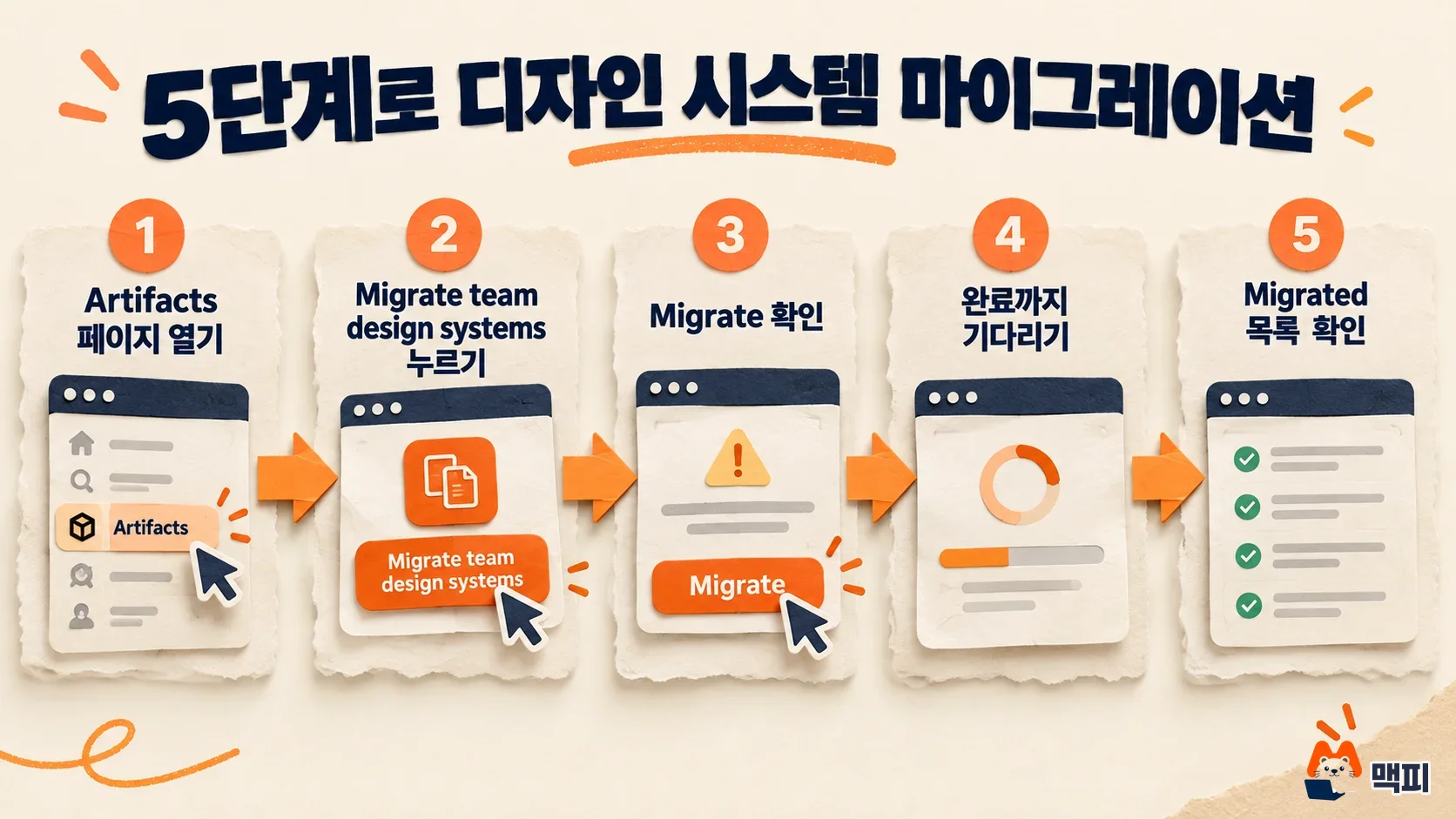
Check the banner to see whether it worked. When everything is done, it shows "All of your design systems have migrated." Migrated design systems then appear in the design system menu when you create a design or slides in Claude. If some fail, read the reason in the Couldn't be migrated list on the banner, click Fix in Claude Design Standalone on that row, use Check to find the problem files, fix them until it shows Nothing found in the way., and migrate again. If the reason is "too large," the help center recommends trimming the uploads folder first, since it often holds many duplicate files.
After migrating, open a new design or slide in Claude and confirm the name you just moved appears in the design system menu. According to the help center, you cannot edit the files directly in Claude after migration. You request changes from Claude instead. If you kept editing a design system on the standalone site, you can migrate it again with Migrate again in the Claude Design menu. Items you already changed on the Claude side are marked Skipped and are not overwritten, so if you want to keep your Claude edits, duplicate them first.
How to save projects and chats, and what to check next
According to the help center, you cannot download all projects at once. You download them one by one. Open the project on the standalone site, click Share, then Project HTML, and with Project archive selected, click Export to get a zip with the project files. Slide decks are under More formats and apps. This download is free and does not count toward usage limits. After downloading, unzip the file and check that the HTML files open. No migration or export feature has been announced for chats and comments, so copy what you need and keep it elsewhere.
Since the official guide lists a migration feature only for design systems, a sensible order is to migrate design systems first, download the projects that are hard to recreate, and then save chats and comments. Two things are worth checking before the shutdown. The help center says it will publish the official project migration method later, so reopen it before December 14. Also, if you put standalone-site public links in internal documents or customer notices, they will not open after the shutdown, so replace them with a new location in advance.
Claude Design shutdown FAQ
Can I still enter the standalone site after December 14?
According to the help center, visiting claude.ai/design redirects you to Claude. Data left on the standalone site is deleted under the data retention policy.
Does migrating delete the original on the standalone site?
No. The original stays unchanged on the standalone site until the shutdown.
Where do I report a bad migration result?
The help center says the original remains on the standalone site, so if the migration result is wrong, tell the support team.
Found this useful? Share it
Latest posts
Kakao Share Thumbnail Not Showing? Here's the Fix (JavaScript SDK 2025)
Learn why Kakao Share thumbnails don't appear even with a valid imageUrl, and fix it using scrapImage to convert your URL into a KAGE CDN URL. Step-by-step guide.
How to Generate CRM User Manuals in 20 Minutes with Claude Code Sub-Agents
Learn how Claude Code sub-agents can analyze your CRM codebase and auto-generate user manuals and visual guidebooks in just 20 minutes. See the real-world results.
GEO Generative Engine Optimization: The Complete 2025 AI Marketing Strategy Guide
Learn what GEO (Generative Engine Optimization) is, how it differs from traditional SEO, and discover 5 proven AI marketing strategies to get cited by AI search engines in 2025.
Related projects
Get new posts by email
Insights on marketing, analytics, and dev, delivered to your inbox.