
BigQuery column aliases let you reuse an alias created in the SELECT clause later in the same SELECT list and in the WHERE clause. Google Cloud announced the general availability (GA) of this feature and of cross-region table copy in its October 15, 2026 release notes (BigQuery release notes). If you query GA4 export data in BigQuery, you can drop the habit of wrapping the same formula in a subquery. If you need to move a dataset to another region, recheck the copy method and its limits.
What changed Column alias reuse (opt-in) and cross-region table copy became GA on October 15.
Who is affected Analysts who query GA4 and ad data in BigQuery, and admins who move datasets to another region.
What to do now Check for name conflicts before you turn aliases on, and run cross-region copy with bq cp, not the console.
What changed with BigQuery column alias reuse
In a spreadsheet, one cell can use the result of the cell before it. Queries can now do the same: you name a calculation early and call it by name later. Until now, you could not use an alias you had just created in the same SELECT list. You had to copy and paste the formula or wrap the query in one more subquery. Queries migrated from other data warehouses often use this syntax as is, and Google cited migration support as a reason.
The example in the official docs is below. It calls gross_price again in the next item and in the WHERE clause (reusable column aliases docs).
SELECT
  net_price * 1.23 AS gross_price,
  gross_price * 0.5 AS discounted_gross_price
FROM product
WHERE discounted_gross_price < 10.0;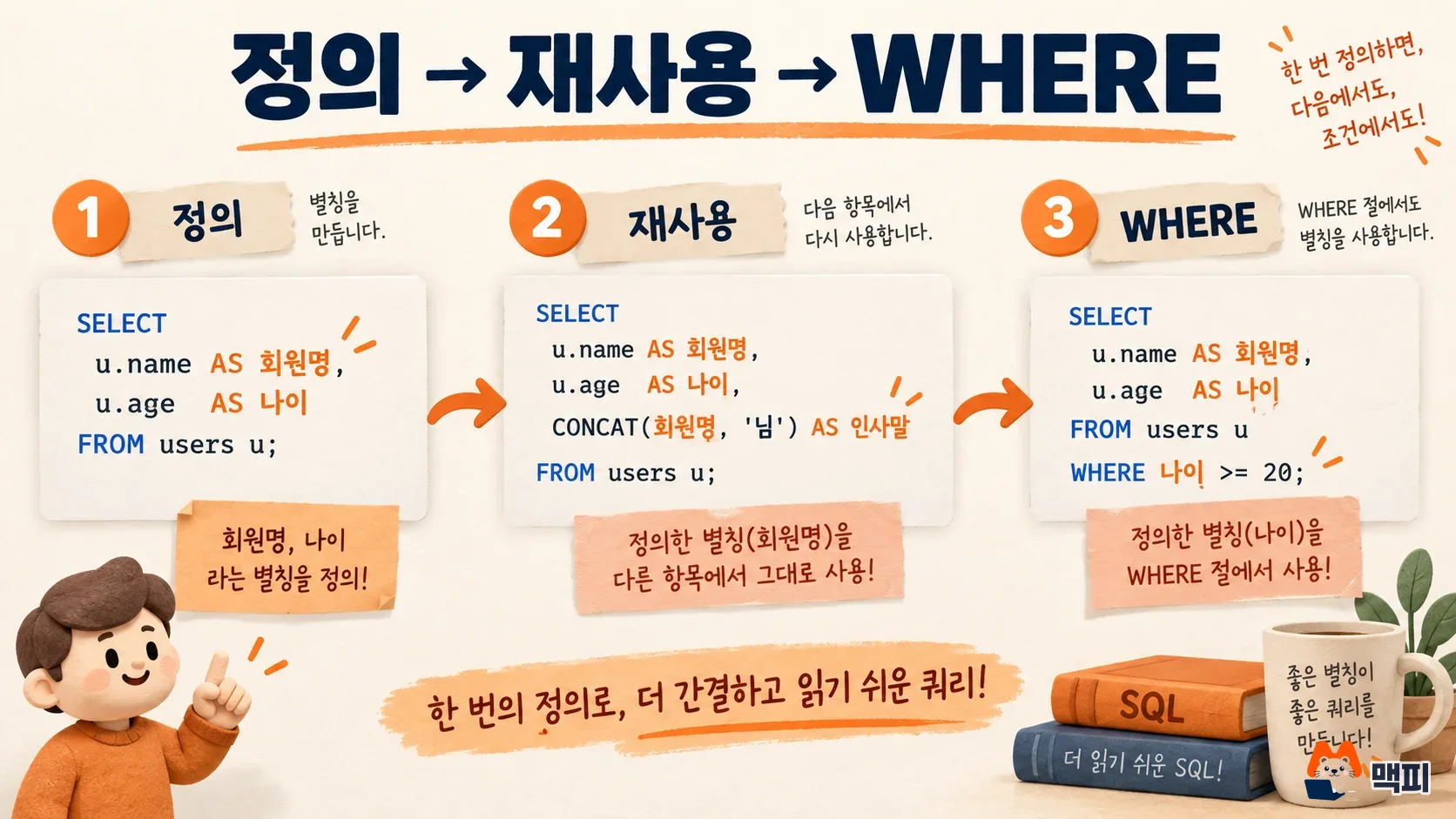
Aliases are referenced only from left to right. If you call an alias before its definition, you get a Column not found error. If you define the same alias twice in one SELECT list, you get a Column name is ambiguous error.
How to turn on column aliases: off by default
This feature is off by default. An admin must set the reusable_column_aliases_mode option to on before you can use it. The required permission is roles/bigquery.admin, or bigquery.projects.update at the project level and bigquery.organizations.update at the organization level (how to enable).
| Scope | Command |
|---|---|
| Project | ALTER PROJECT PROJECT_ID SET OPTIONS (`region-REGION.reusable_column_aliases_mode` = "on"); |
| Organization | ALTER ORGANIZATION SET OPTIONS (`region-REGION.reusable_column_aliases_mode` = "on"); |
| Turn off | Change the value to off. NULL means the system default (off). |
Put the region where your data lives in REGION, and your project ID in PROJECT_ID. After you turn it on, query the PROJECT_OPTIONS, ORGANIZATION_OPTIONS and EFFECTIVE_PROJECT_OPTIONS views to confirm the value is applied as on.
Can my query results change: check for name conflicts
When you turn aliases on, the results of queries with overlapping names can change. BigQuery looks up a name in this order: table columns, aliases defined in the query, columns of the outer query, function arguments, and script variables. So if you already use an alias with the same name as a DECLAREd variable, the alias value is used instead of the variable once the feature is on. The official docs also tell you to assess existing workloads before you enable it.
There are limits on usage too. An alias that points to a grouping column, or an alias that references an aggregate or window function, cannot be used in the WHERE clause or as an argument of another aggregate function. Pipe syntax and GQL do not support it.
Check with a small experiment. Turn it on in a development project first. Run a few queries whose names overlap with variables or outer query columns before and after, and compare the results. If they match, expand to the production project.
BigQuery cross-region table copy GA: method and limits
Cross-region table copy moves tables, table snapshots and table clones from one region (or multi-region) to another. A typical case is merging a dataset in Seoul (asia-northeast3) into the same place as the US multi-region. The method is the bq cp command, and the basic form is below (table management docs).

bq cp --sync=false mydataset_us.mytable mydataset_eu.mytable2You cannot copy across regions in the console or with the CREATE TABLE ... COPY statement. The other limits in the same doc are below.
| Item | Behavior |
|---|---|
| Policy tags and table tags | You cannot copy if the source has them. |
| IAM policy | Not copied, so you must apply it again to the destination table. |
| Time travel data | Not copied to the destination region. |
| Copy mode | Merging several sources into one destination and append mode are not allowed. |
| Expiration time | The source value is also copied to the destination. |
| Replication bandwidth | 2 GiB per second per region and per project (physical). |
There are separate costs too. Cross-region copy incurs data transfer charges under BigQuery pricing, and you are billed even if you cancel before it finishes. If you copy a snapshot or clone to a new region, a full copy is created, so storage costs rise as well. After the copy, count rows in the destination region to check they match the source, and confirm the destination table permissions are what you intended.
What to do now and what to watch next
Turn on column aliases in a development project first, compare the queries with name conflicts, and then apply it to production. For cross-region copy, check tags and IAM policies first, estimate the cost, and then run bq cp. We also covered two BigQuery updates from the same week: how to use the AI.AGG function and how to use the Gemini button in the SQL editor.
Found this useful? Share it
Latest posts
Kakao Share Thumbnail Not Showing? Here's the Fix (JavaScript SDK 2025)
Learn why Kakao Share thumbnails don't appear even with a valid imageUrl, and fix it using scrapImage to convert your URL into a KAGE CDN URL. Step-by-step guide.
How to Generate CRM User Manuals in 20 Minutes with Claude Code Sub-Agents
Learn how Claude Code sub-agents can analyze your CRM codebase and auto-generate user manuals and visual guidebooks in just 20 minutes. See the real-world results.
GEO Generative Engine Optimization: The Complete 2025 AI Marketing Strategy Guide
Learn what GEO (Generative Engine Optimization) is, how it differs from traditional SEO, and discover 5 proven AI marketing strategies to get cited by AI search engines in 2025.
Related projects
Get new posts by email
Insights on marketing, analytics, and dev, delivered to your inbox.