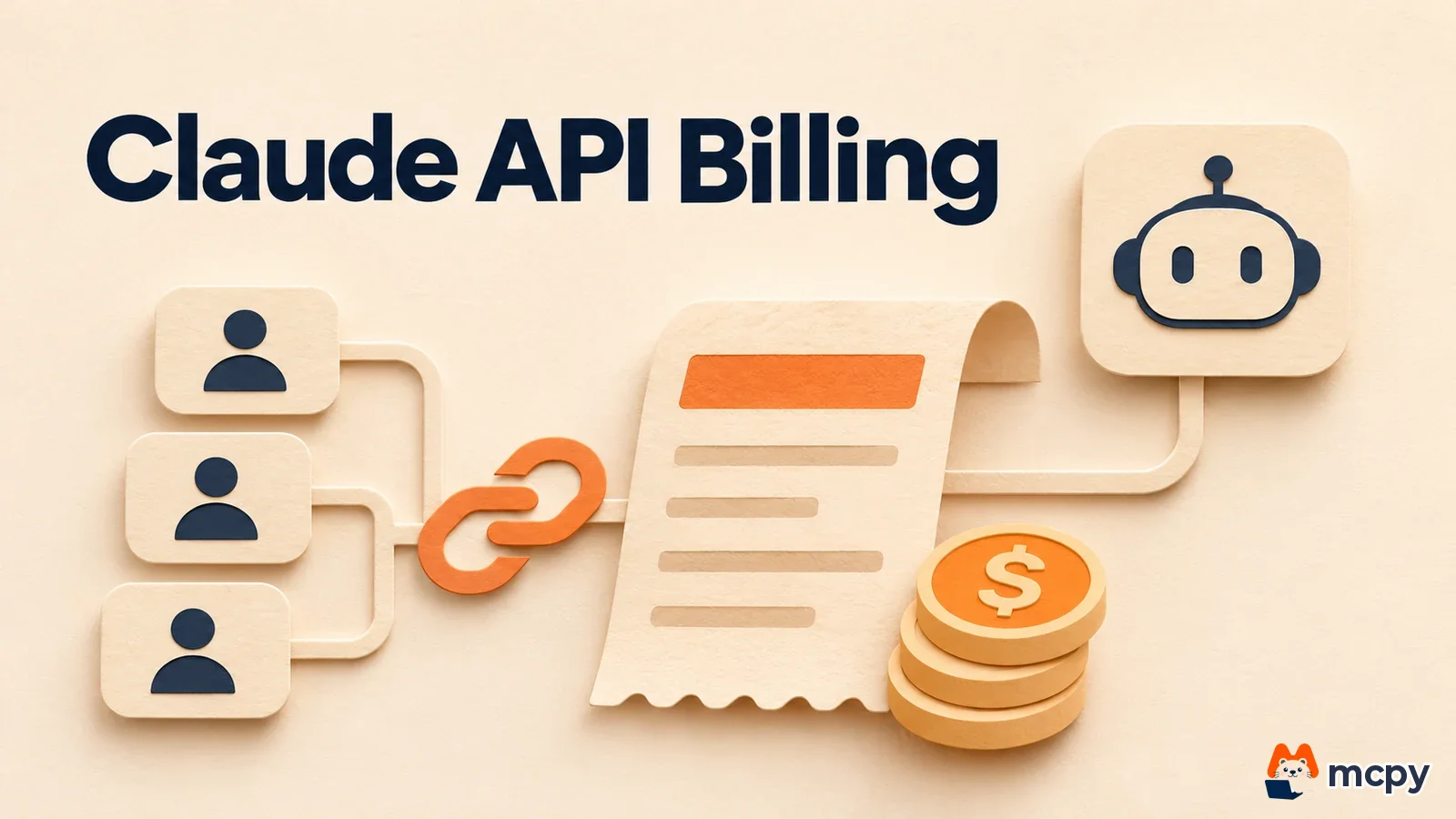
To hand Claude API billing to your customers, use Linked billing, which started as a beta on November 17, 2026. Once a customer links their own Claude organization in your app, your app picks the payer on every request with billing_policy, either the customer or you as the operator. Requests billed to the customer draw from that organization's credits. The condition is that the customer organization pays Anthropic for API usage directly. The Claude Platform release notes announced the feature. Until now, app operators absorbed all API costs, and this lets you pass heavy usage on to the customers who generate it. If you only use an app, you just need to know what you approve when it shows a "Link Claude organization" screen.
On November 17, 2026, Anthropic opened Linked billing in beta on Claude Platform. Requests need the user-profiles-billing-2026-10-01 beta header to use it.
After a customer links your app once, usage is deducted from their organization's credits whenever your app chooses so per request. At link time, the customer sets their own monthly spend cap for your app.
Only organizations that pay Anthropic for API usage directly can link. People on a Claude subscription only (Pro or Max), and organizations that pay through AWS, Google Cloud or Azure, are not eligible.
Who pays what under Claude API billing with Linked billing
According to the official docs, a customer links their Claude organization to your app once through OAuth (the standard way to sign in to another service and approve permissions). The API calls this link a connection. After linking, your app decides on each request whether the customer or the operator pays. The docs state that if a request meant for the customer cannot be processed, the API simply rejects it and does not bill the operator instead. Customers can disconnect at any time.
| Item | Details |
|---|---|
| Announcement | Release notes, November 17, 2026 (beta) |
| Beta header | user-profiles-billing-2026-10-01 |
| Where to set it | billing_policy in /v1/messages and /v1/chat/completions requests |
| Customer-facing screen | Linked platforms page in Claude Console (spend cap, disconnect) |
| Not supported | Message Batches (/v1/messages/batches) |
The docs say Claude Platform OAuth is a beta service, so endpoints and behavior may change and it may not suit production. If you build apps, run it on a test organization first, then open it to customers.
Which customers can use linked billing
The docs target organizations that pay Anthropic directly for API usage, through prepaid credits (topped up in advance) or invoice billing. In the cases below, the request is rejected with 403 user_profile_not_billable (see eligible customers and endpoints).
| Customer situation | Linked billing |
|---|---|
| Organization that buys credits in Console or pays by invoice | Supported |
| Organization that pays through AWS, Google Cloud or Azure | Not supported |
| Organization that uses only a Claude subscription plan | Not supported |
An organization that uses Claude inside Google Cloud is billed on the Google side, so it is not eligible. We covered that structure as the billing difference between Google-managed and Anthropic-managed in Claude on Google Cloud, Anthropic-managed GA.
Not every credit works either. According to the docs, the monthly API credits bundled with Claude Max, Ultra and Team plans, and some Anthropic partner, VC and startup program credits, cannot pay for this billing. If there are no usable credits, you get a 402, and the response alone does not tell you whether credits ran out or a cap was hit. Subscription fees and API usage accumulate separately, so even someone already on a Claude plan needs API credits to pay for app usage. For the plans themselves, see Claude plan comparison.
Only someone with the Admin or Billing role can approve a connection. If you sign in with a personal account, there may be no organization to pick, and only organizations of the account signed in to your browser appear in the list.
Data conditions differ too. According to the docs, linked billing requests run in the app operator's organization. The operator's limits, model access, service tier, data retention and encryption keys apply. The customer organization's ZDR (zero data retention), BAA (a healthcare data agreement) and CMEK (customer-managed encryption keys) do not apply. The docs advise against linking customers who need these protections, such as those handling medical or education records.
The steps from customer link to first request
The app operator creates an app on the OAuth apps screen in Console, chooses Bill and link to organizations, and sets a service account as the linker (operator). This setup happens once per app. The steps below repeat for every customer.
- Create a user profile (
uprof_...) for each customer (one Claude organization) withPOST /v1/user_profiles. One organization maps to one profile. - When the customer clicks a "Link Claude organization" button, your backend sends an authorization request to
https://auth.claude.com/v1/oauth/parand receives arequest_uri. This value expires after 600 seconds. The scope isbilling:attribution. - Send the customer to the approval page. They sign in to Claude, pick an organization, read how billing works, enter a monthly spend cap and click Link and authorize.
- Check the returned
codeandstate, exchange them at the token endpoint, and store the resultingconnection_id(ocon_...) in the customer record. The code is single-use and expires after 5 minutes.
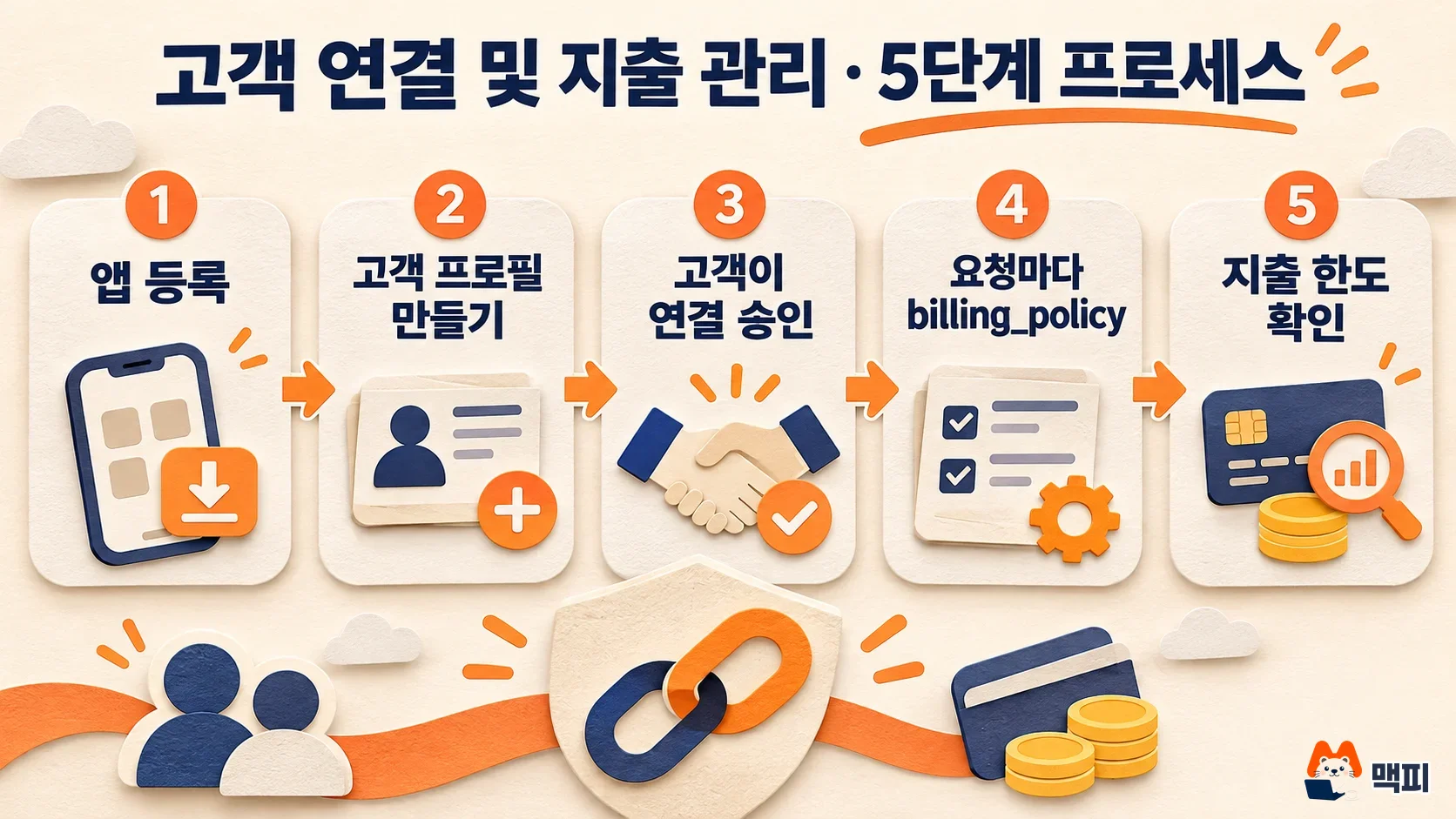
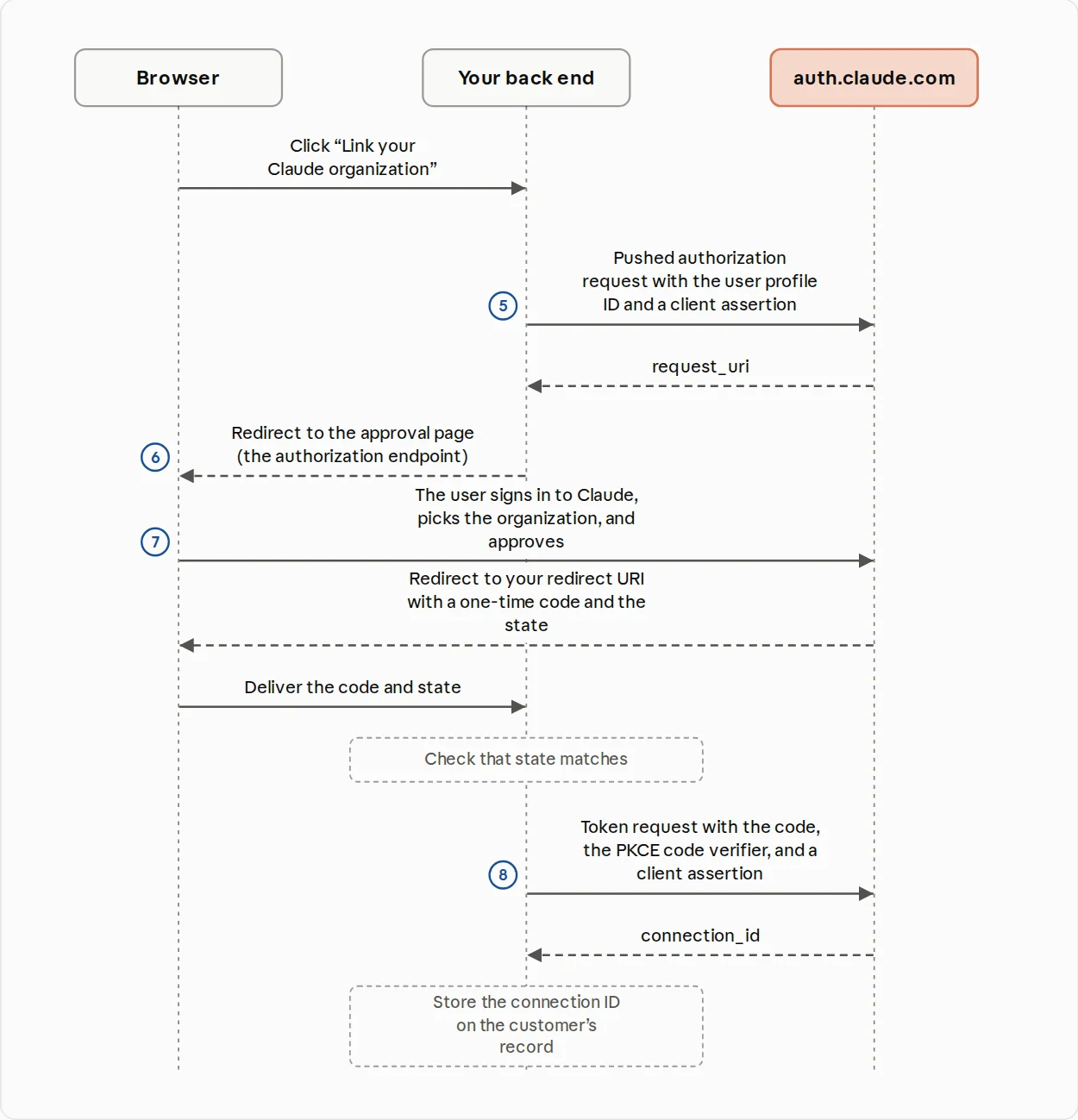
The diagram below shows the same flow from the official docs. Steps 5 (authorization request), 6 (redirect to the approval page), 7 (customer approval) and 8 (token exchange) pass between the browser, the app backend and auth.claude.com.
There is a check you can run yourself before going live. Put a small amount of credit in a second, test organization that does not own the app. Add that organization's Admin to the app's Test users and link it. Then send the same question twice, once with bill_to: "user_profile" and once with bill_to: "self". If the test organization's Console usage shows only the first request and the operator organization's usage shows only the second, your setup is correct. This method follows the test procedure and usage reporting described in the official docs. It is not the result of the author running this feature.
A successful link does not guarantee billing will work. The docs tell you to show "Linked" on screen, not "billing active". A new connection is usually usable right away, but user_profile_not_billable can appear for about 10 seconds after the token exchange, so just resend during that window. Before the app is public, only people on the app's Test users list can approve a connection. The organization that owns the app cannot link to itself, so testing needs a separate second organization.
Set the payer per request with billing_policy
For requests from a linked customer, send the customer profile in the anthropic-user-profile-id header. To have the customer pay, also send the beta header and the billing_policy field.
"billing_policy": {"type": "billing_policy", "bill_to": "user_profile"}| Setting | Payer |
|---|---|
bill_to: "user_profile" | The linked customer |
bill_to: "self" | The app operator |
| No field | The app operator (the beta header is also optional) |
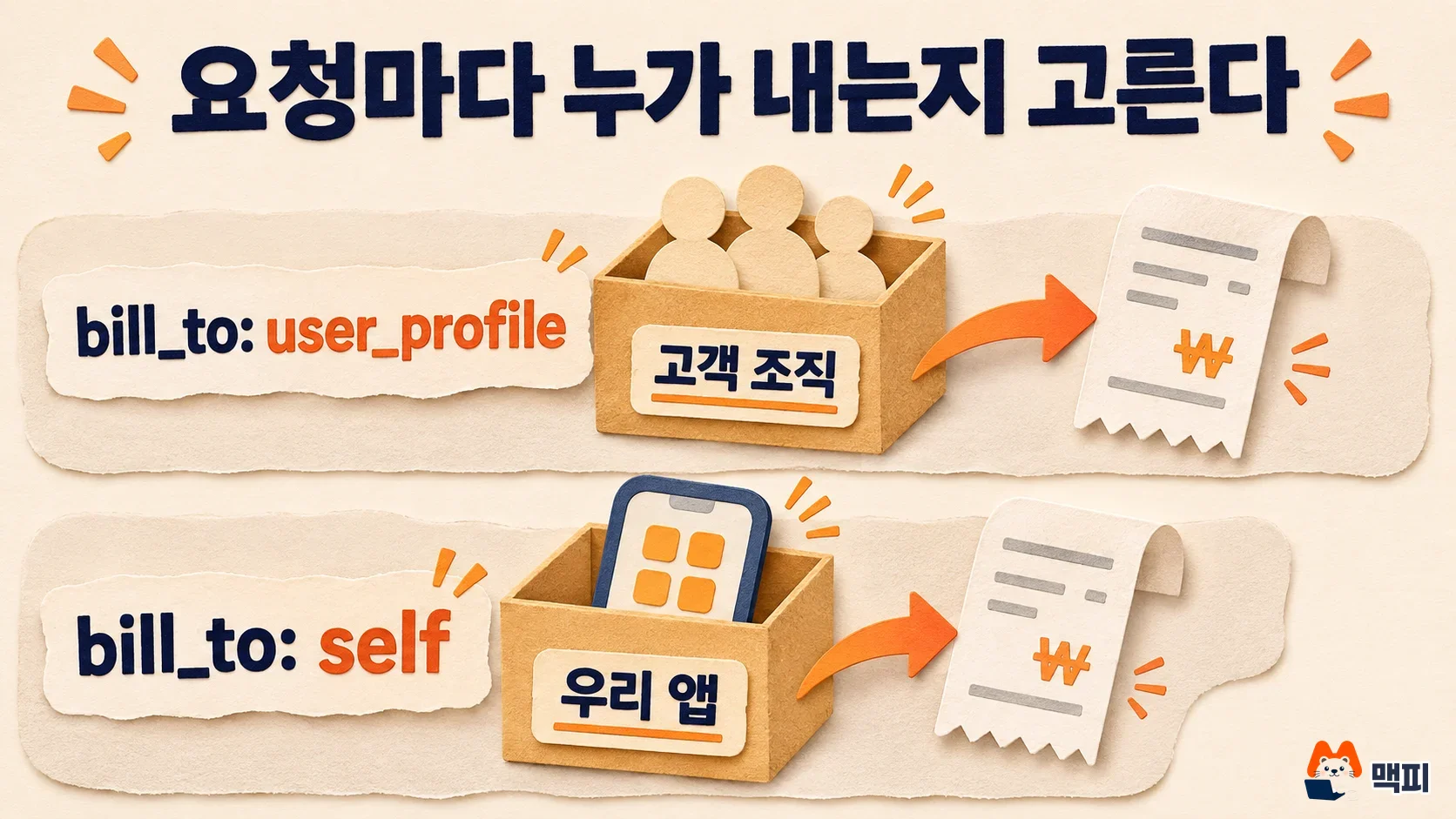
The docs say to use user_profile only for usage the customer directly triggered, meaning requests made by that customer's users inside your app. Do not attach it to the operator's own tests, evaluations or work for other customers, and the API cannot verify this. An operator credential can bill any linked customer just by naming a profile ID, so your app must check that the ID in the header matches the customer behind the request. If it is wrong, another customer's organization is billed with no error.
A successful response does not say who paid. Your app must record which requests it sent as user_profile. You can see usage per profile on the User profiles page in Console and in the usage and cost analysis API. For requests the customer paid, amount adds 0 and list_amount adds the list price. Reports refresh about once an hour, so do not use them for real-time blocking.
Message Batches are not supported. If you put bill_to: "user_profile" on a batch item, only that item fails with invalid_request_error and nobody is billed. Even on regular message requests, user_profile cannot be combined with the code execution feature, which has its own separate cost (400).
Monthly spend caps and disconnection are in the customer's hands
The customer sets a monthly spend cap (spend cap) per app, in US dollars. They enter it first on the link approval screen. After linking, someone with the Admin or Billing role changes it on the Linked platforms page in Console. It is separate from the organization-wide Monthly spend limit, and if either one is used up, requests billed to the customer are rejected. The cap is counted at list price, so an organization with a negotiated discount may see the actual charge differ from the amount counted against the cap.
When the cap is reached, requests are rejected until 00:00 UTC on the 1st of next month (9 a.m. Korea time) or until the customer raises or removes the cap. A change takes about 1 minute to take effect. Your app cannot read the customer's cap or their spend. A cap of $0 rejects every request. As an example, if a customer with a $30 cap uses $30 at list price by mid-month, later customer-billed requests get a 402. Your app must then resend with bill_to: "self" to continue at the operator's cost, or tell the customer to raise the cap.
Before the app is public, a narrower set of limits applies during testing.
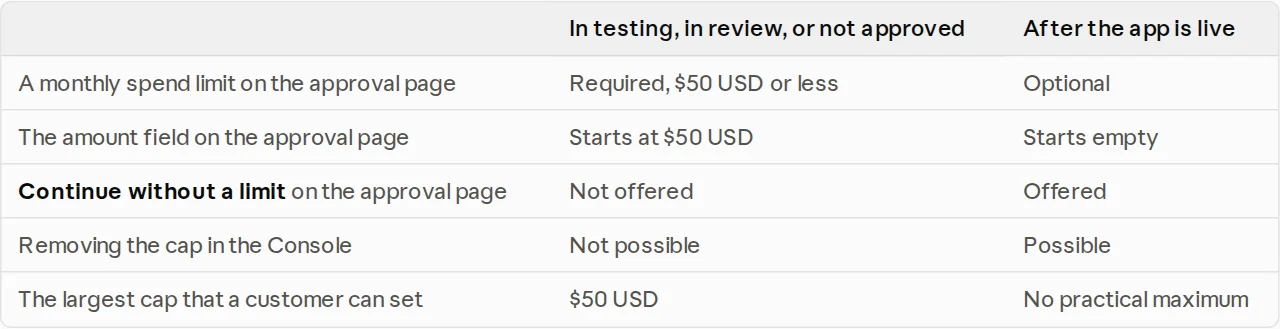
| Item | During testing or review | After going public |
|---|---|---|
| Monthly cap on the approval screen | Required, $50 or less | Optional |
| Default value in the amount field | $50 | Empty |
| Continue without a cap | Not available | Available |
| Remove the cap in Console | Not possible | Possible |
| Maximum cap a customer can set | $50 | Effectively unlimited |
When a customer disconnects your app, the app gets no webhook or email notification. After that, customer-billed requests return 403 user_profile_not_billable, and the profile shows as Unlinked in Console. Running the approval flow again with the same profile links it again. Admin and Billing members of the customer organization get link and unlink emails, but the docs say delivery is not guaranteed.
Common errors and the order to check them
The errors below come from the official docs error list.
| Error | Meaning | What to do |
|---|---|---|
403 user_profile_not_billable | This request cannot be billed to the customer (the response gives no reason) | Check, in order, the credential and profile ID, the link status and the customer organization's eligibility. If urgent, resend with bill_to: "self" |
402 linked_organization_spend_limit_reached | The app cap or the organization's monthly limit is used up, or there are no usable credits | Tell the customer to check the Linked platforms, Spend limits and Billing pages |
402 linked_organization_billing_unavailable | The organization is suspended, or credits ran out mid-response | Do not retry. Tell the customer to check their account |
503 overloaded_error | Billing eligibility could not be checked right now | Wait for the retry-after time, then retry |
400 user_profile_required | The request uses user_profile but the profile ID header is missing | Add the header |
If user_profile_not_billable continues after the 10 seconds following the token exchange, and Console shows Linked, record the request-id response header and the full error.message of the rejected request and send them to your Anthropic account contact. Success means the first request after the customer finishes approval returns 200, and that profile's list_amount builds up in the Console User profiles usage.
This feature is tied to user profiles. Unlike features in the same beta family that switch on with a single header, such as the Claude API message threads beta, it first requires app registration and a customer approval screen design. If you want to look at the Claude API cost structure first, the Claude API refusal billing rules article covers the same kind of billing question.
Frequently asked questions
Can someone with only a Claude Pro or Max subscription pay for app usage?
No. Organizations that use only a subscription plan are not eligible. Only organizations with an API payment method, such as credits bought in Console or invoice billing, can link.
What happens if a customer sets the cap to $0?
Every request billed to the customer is rejected with a 402. Your app must resend the same request with bill_to: "self" to cover it as an operator cost, or tell the customer to adjust the cap.
Does the app get a notification when a customer disconnects?
No. According to the docs, neither a webhook nor an email is sent. When 403 user_profile_not_billable appears, suspect the link status and check whether the profile is Unlinked in Console under User profiles.
Found this useful? Share it
Latest posts
Kakao Share Thumbnail Not Showing? Here's the Fix (JavaScript SDK 2025)
Learn why Kakao Share thumbnails don't appear even with a valid imageUrl, and fix it using scrapImage to convert your URL into a KAGE CDN URL. Step-by-step guide.
How to Generate CRM User Manuals in 20 Minutes with Claude Code Sub-Agents
Learn how Claude Code sub-agents can analyze your CRM codebase and auto-generate user manuals and visual guidebooks in just 20 minutes. See the real-world results.
GEO Generative Engine Optimization: The Complete 2025 AI Marketing Strategy Guide
Learn what GEO (Generative Engine Optimization) is, how it differs from traditional SEO, and discover 5 proven AI marketing strategies to get cited by AI search engines in 2025.
Related projects
Get new posts by email
Insights on marketing, analytics, and dev, delivered to your inbox.