
BigQuery AI.RANK is one of the BigQuery AI functions. It reorders the rows of a table by "how well each row answers a query." Google Cloud announced in the BigQuery release notes of November 17 that the function is now generally available (GA). Say you have a table of reviews, support requests, or document titles. If you ask "how to reset my password," AI.RANK can lift a row like "change your login information" to the top, even though it shares no words with the query.
AI.RANK returns a 0.0 to 1.0 score and a rank showing how well the text column you choose answers the query, and it keeps your original columns attached.
It does not use an index, so cost grows with every row you send. The official docs recommend narrowing candidates with vector search first, then reranking with AI.RANK.
To use it, enable the Discovery Engine API in your project and give the account that runs the query the Discovery Engine Viewer role. Billing goes through separate ranking API pricing.
How AI.RANK differs from keyword and vector search in BigQuery AI functions
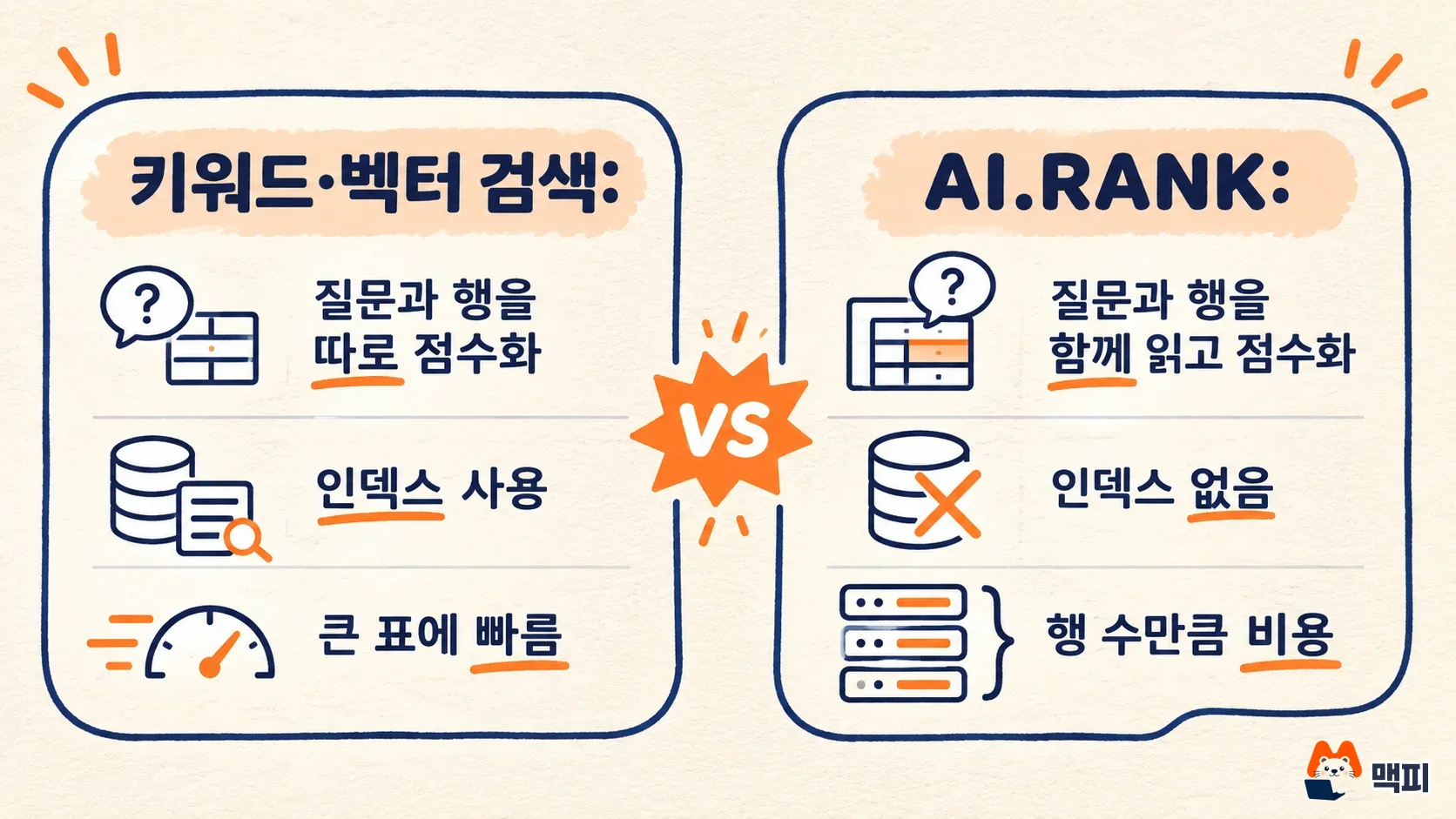
AI.RANK reads the query and each row's text together and then scores them. According to the official Google docs, keyword search, vector search, and hybrid search score the query and each row separately. That lets them use indexes and stay fast on large tables. AI.RANK gives a more precise score, but it cannot use an index, and its cost grows in proportion to the number of rows being ranked (AI.RANK reference).
| Type | How it scores | Index | Cost and scale |
|---|---|---|---|
| Keyword, vector, and hybrid search | Scores the query and each row separately | Can use an index | Scales to large tables |
| AI.RANK | Evaluates the query and each row's text together | Does not use an index | Cost grows with every ranked row |
So AI.RANK works best as the second stage of a search, not as a replacement for search. The release note entry says only this: it reranks rows by how well a text column answers a query, and it is now GA.

How to write an AI.RANK query: syntax and a first example
AI.RANK takes the data, the column to rank, and the query. The model and the number of returned rows are optional.
| Argument | Required | Description |
|---|---|---|
| TABLE table_name or (query) | Required | The data to rank. Pass one of the two |
| column_to_rank | Required | Name of the text column to rank. It must be a STRING, and the input data must not have a column named rank or score (case-insensitive) |
| query | Required | The search query to compare against. An empty string is not allowed |
| model | Optional | The ranking model. Defaults to semantic-ranker-default@latest |
| top_n | Optional | Maximum number of rows to return. Must be positive. If omitted, all ranked rows are returned |

The first example in the official docs uses the public BBC News table. It picks the 5 titles that best match a downturn in the housing market.
SELECT rank, score, title
FROM AI.RANK(
  TABLE `bigquery-public-data.bbc_news.fulltext`,
  'title',
  'downward trends in the housing market',
  top_n => 5
);
The result adds rank (a 1-based position, INT64) and score (0.0 to 1.0 relevance, FLOAT64) to the input columns, sorted by rank ascending. The official docs show output like the table below. Scores change from run to run.
| rank | score | title |
|---|---|---|
| 1 | 0.6353 | House prices drop as sales slow |
| 2 | 0.4060 | House prices suffer festive fall |
| 3 | 0.3988 | Survey confirms property slowdown |
| 4 | 0.3728 | UK house prices dip in November |
| 5 | 0.2671 | No seasonal lift for house market |
Moving the same syntax to a review table looks like AI.RANK(TABLE `프로젝트.데이터세트.reviews`, 'review_text', '배송이 늦어서 불만인 리뷰', top_n => 20). The docs describe the behavior as lifting text that answers the question even when no words overlap. Which reviews actually rise to the top is something you can only learn by opening the results on your own table.
Which column to rank with AI.RANK: title or body
The official docs give this rule. If the query names a topic, a short column such as a title or summary works better, because a long body spreads the topic across unrelated paragraphs. If the query is a detail that would not appear in a headline, pick the long column. The docs use the example of finding "executives who resigned after an accounting scandal." Ranking by title misses the article about the Airing Goose executive resignation, and ranking by body finds it.
To limit the ranking to one category, pass a query instead of a table. The query below picks only business articles and returns 3 by body text.
SELECT rank, score, title
FROM AI.RANK(
  (
    SELECT title, body
    FROM `bigquery-public-data.bbc_news.fulltext`
    WHERE category = 'business'
  ),
  'body',
  'executives who resigned after an accounting scandal',
  top_n => 3
);
AI.RANK ranks every row it receives, so narrowing with WHERE first is the easiest way to control cost. The official docs recommend this too.
Rerank 50 candidates with AI.RANK in a two-stage search
On a large table, do not run AI.RANK from the start. The docs describe the most useful pattern as a two-stage search: a cheap stage picks candidates, and AI.RANK reranks only those candidates.
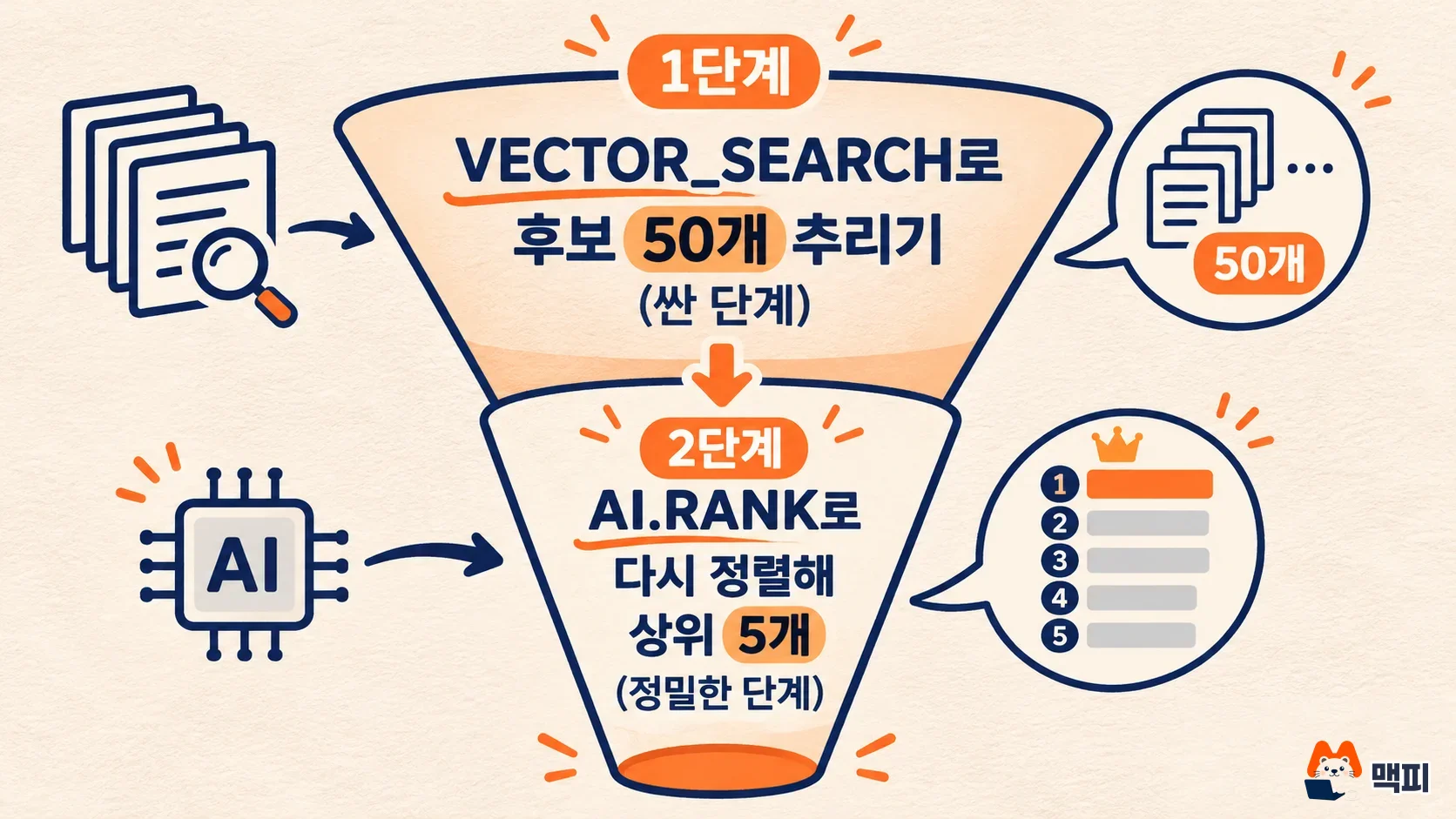
The official example runs VECTOR_SEARCH on a column that already holds embeddings (text converted into numeric vectors) to pull 50 similar articles. AI.RANK then reorders those 50 by the question and returns 5.
SELECT rank, score, title
FROM AI.RANK(
  (
    SELECT base.title AS title, base.body AS body
    FROM VECTOR_SEARCH(
      TABLE `bigquery-public-data.bbc_news.fulltext`,
      'body_embedded',
      (
        SELECT body_embedded
        FROM `bigquery-public-data.bbc_news.fulltext`
        WHERE title = 'Bank opts to leave rates on hold'
      ),
      top_k => 50)
  ),
  'body',
  'downward trends in the housing market',
  top_n => 5
);
VECTOR_SEARCH compares vectors, not text, so the subquery passes in the embedding of an existing article. To search with a sentence you wrote yourself, create its embedding with AI.EMBED and pass that in. In this setup AI.RANK ranks only 50 rows, so the query is fast and the cost is capped by the candidate count. AI.SEARCH can also pick the candidates. If you want to summarize the result rows into one paragraph, read how to use the BigQuery AI.AGG function next. AI.RANK accepts only STRING columns, so to pass images or PDFs into SQL, use the approach in how to use BigQuery ObjectRef.
Before you use AI.RANK: API, permissions, and pricing
AI.RANK calls the Agent Search ranking API of the project that runs the query. So you need two things in place first.
- Enable the Discovery Engine API in the project. Enabling it requires the
serviceusage.services.enablepermission. If you created the project yourself, you likely already have it through the owner role. - Give the account that runs the query the project-level Discovery Engine Viewer (
roles/discoveryengine.viewer) role. This role includes thediscoveryengine.rankingConfigs.rankpermission that an AI.RANK call needs.
Usage is billed separately at ranking API pricing, and call volume counts against that project's Agent Search quotas. The only cost control the docs mention is to shrink the input first. If a row's text is longer than the model's token limit, the excess is truncated. Per-model limits are in the supported models table.
How to check that AI.RANK results are correct
The AI.RANK score is meant only for comparing rows within a single result. It is not calibrated across queries. If you set a fixed cutoff such as "only rows with score above 0.5," it may work for one query and cut off correct answers for another. A score of 0.0 cannot tell irrelevant text apart from a row that was not ranked. To shrink results, use top_n or filter on the rank column.
Here is the order to check it on your own data.
- Start with a table of a few hundred rows, or a query narrowed by WHERE, to cap the cost.
- Pick a query where you already know 3 to 5 correct rows, and run it with
top_n => 10. - Check by rank whether the known rows rise to the top. Look at the order, not the score numbers.
- If they do not, rerun the same query with
column_to_rankswitched from title to body (or the reverse).
If the query finishes without errors and rank runs from 1 onward, the run succeeded. Getting fewer rows than you put in is not an error. According to the docs, rows where the ranked column is NULL or an empty string are dropped before ranking, and rows beyond top_n are dropped from the result.
Frequently asked questions
Do I have to set the model argument?
No. If you omit it, semantic-ranker-default@latest is used, which always points to the latest ranking model. The official docs recommend omitting it so model improvements apply automatically.
Which project is billed for AI.RANK queries?
The project that runs the query. According to the official docs, AI.RANK calls that project's Agent Search ranking API with the running account's credentials, and usage is billed at ranking API pricing.
Can I search a whole table with AI.RANK alone?
It is fine for a small table or a result narrowed by WHERE. On a large table it cannot use an index and costs money for every row, so the structure the official docs recommend is to pick candidates first with VECTOR_SEARCH or AI.SEARCH.
Found this useful? Share it
Latest posts
Kakao Share Thumbnail Not Showing? Here's the Fix (JavaScript SDK 2025)
Learn why Kakao Share thumbnails don't appear even with a valid imageUrl, and fix it using scrapImage to convert your URL into a KAGE CDN URL. Step-by-step guide.
How to Generate CRM User Manuals in 20 Minutes with Claude Code Sub-Agents
Learn how Claude Code sub-agents can analyze your CRM codebase and auto-generate user manuals and visual guidebooks in just 20 minutes. See the real-world results.
GEO Generative Engine Optimization: The Complete 2025 AI Marketing Strategy Guide
Learn what GEO (Generative Engine Optimization) is, how it differs from traditional SEO, and discover 5 proven AI marketing strategies to get cited by AI search engines in 2025.
Related projects
Get new posts by email
Insights on marketing, analytics, and dev, delivered to your inbox.