

If you enabled an internal traffic filter in GA4 but company visits still remain in BigQuery, the filter is likely not yet in the 'Active' state. According to Google's official documentation, an exclusion filter in the 'Active' state permanently removes data, and that data does not remain in either GA4 or BigQuery. In contrast, the 'Testing' state only adds an indicator and keeps the data intact. You can filter data that has already accumulated at the session level in a BigQuery query.
Read this first in three lines
- If the filter is in 'Testing' or 'Inactive' status, company visits continue to enter BigQuery.
- Internal visits receive a
traffic_typevalue, so you can identify them in BigQuery. - You cannot filter them in the BigQuery link settings. Exclude the entire session in a query or view.
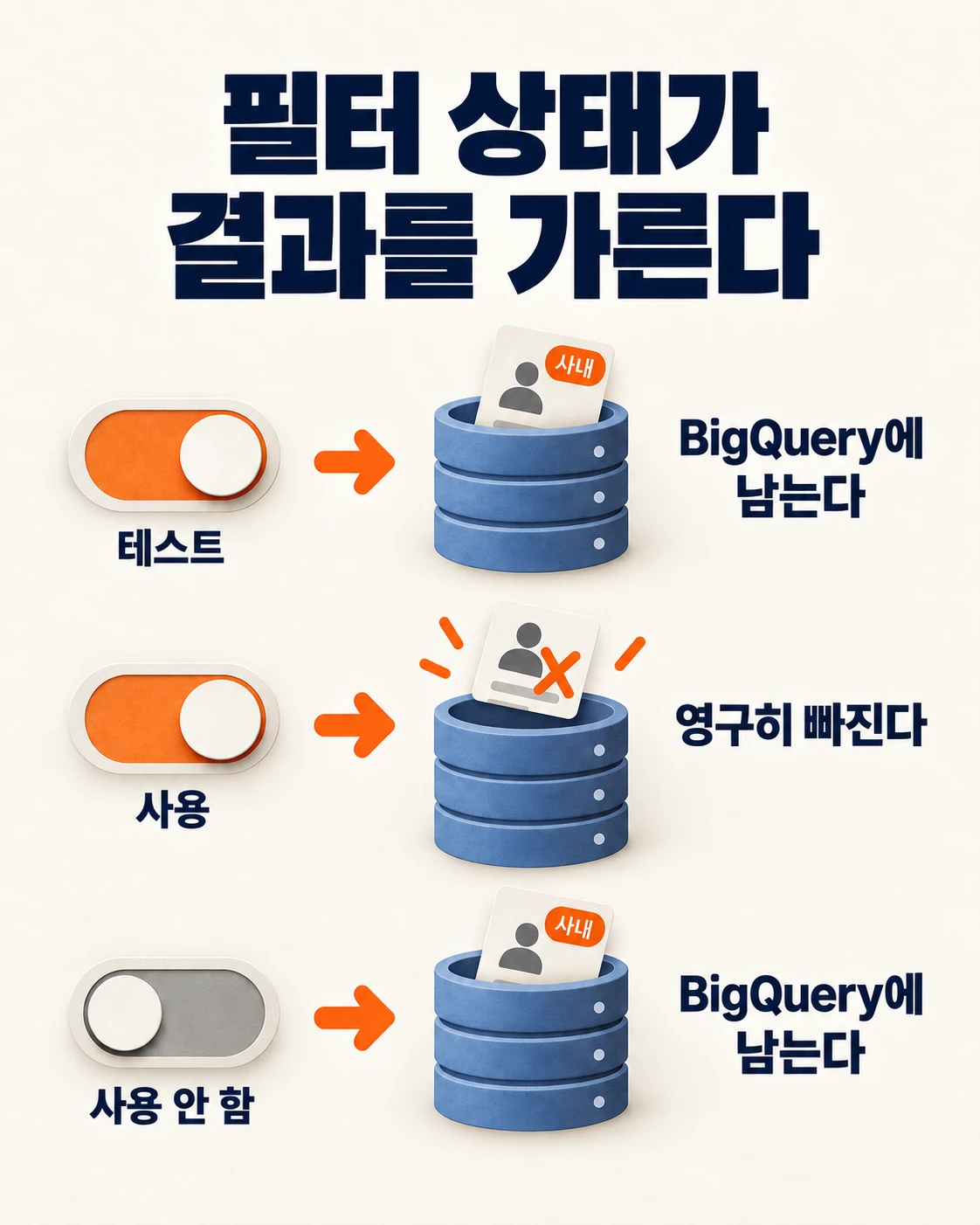
Three filter states determine the result
GA4 data filters have three states. Their names are similar, but they treat data very differently. This is based on Google's internal traffic filter guidance.
| Status | What it does | Does it remain in BigQuery? |
|---|---|---|
| Testing | Only adds the 'Test data filter name' indicator to matching data | Yes |
| Active | Permanently excludes it from incoming data | No |
| Inactive | Does not evaluate the filter | Yes |
This is where many people get confused. When creating a filter, it is often left in the Testing state first to confirm that it is being identified in an Exploration report. But nothing is actually excluded in this state. After verification, you must change it to 'Active' for the exclusion to take effect.
There is one important caveat. The Active state takes permanent effect. Once data is excluded, it cannot be restored. So validating it in Testing first is the right sequence. Just do not forget to switch it afterward.
BigQuery alone cannot tell whether a filter is testing or inactive
The 'Test data filter name' attached in the Testing state is a value visible in GA4 Exploration reports. The BigQuery export schema does not include this value separately. So the fact that company visits remain in BigQuery alone cannot tell you whether the filter is Testing or Inactive.
Check the status in the GA4 Admin screen. Go to Admin → Data collection and modification → Data filters, then look at the status column for the relevant filter. If it is not 'Active', internal visits are still entering BigQuery.
Identify internal visits with traffic_type
When you create an internal traffic rule, GA4 adds the traffic_type parameter to every event originating from the matching IP address. Its default value is internal. Event parameters are exported together in BigQuery's event_params, so you can use this value to find company visits in a query.
Here is an observation from real production data, not a synthetic example. The service name and figures have been anonymized. In one service's export data, sessions with traffic_type='internal' continued to appear after the internal traffic rule was created. Some visits were company visits, which inflated the visit count accordingly. Fortunately, none of these sessions generated inquiries or leads.
You may wonder whether this can be filtered in the BigQuery link settings, but it cannot. Data filtering in the BigQuery link can exclude only at the data stream and event name level. It cannot filter by parameter value.
Exclude the entire session in your query
The key is to exclude data at the session level, not the event level. Even within one session, the marker may be missing from the first event, or events may be mixed around the time the rule was created. If you delete only events, half of the session remains, making both visits and conversion rates inaccurate.
WITH events AS (
  SELECT
    user_pseudo_id,
    (SELECT value.int_value FROM UNNEST(event_params) WHERE key = 'ga_session_id') AS session_id,
    (SELECT value.string_value FROM UNNEST(event_params) WHERE key = 'traffic_type') AS traffic_type,
    COALESCE(
      (SELECT value.int_value FROM UNNEST(event_params) WHERE key = 'debug_mode'),
      SAFE_CAST((SELECT value.string_value FROM UNNEST(event_params) WHERE key = 'debug_mode') AS INT64)
    ) AS debug_mode
  FROM `your-project.analytics_PROPERTY_ID.events_*`
  WHERE _TABLE_SUFFIX BETWEEN '20260901' AND '20260914'
),
session_flags AS (
  SELECT
    user_pseudo_id, session_id,
    LOGICAL_OR(IFNULL(traffic_type = 'internal', FALSE)) AS is_internal,
    LOGICAL_OR(IFNULL(debug_mode = 1, FALSE)) AS is_debug
  FROM events
  GROUP BY user_pseudo_id, session_id
)
SELECT
  COUNT(*) AS all_sessions,
  COUNTIF(NOT is_internal AND NOT is_debug) AS external_sessions
FROM session_flags;
Be sure to include IFNULL(..., FALSE). For sessions without a marker, the comparison result becomes empty (NULL), so regular visits can also be excluded from the count if you leave it as is.
Review three signals together. traffic_type identifies company IP visits. debug_mode identifies developer visits through GTM Preview or a debug extension. If needed, also exclude cases where the host in page_location is not the production domain, such as localhost or a development server. The Meta Pixel development and production conversion separation article explains how to separate development and production environments by hostname in GTM. You can extract only the host with NET.HOST(page_location).
Make it permanent with a view
It is difficult to remember these conditions every time. For the same reason, managing UTM values only in a spreadsheet can cause them to drift. The article on regularly validating UTM conventions with BigQuery also covers how to make rules permanent in a query. Create a view containing the conditions and have dashboards and analyses read only from that view to reduce mistakes.
CREATE OR REPLACE VIEW `your-project.analysis.external_events` AS
WITH base AS (
  SELECT *,
    (SELECT value.int_value FROM UNNEST(event_params) WHERE key = 'ga_session_id') AS session_id,
    IFNULL((SELECT value.string_value FROM UNNEST(event_params)
            WHERE key = 'traffic_type') = 'internal', FALSE) AS is_internal_event
  FROM `your-project.analytics_PROPERTY_ID.events_*`
),
flagged AS (
  SELECT *,
    LOGICAL_OR(is_internal_event) OVER (PARTITION BY user_pseudo_id, session_id) AS session_is_internal
  FROM base
)
SELECT * EXCEPT (session_id, is_internal_event, session_is_internal)
FROM flagged
WHERE NOT session_is_internal;
A view recalculates the source data every time you read it. If the data is large, always apply a date condition when querying it. For frequent use, creating a separate session table is more cost-effective.
Easy-to-miss points
- Filters are not retroactive. As the official documentation states, filters apply from the time they are created. Even after switching to Active, company visits collected earlier remain in BigQuery. Filter historical data with a query.
- Visits with changing IP addresses cannot be identified. If someone visits from outside the company IP range, such as while working from home, on mobile data, or through a VPN, they will not receive the internal marker. This is a limitation of the filter, so add another method that marks team members' devices separately.
- Event-level exclusion is incomplete. As shown above, you must exclude the whole session for both visit counts and conversion rates to be accurate.
Frequently asked questions
If I switch the filter to 'Active', will it also be excluded from BigQuery?
Yes. According to Google's official documentation, data matched by an exclusion filter in the Active state is not processed and remains in neither GA4 nor BigQuery. However, it applies only to data after the time you make the change.
Can I check the Testing state in BigQuery?
The export schema does not include the test filter name. Check the status in the Data filters list in the GA4 Admin screen.
Can I change the traffic_type value?
Yes. The default value is internal, but you can assign different values by branch office. If you do, update the query condition to match that value.
This is a guide to the behavior of an existing feature, not news about a newly changed feature. Official documentation checked: September 29, 2026. Case figures have been anonymized. The image is a generated illustration explaining the concept.
Found this useful? Share it
Latest posts
Kakao Share Thumbnail Not Showing? Here's the Fix (JavaScript SDK 2025)
Learn why Kakao Share thumbnails don't appear even with a valid imageUrl, and fix it using scrapImage to convert your URL into a KAGE CDN URL. Step-by-step guide.
How to Generate CRM User Manuals in 20 Minutes with Claude Code Sub-Agents
Learn how Claude Code sub-agents can analyze your CRM codebase and auto-generate user manuals and visual guidebooks in just 20 minutes. See the real-world results.
GEO Generative Engine Optimization: The Complete 2025 AI Marketing Strategy Guide
Learn what GEO (Generative Engine Optimization) is, how it differs from traditional SEO, and discover 5 proven AI marketing strategies to get cited by AI search engines in 2025.
Related projects
Get new posts by email
Insights on marketing, analytics, and dev, delivered to your inbox.