
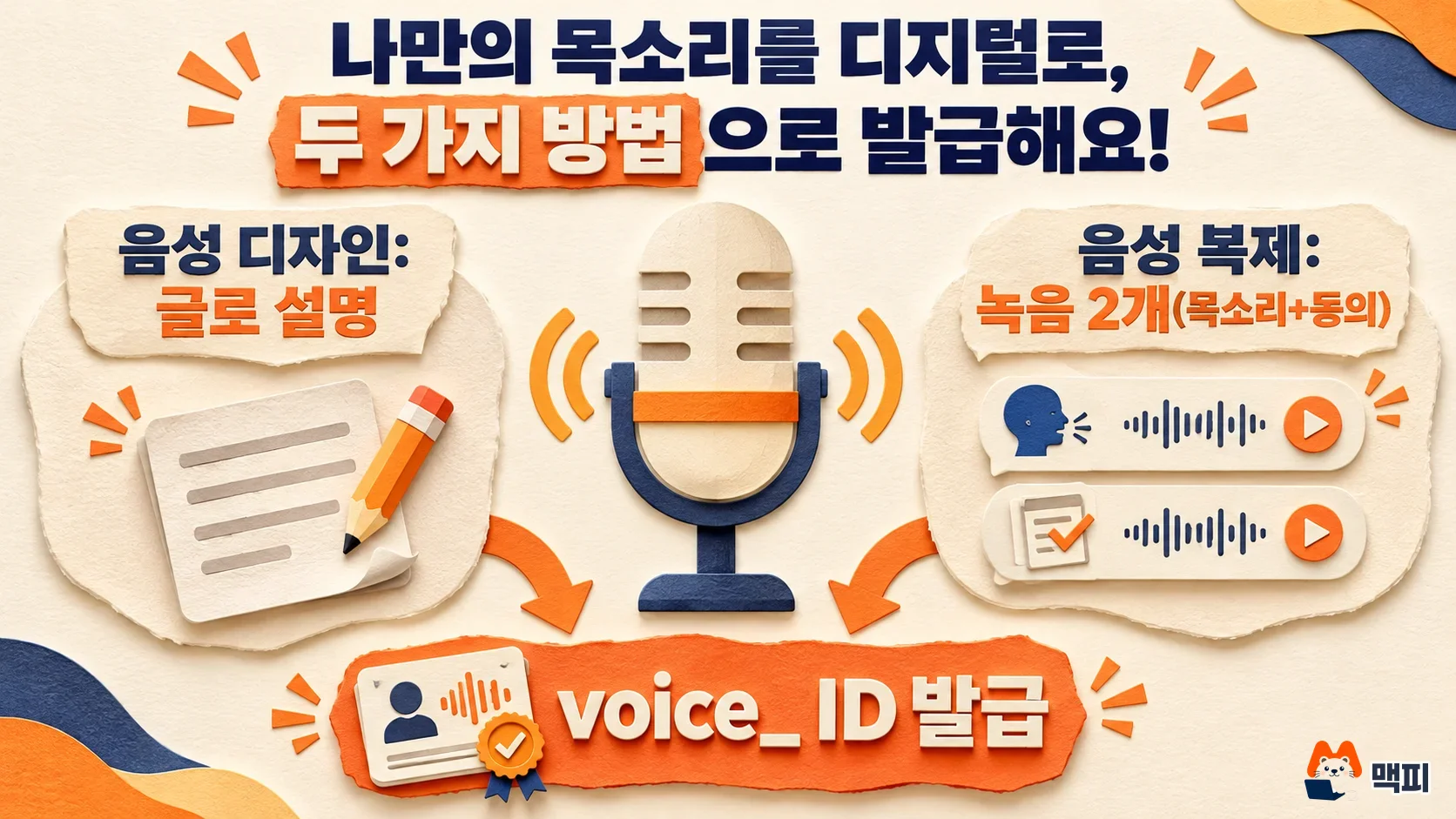
There are two ways to create a voice in Gemini TTS: voice design, where you describe the voice in text, and voice cloning, where you copy a voice from two recordings of the same person. According to Google's Gemini API speech generation docs, both methods work with the gemini-3.8-flash-tts model in AI Studio or through the API, and the result is a voice ID that starts with voice_. Once you create this ID, you reuse it in every later speech request (as of October 22, 2026).
Creating a Gemini TTS voice: what changed
Hiring a new voice actor for every script is different from signing one actor you like and calling them back each time. The Gemini TTS voice ID works like the second option. You create a voice once, save it, and call it by ID. Keep in mind that the ID locks in the character of the voice. It does not guarantee the same reading speed or emotion every time.
Google's docs split the models in two. gemini-3.8-flash-tts is for expressive work and long readings with several speakers. gemini-3.8-flash-lite-tts is built for faster, cheaper bulk processing and voice agents. According to the docs, the two models use the same request format, so you can swap them by changing only the model name. Flash supports more than 130 languages, and Flash-Lite supports more than 100. For other model changes in the Gemini API, see our summary of Gemini API model changes.
Voice design or voice cloning: which should you choose
The deciding question is whether the voice belongs to a specific person. If you must use a particular person's voice, choose cloning. If there is no such limit and you just need a character like "a male podcast host in his 30s," choose design.
| Item | Voice design | Voice cloning |
|---|---|---|
| Input | Text describing the voice | One reference recording and one consent recording |
| API setting | type="prompted" | type="replicated" |
| Best for | Video narration, virtual host characters | Reusing your own voice or the voice of someone who gave consent |
| What you need | Nothing | Two recordings from the same adult speaker |
Cloning uses a real person's voice, so the conditions are strict. The docs require the reference recording and the consent recording to come from the same real adult speaker. This means you cannot create a cloned voice without a consent recording from the voice owner.
How to design a voice in Gemini TTS
In AI Studio, you can enter a voice description to create a new voice. To do it in code, follow Google's docs and send type="prompted" to POST /v1beta/voices. The example below is a shortened version of the Python sample that developer Phil Schmid posted in his Gemini 3.8 TTS article.
voice = client.voices.create(
    store=True,
    voice={
        "model": "gemini-3.8-flash-tts",
        "type": "prompted",
        "display_name": "Deadpan host",
        "gender": "male",
        "language_code": "en-US",
        "prompted": {"input": "A dry, deadpan podcast host in his 30s, low pitch, slight German accent."},
    },
)
print(voice.id)  # voice_... 로 시작
The description should only say who the speaker is and how they sound. The example sentence packs the role (podcast host), age range (30s), pitch (low), and accent (slight German accent) into one line. The sample_audio field in the response is a WAV preview, so listen to it before generating a long script.
Put the speaking manner in the request, not in the voice description. Schmid's article advises that attaching a long style description (Audio Profile) to every request can make the voice drift. His advice is to keep the character in the voice and keep the style string short. This is one developer's personal experience, not a rule set by Google.
How to clone a voice in Gemini TTS: two recordings and settings
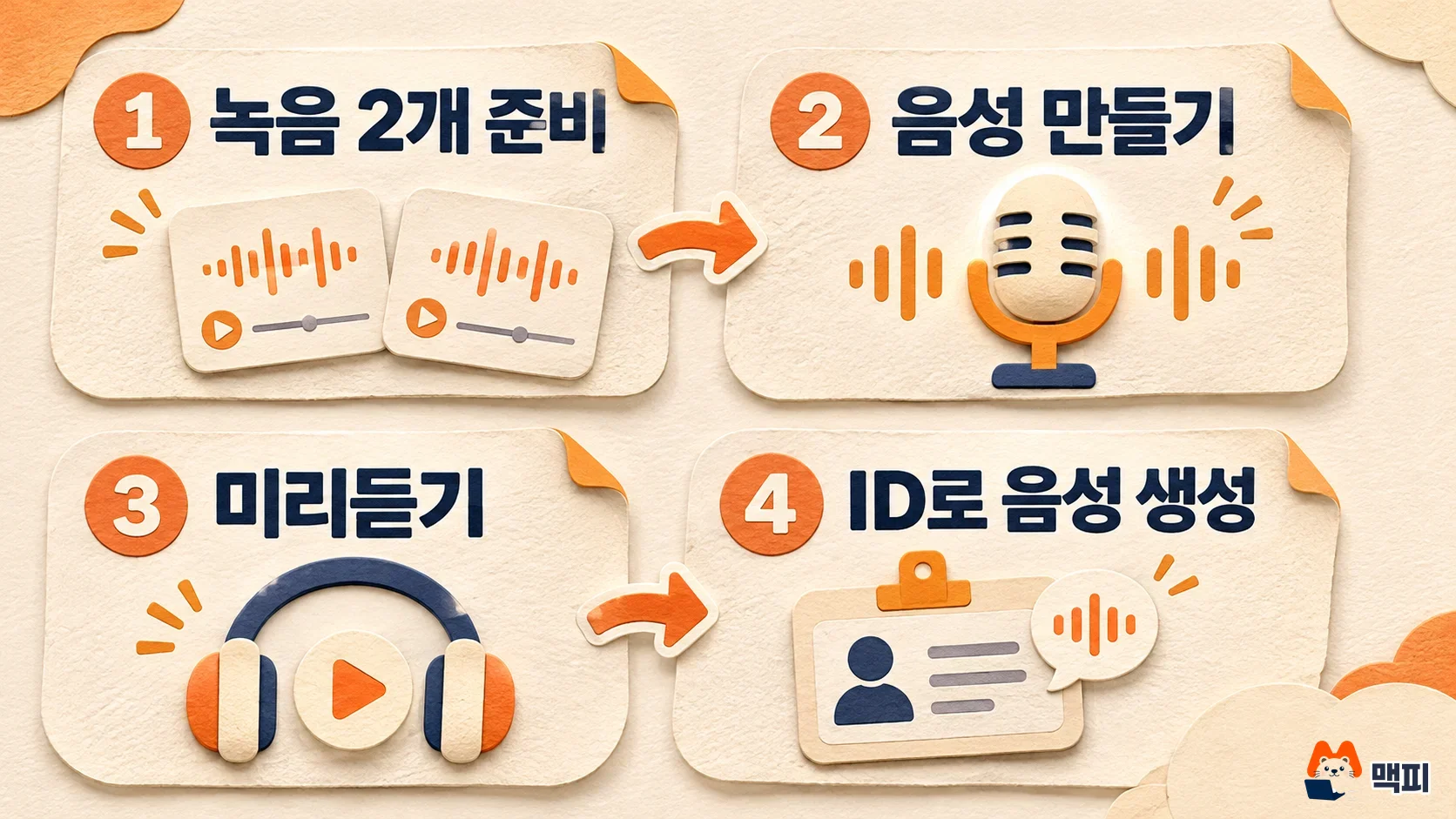
The steps in the voice cloning docs are as follows.
- Choose how to store the voice.
store=True(the default) saves it to your project and returns a voice_ ID.store=Falsereturns an encrypted key (voicekey_) that you keep yourself. - Prepare two recordings from the same adult speaker. The reference recording is 10 to 30 seconds of clean, natural speech. The consent recording is the same person reading the consent sentence. A 24kHz mono 16-bit WAV is recommended.
- Record both in a quiet place, with the same microphone and the same environment. The docs explain that this is what lets speaker verification pass.
- On the AI Studio voice cloning screen, record or upload the two files and preview the result. With the API, send
type="replicated"withsource_audioandconsent_audioas base64. - Put the returned ID in
generation_config.speech_configof your speech generation request.
The consent sentence is fixed for each language. In English it is "I am the owner of this voice and I consent to Google using this voice to create a synthetic voice model." The docs say consent sentences are available in 30 languages, including Korean. You must read the consent recording exactly as written in the language you choose.
Generate speech with your voice and check it
You use the voice ID by putting it in the request's speech_config. The script is read exactly as written, so if you put an instruction like "read this calmly" inside the script, that sentence is spoken aloud too. You can set the manner for a whole line in style inside speech_metadata. For short laughs or pauses, use tags like <laugh> and <short pause>. You can confirm this in Schmid's article above.
One check you can run yourself is to generate the same sentence twice with the same voice ID and compare. Check that the response opens as a WAV file (according to the Google docs, a normal response is a WAV with a 44-byte header). Check that it sounds like the same person as the preview. Check that the voice does not change midway through a long script. If your code adds a header by itself, remove it so the header is not added twice.
Know the limits too. Multi-speaker output in one request supports up to 2 speakers and only the built-in voices. To make a conversation between voices you created, generate each speaker separately and join the audio. According to the Google docs, you can save up to 200 voices per project. A voice expires if unused for 1 year, and the period restarts each time you use it. A key received with store=False expires after 7 days.
Gemini TTS pricing: half price until December 31
According to the Google pricing docs, both models are free for input and output on the free tier. On the paid tier, text input costs $0.50 per 1 million tokens, and audio output costs $9 for Flash and $6 for Flash-Lite. These prices apply until December 31, 2026. From January 1, 2027, prices double to $1 for input, $18 for Flash output, and $12 for Flash-Lite output. Currency conversion varies with the exchange rate and tax, so check the amount on your billing screen before you settle accounts.
| Model | Until December 31, 2026 | From January 1, 2027 |
|---|---|---|
| Flash TTS | 9 | 18 |
| Flash-Lite TTS | 6 | 12 |
If you plan to produce long readings in bulk, it is better to settle on a voice ID and test it before prices go up. The price increase applies to generation costs. The storage terms for voice IDs you have already created stay the same as the limits and period above.

Frequently asked questions
Can Gemini TTS voice cloning use someone else's voice?
A consent recording is required, so the voice owner must read the consent sentence themselves. The reference recording and the consent recording must come from the same adult speaker.
Can I create a voice in Korean?
The Google docs say speech generation supports more than 130 languages on Flash and more than 100 on Flash-Lite. Consent sentences for cloning are also available in 30 languages, including Korean.
Can I use Google AI Studio without code?
The docs say you can create voices with both voice design and voice cloning in AI Studio. For cloning, you upload or record the two recordings on screen, preview the result, and then copy the ID.
Found this useful? Share it
Latest posts
Kakao Share Thumbnail Not Showing? Here's the Fix (JavaScript SDK 2025)
Learn why Kakao Share thumbnails don't appear even with a valid imageUrl, and fix it using scrapImage to convert your URL into a KAGE CDN URL. Step-by-step guide.
How to Generate CRM User Manuals in 20 Minutes with Claude Code Sub-Agents
Learn how Claude Code sub-agents can analyze your CRM codebase and auto-generate user manuals and visual guidebooks in just 20 minutes. See the real-world results.
GEO Generative Engine Optimization: The Complete 2025 AI Marketing Strategy Guide
Learn what GEO (Generative Engine Optimization) is, how it differs from traditional SEO, and discover 5 proven AI marketing strategies to get cited by AI search engines in 2025.
Related projects
Get new posts by email
Insights on marketing, analytics, and dev, delivered to your inbox.