
An affiliate marketing site is an ad partnership service. You place purchase links in your posts or channel, and you earn a commission when those links lead to a real purchase or signup. If you are new, start with one site that is easy to join, such as Coupang Partners (the affiliate program of Coupang, Korea's largest e-commerce company). When you compare sites, look at the final approval terms, payout terms, cancellation and return handling, and the paid-promotion notice at the top of the post before you look at the commission rate. Below, we use the official Coupang Partners terms as a reference case and show how to test other sites against the same four points.
What is an affiliate marketing site? How the money flows
Search for "affiliate marketing sites" and you will find many posts that promise instant income, so it is hard to even decide where to sign up. The structure is easier to see if you picture someone who brings customers to a neighborhood bookstore and earns a referral fee each time a book sells. The referrer does not collect the book price. They are paid based on a record that says "the customer I brought bought something," and that record is kept only through a dedicated address set by the bookstore. An affiliate marketing site works the same way: only purchases that come through your link count as your results. And just as the referral fee disappears when a customer returns the book, canceled and returned amounts are removed from your earnings.
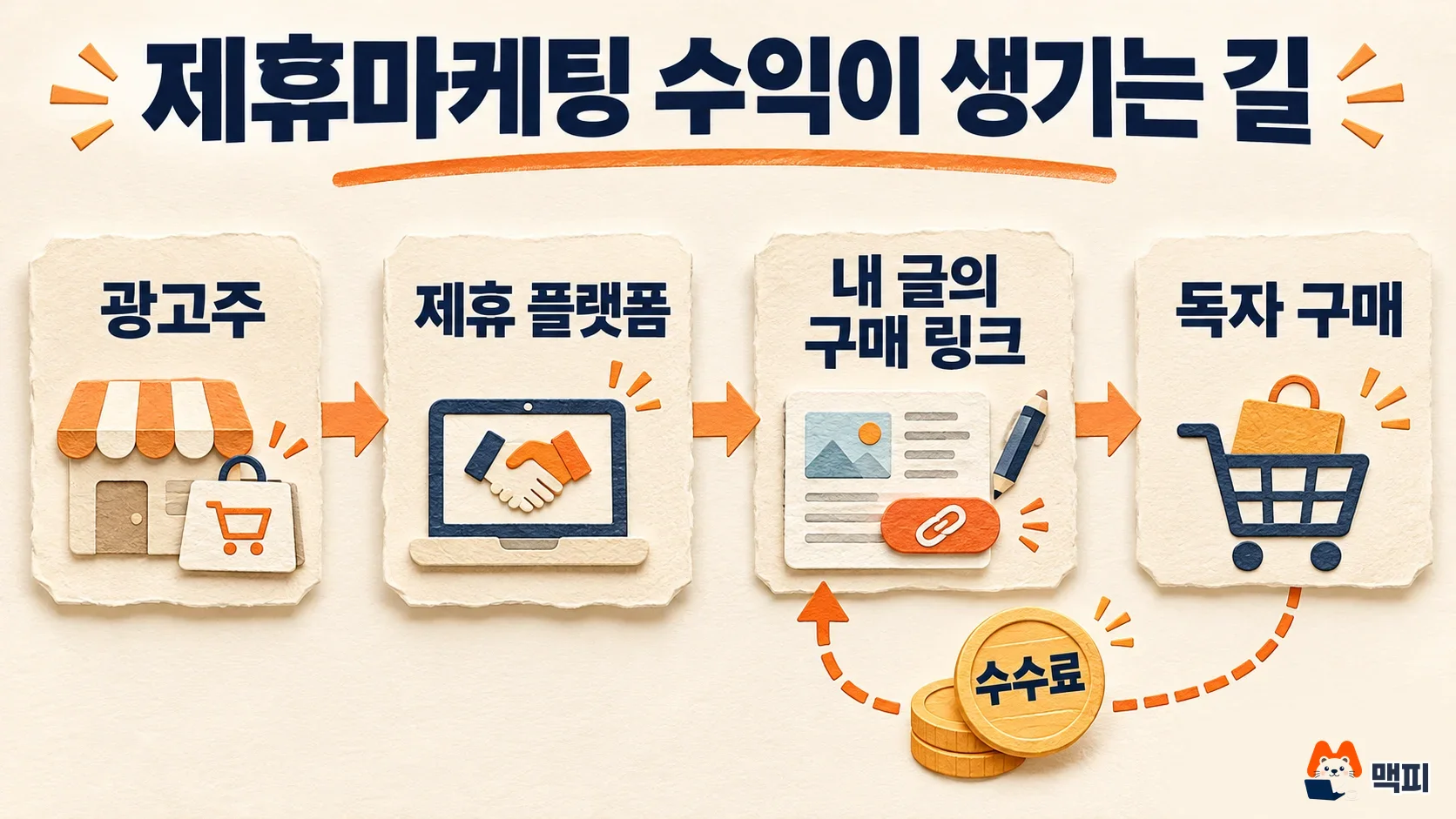
Money flows in four steps. An advertiser lists products with an affiliate platform, you put the purchase link for a product in your post, a reader clicks the link and buys, and the platform confirms the result and pays the commission.
The action that earns a commission differs by site. On Coupang Partners, a sale made through a Coupang product link counts as a result. Other affiliate sites may count actions other than purchases, such as signups or app installs. So before you join, read "what has to happen for me to earn a commission."
Coupang Partners terms: final approval and payout
Coupang Partners does not pay you just because you signed up. According to the Coupang Partners user guide, once your cumulative sales reach 150,000 KRW, the final channel approval review starts automatically, and you can receive payouts only after final approval is complete. The payment terms in the same guide are as follows.
| Item | Guide says | What you should do |
|---|---|---|
| Final approval | Automatic review once cumulative sales reach 150,000 KRW | Start knowing that you stay in pending status until your results reach 150,000 KRW after signup |
| Payment terms | Final approval complete, and previous month's earnings of 10,000 KRW or more | Check your approval status and earnings in the settlement report first |
| Earnings under 10,000 KRW | Carried over to the next month, up to 6 months, then paid in one lump sum | Confirm that the small amount has not disappeared |
| Payment timing | The 15th of the second month after the month the earnings occurred (for businesses that issue tax invoices; tax invoice approval is due by the 10th of that month) | Read the settlement notice in the guide that matches your business type |
| Cancellations and returns | Canceled and returned amounts are excluded from income | Count the amount after the return period has passed as your earnings, not the amount right after purchase |
The guide states that the maximum monthly payout is 30 million KRW. For someone just starting out, the first three rows of the table above matter before this cap does. If you have earnings but no deposit, the guide says to first check whether final approval is complete and whether the settlement amount is 10,000 KRW or less.
Commission rates can change by product category and over time, so this article does not list them as numbers. Log in to the Partners site and calculate from the commission notice on your own account screen.
4 criteria for choosing an affiliate marketing site
When you compare other affiliate sites, ask the same questions as in the Coupang Partners table. The four below are not an official list. They are MCPY's own comparison criteria, taken from the items in the table above. We chose them because they directly affect payouts and whether earnings are confirmed, whatever the site is called. Find all four in the signup screen and terms of service and write them down. If you cannot find even one, put off signing up.

- Commission basis: Check whether a purchase, signup, or install counts as a result, and what the commission rate is for each product category.
- Payout terms: Check the minimum payout amount, the payment timing, and whether you need a business registration or tax invoice.
- Approval process: Check whether you can use the site right after signup, or whether payouts require a results or channel review.
- Cancellation and return handling: Check whether canceled results are removed from your earnings, and for how long.
If you do not have a channel for your links yet, prepare the channel before you pick an affiliate site. If you plan to build a homepage as your channel, see Comparing ways to build a homepage. For the basic checks that help your posts get found in search, continue with What SEO means and the basic methods.
Affiliate disclosure: where to put it
If you earn a commission from purchase links in a post, you must tell readers that you earn it. The Korea Fair Trade Commission's Review Guidelines on Labeling and Advertising of Recommendations and Endorsements give an example of economic compensation: writing a recommendation post while having agreed to receive a commission. The guidelines say the disclosure must be placed in "the title or the first part of each post." The guidelines do not name purchase links specifically. But a purchase through your link that earns a commission is the same kind of commission as in this example, so it is safer to treat it as something that must be disclosed. For example disclosure wording and violation cases, see Hidden ad rules and how to label sponsorships.

The same guidelines say to place the disclosure close to the recommendation. They give a comment, or a spot that appears only after clicking "See more," as examples of places that are not easy to find. The revised guidelines have been in effect since June 1, 2026. Write the notice in words that clearly say you earn a commission, such as "This post contains affiliate links, and I earn a commission on purchases made through them."
Steps to get started and how to check them
- Choose the channel (a blog or social media account) where you will post links.
- Pick one site with easy signup terms, such as Coupang Partners.
- Find the final approval and payment terms in the guide and write them down like the table above.
- Create a product link and put it in the first part of your post together with the paid-promotion notice.
- Open the link to check that it goes to the right site, and check that the notice shows on the first mobile screen.
Check the link in an incognito window where you are not logged in. If the address bar goes to the affiliate site's product page, and the notice still shows on the first screen of the post for a visitor who is not you, it passes. Then check success in two places. One is whether clicks and results appear in the Partners report. The other is whether a confirmed amount remains after cancellations and returns are removed. If you get clicks but no results, do not blame the link first. Check whether your post actually answers the questions buyers have.
Frequently asked questions
I have Coupang Partners earnings but no deposit. What should I check first?
The guide says to first check whether your account has completed final approval and whether the settlement amount is 10,000 KRW or less. If both are fine, check the settlement status in the settlement report. The screen-by-screen steps from signup to payout are in the How to use Coupang Partners article.
Do I need the paid-promotion notice in every post?
The review guidelines say the disclosure goes in the title or first part of each post, so put it at the very top of every post that has an affiliate link. Do not skip it in a new post because you already added it to an earlier one.
Found this useful? Share it
Latest posts
Kakao Share Thumbnail Not Showing? Here's the Fix (JavaScript SDK 2025)
Learn why Kakao Share thumbnails don't appear even with a valid imageUrl, and fix it using scrapImage to convert your URL into a KAGE CDN URL. Step-by-step guide.
How to Generate CRM User Manuals in 20 Minutes with Claude Code Sub-Agents
Learn how Claude Code sub-agents can analyze your CRM codebase and auto-generate user manuals and visual guidebooks in just 20 minutes. See the real-world results.
GEO Generative Engine Optimization: The Complete 2025 AI Marketing Strategy Guide
Learn what GEO (Generative Engine Optimization) is, how it differs from traditional SEO, and discover 5 proven AI marketing strategies to get cited by AI search engines in 2025.
Related projects
Get new posts by email
Insights on marketing, analytics, and dev, delivered to your inbox.