
Google is removing the language setting from Search campaigns at the end of September 2026, and advertisers do not need to take any action. But from then on, the language of your ad copy and landing page (the page people reach after clicking an ad) decides which language you serve. If you have split campaigns by language setting, open your account and check. This article reflects the situation as of September 30, 2026.
Performance Max (PMax) is a campaign type that lets Google place ads automatically across Search, YouTube, Display and more. PMax follows the same rule only for impressions on the Google Search Network (Google search results and partner search sites). Channels such as YouTube and Display keep the language setting. The Google Help page says "No action is required by advertisers". The exact rollout date is only given as "end of September", and I could not confirm when it reaches my own account.
The short version in three lines
- The language setting disappears from Search campaigns, and Google matches by the language of the ad.
- PMax is affected only on Google Search Network impressions. Other channels keep the existing language setting.
- If you split Korean and English campaigns by language setting alone, open your account and check. This part is MCPY's inference.
The basis is the Google Ads Help page. The developer announcement "Google Ads language targeting changes starting September 2026" was posted on August 13. I could not see the LinkedIn explanation from Ginny Marvin, a Google Ads product lead, and confirmed it through coverage by PPC Land and Search Engine Roundtable. I have not reproduced any of this in a live account.
What changes: announced in August, live at the end of September
The Help page puts it this way: "Starting in September 2026, the way language targeting works is changing for Search campaigns and the Search Network portion of Performance Max campaigns." For Search campaigns, the campaign-level language setting is removed, and ads are matched automatically based on the language of the ad.
This change is not new. According to PPC Land, the schedule was originally set for late 2025 and slipped by about nine months. Since the date has moved once already, do not rely on "end of September" alone. Check whether the setting still appears in your account screen.
Where the setting goes away and where it stays
In Search campaigns, the setting goes away. PMax is split. The campaign language setting no longer applies to ads served on the Google Search Network, but it still applies to YouTube, Display, Discover and Gmail impressions. Within a single campaign, each channel follows a different rule. For the structure of PMax itself, see About Performance Max campaigns. For the existing way to choose language settings, see the location and language settings Help page.
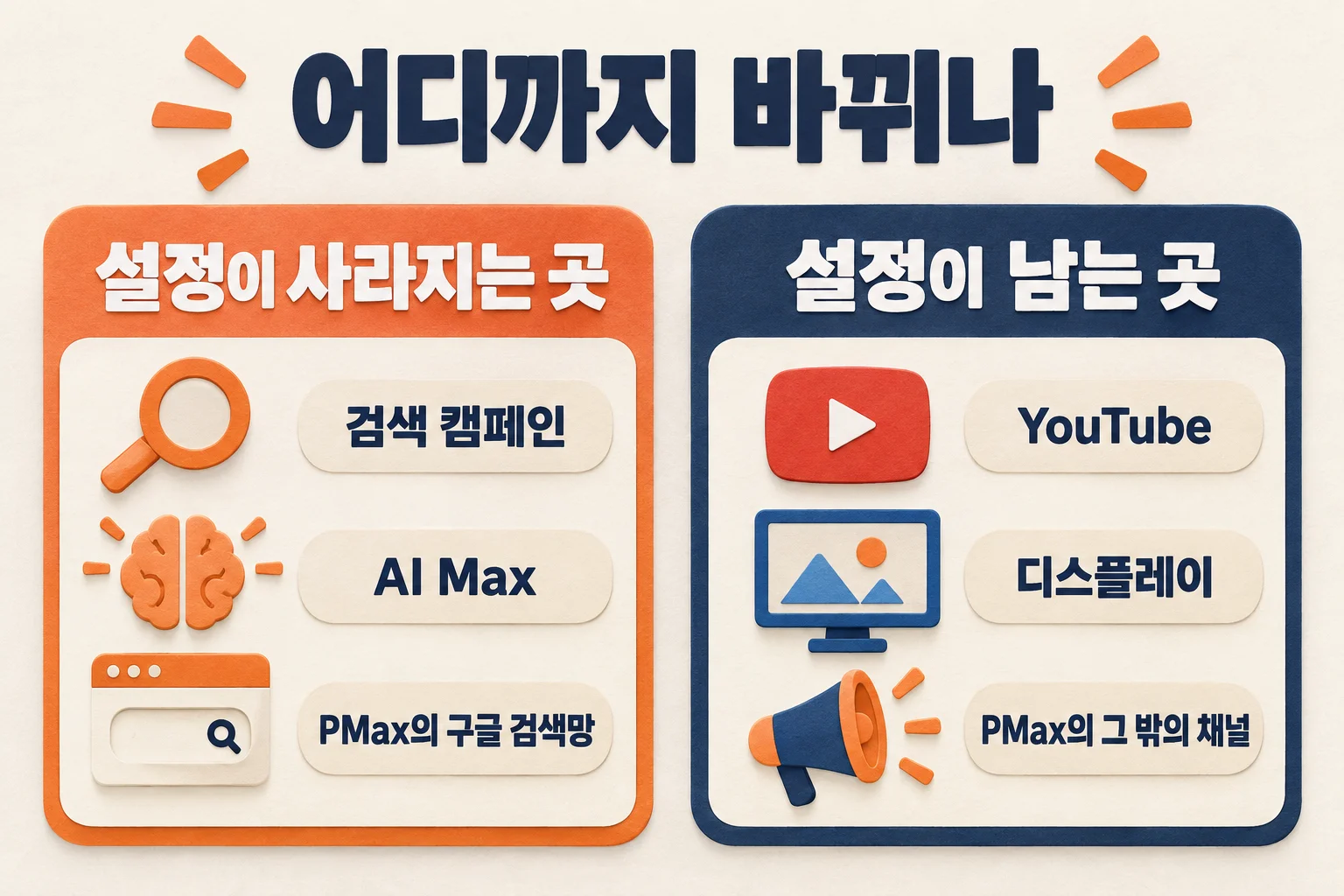
AI Max for Search does not appear separately in the Help page text. Relevant Audience wrote that Search and AI Max for Search campaigns are both covered. This is not confirmed in official documentation, so I included it in the diagram for reference only. The claim that standalone YouTube or Demand Gen campaigns are not affected also appears only in press coverage. The scope I could confirm in the Help page is Search campaigns and the channels inside PMax.
So what does Google use to decide the language?
Marvin explained that the campaign-level setting was already redundant. Google looks at the language of the ad copy, the language of the landing page, the language of the search query and the languages the user speaks. If a user knows several languages, ads and landing pages in the same language as the query are served first. I could confirm this explanation only through press coverage.

The weights are unknown. Official sources do not say whether ad copy or the landing page counts for more. That makes ads whose copy and landing page languages do not match hard to predict.
What Korean advertisers should check in their accounts
This section is a practical suggestion MCPY drew from the official rules. It is not a procedure published by Google. The change does not apply to Naver Search Ads (Naver is Korea's largest search engine). It only affects accounts that run Google Ads in Korean and English as separate setups.
The first structure to look at is a pair of campaigns separated only by language setting. Coverage such as Search Engine Roundtable says that structures split by language keep working. However, the language setting on those campaigns goes away, so you need to check whether the split is also reflected in the ad copy and landing pages. If your account has a Korean campaign and an English campaign with the same keywords and budget, differing only in language setting, the dividing line disappears. If both campaigns use the same keywords, their bids may overlap. Only your account data can show whether they actually do.
Next are ads that set the language to "Korean" only but send traffic to an English landing page. Until now, the setting narrowed who saw the ad. From now on, the landing page language becomes a signal too. If the ad copy is Korean and the landing page is English, official sources do not tell us how it will be judged.
- In your campaign list, pull the Search and PMax campaigns whose language setting is not "All languages".
- Among them, look for campaign pairs separated only by language setting. If you find any, check that the keywords and ad copy match the campaign language.
- Find ads where the ad copy language and landing page language differ.
- Save the clicks, conversions, cost and search terms report for the four weeks before the change.
- For two weeks after the change, check the search terms report for growth in queries in unexpected languages.

MCPY would do step 4 first. Without before-and-after records, you cannot separate causes if performance moves. If you also changed automatic ad copy generation or your bidding strategy around the same time, write down those change dates too. If you are not sure the conversion values you will compare are reliable, read the roles of pixel, click ID and server-side conversion tracking first.
Common mistakes
First, reading it as the language setting disappearing on every channel. Inside PMax, the YouTube and Display side keeps it. Second, assuming that English ads will now also reach Korean-speaking users because the language setting is gone. Google said it will match the language of the query to the language of the ad. Third, reading "no action required" as "nothing to check". It means there is no button for advertisers to press. It does not guarantee anything about how your account structure affects performance.
Confirmed facts, inferences and what remains unknown
Three things are confirmed by the official Help page. The campaign-level language setting is removed from Search campaigns, Search ads are matched automatically by ad language, and PMax uses the same rule only for Google Search Network impressions. YouTube, Display, Discover and Gmail keep the existing setting, and no advertiser action is needed. The developer announcement is dated August 13.
MCPY has two inferences. Campaign pairs split only by language setting become less clearly separated, so bids may overlap. If the landing page language differs from the ad language, impressions may change.
Still unknown are the rollout date for each account, whether language values left on existing campaigns will show as read-only or disappear, the weight of each signal and the actual performance impact in the Korean market. There is no directly measured data on performance impact.
Frequently asked questions
I can still see the language setting in my Search campaign. Has the change already been applied?
No. If it still appears on screen, the change may not have reached your account yet. Google has only said end of September.
Does everything change in PMax too?
Only Google Search Network impressions change. The Help page says the campaign language setting continues to apply to YouTube, Display, Discover and Gmail.
I only run Korean ads. Do I need to care?
If both your ad copy and landing pages are in Korean, little will change. If your landing page is in English or the two languages are mixed, open your search terms report.
Official sources and reference articles
- Google Ads Help: Language targeting (official)
- Google Ads Help: About Performance Max campaigns (official)
- Google Ads Help: Choose location and language settings (official)
- Google Ads Developer Blog, 2026-08-13 (official announcement, post date confirmed)
- PPC Land: background on the nine-month delay (press)
- Relevant Audience: summary of affected channels (press)
- Search Engine Roundtable: September language targeting change (press)
Official documents checked on September 30, 2026. This article is based on official Help pages and press coverage, not on a Google Ads account screen. The images are generated diagrams that explain concepts. They are not actual Google Ads screens.
Found this useful? Share it
Latest posts
Kakao Share Thumbnail Not Showing? Here's the Fix (JavaScript SDK 2025)
Learn why Kakao Share thumbnails don't appear even with a valid imageUrl, and fix it using scrapImage to convert your URL into a KAGE CDN URL. Step-by-step guide.
How to Generate CRM User Manuals in 20 Minutes with Claude Code Sub-Agents
Learn how Claude Code sub-agents can analyze your CRM codebase and auto-generate user manuals and visual guidebooks in just 20 minutes. See the real-world results.
GEO Generative Engine Optimization: The Complete 2025 AI Marketing Strategy Guide
Learn what GEO (Generative Engine Optimization) is, how it differs from traditional SEO, and discover 5 proven AI marketing strategies to get cited by AI search engines in 2025.
Related projects
Get new posts by email
Insights on marketing, analytics, and dev, delivered to your inbox.