

Kakao Alimtalk is an informational message you can send even to customers who have not added your channel, and it only goes out through templates that Kakao has approved. A template is a message format you get reviewed in advance. The Kakao Business guide sets three sending conditions. Convert your channel to a business channel (a channel verified as a real business through review), turn on home page visibility, and add a customer service contact. You can send only through an official dealer (a partner company that runs the Alimtalk sending system under contract with Kakao). Template review is handled in order within 2 business days. Everything below is based on the official guide as checked on October 4, 2026.
What Kakao Alimtalk is and what you can send
Alimtalk automatically sends information that buyers must receive, such as order confirmations, payment completions and delivery notices. The official guide accepts only information needed for signing or performing a contract, completing a transaction, or using a service as informational messages. Promotions for discounts and new products cannot be sent through Alimtalk.

| Type | Examples | Alimtalk sending |
|---|---|---|
| Informational | Order confirmation, payment completion, delivery notice, reservation notice, terms change notice (sending examples) | Allowed (approved templates only) |
| Informational (conditional) | Notice about a coupon the user got by taking an action themselves, expiry notice for points earned through transactions | Allowed |
| Advertising | Pushing app installs, wording that asks for personal data in exchange for a free trial or discount coupon, issuing coupons to people who did not agree to receive them | Not allowed |
The sending example guide says order messages must not include wording that pushes people to add your channel or that announces coupons. The review guide treats a message as a rejection target if any part of it has advertising content.
How to send Alimtalk in 6 steps
These are the conditions in the official guide, put in the order you would work through them. The step numbers are not an official division.

- Create a KakaoTalk channel. If you have none, open one first in Kakao Business.
- Convert it to a business channel. Alimtalk can be sent only from a channel converted to a business channel.
- Turn on home page visibility for the channel and enter a customer service contact.
- Choose an official dealer and sign a contract. Alimtalk goes out only through an official dealer with a partner contract with Kakao. The official guide lists 15 companies, including Daou Technology, NHN Cloud, LG CNS and Infobank.
- Create a template and request review. Only approved templates can be sent.
- After approval, send through the API the dealer provides. Use only recipient phone numbers collected for a lawful purpose and by a lawful procedure.
The screens for creating a KakaoTalk channel appear in the channel creation guide. Sending must go through a dealer, so the unit price and settlement terms are set in the dealer contract.
The official guide says you can send only with templates approved in Kakao review. Until a template is approved, you cannot send customers messages in that format.
Alimtalk template review criteria and rejection reasons
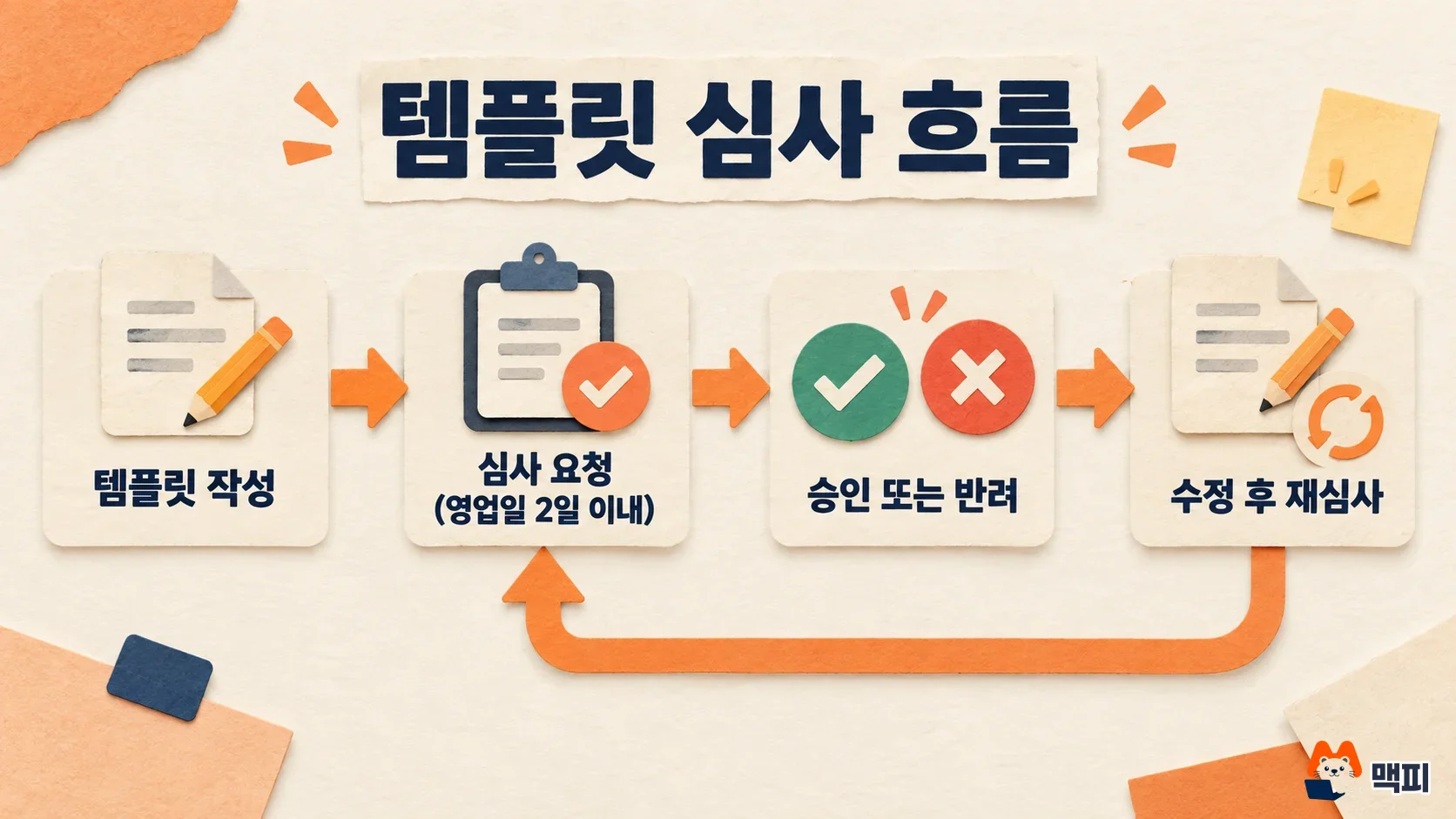
Templates are reviewed against Korea's Network Act (the Information and Communications Network Act) and Kakao's internal standards. The review guide tells you to fix a rejected template and submit it again. The common rejection reasons are below.
| Rejection reason | How to avoid it |
|---|---|
| It contains advertising content | Remove discount wording, new product promotion and app install prompts |
| Variables are set up wrong | Add example text for every variable, keep variables to 40 or fewer, and do not fill the body with variables alone |
| A variable appears in a button name or preview | Use fixed text for button names and preview text |
| Coupons are issued to people who did not agree to receive them | Send only notices about coupons the user got by taking an action themselves |
A variable is a slot in the template that changes per recipient, such as a name or an order number. The review guide sees Alimtalk as a standardized message: only the recipient details change, and the content is always the same under a given condition.
If the review result is approval, you can send with that template. If it is rejection, request review again with the revised template. The review period is 2 business days from the request, so submit well before your launch date.
Public templates let you skip review. The public templates come in 11 types, including operation notice, sign-up, reservation notice, delivery notice, order notice and point notice, and you can use them right away with no separate registration or review. Variables have set input formats, such as a maximum of 15 characters, a maximum of 40 characters, 14 characters for phone numbers, and URLs (http:// or https:// required). Breaking these limits restricts sending.
Alimtalk cost and choosing a dealer
You can send Alimtalk only through a dealer, so the per-message price is also set when you contract with the dealer. The Kakao Business guide lists 15 official dealers. Before signing, ask two or three dealers the items below and compare (these are questions the author suggests, not official requirements).
| Ask the dealer | Why |
|---|---|
| Per-message price at your expected monthly volume | The price is a contract term with the dealer, so share your expected volume and get a quote |
| Whether they handle template registration and review | Deciding who fixes a rejected template keeps your schedule from slipping |
| API integration method | Alimtalk is sent by API, so check how much development you need to connect it to your online store or booking system |
Alimtalk sanctions and how to check them
If sending breaks the law, the sending business is responsible. The review guide says that when many user reports come in, the service can be blocked by business registration number and Alimtalk use can be suspended permanently, whether or not you submit an explanation.
To see whether you have been sanctioned, follow the Kakao customer center guide and open the channel history in the management menu of the channel admin center. If you cannot confirm it there, contact your dealer with your search ID, channel name, template code and the sanction date.
Common Alimtalk mistakes
- Adding coupon or event wording to the end of a delivery notice: a message is rejected if even part of it is advertising. Send coupon news separately to customers who agreed, following the prior consent and sending conditions for advertising messages.
- Looking for a dealer while still on a regular channel: the sending conditions are met only after business channel conversion, home page visibility and a customer service contact are done.
- Leaving out example text for variables: review does not proceed unless every variable has an example.
Alimtalk FAQ
Can Alimtalk be sent only to customers who added the channel?
No. You can also send it to users who have not added your channel. The content must be informational, and you may use only phone numbers collected lawfully.
Can I send Alimtalk from a regular channel?
The official sending conditions include business channel conversion, so a regular channel cannot meet them. Check the documents needed for conversion by applicant type in the channel creation guide.
Where can I check Alimtalk sanctions?
Sanction records appear in the channel history under the management menu of the channel admin center. If you do not see them, ask your dealer or the Kakao customer center about the reason for the sanction.
First, check in the channel admin center whether your current KakaoTalk channel is a business channel, and whether home page visibility and the customer service contact are filled in. Then pick one message you want to send, sort out whether it is informational, and ask two or three dealers for quotes.
Found this useful? Share it
Latest posts
Kakao Share Thumbnail Not Showing? Here's the Fix (JavaScript SDK 2025)
Learn why Kakao Share thumbnails don't appear even with a valid imageUrl, and fix it using scrapImage to convert your URL into a KAGE CDN URL. Step-by-step guide.
How to Generate CRM User Manuals in 20 Minutes with Claude Code Sub-Agents
Learn how Claude Code sub-agents can analyze your CRM codebase and auto-generate user manuals and visual guidebooks in just 20 minutes. See the real-world results.
GEO Generative Engine Optimization: The Complete 2025 AI Marketing Strategy Guide
Learn what GEO (Generative Engine Optimization) is, how it differs from traditional SEO, and discover 5 proven AI marketing strategies to get cited by AI search engines in 2025.
Related projects
Get new posts by email
Insights on marketing, analytics, and dev, delivered to your inbox.