
The KakaoTalk channel admin center now opens inside the Kakao Business Partner Center at business.kakao.com. If you open the old address, center-pf.kakao.com, it redirects automatically (301 is the response code meaning an address has moved permanently). So an old bookmark still shows the same login screen. You log in with a Kakao account, and the account must have channel operation rights for your channel to appear.
KakaoTalk channel admin center PC address and redirect check
On a PC, go to business.kakao.com and click [Log in] at the top right. As of November 14, 2026, the old admin center address center-pf.kakao.com moves permanently (301) to this address. center-pf.kakao.com/dashboard also moves to business.kakao.com/dashboard.

You can check the redirect yourself. Type center-pf.kakao.com in the browser address bar, press Enter, and see whether the address changes to business.kakao.com. If you have a terminal, run curl -I https://center-pf.kakao.com/ and look for HTTP/2 301 and location: https://business.kakao.com/ in the response. When we ran it on November 14, 2026, both lines appeared. Some official Kakao guide pages still list the old address (How to check your Biz Wallet), but that address also redirects to the same place.
Why the admin center is called the Partner Center
According to Kakao, the default unit of use in the Partner Center changed from "channel" to "business" on September 1, 2026. A business is a unit that manages a KakaoTalk Channel, a KakaoMap store, KakaoTalk Booking and Biz Membership as one bundle (Kakao Business Guide: Current Business). That is why different documents call the same screen the "channel admin center" or the "Partner Center."
The mobile app follows the same pattern. The app name in the App Store is "Kakao Business Partner Center," and its description says the former name was the KakaoTalk Channel Admin app (App Store: Kakao Business Partner Center). If you search the App Store for the old name and find nothing, search for the new name.
What to check when you cannot log in
To use a channel, you must sign up for Kakao Business, log in with a Kakao account, and switch to a Kakao Business integrated member. Existing channel admins must go through the same switch to agree to the updated terms of service (Kakao Business Guide: Create a Channel). If the login screen opens but your channel does not appear, check the steps below in order.
- Check that you logged in with the Kakao account you used to create the channel. If you have several accounts, it is easy to mix up a personal account and a work account.
- If the integrated member switch and terms agreement prompts appear, complete them all the way.
- Ask the channel master whether your account is registered as a master or manager of that channel.
If you have not created a channel yet, creating one comes before logging in. The steps are covered in How to create a KakaoTalk Channel and the difference between general and business channels.
Where did the admin center menus go: old and new names in the official guides
Kakao's official "Operate" guide splits KakaoTalk Channel operation features into nine categories: Partner Home, Current Business, News, Message, Biz Tools, Chat, Insights (statistics), Biz Wallet and Service Connection (Kakao Business Guide: Operate).
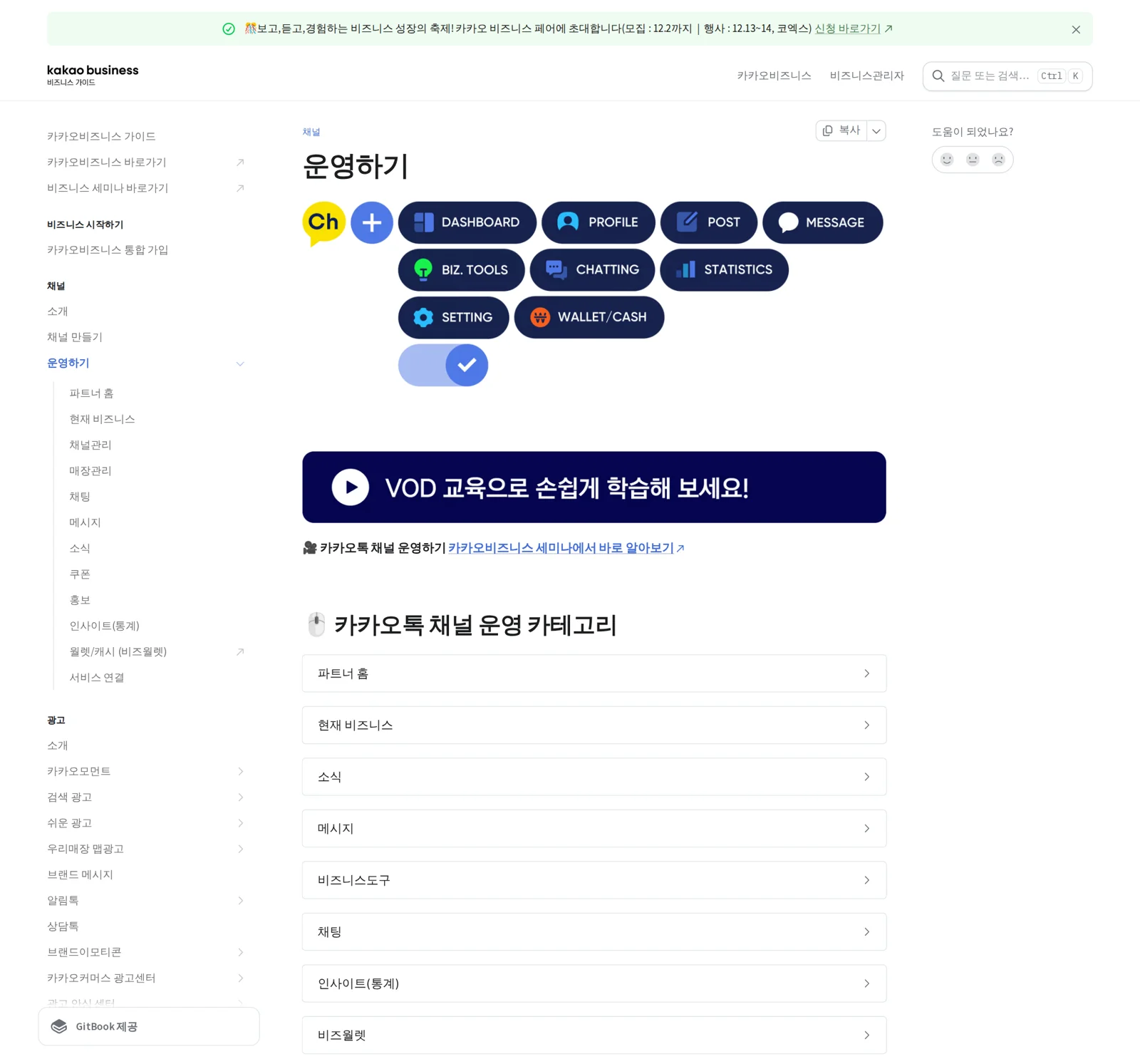
The names for the same feature differ depending on when the document was written. The table below copies the menu names as written in two kinds of Kakao guide documents. It does not mean that items on the same row are the same feature.
| Guide document | Menu names listed |
|---|---|
| Channel creation guide (PC admin center) | Dashboard, Home and Profile settings, 1:1 Chat, News, Message, Biz Tools, Statistics, Manage (friend groups, admin invitations and more) |
| Operate (Partner Center) | Partner Home, Current Business, News, Message, Biz Tools, Chat, Insights (statistics), Biz Wallet, Service Connection |
| Channel home settings | Kakao Business Partner Center > Channel > Channel Home Settings |
Check which of the two lists matches the menu names on your screen. That tells you whether your screen uses the old layout or the new one. When you search by name, look for overlapping terms together, such as "Statistics" and "Insights (statistics)," or "Profile settings" and "Channel home settings." In the old guide, admin invitations and wallet information sit under "Manage." If you cannot see "Manage" on the new screen, open Current Business and Biz Wallet.
Master and manager permission differences
The admin who opened the channel is the master. The Kakao Business Guide explains that channel operation rights are the same for masters and managers. Only the master can invite and remove managers, create and connect a Biz Wallet, and request channel deletion (Kakao Business Guide: Getting Started with KakaoTalk Channel).
| Task | Master | Manager |
|---|---|---|
| Channel operation such as news, messages and chat | Yes | Yes |
| Invite and remove managers | Yes | No |
| Create and connect a Biz Wallet | Yes | No |
| Request channel deletion | Yes | No |
When staff change, you can hand over daily operation just by adding a manager. Tasks tied to cost and ownership, such as the wallet and deletion, stay with the master. MCPY recommends creating the master account with the Kakao account of the CEO or the operations lead. Only the master can invite and remove managers and create a wallet, so if the person in charge leaves the company, no one is left to do these tasks.
Mobile app and extra verification for 1:1 chat
In the app, you can check channel status and the last 7 days of statistics, use 1:1 chat, send messages, write news posts, issue coupons, and check the Biz Wallet and free cash. The statistics cover one week of friends, profile, news and chat, and are counted up to the previous day (Channel creation guide).
The first time you enter the 1:1 chat menu, you need extra admin verification to protect personal information. You verify through KakaoTalk or text message (SMS). To turn this verification off, go to My account info > Admin extra verification settings and switch it to OFF (Activate 1:1 chat). Chat notifications only appear when the chat status is set to ON.
Message costs and where to check free cash
To send messages, your Biz Wallet must have cash charged. If you qualify for small business support, free cash is charged, and it is valid for 1 year from the date of issue (Check message sending cost charges). On a PC, open [Manage > Biz Wallet Info] in the left menu and click the [Biz Wallet Info] button to see your balance. In the app, check [Wallet] in the bottom full menu.
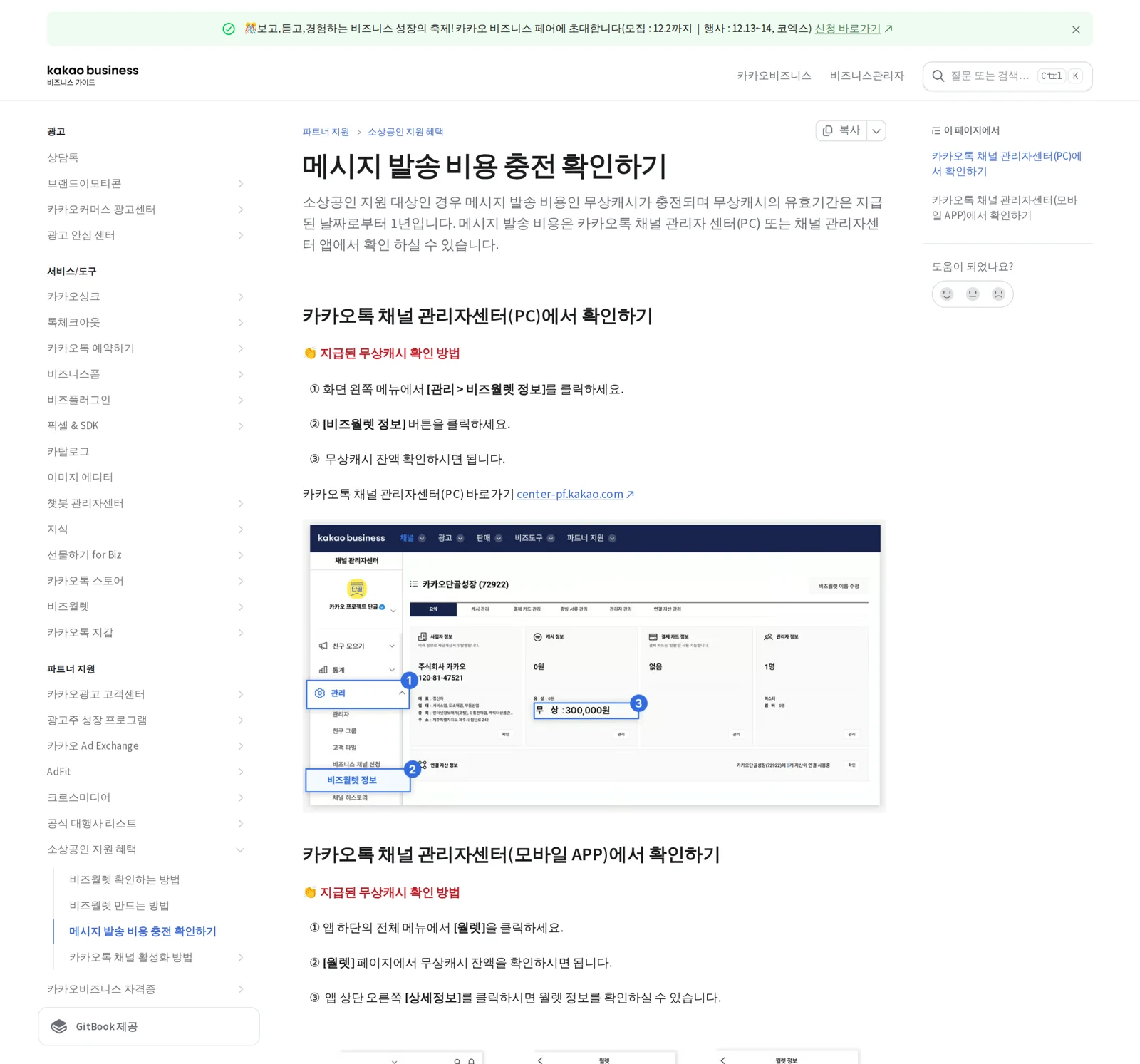
This document is based on the old PC screen, so menu names may differ from the new screen. If you cannot find it on the new screen, open the "Biz Wallet" menu listed in the Operate guide. Alimtalk and ad message costs and review are covered in How to send Kakao Alimtalk and template review tips.
Frequently asked questions
Can a manager also send messages?
Yes. Operation rights are the same for masters and managers. The difference is that inviting managers, creating and connecting a wallet, and requesting channel deletion are master only.
I am asked to verify every time I enter 1:1 chat. Can I turn it off?
Go to My account info > Admin extra verification settings and switch it to OFF. This step protects personal information, so keep it on for devices that several people use.
I cannot find the KakaoTalk Channel Admin app in the App Store
The app name changed to Kakao Business Partner Center. Search for this name from the same developer (Kakao).
Found this useful? Share it
Latest posts
Kakao Share Thumbnail Not Showing? Here's the Fix (JavaScript SDK 2025)
Learn why Kakao Share thumbnails don't appear even with a valid imageUrl, and fix it using scrapImage to convert your URL into a KAGE CDN URL. Step-by-step guide.
How to Generate CRM User Manuals in 20 Minutes with Claude Code Sub-Agents
Learn how Claude Code sub-agents can analyze your CRM codebase and auto-generate user manuals and visual guidebooks in just 20 minutes. See the real-world results.
GEO Generative Engine Optimization: The Complete 2025 AI Marketing Strategy Guide
Learn what GEO (Generative Engine Optimization) is, how it differs from traditional SEO, and discover 5 proven AI marketing strategies to get cited by AI search engines in 2025.
Related projects
Get new posts by email
Insights on marketing, analytics, and dev, delivered to your inbox.