
Claude Managed Agents self-hosting lets you run the entire agent service on your own server or cloud account. Anthropic announced it on November 12, 2026 in the Claude Platform release notes. Before, you could only operate the sandbox where tools run. Now you can also move the service that stores agents, sessions, and conversation history onto your own infrastructure. To use it, you must request access from your Anthropic account team, as described in the official docs.
Anthropic has released self-hosted Claude Managed Agents, which runs the whole agent service (API, agent loop, storage) on your infrastructure.
Access is by application. The database must be PostgreSQL 16 or later. Model calls can go to the default Claude API, or to Amazon Bedrock, Google Cloud, Microsoft Foundry, or a model gateway you build yourself.
You must run the server and database yourself. It is an option for development and security teams that need to keep conversation history inside the company or want to choose the model call path.
Cloud, self-hosted sandbox, and self-hosted Claude Managed Agents compared
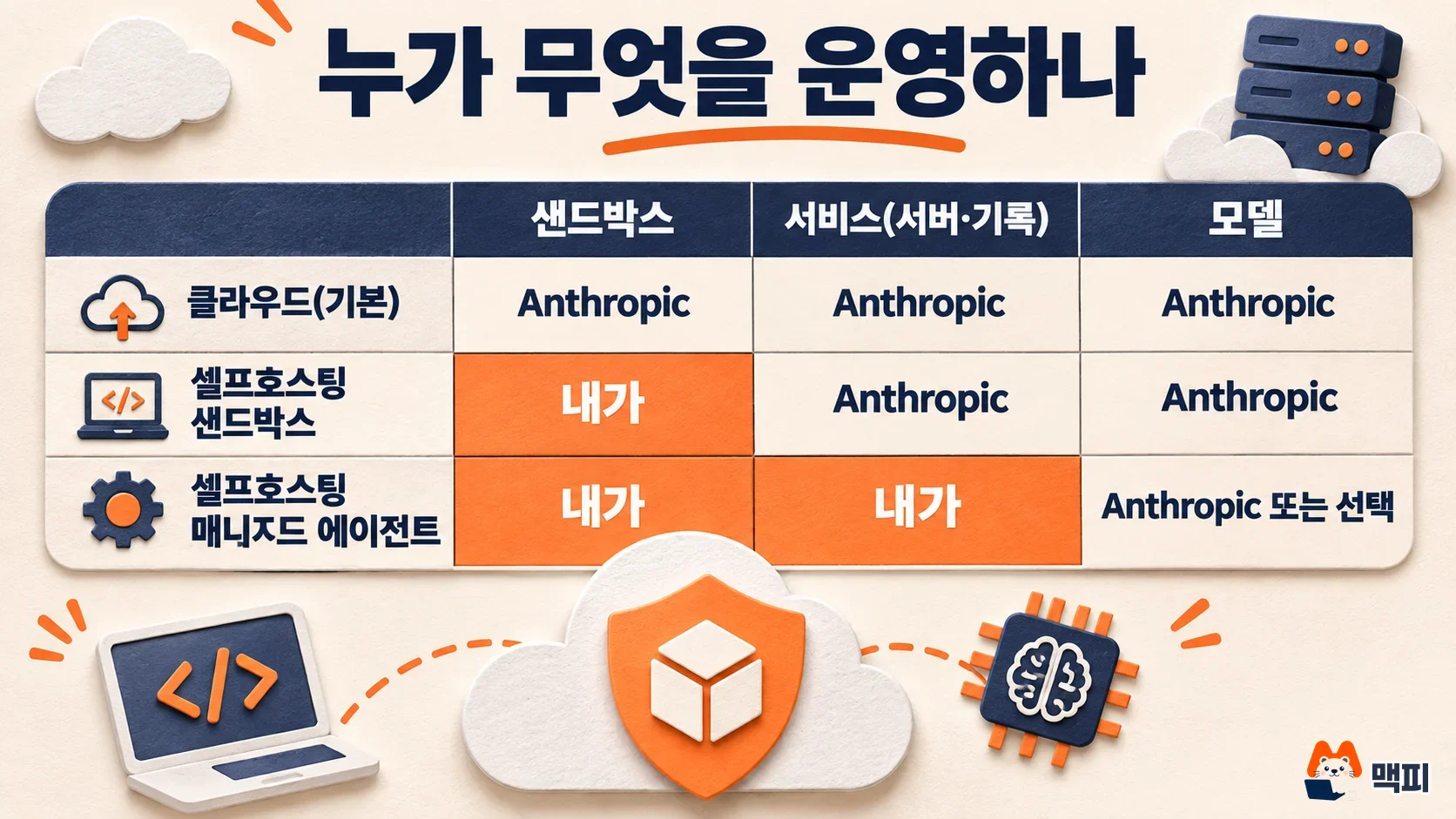
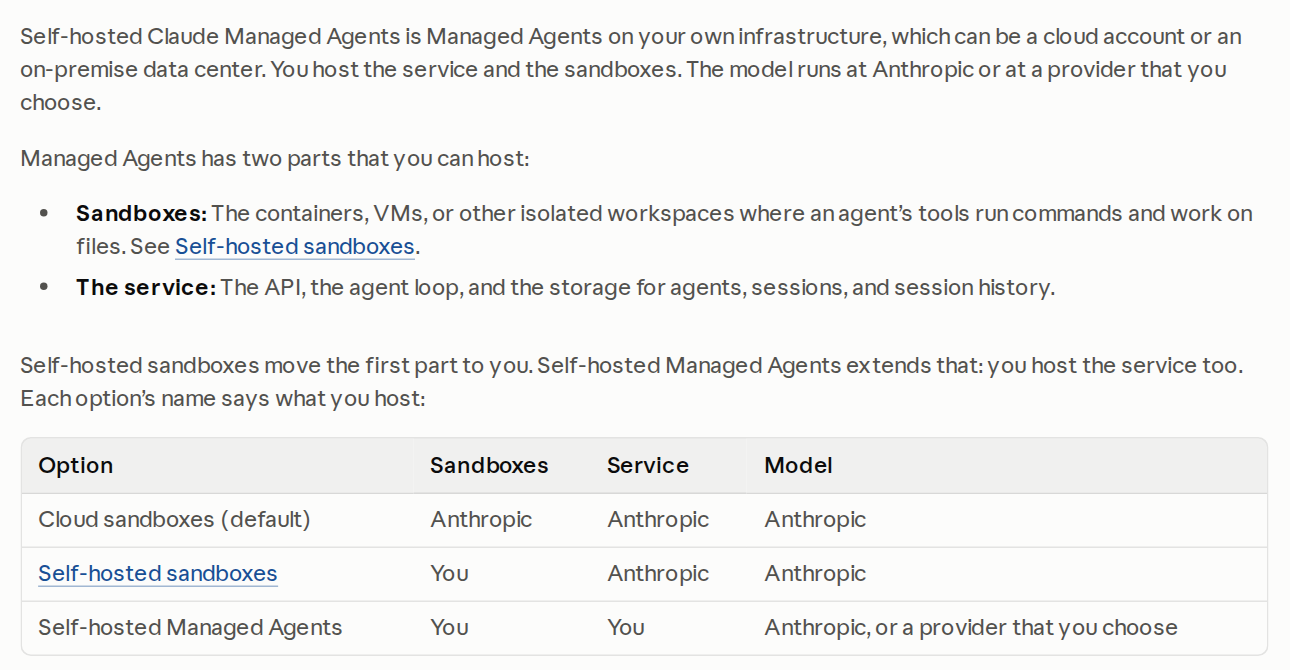
Managed Agents has two parts you can host. One is the sandbox (an isolated workspace such as a container or virtual machine) where the agent's tools run commands and handle files. The other is the service, which combines the API, the agent loop, and storage for agents, sessions, and session history. Here is the comparison table from the official docs, translated.
| Mode | Sandbox | Service | Model |
|---|---|---|---|
| Cloud sandbox (default) | Anthropic | Anthropic | Anthropic |
| Self-hosted sandbox | You | Anthropic | Anthropic |
| Self-hosted Managed Agents | You | You | Anthropic or a provider you choose |
The self-hosted sandbox was first listed in the release notes on May 19, 2026. This announcement adds the service on top of it. The server does not run tools itself. The server runs the agent loop and calls the model, while a worker you operate (a program that takes jobs and runs them in a sandbox) handles tool execution.
When to choose Claude Managed Agents self-hosting
The official docs give two reasons. First, you must store agents, sessions, and session history on your own infrastructure. Second, you must send model calls to Amazon Bedrock, Claude models on Google Cloud (Google-managed), Microsoft Foundry, or a model gateway you built. If running only the tools on your infrastructure is enough, the environment selection guide says to use the self-hosted sandbox, where Anthropic runs the service.
You should check separately where data goes. Each time the server calls the model, it sends the conversation so far and the tool inputs and results to the model provider. The default provider is the Claude API, so if you do not change it, conversation content still goes to Anthropic. Only the storage location moves to your side. Not all model call data stays inside.
The operating burden also grows. You run the server, database, and sandbox, you own security, and you install each new release yourself. According to the official security warning, the agent's bash tool is a real shell with the permissions and network access of the worker process. The worker does not isolate this shell, so if you start workers yourself, run them in a disposable container or virtual machine that holds nothing worth protecting.
Server components and three credentials
One deployment consists of the server (cma-server), a database, and workers. The database is PostgreSQL 16 or later. If you start without a database, the server keeps data only in memory, and a restart wipes it all. The admin command-line tool cma-server-admin creates environments and environment keys, and it runs on Linux (x86-64, Arm) and Apple silicon Macs. In the web interface (console) at the server address, you can sign in with your company's login provider, create agents, and run sessions.
| Credential | Who holds it | What it authenticates |
|---|---|---|
| Server API key | Your application, the ant command-line tool, the admin tool | Requests to your server. Generated at install. |
| Inference credential | The server | The server's calls to the model provider. A Claude API key, cloud credentials, and so on. |
| Environment key | Workers that pull jobs from the server | One environment's job queue and that environment's sessions. |
What changes from the hosted Claude Managed Agents service
The server API matches the service Anthropic runs, so the SDK and the ant command-line tool work as they are. However, the differences page lists a long set of exceptions. The first thing to know is that data from the existing hosted service is not copied over. You must recreate agents, skills, vault credentials, and memory stores on your own server.
| Feature | On a self-hosted server | What to do instead |
|---|---|---|
| Cloud environments | Not available. Only self_hosted environments exist, and requesting a cloud environment returns a 400 error | Deploy self-hosted workers for every environment |
| Messages API, Models API | Not provided by the server (404) | Call the Claude API or your provider separately |
| File session resources, Files API | Not available | Place files in the worker working directory or pass them as base64 |
| Scheduled deployments, dreams | No route | Start sessions with your own scheduler such as cron. There is no replacement for dreams |
| Webhooks | The server does not send them | Follow the event stream or list events |
| mcp_oauth vault credentials | Registration rejected | Store as static_bearer and refresh before expiry |
| docx, pdf, pptx, xlsx built-in skills | Agents that declare them are rejected | Download from the skills repository and upload as custom skills |
Some features start turned off. The official docs explain how to configure them. An MCP server connects only after you list its host in mcp.allowed_hostnames in the config file, and the default list is empty. Hosts must match exactly, with no wildcards. The web search and web fetch tools stay off until you turn on web_tools.enabled: true, and while they are off, an agent with no tool entries runs without tools and without an error. Git repository resources require git.allowed_hostnames and the branches allowed for push (git.allowed_push_refs). The server does not block force pushes, so to block them, protect the branch on your git host.
Behavior also depends on your model provider. The web search tool is exposed to the model only with the anthropic, vertex, and foundry providers, and web fetch only with anthropic and foundry. With other providers, the agent is saved and runs, but the model cannot call those tools. In that case, the official docs tell you to attach a custom search tool or an MCP server.
Switching the model call provider
In the inference provider docs, the inference.provider value in the config file has five options.
| Value | Where model calls go | Auth the server uses |
|---|---|---|
| anthropic (default) | Claude API | ANTHROPIC_API_KEY |
| bedrock | Amazon Bedrock | AWS credentials |
| vertex | Claude models on Google Cloud (Google-managed) | Google application default credentials |
| foundry | Microsoft Foundry | Foundry API key or Microsoft Entra ID |
| gateway | A model gateway you operate | The key or token the gateway accepts |
Agents specify the model with a Claude API model ID such as claude-opus-5-5, and the server translates it for the provider. If the model ID in your cloud account differs, match it with model_id_overrides. After you change the settings, restart the server and check that the log prints an upstream credential resolved line with the provider name. This line only means a credential was found. It is not proof that the model is enabled in your account. If the model is off, session.error appears on the first turn that uses it.
With the default anthropic provider, the server requests the Claude API server-side fallback by default. If a safety classifier refuses a request, a different Claude model, possibly less capable, answers instead, and no event announces the change. To turn it off, set inference.model_fallback: false. With other providers, such requests simply end in a refusal.
First run steps and how to confirm success
The official quickstart starts the server on a single computer with Docker Compose. It is for development, and the docs recommend the Helm charts for Kubernetes in production. This stack uses plain HTTP and, by default, opens port 8400 only on the local address (127.0.0.1).
- After access is approved, unpack the release archive you received and move to the
composedirectory. - Put the database password, your Claude API key, the server API key, and the stored-secret encryption key in the
.envfile, and set its permissions to 600. - Run
docker compose up --build -dand wait forcma-server listeningin the server log. - If
curl -s http://127.0.0.1:8400/cma-server/readyzreturns"status":"ready", the server is ready. For a few seconds right after start, it may showdegraded. - In a second terminal, set
ANTHROPIC_BASE_URLtohttp://127.0.0.1:8400andANTHROPIC_API_KEYto your server API key (not your Claude API key). - Create the agent with
ant apply --yes quickstart-agent.md, start a session in thecompose-sandboxenvironment the stack created, and open a chat withant beta:sessions connect.
There are two checks you can run yourself. First, confirm the readyz response is ready. Then ask the agent to run hostname. If the answer is a name starting with cma-sandbox-, the tool ran in a sandbox container, not on your computer. Running docker ps --filter label=cma-server.sandbox in another terminal shows the same container. If a tool call never finishes, no worker is polling the environment. As the troubleshooting guide explains, this stack starts 10 workers, and a session with no messages can hold a worker for up to 1 hour, so archive sessions you no longer use.
There is one mistake to avoid. If you run docker compose to start the server in a terminal where ANTHROPIC_BASE_URL points to your own server address, the server calls itself as the model and the readiness status stays degraded. Run the compose command only in the first terminal, where that variable is not set.
If you only use the self-hosted sandbox
If you already use the self-hosted sandbox, you can attach workers to the new server because the worker software is the same. However, workers started by webhook do not work with this server. Sandbox news so far includes the self-hosted sandbox launch on May 19, Claude Platform on AWS support on May 29, and memory store connection on August 19. A team that only needs tools to run on its side is better off staying with the sandbox mode, without the burden of running a server too.
Teams that used cloud-side features should read other articles before moving. Scheduled deployments and dynamic workflows cannot be used on a self-hosted server, as the table above shows.
Frequently asked questions
Does self-hosting keep all data away from Anthropic?
No. With the default settings, conversation content and tool results go to the Claude API on every model call. To change where they go, configure another provider such as Bedrock or a gateway you operate.
Can I move agents built on the existing hosted service?
They are not copied. According to the official differences page, nothing carries over, including session history, so you must recreate agents, skills, vault credentials, and memory stores on your own server.
Can I use Docker Compose in production?
No. The official docs define the Compose stack as for development, and they recommend deploying to Kubernetes with the two Helm charts included in the release.
Found this useful? Share it
Latest posts
Kakao Share Thumbnail Not Showing? Here's the Fix (JavaScript SDK 2025)
Learn why Kakao Share thumbnails don't appear even with a valid imageUrl, and fix it using scrapImage to convert your URL into a KAGE CDN URL. Step-by-step guide.
How to Generate CRM User Manuals in 20 Minutes with Claude Code Sub-Agents
Learn how Claude Code sub-agents can analyze your CRM codebase and auto-generate user manuals and visual guidebooks in just 20 minutes. See the real-world results.
GEO Generative Engine Optimization: The Complete 2025 AI Marketing Strategy Guide
Learn what GEO (Generative Engine Optimization) is, how it differs from traditional SEO, and discover 5 proven AI marketing strategies to get cited by AI search engines in 2025.
Related projects
Get new posts by email
Insights on marketing, analytics, and dev, delivered to your inbox.