
BigQuery federated queries let you send SQL from BigQuery to another database and read the result directly (official overview). On November 13, 2026, Google announced MySQL, Oracle and PostgreSQL connections, along with a federated query for each, as a Preview (a trial release before general availability) in the BigQuery release notes. If you run MySQL or PostgreSQL on your own servers or on-premises (company-owned servers) and have been copying that data into BigQuery, you now have one more option: query it without copying. However, it is read-only and filters are not pushed down automatically, so it is not a good fit for replacing a daily read of a large table right away.
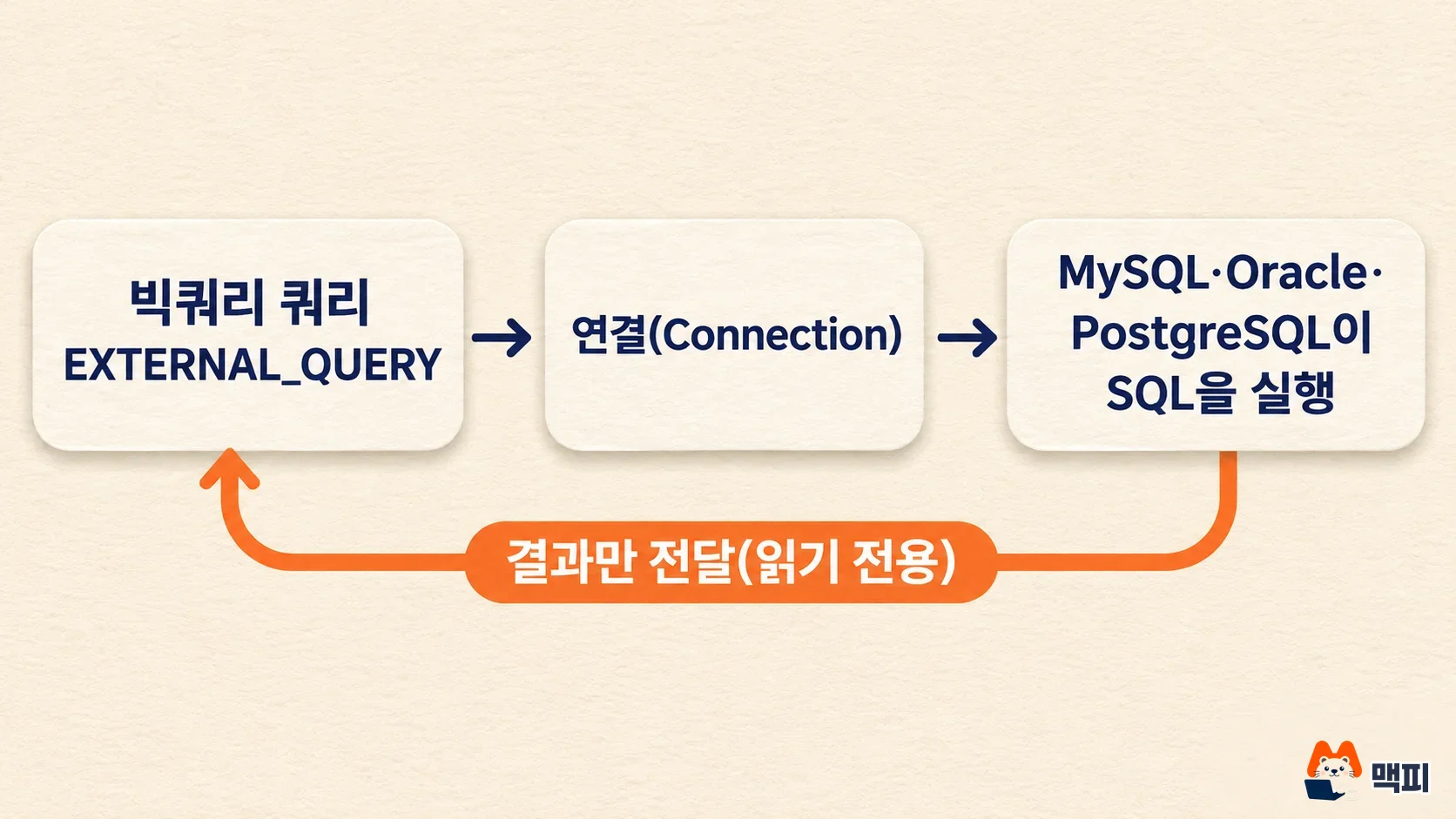
BigQuery opened federated queries as a Preview: you create a connection to MySQL, Oracle or PostgreSQL, then use the EXTERNAL_QUERY function to run SQL in that database and pull back the result.
Supported versions are MySQL 8.4 LTS and 8.0, PostgreSQL 16 and 15, and Oracle 23ai, 21 and 19. It is query-only, and the PostgreSQL documentation states there is no extra charge on the BigQuery side for federated queries themselves.
BigQuery data owners should check who has permission to create connections first. For general marketers, it is enough to know that this feature is now on.
What BigQuery federated queries change for MySQL, Oracle and PostgreSQL
A federated query reads data where it already lives instead of moving it into BigQuery. According to the BigQuery documentation, you pass a connection name and a SQL string to the EXTERNAL_QUERY function. That SQL runs in the external database, and the result is streamed back to BigQuery. You can then JOIN that result with BigQuery tables.
The release note is a single sentence. It says BigQuery connections to the three databases are now available, that you can use them to run MySQL, Oracle and PostgreSQL federated queries, and that all three features are in Preview.

The screen shows the November 13 entry reading "BigQuery connections to MySQL, Oracle, and PostgreSQL are now available and can be used to run MySQL federated queries, Oracle federated queries, and PostgreSQL federated queries. These features are in Preview." The November 12 entry right below it is the general availability of pipeline data lineage (a feature that tracks where data came from), which is a separate item.
Supported versions and environments for each database
Each database has different supported versions and connection environments. The table below combines the federated query documentation for each database (MySQL, Oracle, PostgreSQL).
| Database | Supported versions | Environments you can connect to | Authentication |
|---|---|---|---|
| MySQL | 8.4 LTS, 8.0 | Cloud or on-premises MySQL reachable by public IP or network connection (Cloud VPN, Cloud Interconnect), including MySQL you install yourself on Compute Engine | Username and password only |
| PostgreSQL | 16 (recommended), 15 | Same environments as MySQL | Username and password only |
| Oracle | 23ai, 21, 19 | Oracle Database@Google Cloud, Exadata Database Service, and on-premises reachable by Cloud VPN, Cloud Interconnect or public IP | Username and password only (OCI IAM, Kerberos and RADIUS are not supported) |
Google Cloud managed services are not the target. The documentation tells you to use each service's own federated query connector for Cloud SQL for MySQL and PostgreSQL or AlloyDB (Cloud SQL federated queries, AlloyDB federated queries). The big difference between them is SQL pushdown (passing filters from the outer query down into the inner database). The MySQL documentation says "No additional SQL pushdowns are supported for MySQL", while the Cloud SQL connector supports pushdown.
| Target database | Connector to use |
|---|---|
| MySQL or PostgreSQL on your own server, on-premises or another cloud | The new MySQL and PostgreSQL connections |
| Cloud SQL for MySQL and PostgreSQL | Cloud SQL federated queries |
| AlloyDB for PostgreSQL | AlloyDB federated queries |
How to create a PostgreSQL connection and confirm it works
The connection guides for the three databases (MySQL, Oracle, PostgreSQL) follow the same pattern. Below are the steps from the PostgreSQL guide. Screen labels are written exactly as in the English documentation.
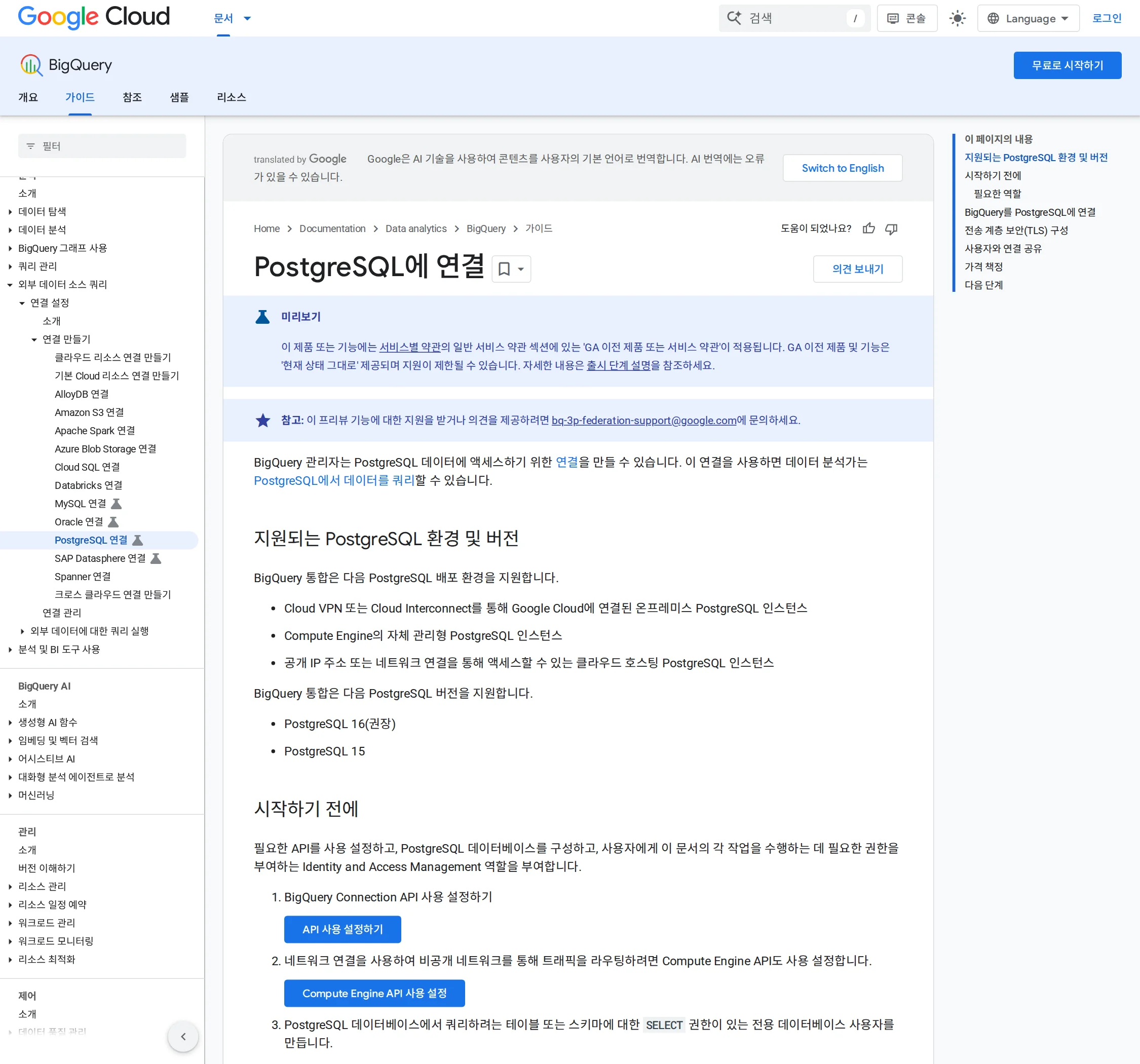
- Enable the BigQuery Connection API. If you use a network connection (private network attachment), also enable the Compute Engine API.
- Create a dedicated user in the external database and grant only
USAGEandSELECTon the schema you will query. The example in the documentation is three lines:CREATE USER,GRANT USAGE ON SCHEMAandGRANT SELECT ON ALL TABLES IN SCHEMA. - The person creating the connection needs the BigQuery Connection Admin (
roles/bigquery.connectionAdmin) role on the project. - Open BigQuery in the console and click Add data in the Explorer. Set Data Source Type to Databases, or type
postgresqlin the search box, then pick the BigQuery Federation card (described as "Federated queries to PostgreSQL") under Access external data in place. Do not pick the Cloud SQL or AlloyDB cards. - Enter Connection ID, location type (Region), Host:port (for example
10.10.2.2:5432), Username, Password, Database and TLS mode, then click Create connection.
If you connect over the public internet, you must open the database firewall to all Google IP address ranges, and the TLS mode must be ENCRYPT_VERIFY_CA_AND_HOST. A private connection needs a network attachment in the same region as the BigQuery connection. DNS peering is not supported, so use an IP address or a host name that resolves inside the VPC.
Once the connection exists, share it so others can use it. In the console, go to your project in the Explorer, then Connections, select the connection, and use Share under Details to grant the BigQuery Connection User (roles/bigquery.connectionUser) role. According to the documentation, you cannot share it with the bq command line.
One query is enough to confirm success. A shortened version of the documentation's example is below, and the connection name has the format projects/MY_PROJECT/locations/REGION/connections/CONNECTION_ID.
SELECT *
FROM EXTERNAL_QUERY(
  'projects/PROJECT_ID/locations/LOCATION/connections/CONNECTION_ID',
  '''SELECT table_schema, table_name, table_type
     FROM information_schema.tables
     WHERE table_schema = 'SCHEMA_NAME' ''');
If a list of tables comes back, the connection, permissions and network are all correct. If you get an error, first check that the connection and the query run in the same region. The documentation states that queries using this connection must run in the same region as the connection.
Join a customer table with an orders database: query example
The case marketers hit most often is combining the order system database with ad and GA4 data in BigQuery. The PostgreSQL documentation has an example shaped like this. It attaches each customer's first order date from a PostgreSQL orders table to a customer table in BigQuery.
SELECT c.customer_id, c.name, fo.first_order_date
FROM mydataset.customers AS c
LEFT OUTER JOIN EXTERNAL_QUERY(
  'projects/my-project/locations/us-central1/connections/postgres_prod_conn',
  '''SELECT customer_id, MIN(order_date) AS first_order_date
     FROM orders
     GROUP BY customer_id''') AS fo
  ON fo.customer_id = c.customer_id;
Note that the aggregation (GROUP BY) sits in the inner PostgreSQL SQL, not in the outer BigQuery query. Because there is no pushdown, filters and aggregations written in the outer query are not passed to the external database. If you do not reduce the data on the inside, a large table travels over the network in full. The documentation also recommends excluding unneeded rows and columns inside EXTERNAL_QUERY up front.
Preview limits and type conversion issues to watch for
These limits appear in all three documents.
| Limit | Meaning | What to do |
|---|---|---|
| Read-only | No DDL or DML | Do writes in the original database |
| No external tables | You cannot create a BigQuery external table or persistent dataset that maps to the external DB table | Use EXTERNAL_QUERY each time, or save the result as a BigQuery table |
| First-query delay | The first query on an idle connection can take over a minute | Set a generous timeout on scheduled queries |
| Aliases required | Function or expression columns without a name break the BigQuery schema | Write them like COUNT(*) AS total_count |
| No pushdown | Outer filters and aggregations are not passed to the inner database | Reduce data in the inner SQL |
| VPC Service Controls | May fail when you use a network attachment | Set up ingress and egress rules |
Check type conversion too. In CREATE TABLE ... AS SELECT, which creates a new table, selecting MySQL TINYINT, SMALLINT or FLOAT columns, or PostgreSQL smallint or real columns, as they are causes an Unsupported type error. In that case, select them with CAST(column AS INT64) or FLOAT64. INSERT INTO ... SELECT into an existing table converts them automatically. Large decimal numbers (DECIMAL, numeric) go to BIGNUMERIC(76, 38), and the query fails if the integer part exceeds 38 digits. In that case, cast to a string and read it that way.
In Oracle, a NUMBER with no precision specified comes through as STRING. To use it in money calculations, convert it to a number on the BigQuery side. Spatial types (SDO_GEOMETRY), collections, BFILE and binary JSON are not supported. In all three databases, dates before October 15, 1582 can be off by 10 days because of the calendar switch.
Costs and what to do now
The PostgreSQL federated queries documentation splits costs into three parts. The compute cost of running the query in the external database and the data transfer cost of sending the results out are billed by whoever hosts that database. On the BigQuery side, only the query execution cost applies, and the documentation says there is no additional charge for federated queries themselves. If you use Google Cloud networking components such as Cloud VPN or Cloud NAT, those charges are billed separately. The connection guide says standard federated query pricing applies, so read that page before you are billed.
| Situation | What to do |
|---|---|
| You copy your own MySQL or PostgreSQL data into BigQuery every day | Test the connection and EXTERNAL_QUERY with one small table, and decide whether to change your copy method after general availability |
| You use Cloud SQL or AlloyDB | This feature is not for you. Keep using the existing federated query connector |
| You want to bring Oracle data into analysis | First check that your version (19, 21, 23ai) and login method (username and password) fit |
| You only use BigQuery for reports | Nothing to do. If a data owner creates a connection, you may just see EXTERNAL_QUERY in queries |
According to the Google documentation, a Preview is a pre-GA stage, so the Preview terms of the service agreement apply and support may be limited. The documentation lists bq-3p-federation-support@google.com as the contact. Rather than making it the only data path for a live revenue report, it is safer to run it side by side with your copy pipeline and compare. The comparison is simple. Get the row count and totals for the same period from the EXTERNAL_QUERY result and from your existing copied table, and check that they match.
Features that make writing BigQuery queries easier are covered in our post on reusing BigQuery column aliases and copying tables across regions. The one difference is that the SQL inside a federated query must use the external database's syntax, not BigQuery syntax. If you want Gemini help in the editor when writing the outer query, see how to use the Gemini button in the BigQuery SQL editor.
Frequently asked questions
Can I modify PostgreSQL data from BigQuery?
No. According to the documentation, EXTERNAL_QUERY is read-only, and DDL and DML are not supported.
Can I create a BigQuery external table for MySQL data?
No. Federated queries can only be used through the EXTERNAL_QUERY function. An external table or persistent dataset that maps directly to a MySQL table is not supported.
Why does the first query on a connection take so long?
An unused connection can go dormant. The documentation says the first query after a long gap can take over a minute.
Found this useful? Share it
Latest posts
Kakao Share Thumbnail Not Showing? Here's the Fix (JavaScript SDK 2025)
Learn why Kakao Share thumbnails don't appear even with a valid imageUrl, and fix it using scrapImage to convert your URL into a KAGE CDN URL. Step-by-step guide.
How to Generate CRM User Manuals in 20 Minutes with Claude Code Sub-Agents
Learn how Claude Code sub-agents can analyze your CRM codebase and auto-generate user manuals and visual guidebooks in just 20 minutes. See the real-world results.
GEO Generative Engine Optimization: The Complete 2025 AI Marketing Strategy Guide
Learn what GEO (Generative Engine Optimization) is, how it differs from traditional SEO, and discover 5 proven AI marketing strategies to get cited by AI search engines in 2025.
Related projects
Get new posts by email
Insights on marketing, analytics, and dev, delivered to your inbox.