
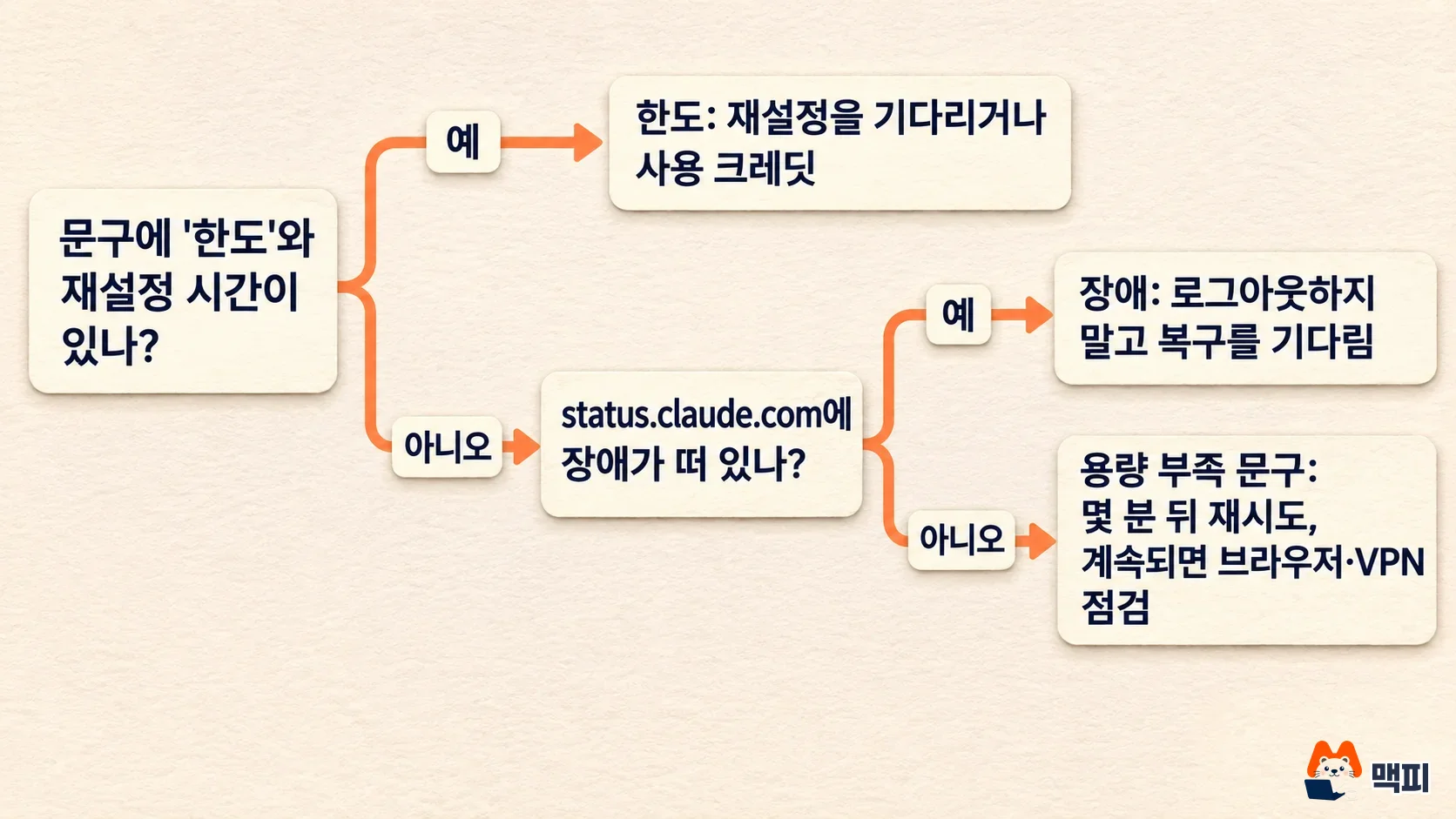
To check whether Claude is down, open status.claude.com. If an incident is posted on Anthropic's official status page, the problem is on the service side. Support points to this page for confirming service outages. When you cannot connect, there are three main causes. A full service outage, the usage limit on your own plan, or a capacity shortage, where demand is too high to answer but nothing is technically broken. The screen message differs in each case. Reading it tells you whether to wait or whether you can fix it yourself.
Claude down or not working: tell the cause from the screen message
The usage limit guide in Anthropic's help center sorts error messages by cause. Read one message exactly and your next step is clear.
| Message on screen | Cause | What to do |
|---|---|---|
| "5-hour limit reached - resets [time]" | You used up the 5-hour session limit | Wait until the reset time |
| "You've reached your weekly limit. It resets [day] at [time]." | You used up the weekly limit | Wait for the reset, or if your plan supports it, turn on usage credits on the usage screen in settings |
| "5-hour limit resets [time] - continuing with usage credits" | You passed the limit but work continues on usage credits | Nothing to do. Just check your credit balance and monthly spend limit |
| "Due to unexpected capacity constraints, Claude is unable to respond to your message. Please try again soon." | Heavy demand from all users on the infrastructure | Resend in a few minutes. The help center says this is not an outage, and it does not appear on the status page |
| "There was an error logging you in" | Login failed (unspecified cause) | Turn off your VPN and browser extensions, then clear cache and cookies. If it continues, check the status page |
| "Your message will exceed the length limit for this chat." | The message you sent is too long | Split it, summarize it, or open a new chat |
Limit messages always include a reset time. If you see a time, it is a limit on your plan, not an outage. To see how large each limit is, the Claude plan price and usage limit comparison covers the differences between Pro, Max, and Ultra.
Check whether Claude is down on status.claude.com
If the message has no limit wording, open the Claude status page. Active incidents appear at the top as an orange bar. Inside the bar, updates stack in time order: investigation started, cause identified, recovery. Times are in UTC, so add 9 hours to get Korea Standard Time.
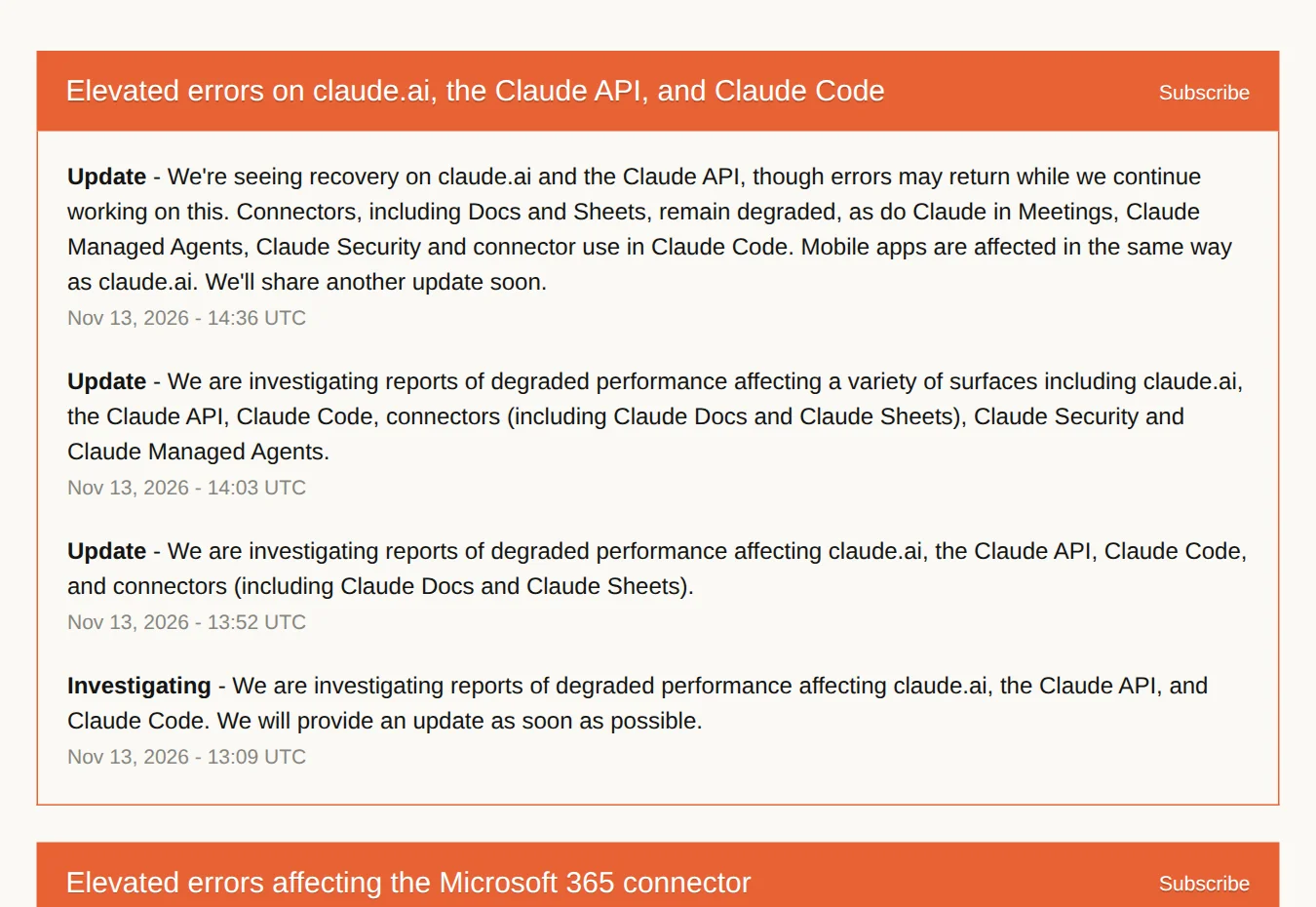
Here is how to read that incident. The first post (Investigating) is 13:09 UTC on November 13, which is 22:09 in Korea. The impact then spread from claude.ai, the API, and Claude Code to the Docs and Sheets connectors, managed agents, and Claude Security. The 14:36 UTC update (23:36 in Korea) says recovery is visible but errors may return. Earlier the same day, at 11:58 UTC (20:58 in Korea), a separate incident with errors on claude.ai, Claude Code, and platform.claude.com was resolved. The incident history on the status page lists 5 incidents from November 8 to 13.
| Component | What it covers |
|---|---|
| claude.ai | Web chat. The mobile app is said to be affected in the same way |
| Claude Console (platform.claude.com) | Developer screen for managing API keys, usage, and billing |
| Claude API (api.anthropic.com) | Developer calls that build Claude into a service |
| Claude Code | Coding tool for the terminal and desktop |
| Claude Cowork and others | Cowork, Claude for government, and Claude on cloud platforms are listed separately |
Check whether your product line shows Operational, Partial Outage, or Degraded Performance. As the help center notes, a capacity shortage is not an outage, so it does not appear on the status page. If there is no incident bar and every line is normal but Claude still fails, it is a capacity shortage or a problem in your own environment. Teams that care about outages can use the Subscribe button on the status page to get email, text, Slack, Teams, and webhook alerts.
Claude not working but no outage: what to check
If the status page is normal, first check whether the message is the capacity one. For that message, resend after a few minutes. If you keep getting stuck in the same chat, you can open a new chat. For a login error, follow the order the help center gives.
- Turn off your VPN if it is on.
- Turn off browser extensions, or open Claude in an incognito window.
- Clear the browser cache and cookies, then log in again.
- If it still fails, check the status page again.
There is a simple way to find the cause yourself. Open the same address in an incognito window too. If it works there but not in the normal window, an extension or cache is the cause, so finish the steps above. If it fails in both, the problem is on the service side, not yours. The success test is getting a reply when you send a short message in a new chat. If only long messages fail, suspect the length limit or a capacity shortage. This check is the author's suggestion, not from the help center.
Claude Code error messages and fixes
Claude Code error messages are more specific. The Claude Code error docs explain them as follows.
| Error message | Meaning | Fix |
|---|---|---|
API Error: 500 Internal server error | Internal Anthropic error. Not caused by your prompt or settings | Check the status page, wait, then resend. If there is no incident notice, report it with /feedback |
API Error: Repeated 529 Overloaded errors | The API is at capacity. Claude Code already retried and it does not count against your limit | Wait a few minutes or switch to another model with /model. Capacity is tracked per model |
Opus is experiencing high load | Load is concentrated on one model | Pick another model such as Sonnet in /model |
Request timed out | No response within the default 10 minutes | Try again. On slow networks, raise API_TIMEOUT_MS |
Not logged in · Please run /login | No login session | Run /login |
Server is temporarily limiting requests, Request rejected (429) | Request limiting | Try again shortly. A temporary 429 is retried automatically |
The per-model capacity point is the most useful in practice. If 529 keeps repeating on the top model, switch one tier down with /model, keep working, and come back once it recovers. If you are new to Claude Code, start with the Claude Code first task and permission mode guide, and check plan limits in the Claude Code install, pricing, and usage limit summary. If you are blocked by a full limit, the guide to switching between multiple Claude Code accounts explains how to split usage across accounts.
API error codes developers should tell apart: 429 and 529
If you build Claude API into a service, you need to tell the codes in the API error docs apart to retry correctly. A 429 is a problem with your organization. A 529 is a problem with overall traffic.
| Code | Type | Meaning and fix |
|---|---|---|
| 400 | invalid_request_error | Problem with the request format. Hitting a spend limit set on an organization or workspace also returns 400 |
| 401 | authentication_error | The API key is wrong or revoked |
| 402 | billing_error | Problem with billing information. Check in the Console |
| 429 | rate_limit_error | Your organization hit a rate limit or the monthly spend cap. A spend-cap 429 has no retry-after header and keeps failing until access is restored |
| 500 | api_error | Internal Anthropic error. Retry with exponential backoff, and contact support with the request ID if it continues |
| 529 | overloaded_error | Temporary overload from overall user traffic |
Every response carries a request-id header. Send this value when you contact support so they can find the request quickly. The official SDKs automatically retry connection errors, rate limits, and 5xx errors twice by default, and follow the retry-after header when present. If you get a 429 and think your limit is too low, follow the help center guide: check your tier and limits on the Rate limits screen in the Console, and you can request an increase after using more than half of your current limit.
Steps that save time when Claude is down
- Read the screen message for "limit" and a reset time. If present, follow the help center guide to wait or turn on usage credits.
- If not, look at your product line on status.claude.com.
- If there is an incident bar, convert the update times to your local time and wait for the recovery notice.
- If there is no bar and the message says "capacity constraints", resend after a few minutes.
- For a login error, check your VPN, extensions, and cache in that order.
If urgent work depends on Claude alone, you can also put the same question into another chatbot as a backup. This is the author's suggestion, not official guidance. The official guidance is to watch the status page updates and wait during an outage.
Frequently asked questions
Does the Claude mobile app have the same outage?
Yes. An update on the status page for the November 13, 2026 incident stated that the mobile app is affected in the same way as claude.ai. When the web is down, the app is often down too.
Where can I see past outage records?
You can browse them by date on the History screen of the status page. The same place offers Atom and RSS feeds (status.claude.com/history.atom).
Do I have to pay extra if I hit a limit?
Not necessarily. You can simply wait until the reset time. If your plan supports it, you can turn on usage credits on the usage screen in settings and keep working past the limit, paying for what you use.
Found this useful? Share it
Latest posts
Kakao Share Thumbnail Not Showing? Here's the Fix (JavaScript SDK 2025)
Learn why Kakao Share thumbnails don't appear even with a valid imageUrl, and fix it using scrapImage to convert your URL into a KAGE CDN URL. Step-by-step guide.
How to Generate CRM User Manuals in 20 Minutes with Claude Code Sub-Agents
Learn how Claude Code sub-agents can analyze your CRM codebase and auto-generate user manuals and visual guidebooks in just 20 minutes. See the real-world results.
GEO Generative Engine Optimization: The Complete 2025 AI Marketing Strategy Guide
Learn what GEO (Generative Engine Optimization) is, how it differs from traditional SEO, and discover 5 proven AI marketing strategies to get cited by AI search engines in 2025.
Related projects
Get new posts by email
Insights on marketing, analytics, and dev, delivered to your inbox.