
Coupang Wing (WING) is the seller center where Coupang Marketplace sellers manage product listings, orders, shipping and settlement. You sign up by applying for seller onboarding on Coupang Marketplace. Coupang, Korea's largest e-commerce company, introduces Wing on its Wing seller center page. According to the seller FAQ, if you submit a business registration certificate, a mail-order business report certificate, and a copy of the representative's bank account book, the review result comes within 1 business day at most (as of November 4, 2026). This guide covers the sign-up order, documents, login location, settlement options, and what to check after you join.
How to sign up for Coupang Wing: where to start
You want to sell on Coupang, but the site shows "onboarding," "seller sign-up," and "Wing" separately, so it is easy to get stuck on where to click first. Think of opening a new shop. First you apply for a space at the building office, then you submit business papers to get approved, and only then do you fill the shelves. Coupang Wing is the screen that works as both the office and the cash register, and you can use it only after onboarding is complete. Review and document rules can change, so the guidance on the Wing screen always comes first.
On its seller registration guide, Coupang shows the onboarding flow in five steps. They are onboarding application, business verification, product listing, fulfillment and delivery method selection, and sales settlement.
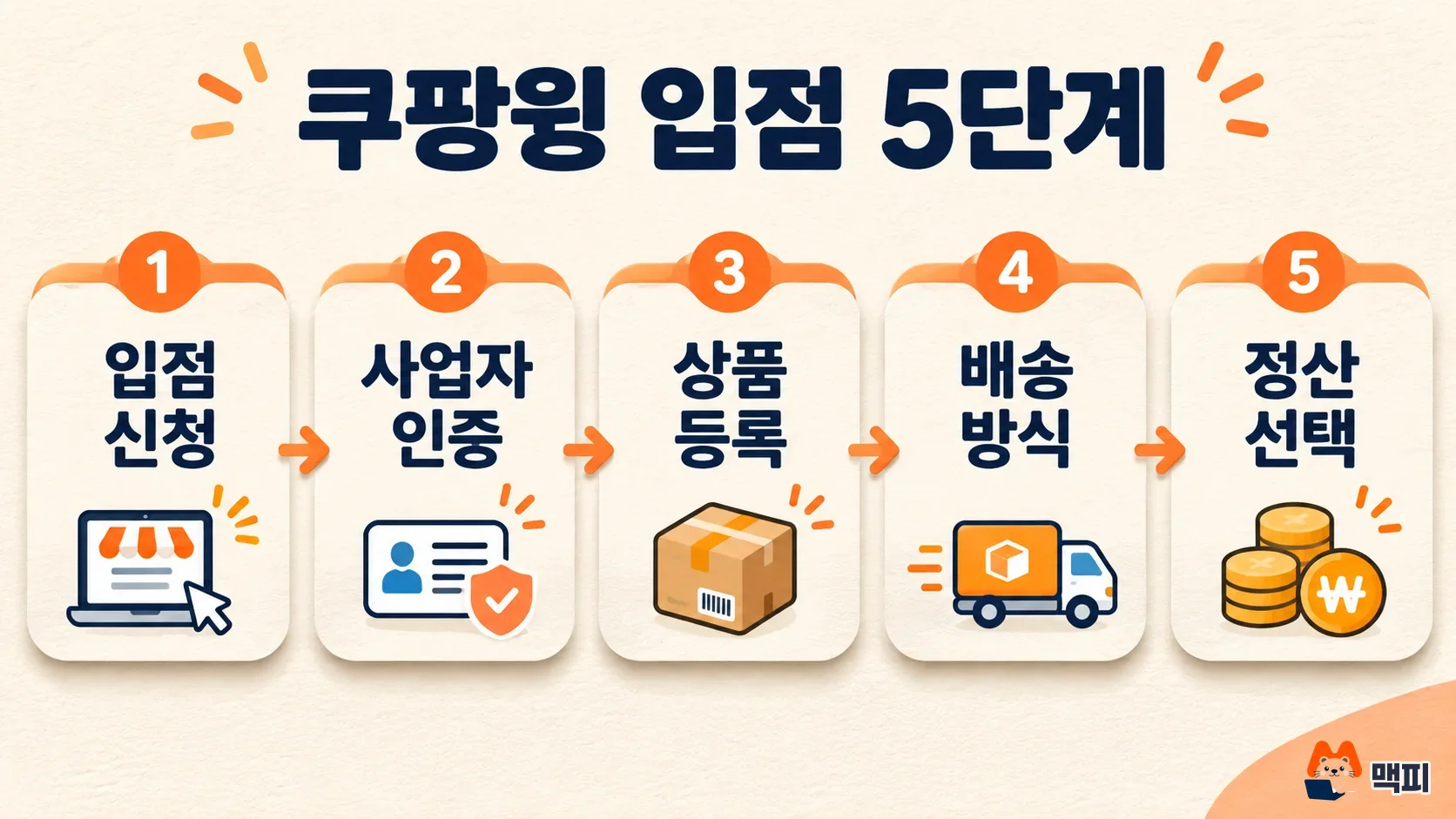
- Onboarding application: On the Coupang Marketplace home page, click "Start selling" or "Sign up" and enter your account details.
- Business verification: Upload your documents on the business information page in Wing.
- Product listing: Upload the products you want to sell in Wing. The Coupang FAQ says you can sell even with just one product.
- Delivery method selection: Ship by yourself, or use Coupang Rocket Growth, where Coupang's fulfillment centers pack and ship for you.
- Settlement method selection: Choose weekly settlement or monthly settlement.
Even if you do not have a business registration number yet, the FAQ says you can sign up and list products first. Then you prepare the number and get onboarding approval. Businesses with different registration numbers must each apply for onboarding separately.
Coupang seller documents and approval time
The Coupang FAQ says to submit three basic documents on the business information page in Wing: the business registration certificate, the mail-order business report certificate, and a copy of the representative's bank account book. For co-representatives, you may be asked for an extra claim waiver pledge and the seal certificate of the person waiving the claim. You can upload documents as photos on both PC and mobile.
| What to prepare | Where to get it | Notes |
|---|---|---|
| Business registration certificate | National Tax Service Hometax | Pick it up at the tax office after applying, or print it from Hometax. Required documents differ by business type. |
| Mail-order business report certificate | Government24 (Korea's government services portal) | When you file the report, attach the purchase safety service confirmation as a supporting document. You download this confirmation from Coupang Wing. |
| Copy of the representative's bank account book | Bank app or passbook | The Coupang FAQ lists it as a basic document. |
According to the same FAQ, you can check the review result within 1 business day at most. If you need to supplement documents, it takes longer. Sellers who must file a mail-order business report need 2 to 3 more business days for the report history to sync before review starts. As the Coupang registration guide explains, the mail-order report requires the purchase safety service confirmation downloaded from Wing. So the order is: get this confirmation, file the report on Government24, then upload the report certificate as a document.
A mobile phone number used on an account that has not finished onboarding cannot be used for another new onboarding. If you see a rejection or duplicate-number message, switch to a different number and apply again.
How to log in to Coupang Wing and use the app
Coupang Wing login starts from the "Wing Login" button at the top right of the Coupang Marketplace home page. The button takes you to the Coupang authentication page, and logging in with your seller account opens the Wing screen. If you have not signed up yet, use "Start selling" on the same screen to sign up first.
According to Coupang, Wing works on PC, mobile web, and a dedicated app. On mobile, install the "Coupang Wing Seller Center" app from Google Play or the App Store.
Here is what to check after you log in. Coupang advertising is introduced separately as a growth support service, not as a Wing menu. To run ads, read how to start with Coupang Ads Center separately.
| What you do in Wing | Features listed by Coupang |
|---|---|
| Product management | Product listing, inventory management |
| Orders, shipping, customer service | Order processing, customer inquiry handling |
| Settlement and statistics | Daily and monthly sales, settlement details including fees, sales performance analysis |
| Support | Dashboard, help, 1:1 online inquiry |
Coupang settlement: weekly or monthly, which should you choose
Coupang settlement is based on the purchase confirmation date. If a customer does not confirm the purchase, it is confirmed automatically 7 days after the delivery completion date. Choosing is like picking a payday. You either get money earlier but have part of it held back, or you receive it all at once but wait longer.
| Option | How you get paid | Best when |
|---|---|---|
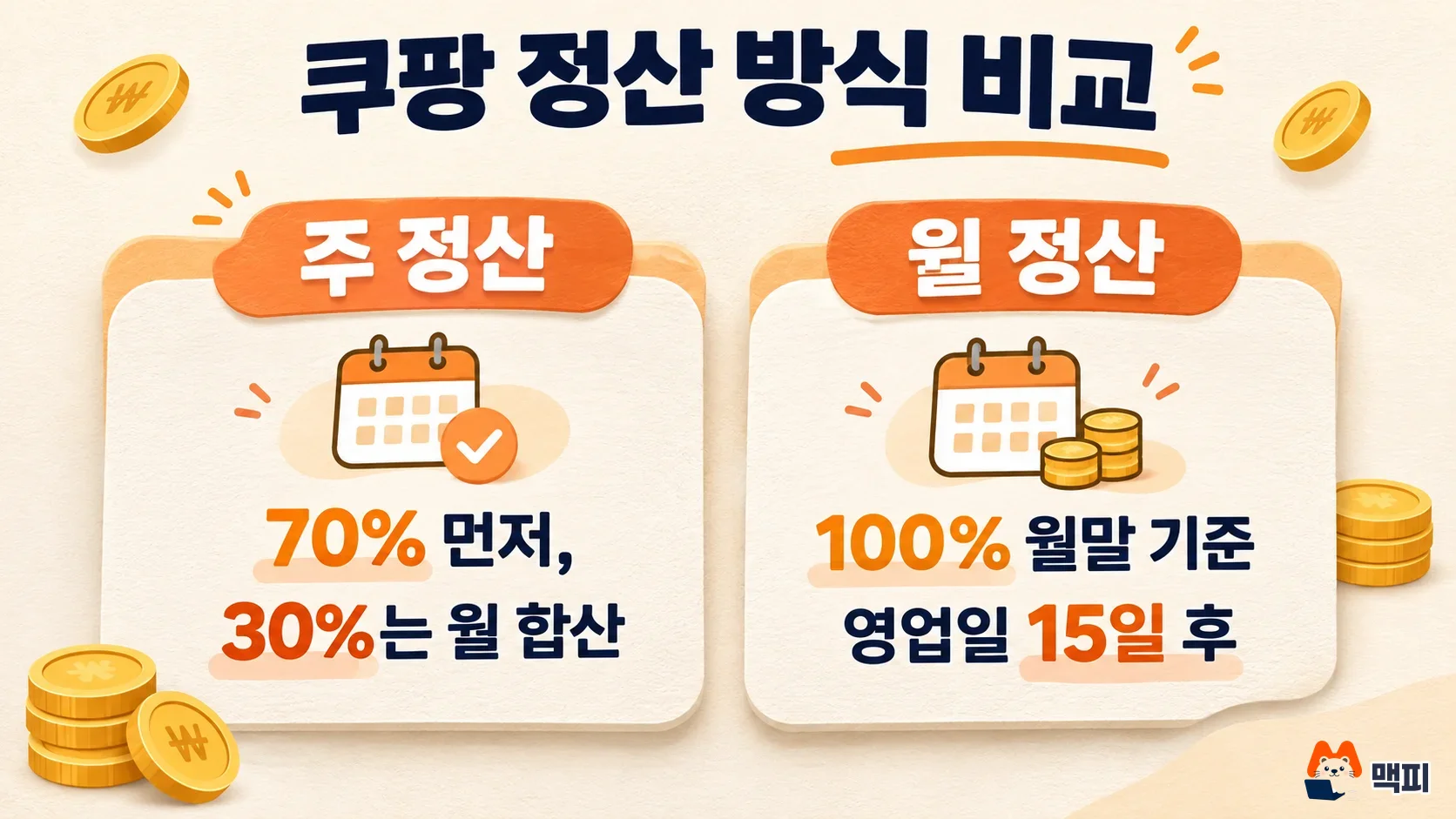
| Weekly settlement | Amounts confirmed from Monday to Sunday are paid weekly. 70% of the settlement amount is paid first. The other 30% is held in case of refunds, then added up and paid monthly. | You need cash to turn over often, for example for purchasing costs |
| Monthly settlement | 100% of the amount confirmed during the month is paid. The payment date is 15 business days after the last day of each month. | Your cash flow is comfortable and you want to see settlement details in one go |
The numbers show the difference. If the amount confirmed in one week is 1,000,000 KRW, weekly settlement pays 700,000 KRW first and moves the remaining 300,000 KRW to the monthly combined payment. Monthly settlement pays the whole month, including that amount, 15 business days after month end. This calculation applies the payout ratios from the Coupang registration guide as an example. Fees and refunds change the actual amount.
| Category | Ratio |
|---|---|
| Paid first, weekly | 70% |
| Held for refunds, then paid in the monthly total | 30% |
If you want to be paid faster, you can use the fast settlement of Seller Wallet, a separate service. In its FAQ, Coupang says there are no fees other than the sales commission. Still, you should check the commission rate for your category yourself through the Coupang guide link before you join.
How to check that your sign-up worked
- On the business information page in Wing, check the review result for your submitted documents. If a supplement request arrives, upload the documents again as instructed. Coupang says you can see the result within 1 business day at most.
- Register one product, save it, and check that it appears in the product management list.
- Check that a delivery method (self-shipping or Rocket Growth) and a settlement method are selected.
- When the first order comes in, check that its status changes in the orders and shipping menu, and that it appears in the settlement details after purchase confirmation. Coupang lists settlement details as part of the settlement and statistics feature in Wing.
For how to upload product photos and descriptions, see the product detail page production steps and Coupang specs.
Common sign-up blockers
- Reusing a mobile phone number: A number used on an account that has not finished onboarding cannot be used for a new onboarding. Switch to another number and apply.
- Several business registration numbers: If the numbers differ, each business must apply for onboarding separately.
- Waiting for report history sync: Sellers who must file a mail-order report may wait 2 to 3 more business days for sync, so do not reapply right away just because the review is slow.
- Misreading the settlement timing: Settlement is based on the purchase confirmation date. Even after delivery ends, if the customer does not confirm the purchase, it is confirmed automatically only after 7 days. Until then it is not eligible for settlement.
Frequently asked questions
Can I sign up for Coupang Wing without a business registration certificate?
You can sign up and list products first. To start selling, you must prepare a business registration number and get onboarding approval.
How long does Coupang Wing review take?
Coupang says you can see the result within 1 business day at most. If documents need supplementing or the mail-order report history needs to sync, it can take 2 to 3 more business days.
Can I switch between weekly and monthly settlement on Coupang?
The Coupang FAQ only says you can choose either of the two options. Check the conditions for changing midway on the settlement settings screen in Wing.
Found this useful? Share it
Latest posts
Kakao Share Thumbnail Not Showing? Here's the Fix (JavaScript SDK 2025)
Learn why Kakao Share thumbnails don't appear even with a valid imageUrl, and fix it using scrapImage to convert your URL into a KAGE CDN URL. Step-by-step guide.
How to Generate CRM User Manuals in 20 Minutes with Claude Code Sub-Agents
Learn how Claude Code sub-agents can analyze your CRM codebase and auto-generate user manuals and visual guidebooks in just 20 minutes. See the real-world results.
GEO Generative Engine Optimization: The Complete 2025 AI Marketing Strategy Guide
Learn what GEO (Generative Engine Optimization) is, how it differs from traditional SEO, and discover 5 proven AI marketing strategies to get cited by AI search engines in 2025.
Related projects
Get new posts by email
Insights on marketing, analytics, and dev, delivered to your inbox.