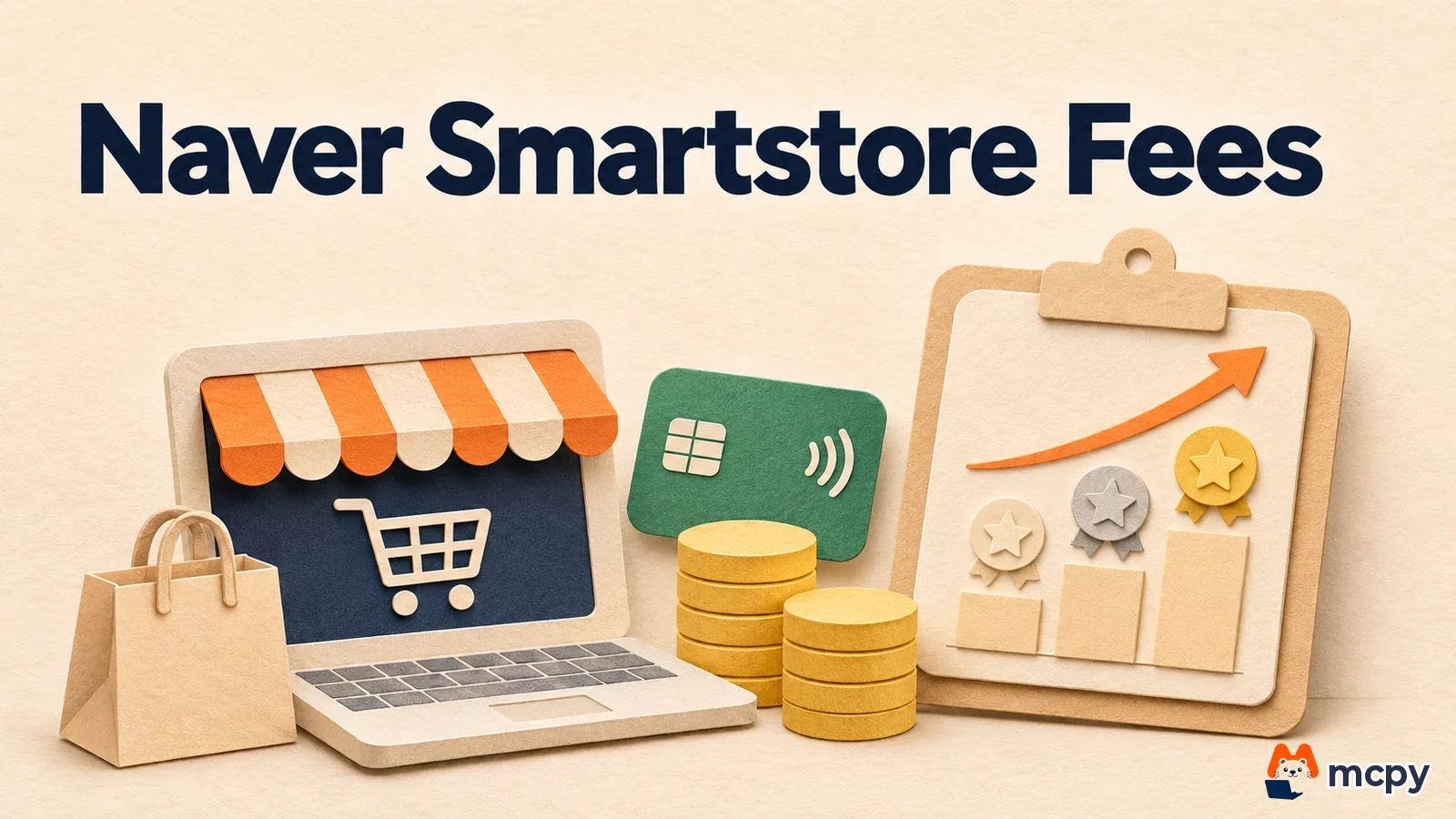
Naver Smartstore fees add two charges to every order, the Npay fee and the Naver Shopping sales fee, and both are deducted automatically at settlement. According to the Smartstore Center help desk, opening a store and listing products cost nothing, and fees apply only when a sale actually happens. As of November 24, 2026, the Npay fee is 1.947 to 3.630% including VAT, depending on your sales grade. The sales fee is 3% for regular traffic, and 1% for orders that arrive through a seller-issued marketing link or Naver ads. For the same product, the sales fee alone differs by 3x between 3% and 1%. The combined total ranges from 2.947% (micro grade, marketing traffic) to 6.630% (general grade, regular traffic).
Naver Smartstore fees at a glance: two charges come out of the payment
The rates changed on the dates below. If another article shows different numbers, check these dates first.
| Date | What changed |
|---|---|
| June 2, 2025 | The inflow fee in the Naver Shopping revenue-linked fee became the sales fee |
| Payments from 0:00 on October 1, 2025 | Npay fee cut for the micro and small-business 1 to 3 grades |
| Payments from August 14, 2026 | Npay fee applied under the second-half 2026 grade criteria |
The two fees sound similar but have different bases. The Npay (Naver Pay) fee covers payment and seller center services such as order management, delivery tracking, and customer management. The sales fee covers exposure and sales on Naver Shopping. The official help page breaks them down like this.
| Charged on | Npay fee | Naver Shopping sales fee |
|---|---|---|
| Product amount | Charged | Charged |
| Initial shipping fee | Charged | Not charged |
| Return and exchange shipping fee | Charged | Not charged |
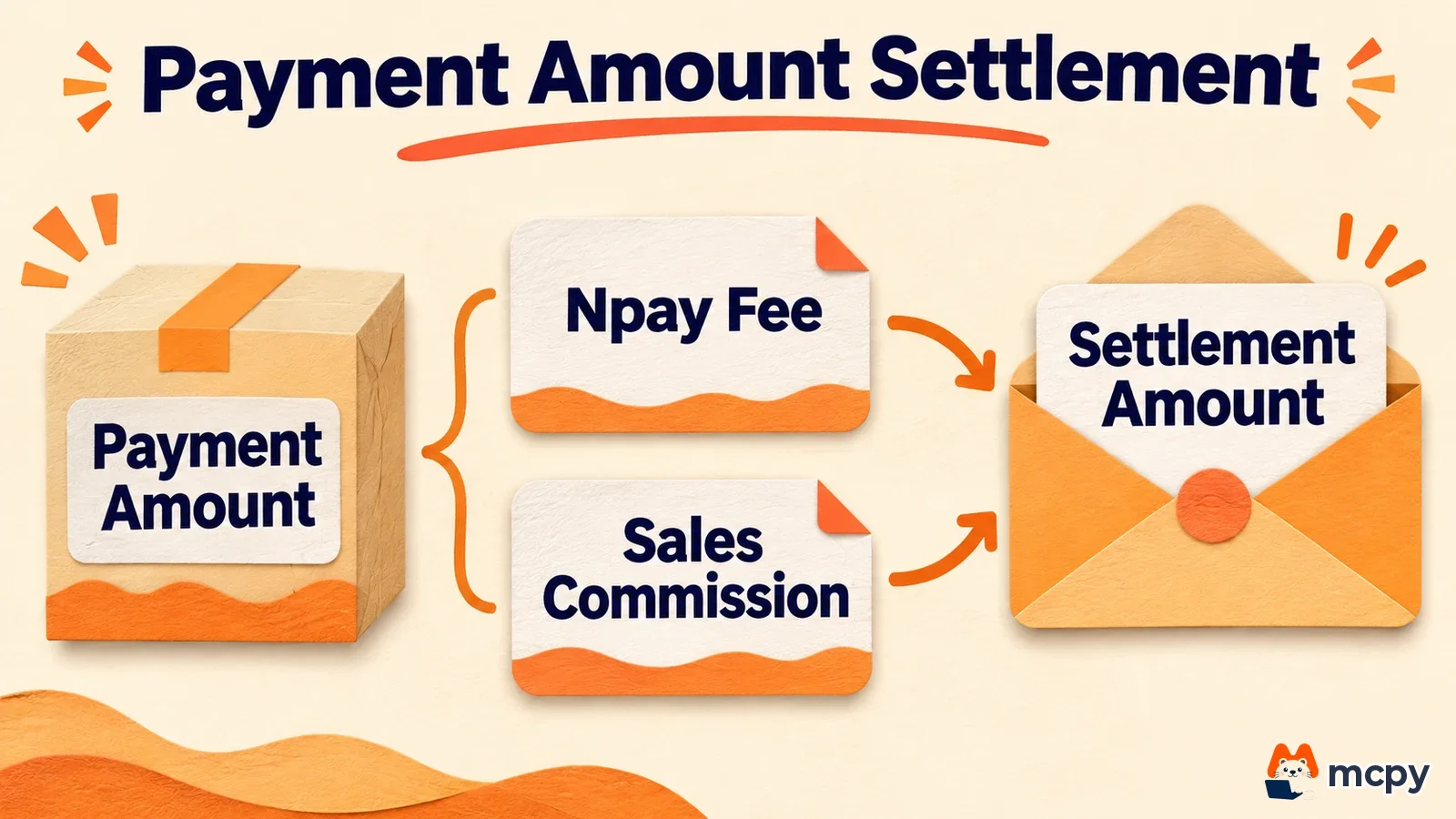
The product fee applies to what the buyer actually paid, not the list price. If an item is listed at KRW 10,000 with an instant discount of KRW 1,000, the buyer pays KRW 9,000, so fees are calculated on KRW 9,000. The diagram below shows the structure.
Npay fee: rates by sales grade and how your grade is set
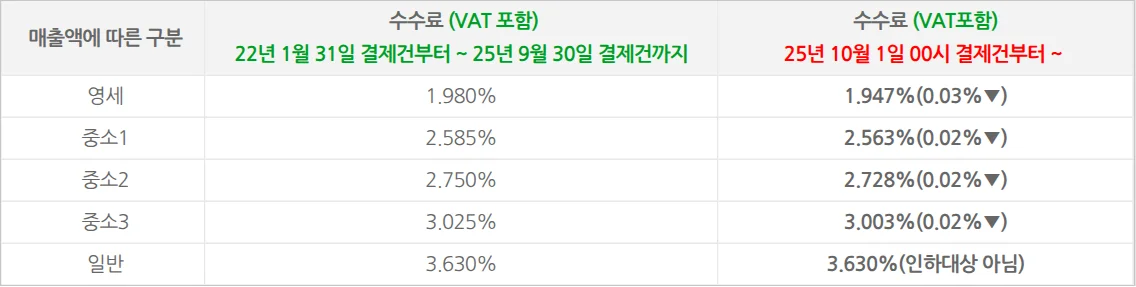
The Npay fee is split into five sales grades. Smartstore Center states that for payments from 0:00 on October 1, 2025, the rates are 1.947% for micro, 2.563% for small 1, 2.728% for small 2, 3.003% for small 3, and 3.630% for general (all including VAT).
| Grade | Before | After |
|---|---|---|
| Micro | 1.980% | 1.947% |
| Small 1 | 2.585% | 2.563% |
| Small 2 | 2.750% | 2.728% |
| Small 3 | 3.025% | 3.003% |
| General | 3.630% | 3.630% |
The cut is 0.03 percentage points for micro and 0.02 percentage points for each of small 1 to 3. The general grade was not reduced. Below is the original official table.
You do not choose your grade. It is set from the total sales you reported to the National Tax Service (including your own online store and Npay merchant sales), and it is updated twice a year, on February 14 and August 14. The sales brackets in the official table are as follows.
| Grade | Annual sales |
|---|---|
| Micro | KRW 300 million or less |
| Small 1 | KRW 300 million to 500 million |
| Small 2 | KRW 500 million to 1 billion |
| Small 3 | KRW 1 billion to 3 billion |
| General | Not listed in the table; above the small 3 bracket |
Second-half 2026 grades were set from sales between January and December 2025. The new Npay rate applies to payments from August 14, 2026. If your business is under one year old, your grade is calculated separately using the National Tax Service method.
The sales fee is 3%, or 1% through a marketing link
Since June 2, 2025, the inflow fee inside the Naver Shopping revenue-linked fee has become the sales fee. Many articles still explain it with the old 2% inflow fee. The current rates are in the table below. The help page lists the displayed rate, the actual rate, and the rate used at settlement separately.
| Type | Displayed rate | Actual rate | Settlement rate (VAT included) |
|---|---|---|---|
| Smartstore sales fee | 2.73% | 2.727% | 3% |
| Smartstore seller marketing | 0.91% | 0.909% | 1% |
| Brand Store sales fee | 3.64% | 3.636% | 4% |
| Brand Store seller marketing | 1.82% | 1.818% | 2% |
The displayed 2.73% excludes VAT. What is actually deducted at settlement is 3%, which includes VAT. Every total in this article uses VAT-inclusive rates. One of the four rows above always applies to an order. On top of that, Shopping Live (1% for standard live, 3% for calendar-listed, planned, or partner live), One Plus Deal at 3%, and the rental solution fee at 4% can be added depending on the traffic source or product settings.
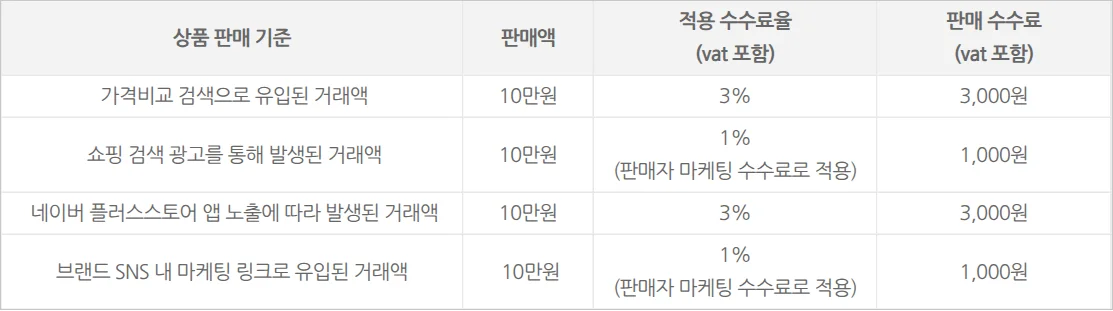
The official example uses KRW 100,000 in sales. Orders from price comparison search and from exposure in the Naver Plus Store app pay 3% (KRW 3,000). Orders through Shopping Search Ads and through a marketing link on a brand's social media pay 1% (KRW 1,000).
When the 1% marketing link rate applies and when it does not
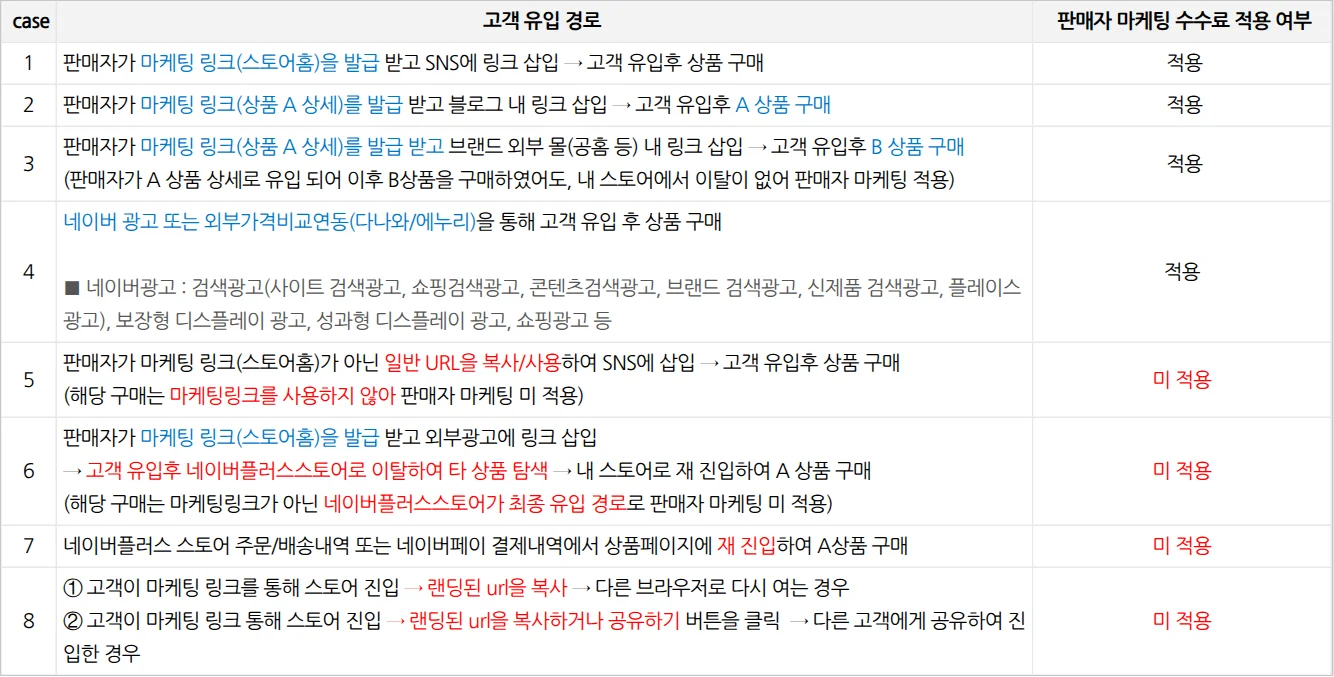
The 1% rate is a lower rate for customers the seller brought in. Whether it applies depends on the customer's final traffic history at the time of the order. Even if a customer first came in through a marketing link, if they leave the store and re-enter through another path such as Naver Plus Store, the last path counts and 3% is charged. The official help page shows eight cases.
| Case | Traffic path | 1% applied |
|---|---|---|
| 1 | A store home marketing link is placed on social media and the customer buys after clicking it | Applied |
| 2 | A marketing link for product A is placed on a blog and the customer buys A | Applied |
| 3 | A customer arrives via the product A marketing link and buys B without leaving the store | Applied |
| 4 | The customer buys after arriving through Naver ads (search ads, Shopping Search Ads, brand search, Place ads, display ads, and others) or through Danawa and Enuri price comparison links | Applied |
| 5 | A plain URL, not a marketing link, is copied and placed on social media | Not applied |
| 6 | The customer arrives via a marketing link, leaves for Naver Plus Store, comes back, and buys | Not applied |
| 7 | The customer returns to the product page from Plus Store order and delivery history or Naver Pay payment history and buys | Not applied |
| 8 | The address is copied and opened in another browser or shared with another customer | Not applied |
The rate also does not apply if the customer pays more than 25 hours after clicking the link, or if the device used to click differs from the device used to pay. A marketing link is an address the seller issues in Smartstore Center and places on social media or a blog.
The 'order inflow path' in your order list shows the traffic at the moment the buyer reached the order form. Even if it says marketing link, the final history may mean 1% does not apply. The most common mistake is case 5. If you paste the plain URL from the product address bar into Instagram or a blog, you get no marketing link benefit, so issue a link under marketing link management in Smartstore Center instead. Orders from Naver ads get 1% without a separate link. When you judge ad performance, you can count the sales fee dropping from 3% to 1% alongside the ad spend. To confirm that 1% was actually applied, check the order's sales fee in the next settlement details. For ad setup, see how to get started with Naver Shopping Search Ads.
Naver Smartstore fees calculation: totals by grade and one order worked out
Adding the two fees gives the total rate by grade and traffic source. The table below sums the official VAT-inclusive rates above.
Here is one real order. A micro-grade seller sells a KRW 10,000 item with a KRW 1,000 instant discount and collects KRW 3,000 in initial shipping. These numbers are assumptions for illustration. The Npay fee is 1.947% of KRW 12,000 (the KRW 9,000 product amount plus KRW 3,000 shipping), which is about KRW 234. The sales fee excludes shipping and applies only to the KRW 9,000.
| Item | Regular traffic (3%) | Marketing link (1%) |
|---|---|---|
| Npay fee (KRW 12,000 x 1.947%) | about KRW 234 | about KRW 234 |
| Sales fee (KRW 9,000 x 3% or 1%) | KRW 270 | KRW 90 |
| Total fees | about KRW 504 | about KRW 324 |
| Expected settlement (deducted from KRW 12,000) | about KRW 11,496 | about KRW 11,676 |
That is a KRW 180 gap on one order, but at 1,000 orders a month it adds up to KRW 180,000. The calculation leaves out coupons, points, and returns. The official help page does not state a rounding rule, so the figures are marked as approximate. For the same sales amount, the gap between grades is even larger. If KRW 100,000 sells through regular traffic, a micro-grade seller pays KRW 4,947 and a general-grade seller pays KRW 6,630.
How Coupang's fee structure compares
Coupang, Korea's largest e-commerce marketplace, is structured differently. Its published sales fee table by category is dated November 25, 2019. The lowest item is 4% (pure gold, gold bars, baby first-birthday gold rings) and the highest is 10.9% (noodles and ramen). The table does not say whether VAT is included. The defaults for main categories are 7.8% for consumer electronics and household goods, 9.6% for beauty, 10.5% for fashion, 10.6% for food, and 10.8% for furniture, books, and kitchenware.
| Item | Smartstore | Coupang Marketplace | Coupang Rocket Growth |
|---|---|---|---|
| Sales fee basis | 3% (VAT included) with no category split in the official table, 1% for marketing traffic | 4 to 10.9% by category (no VAT note in the official table) | Same as seller-fulfilled |
| Other costs | Npay fee of 1.947 to 3.630% (VAT included) | The official table lists the sales fee only | Inbound/outbound handling and shipping fees are separate |
| What to compare | Grade and traffic source | Product category | Size and selling price |
The three columns use different units and bases, so you cannot say one is simply cheaper. On Smartstore, the fee varies by grade and traffic source even within one category. On Coupang, it varies by category. For Coupang Rocket Growth, the sales fee is the same as seller-fulfilled, with handling and shipping fees added separately. To compare both channels for one product, fix the selling price, shipping fee, and traffic source as in the calculation above, then add up each channel's fees line by line. For Coupang onboarding, see how to sign up for Coupang Wing Seller Center. For costs, see Coupang Rocket Growth fees.
Where to check your fees and the preferential fee refund
In Smartstore Center, open the settlement details (daily or per order) menu under settlement management, and you will find 'My fee information'. To check that your rate matches the tables above, and that orders from marketing links settled at 1%, search by order number in the per-order settlement details and compare. Your fee grade and rates are shown in My fee information under settlement management, and fees are deducted automatically at settlement.
New businesses that started at the general grade because they had no sales report yet may be eligible for a refund. If a later half-year sales report confirms a micro or small grade, the card fees of the previous half-year are refunded retroactively, and refunds are processed every March and September. Grade updates (February 14 and August 14) and refund timing (March and September) are separate schedules.
Frequently asked questions
Does Smartstore have a listing fee or monthly fee?
No. The official help page says there is no separate cost to open a store or list products, and fees are charged only when a sale is made.
When and how are fees deducted?
They are deducted automatically at settlement. For per-order details, search by order number in the per-order settlement details under settlement management. The result is split into product order and shipping fee items.
Are fees charged on refunds and return shipping?
The Npay fee also applies to initial shipping and to return and exchange shipping, while the sales fee applies only to the product amount. Check the exact settlement amount in the per-order settlement details.
Found this useful? Share it
Latest posts
Kakao Share Thumbnail Not Showing? Here's the Fix (JavaScript SDK 2025)
Learn why Kakao Share thumbnails don't appear even with a valid imageUrl, and fix it using scrapImage to convert your URL into a KAGE CDN URL. Step-by-step guide.
How to Generate CRM User Manuals in 20 Minutes with Claude Code Sub-Agents
Learn how Claude Code sub-agents can analyze your CRM codebase and auto-generate user manuals and visual guidebooks in just 20 minutes. See the real-world results.
GEO Generative Engine Optimization: The Complete 2025 AI Marketing Strategy Guide
Learn what GEO (Generative Engine Optimization) is, how it differs from traditional SEO, and discover 5 proven AI marketing strategies to get cited by AI search engines in 2025.
Related projects
Get new posts by email
Insights on marketing, analytics, and dev, delivered to your inbox.