
Naver hospital search is the service for finding hospitals in Naver Map and Naver Search (Naver is Korea's largest search engine). It now shows clinics that treat a condition when you search only a symptom, disease, procedure or checkup name. On November 16, 2026, Naver announced on its official search blog that users can find hospitals with queries like "heori tongjeung" (lower back pain), "iseokjeung" (otolith disorder, a type of vertigo), "filler" and "abdominal ultrasound". The new search results roll out in stages through December. Hospital operators pick up to 30 real treatment items themselves under 'Our Hospital Search Keywords' in Smart Place, Naver's business listing management tool.
With Naver hospital search, you can find hospitals by the name of a symptom (sore throat, lower back pain), disease (disc, gastritis), procedure (manual therapy, LASEK) or checkup (abdominal ultrasound, dementia test).
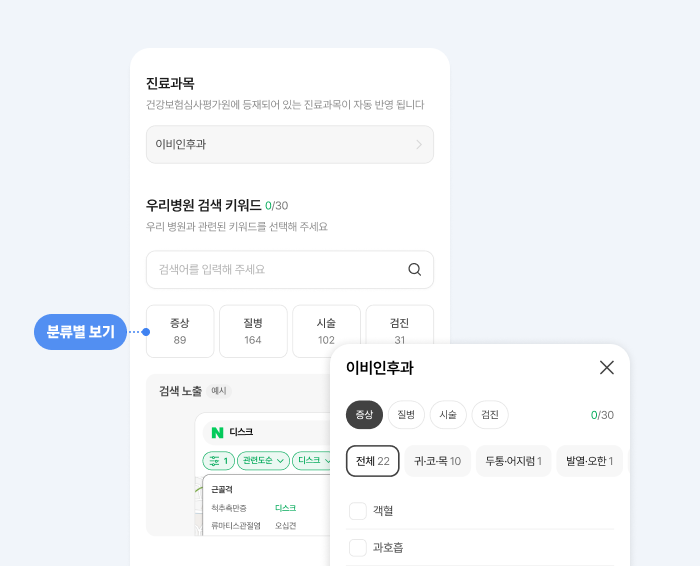
In Smart Place, under 'Business Info > Provided Services', hospitals choose up to 30 real treatment items in 'Our Hospital Search Keywords'. The list draws from 89 symptoms, 164 diseases, 102 procedures and 31 checkups, and only shows items that match the hospital's medical departments.
The rollout expands in stages through December, so some queries may still show the old results.
How to use Naver hospital search by symptom, disease, procedure or checkup
Patients can search the way they always do. Naver's official blog example adds conditions step by step: "otolith disorder", "otolith disorder hospital", "Gangnam otolith disorder hospital", "Gangnam otolith disorder ENT clinic". Add a station name if you want a clinic near work. Add 'night' if you want after-work hours. Add the department name if you know it.
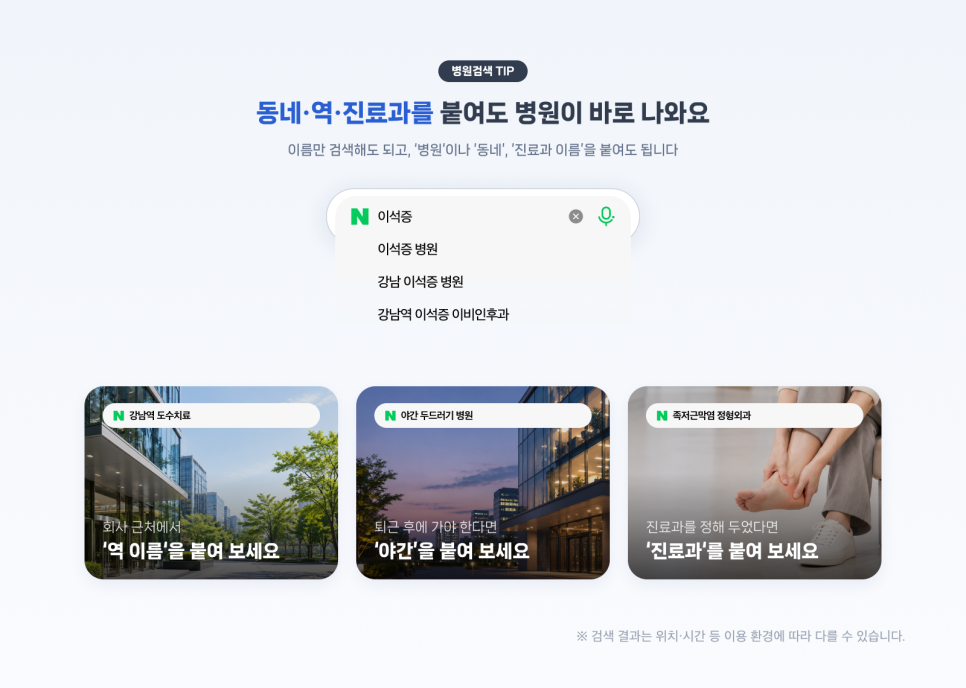
| Situation | Example queries |
|---|---|
| Scratchy throat | Sore throat |
| Stiff shoulders for several days | Shoulder pain, lower back pain, knee pain |
| Looking for a hospital for a diagnosed disease | Disc, panic disorder, gastritis |
| Starting a treatment you postponed | Manual therapy, teeth straightening, LASEK |
| Exploring skin or body care | Filler, laser hair removal, under-eye fat repositioning, liposuction |
| Looking into health checkups | Abdominal ultrasound, thyroid test, carotid ultrasound, dementia test |
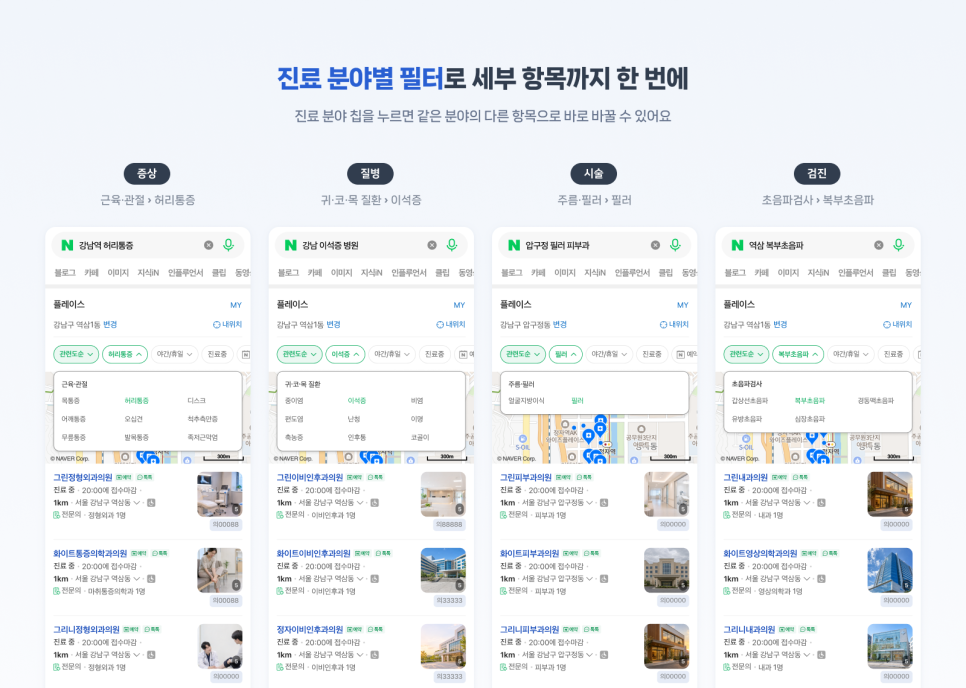
Treatment area chips and most-treated diseases
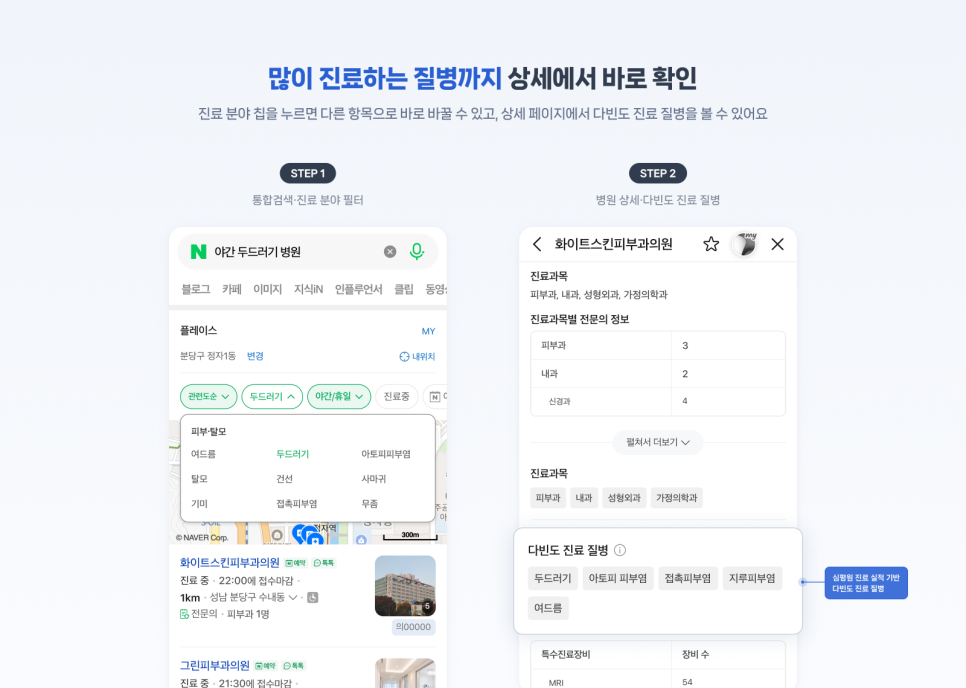
Treatment area chips appear at the top of the results. Tap a chip to switch straight to another item in the same area. In Naver's example, searching 'night hives clinic' selects hives under the 'Skin and Hair Loss' area and also applies the 'Night/Holiday' condition.
On a clinic's detail page, you can see the diseases that clinic treats most often, based on treatment records from the Health Insurance Review and Assessment Service.
Car insurance, nursing care and foreign patient information
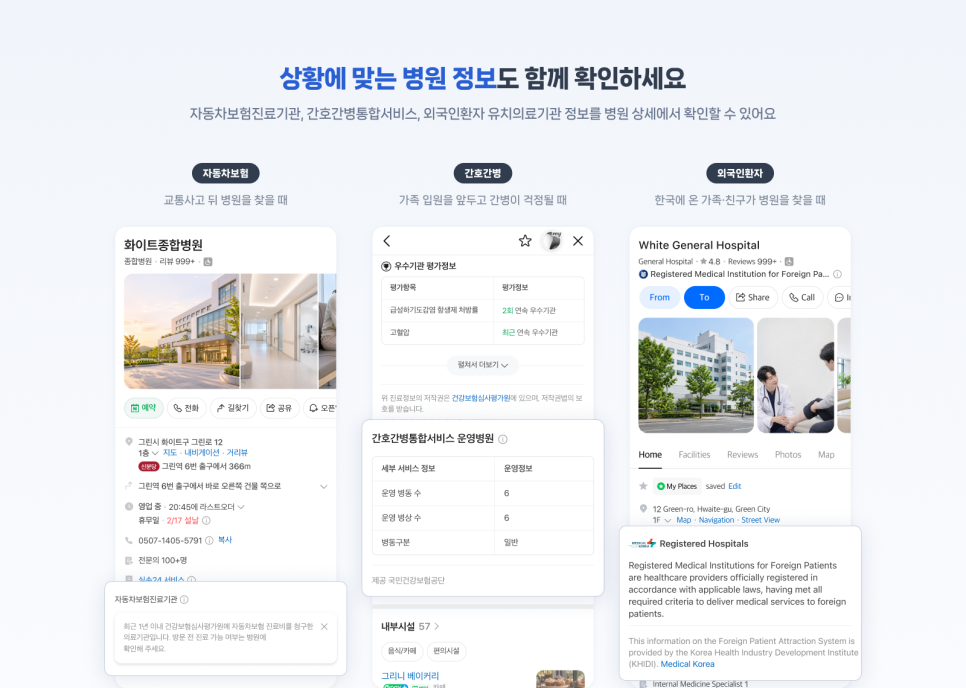
The hospital detail page also shows information for specific situations. Naver pulls all of the information below from outside organizations.
| Situation | Information shown | Provided by |
|---|---|---|
| Looking for a hospital after a traffic accident | Whether it is a car insurance treatment institution (a hospital with car insurance claims for treatment costs in the past year) | Health Insurance Review and Assessment Service |
| Worried about care before a family member is admitted | Whether it runs an integrated nursing and caregiving service ward (nursing staff care for inpatients, with no need for family or a private caregiver) | National Health Insurance Service |
| Foreign family or friends looking for a hospital | Information on institutions registered to attract foreign patients. Switch the map app to English, Japanese or Chinese and search 'hospital' or 'clinic' | Korea Health Industry Development Institute |
What hospital operators should do in Smart Place
According to Naver's official blog, hospital operators select up to 30 items they actually treat in 'Our Hospital Search Keywords', under the 'Business Info > Provided Services' menu in Smart Place. The list matches the hospital's medical departments, and the departments registered with the Health Insurance Review and Assessment Service are applied automatically. You register in four categories: symptom, disease, procedure and checkup. In each category view you can pick items, or type a query to choose a recommended keyword right away.
| Step | What to do | How to confirm success |
|---|---|---|
| 1 | Open Business Info > Provided Services in Smart Place | You see 'Our Hospital Search Keywords 0/30' |
| 2 | In each category (symptom, disease, procedure, checkup), pick only items you really treat | The selected count shows 30 or fewer |
| 3 | After registering, search Naver Map and Naver Search for "neighborhood + item + hospital" | Check that your hospital appears in the results. The rollout is staged through December, so it may not show right away. Check again a few days later |
Naver tells operators to select only items they actually treat. Naver also said the detailed registration steps are in the Smart Place notices. If you do not have a Smart Place account yet, start with how to register on Naver Place and how long it takes.
Operators looking into hospital and pharmacy ads can also read Naver digital out-of-home ads expanding to hospital and pharmacy industries. Search screen changes are covered in the Naver search screen redesign effective October 15.
Frequently asked questions
Do hospitals show up if I search only a symptom, without a hospital name?
Naver's official blog says you can search just a disease name like "otolith disorder". The new results roll out in stages through December, so some queries may still show the old results.
Do I have to fill all 30 slots in Our Hospital Search Keywords?
The guidance only says you can choose up to 30. There is no requirement to fill them all. Naver tells operators to select the items they actually treat.
Found this useful? Share it
Latest posts
Kakao Share Thumbnail Not Showing? Here's the Fix (JavaScript SDK 2025)
Learn why Kakao Share thumbnails don't appear even with a valid imageUrl, and fix it using scrapImage to convert your URL into a KAGE CDN URL. Step-by-step guide.
How to Generate CRM User Manuals in 20 Minutes with Claude Code Sub-Agents
Learn how Claude Code sub-agents can analyze your CRM codebase and auto-generate user manuals and visual guidebooks in just 20 minutes. See the real-world results.
GEO Generative Engine Optimization: The Complete 2025 AI Marketing Strategy Guide
Learn what GEO (Generative Engine Optimization) is, how it differs from traditional SEO, and discover 5 proven AI marketing strategies to get cited by AI search engines in 2025.
Related projects
Get new posts by email
Insights on marketing, analytics, and dev, delivered to your inbox.