

A customer journey map is a one-page table of the actions, thoughts and feelings customers have on the way to a purchase. You build it in 6 steps: find touchpoints, define a persona, set goals, talk to customers, choose metrics and update. The US usability research firm Nielsen Norman Group (NN/g) describes a journey map as a tool that organizes a user's goals and actions in time order and adds thoughts and feelings to visualize them. You go through 6 steps, from finding touchpoints to updating the map. Once it is done, you use GA4 Path exploration to check whether the behavior stages match reality.
A customer journey map helps when ads run well but purchases do not grow
If ad clicks go up but purchases stay flat, you first need to know at which stage customers lose interest. It is like driving on a trip without a map. You cannot even tell where you got lost. If you mark the start, the forks and the blocked roads on a map, you can see which section to fix first. A customer journey map works the same way. You write down the actions and feelings for each section customers pass through, then find where they get stuck. But the map only works if you fill it with what you heard from real customers. A map imagined at a desk is just a nice-looking picture.
Customer journey map components: what goes on one page
The table below shows the components NN/g describes. By default, one map is drawn around one person (one point of view) and one experience.
| Component | Meaning | Example |
|---|---|---|
| Actor (persona) | The one customer at the center of the map | A 30-something office worker considering a first subscription |
| Scenario | The specific experience to map and the customer's goal | Ordering flowers online as a gift |
| Phases | The sections the journey is divided into | Aware, compare, buy, return |
| Actions, thoughts, feelings | What they do, what they think inside, how they feel in each phase | Searches for reviews / What if delivery is late? / Anxious |
| Touchpoints | Where and how customers meet us | Search ads, product detail page, Alimtalk (Korea's KakaoTalk business message) |
| Opportunities and owners | The improvement ideas found and the team that will own them | Move delivery info above the product detail page / Operations team |
If you lay out these components by phase, the action, thought and feeling rows sit below the phase cells, as in the figure below.
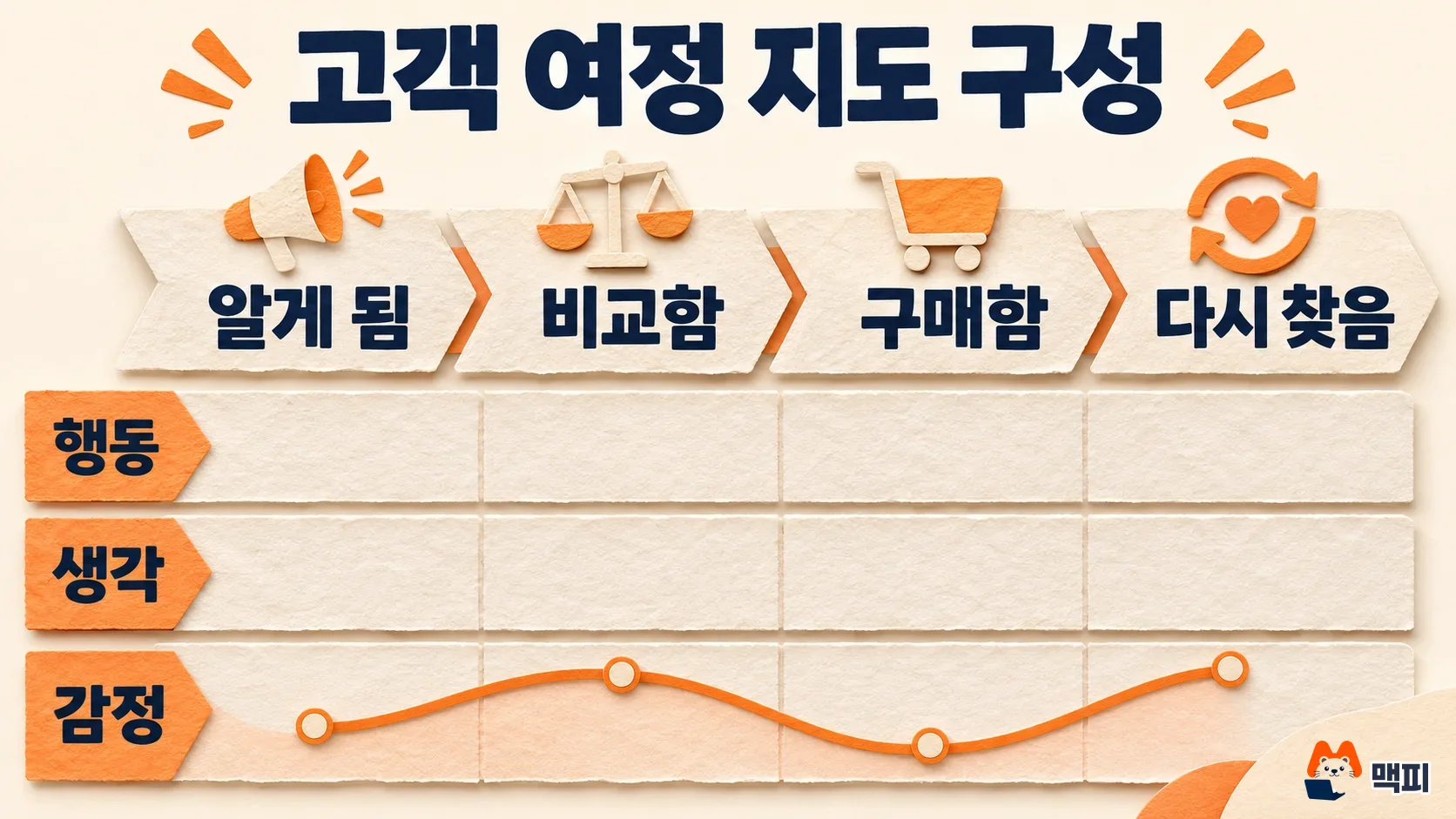
According to the original NN/g article, the action, thought and feeling rows must rest on qualitative research such as field studies or interviews. Quantitative data alone cannot create the story. Access logs only tell you what customers clicked, not why they hesitated. Do not forget the row for the owning team either. In the same article, NN/g warns that without an owner, nobody takes responsibility for making changes.
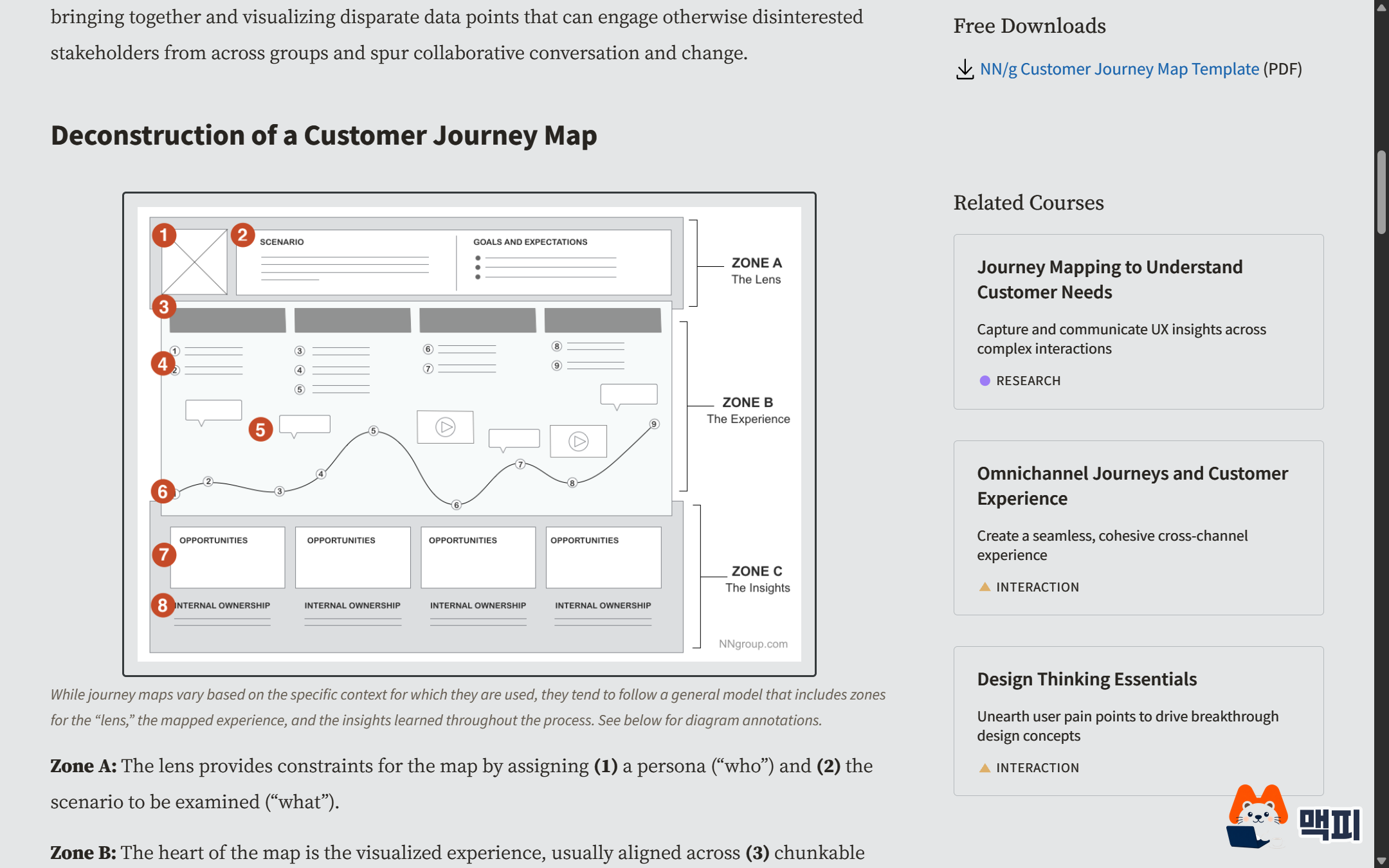
The breakdown diagram in the NN/g original shows where each component sits on the page. The diagram splits the map into three areas. Area A at the top is the "lens" that decides whose experience to map, and it holds item 1, the persona, and item 2, the scenario (goals and expectations). Area B in the middle is the "experience", the core of the map. Under the phase bar (item 3) come item 4 actions, item 5 thoughts and the item 6 emotion curve. Area C at the bottom is the "insights" from the map. Item 7, opportunities, and item 8, internal owners, are attached to each phase. Touchpoints have no separate number in this diagram. The original says to write them together with item 4, actions, and the goals.
How to create a customer journey map in 6 steps
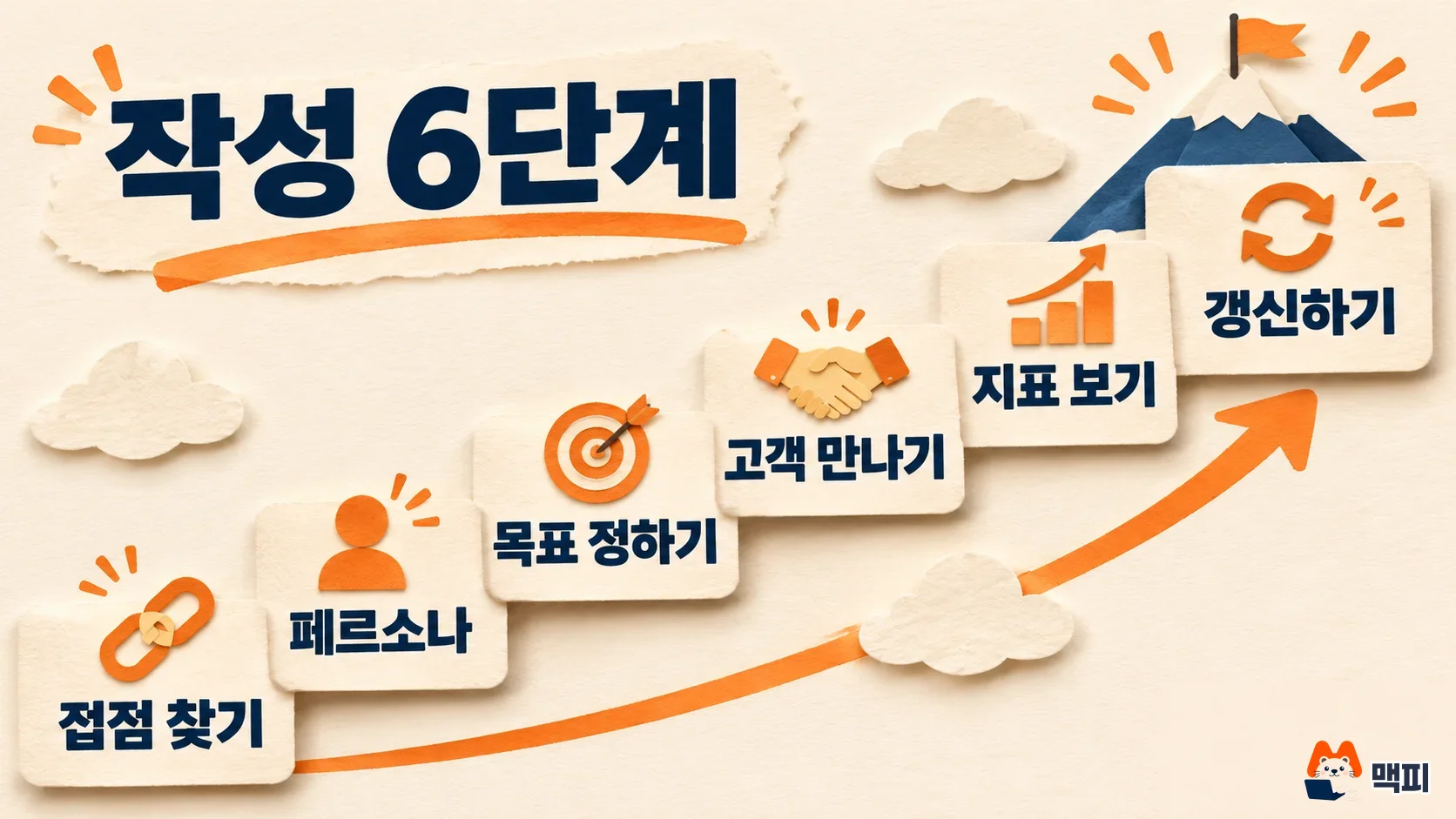
The order that Amazon Ads presents in its customer journey map guide has 6 steps: define touchpoints, buyer personas, set goals, user research, analysis and update. If you follow this order as is, even a first-timer can fill in the map without gaps.
- Find touchpoints. List every point where customers meet you in ads, your website, social media and customer service. It is fast to start from the campaign list in your ad account and the page list of your site.
- Define a persona. Pick one representative customer. If you need a targeting framework, first read how to segment customers with STP strategy.
- Set goals. Choose which matters now: awareness, sales or repeat visits. Then attach a goal to each touchpoint. The Amazon Ads guide says every touchpoint needs a goal.
- Meet customers. Talk to customers directly (the Amazon Ads guide treats this check as a separate step). Also read the complaints that keep coming to your support team, and confirm the map is right. The action, thought and feeling rows get filled in at this step.
- Choose and read metrics. Pick the numbers that will judge success, such as repurchase, revenue and bounce rate, and read them by phase. How to choose metrics is covered in how to set marketing KPIs.
- Update the map. The Amazon Ads guide says even a map that is useful now may stop fitting within a year, so revise it when needed. Open it again whenever your product, price or ad channels change.
Below is a short example for a fictional flower subscription service. Rows are phases and columns are map cells. No numbers are included. The last column shows the value to check in GA4 after step 4.
| Phase | Action | Thought, feeling | Touchpoint | Opportunity | Value to check in GA4 |
|---|---|---|---|---|---|
| Aware | Sees and clicks a search ad | Will regular delivery be a burden? Curious | Search ad, landing page | Show cancellation terms on the first screen | Next move after the landing page path |
| Compare | Checks reviews and price | Can I trust this? Anxious | Product detail page, review board | Put real reviews at the top | Exit paths from the product detail page |
| Buy | Goes through checkout | What if delivery is late? Tense | Cart, checkout screen | Show the delivery date before payment | Paths before and after the begin checkout event |
| Return | Reorders after seeing an Alimtalk message | Convenient, satisfied | Alimtalk, My Page | Add a reorder button to the Alimtalk message | First page of returning users |
The thought and feeling cells in this table are assumptions for illustration. In a real map, replace them with what customers told you in step 4.
Read the table from left to right. First pick a phase and look at what the customer does in it. Next look at their thoughts and feelings at that moment, then check the touchpoint where it happens. Then you can see why the improvement in the opportunity cell came about. For example, the "Compare" phase is where customers check reviews and price and worry about whether they can trust the service. So the opportunity cell proposes putting real reviews at the top of the product detail page. The GA4 value in the last column is for checking where customers actually go after this phase. The phase names, touchpoints and improvements in the table are all examples for a fictional flower subscription service, so adapt them to your own service.
You get stuck less if you fill in an empty table in this order.
- Write the phase names first. Three or four are enough.
- For each phase, write what the customer does in one sentence.
- Write the touchpoint where that action happens. You can copy the touchpoint list from step 1.
- Leave the thought and feeling cells empty. Fill them in after customer interviews and support inquiries.
- Last, write the improvement in the opportunity cell, along with the team that will own it.
What to decide before you map: touchpoint and persona tips
If you open an empty table first, you get tired filling cells. Before building the map, NN/g says to answer which business goal the map supports, who will use it, whose experience it covers and how it will be shared. A map that does not fit the goal gives no insight worth acting on. The same article also recommends inviting people from other teams to join data collection and map building. The biggest gain of making a map is that each team's different picture of the customer gets aligned. If you draw it alone and email it around, it is hard to win buy-in.
Step 1 Touchpoints: pull them all out of your ad account and site
A touchpoint is every moment a customer sees or meets your brand. The Amazon Ads guide gives examples such as ad impressions, website visits, social media, email, apps and customer service. For your own service, first write down search ads, the product detail page, Alimtalk, customer support and reviews. Then fill any gaps by checking the campaign list in your ads manager and your site menu structure. NN/g explains that touchpoints and channels are where the brand often looks inconsistent. So at this point, also put your ad copy and product page copy side by side and check that they make the same promise.

Step 2 Persona: pick one person and keep it short
A persona is a device that makes everyone reading the map picture the same one person. Along with demographic information, the Amazon Ads guide suggests thinking about how far your current customer base differs from your goals and which customer types you want to reach in the future. NN/g says to use only one point of view in a basic map. So a card can start with three lines: who they are, what they want and what worries them. For the flower subscription example, you would write something like "a 30-something office worker considering a first regular delivery, wants flowers at home, worries that canceling will be a hassle". This sentence is also an assumption for explanation. A real persona is set from your own buyer data and interviews.

Customer interview questions and using the map: tips for steps 4 and 6
Step 4 Meet customers: what to ask
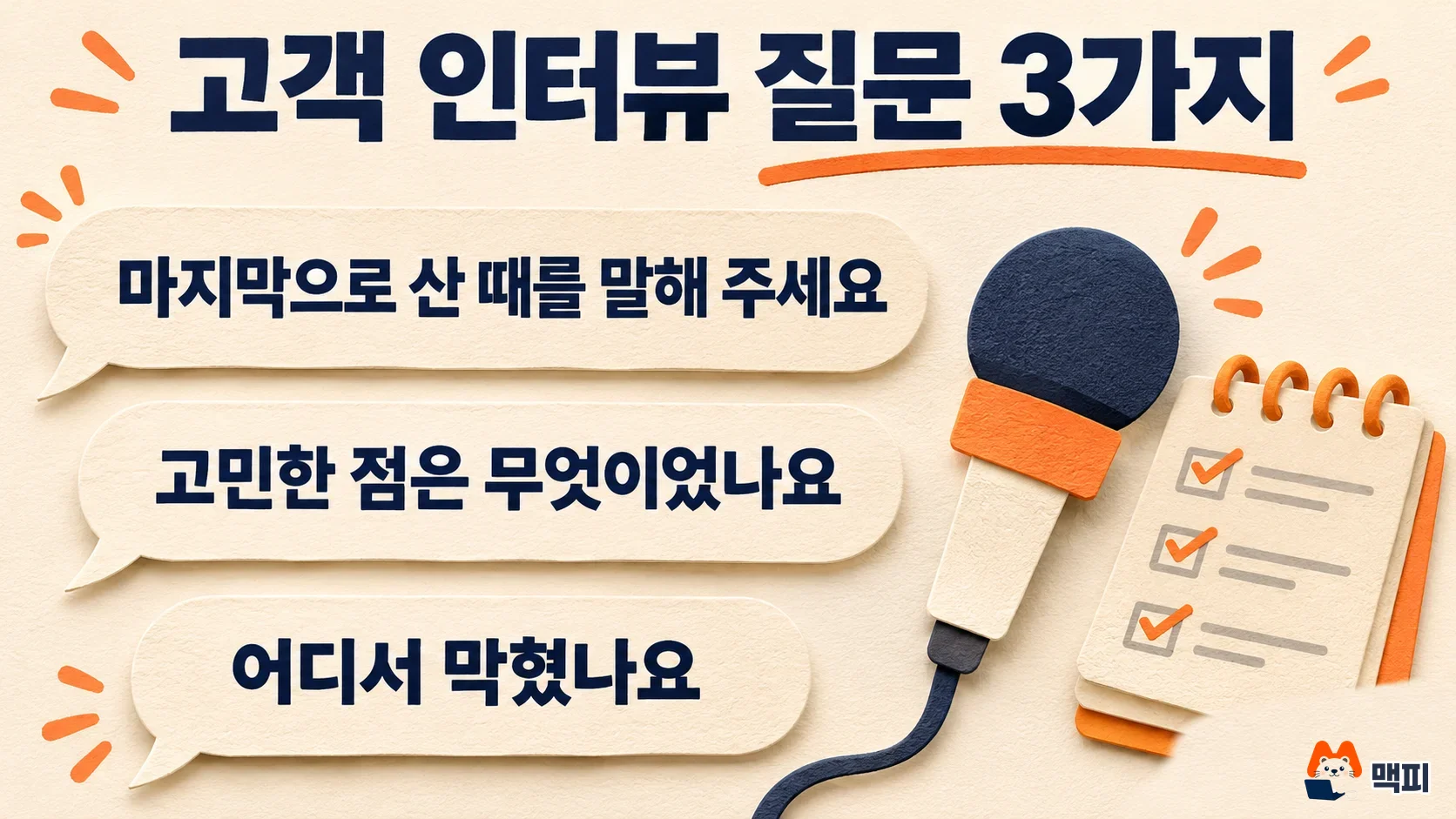
Fill the action, thought and feeling rows with customers' words, not imagination. The Amazon Ads guide says to look at user research, surveys and conversations with customers, along with complaints and repeated negative feedback that reach the customer support team. In interviews, asking customers to walk through what they actually did most recently fits the map's phases better than opinion questions like "Do you like this service?" For example, ask them to describe the last time they bought, ask what they worried about, then ask where they got stuck. Do not summarize the expressions that come out. Copy them into the thought and feeling cells exactly as the customer said them. NN/g also explains that placing quotes or video from research alongside the map deepens understanding.
Customer support inquiry records are material you can collect without setting aside extra time. Sort the past few months of inquiries by phase, and mark the feeling cell of any phase where the same complaint repeats. That phase is the first place to fill in the opportunity cell.
Step 6 Update and use: assign owners and review again
A map only matters if it is used after you draw it. NN/g lists these uses for a finished map: shifting from an internal, operations-centered view to a customer-centered view, breaking down walls between departments, assigning an owner to each part of the journey, comparing multiple personas and finding the cause of numbers such as stalled sales. Write the improvement in the opportunity cell, note the owning team beside it, make the fix, and check again whether the chosen metric changed. The Amazon Ads guide says a map can lose relevance after a year, so it is safe to put the update date on a calendar.

Use GA4 Path exploration to check the map's behavior stages
You can see whether the behavior drawn on the map actually happens with GA4's Path exploration. According to the Google Analytics Help Center, Path exploration shows, in a tree shape, what users did after a specific event or page. Funnel exploration, which shows drop-off rates by step, is covered in the growth hacking article. Here we only look at where people go after a map phase.
- In the left menu of GA4, open Explore, then under Start a new exploration choose the Path exploration template.
- Click Start over at the top right, then under starting point choose the event name or page path that matches one phase of the map. You can set only one starting point or ending point at a time.
- Click a displayed node to expand the next step. The top 5 show first for each step, and clicking View more shows up to 20 (Google Help).
- Check whether the page or event you wrote as the next action on the map is among the top nodes. If it is not, either the map's assumption is wrong or customers are leaving to somewhere unexpected.
Read the screen from left to right. The leftmost node is the starting point you chose, and further right come the events or pages that happened next. Each click on a node expands the next column, so set one map phase as the starting point and follow it one column at a time. With the example table above, set the starting point of the "Compare" phase to the product detail page, then look at whether the cart or the review board appears in the next column. You can set only one starting point or ending point at a time, so open a separate analysis for each phase.
The success criterion is whether the next action on the map matches the actual top nodes. For example, if the review board shows up large after the product detail page instead of the cart, that is a clue to ask customers again about the review anxiety you wrote in the thought cell of the compare phase. But GA4 only shows behavior, not thoughts or feelings. To learn why they did it, you need customer interviews or screen recordings. For screen recordings, the guide on how to use Microsoft Clarity can help.

Common customer journey map mistakes
| Mistake | Problem it causes | How to fix it |
|---|---|---|
| Filling it in by imagination in a meeting room | The thought and feeling cells are wrong, so improvements miss the mark | Fill the cells from interviews and support inquiries |
| Putting every customer type on one page | Each cell gets muddled and the map loses its use | Start with one persona and one scenario |
| Building the map from access logs alone | You cannot tell why people dropped off | Use GA4 only to check behavior |
| Not writing the owning team | Improvements never get carried out | Write the owning team in every opportunity cell |
| Drawing it once and leaving it | After a year it no longer matches reality | Update it when products or channels change |
The next step, gathering customer data and turning it into messages, continues in cautions for sending CRM marketing messages.
Frequently asked questions
How is a customer journey map different from a marketing funnel?
A funnel is a number-centered frame that shows how many people remain at each step. A journey map is a story-centered frame that also captures what customers do and how they feel in those steps.
How many phases should a customer journey map have?
There is no fixed number. The Amazon Ads guide gives a five-phase setup of awareness, appeal, ask, act and advocacy as an example. It varies by brand and scenario, so you can start with three or four phases, as in the example above.
Where can I get a template?
In its journey mapping tips, NN/g explains that templates save time and that a simple spreadsheet is enough if the schedule is tight. You can move the component table in this article straight into sheet columns.
Found this useful? Share it
Latest posts
Kakao Share Thumbnail Not Showing? Here's the Fix (JavaScript SDK 2025)
Learn why Kakao Share thumbnails don't appear even with a valid imageUrl, and fix it using scrapImage to convert your URL into a KAGE CDN URL. Step-by-step guide.
How to Generate CRM User Manuals in 20 Minutes with Claude Code Sub-Agents
Learn how Claude Code sub-agents can analyze your CRM codebase and auto-generate user manuals and visual guidebooks in just 20 minutes. See the real-world results.
GEO Generative Engine Optimization: The Complete 2025 AI Marketing Strategy Guide
Learn what GEO (Generative Engine Optimization) is, how it differs from traditional SEO, and discover 5 proven AI marketing strategies to get cited by AI search engines in 2025.
Related projects
Get new posts by email
Insights on marketing, analytics, and dev, delivered to your inbox.